If you are coming from Windows malware analysis, your muscle memory is tuned to Portable Executable (PE) headers, DOS stubs, import address tables (IAT), and Registry persistence.
When pivoting to macOS, that entire mental model changes. macOS does not use PEs or the Windows Registry. Instead, compiled executables run on the Mach-O (Mach Object) file format, interact with Apple’s dynamic linker (dyld), and leverage Mach kernel primitives and Darwin POSIX subsystems.
In this beginner-focused series, we won't get lost in abstract documentation. We are going to explore macOS internals hands-on by dissecting an actual malware sample from the wild: the second-stage payload from the RustBucket campaign (attributed to BlueNorOff).
1. Introduction & Lab Setup
Before touching live malware, ensure you are analyzing inside an isolated macOS virtual machine (such as a local VM with networking disabled).
Sample Details
.pd7887638bcafd57e2896c7c16698e927ce92fd7d409aae698d33cdca3ce8d25b8Essential Toolkit
For this post, we will rely primarily on standard macOS command-line utilities bundled with Apple's Command Line Tools (xcode-select --install):
file: Quick inspection of architecture and file type.otool: The standard object file displaying tool (Apple’s CLI inspector for Mach-O structures).nm: Dumps symbol table entries.strings: Scrapes printable strings.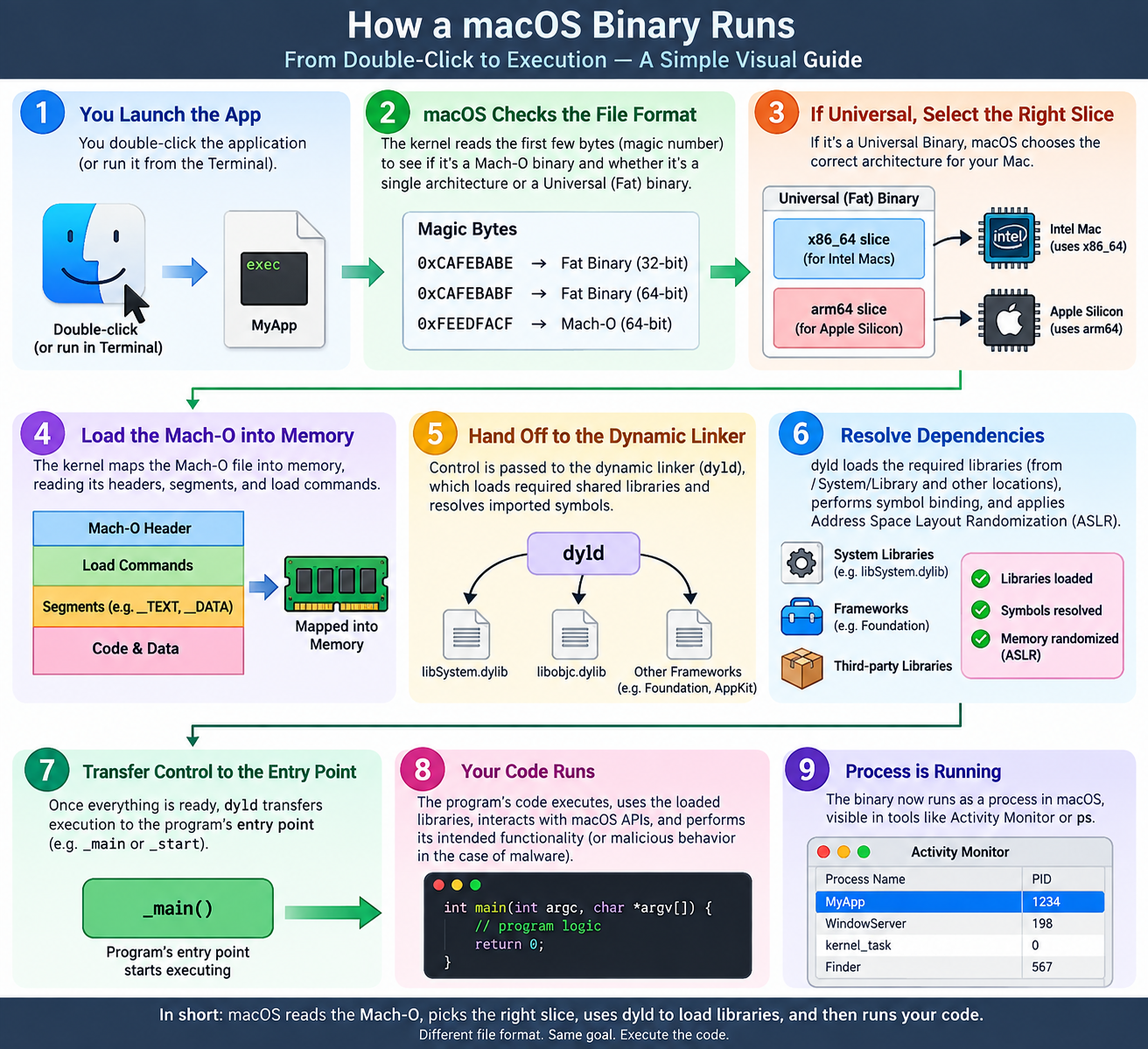
How a macOS Binary Runs
2. Mach-O Architecture & The Universal (Fat) Binary
On Windows, an executable target is strictly one architecture (a 64-bit PE cannot natively house both x86_64 and ARM64 code).
macOS solves multi-architecture support using Universal Binaries (historically called "Fat Binaries"). A Universal Binary is simply an archive wrapper that bundles multiple architecture-specific Mach-O slices into a single file.
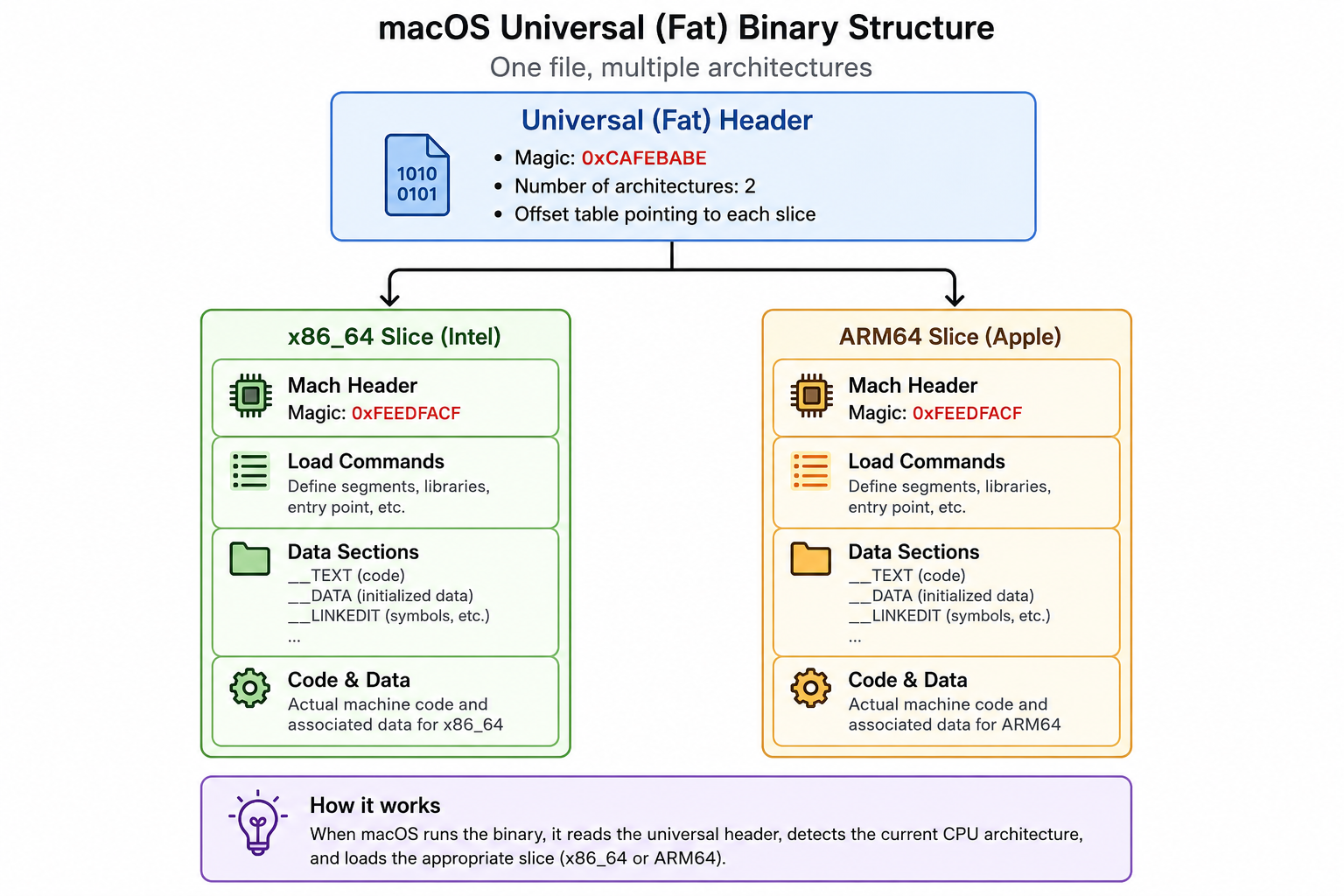
macho fat binary structure
When an analyst double-clicks an application, the macOS dynamic loader inspects the Fat Header:
ARM64 slice.x86_64 slice.Architecture Identification Cheat Sheet
Keep these magic bytes and CPU constants handy:
| Architecture | Magic Bytes (Hex) | CPU Type Constant | cputype Value |
|---|---|---|---|
| Fat Binary (32-bit offset) | 0xCAFEBABE | FAT_MAGIC | N/A (Header container) |
| Fat Binary (64-bit offset) | 0xCAFEBABF | FAT_MAGIC_64 | N/A (Header container) |
| Mach-O 64-bit (x86_64) | 0xFEEDFACF | CPU_TYPE_X86_64 | 16777223 (0x01000007) |
| Mach-O 64-bit (ARM64) | 0xFEEDFACF | CPU_TYPE_ARM64 | 16777228 (0x0100000C) |
Hands-on Triage: Inspecting Our Specimen (.pd)
Let’s point our CLI tools at our RustBucket specimen to inspect its architecture.
Step 1: Check File Type and Slices
file .pd
file command output
Breaking Down the Output
This single line tells us crucial details about the target:
x86_64: Targets Intel-based Macs (or systems running under Rosetta 2).arm64: Targets Apple Silicon (M1/M2/M3/M4 chips) natively.NOUNDEFS: No unresolved external references exist at compile time.DYLDLINK: Informs the kernel to pass execution to the dynamic linker (dyld).TWOLEVEL: Uses two-level namespace lookups (every imported symbol records both the symbol name and the specific library that provides it).PIE: Position Independent Executable. The code can load at any randomized virtual memory address (ASLR).Step 2: Peeking at the Universal (Fat) Header
Because our sample is a multi-architecture file, it doesn't start directly with raw assembly code or segment definitions. Instead, the file begins with a Fat Header—a small container directory that tells the macOS dynamic linker (dyld) where each architecture slice lives inside the file.
We can view the raw container breakdown using Apple's object file displaying tool, otool:
otool -f .pd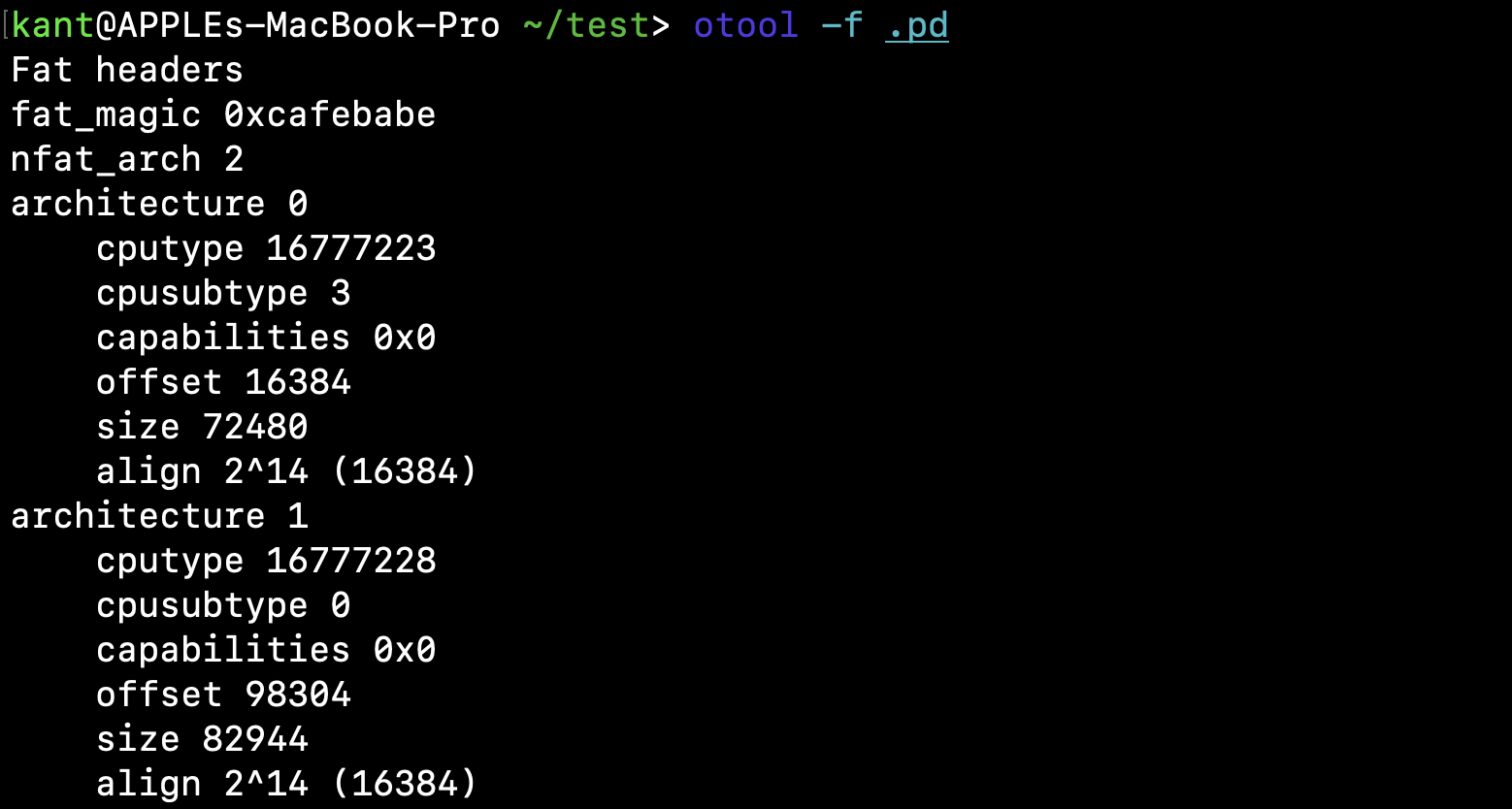
otool -f .pd output
Deconstructing the Output
Every field here serves a specific purpose in macOS execution:
fat_magic 0xcafebabe: The classic magic bytes defining a universal binary with 32-bit architecture offsets. (If offsets exceed 4GB, you would encounter 0xcafebabf for 64-bit universal binaries).nfat_arch 2: Informs the kernel that there are exactly two compiled architecture slices bundled inside.Now look closely at the two architecture records:
| Field | Architecture 0 (x86_64) | Architecture 1 (arm64) | Why It Matters |
|---|---|---|---|
cputype | 16777223 (0x01000007) | 16777228 (0x0100000C) | Maps to CPU_TYPE_X86_64 and CPU_TYPE_ARM64. |
cpusubtype | 3 (CPU_SUBTYPE_I386_ALL) | 0 (CPU_SUBTYPE_ARM64_ALL) | Indicates standard processor capabilities without specialized instructions. |
offset | 16384 (0x4000) | 98304 (0x18000) | The exact byte offset in the file where each independent Mach-O binary begins. |
size | 72480 bytes (~70.8 KB) | 82944 bytes (~81 KB) | ARM64 instructions are fixed-width (4 bytes each), typically making the ARM64 slice slightly larger than the variable-length x86_64 slice. |
align | 2^14 (16,384 bytes) | 2^14 (16,384 bytes) | Memory page alignment. |
Analyst Note on Alignment: Notice the align value is set to 2^14 (16 KB) for both slices. While Intel x86_64 systems traditionally use 4 KB memory pages, Apple Silicon hardware uses 16 KB pages. To ensure compatibility across all modern Mac hardware without paging faults, the compiler aligns both slices to 16 KB boundaries.
Step 3: Splitting the Universal Container with lipo
When performing static reverse engineering in tools like Ghidra, IDA Pro, or Hopper, loading a multi-architecture binary often prompts you to choose one specific architecture to decompile. On the command line, parsing commands against a Fat binary can clutter your output by printing duplicates for every single architecture slice.
To keep our analysis clean and controlled, we use lipo - macOS’s native utility for manipulating Universal Binaries—to carve each architecture into its own standalone Mach-O file.
lipo .pd -thin x86_64 -output pd_x86 && lipo .pd -thin arm64 -output pd_arm64 && file pd_x86 pd_arm64
splitting the fat binary using lipo command
What Changed Under the Hood?
By "thinning" the binary:
fat_header and padding are stripped away.pd_x86 and pd_arm64) now begins at byte 0x00 with its native 64-bit Mach-O header (0xFEEDFACF).Step 4: Dissecting the Native Mach-O Headers
Now that both slices are separated, each file starts directly at offset 0x00 with a standard mach_header_64 structure (defined in <mach-o/loader.h>).
Let's inspect the headers of both slices side-by-side:
otool -h pd_x86 pd_arm64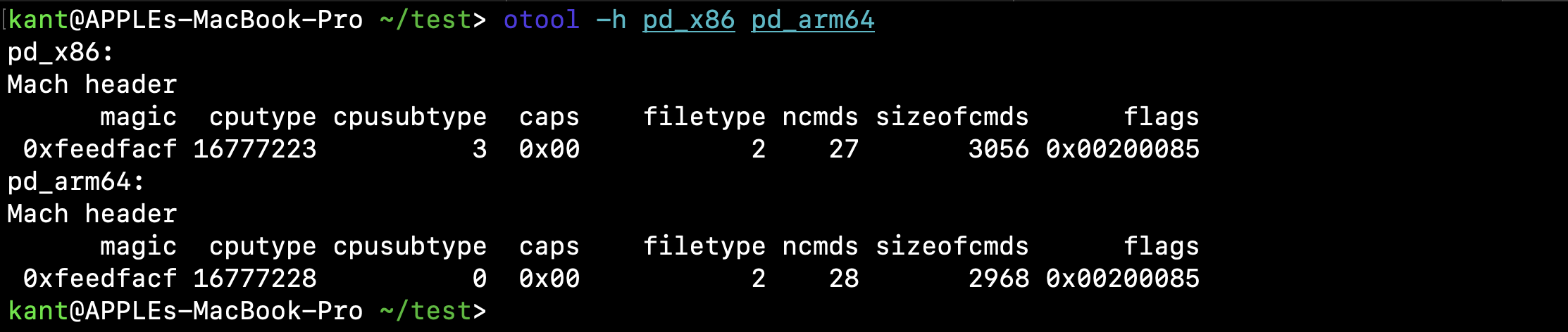
otool output of both the binaries
Decoding the Header Fields
| Field | pd_x86 Value | pd_arm64 Value | Meaning & Internals Detail |
|---|---|---|---|
magic | 0xfeedfacf | 0xfeedfacf | MH_MAGIC_64. Confirms both are 64-bit Mach-O binaries in native host byte order. |
cputype | 16777223 (0x01000007) | 16777228 (0x0100000C) | CPU_TYPE_X86_64 vs CPU_TYPE_ARM64. |
cpusubtype | 3 | 0 | CPU_SUBTYPE_I386_ALL vs CPU_SUBTYPE_ARM64_ALL. |
caps | 0x00 | 0x00 | Capability bits. On ARM64e systems, this field can hold pointer authentication (PAC) flags. |
filetype | 2 | 2 | MH_EXECUTE. Tells dyld this is an executable binary with an entry point, not a shared library (MH_DYLIB = 6) or object bundle (MH_BUNDLE = 8). |
ncmds | 27 | 28 | The total count of Load Commands immediately following the header. Notice ARM64 has 28 vs. 27 on x86_64! |
sizeofcmds | 3056 bytes | 2968 bytes | The total byte size occupied by all load command structures combined. |
flags | 0x00200085 | 0x00200085 | Bitmask of runtime capabilities. |
Demystifying the flags Bitmask (0x00200085)
The flags tell us how the macOS kernel and dyld will treat this binary in memory:
0x00000001 (MH_NOUNDEFS): The compiler resolved all internal symbols, no undefined references remain.0x00000004 (MH_DYLDLINK): Binary uses the dynamic linker (dyld) rather than static linking.0x00000080 (MH_TWOLEVEL): Uses two-level namespace symbol resolution (each import records both its symbol name and the specific library it belongs to, speeding up loading and preventing namespace collisions).0x00200000 (MH_PIE): Position Independent Executable. ASLR (Address Space Layout Randomization) will randomize the base virtual address on every run.For our next step, we need to inspect the Load Commands to see why ARM64 has 28 commands while x86_64 has 27, and how memory segments are mapped.
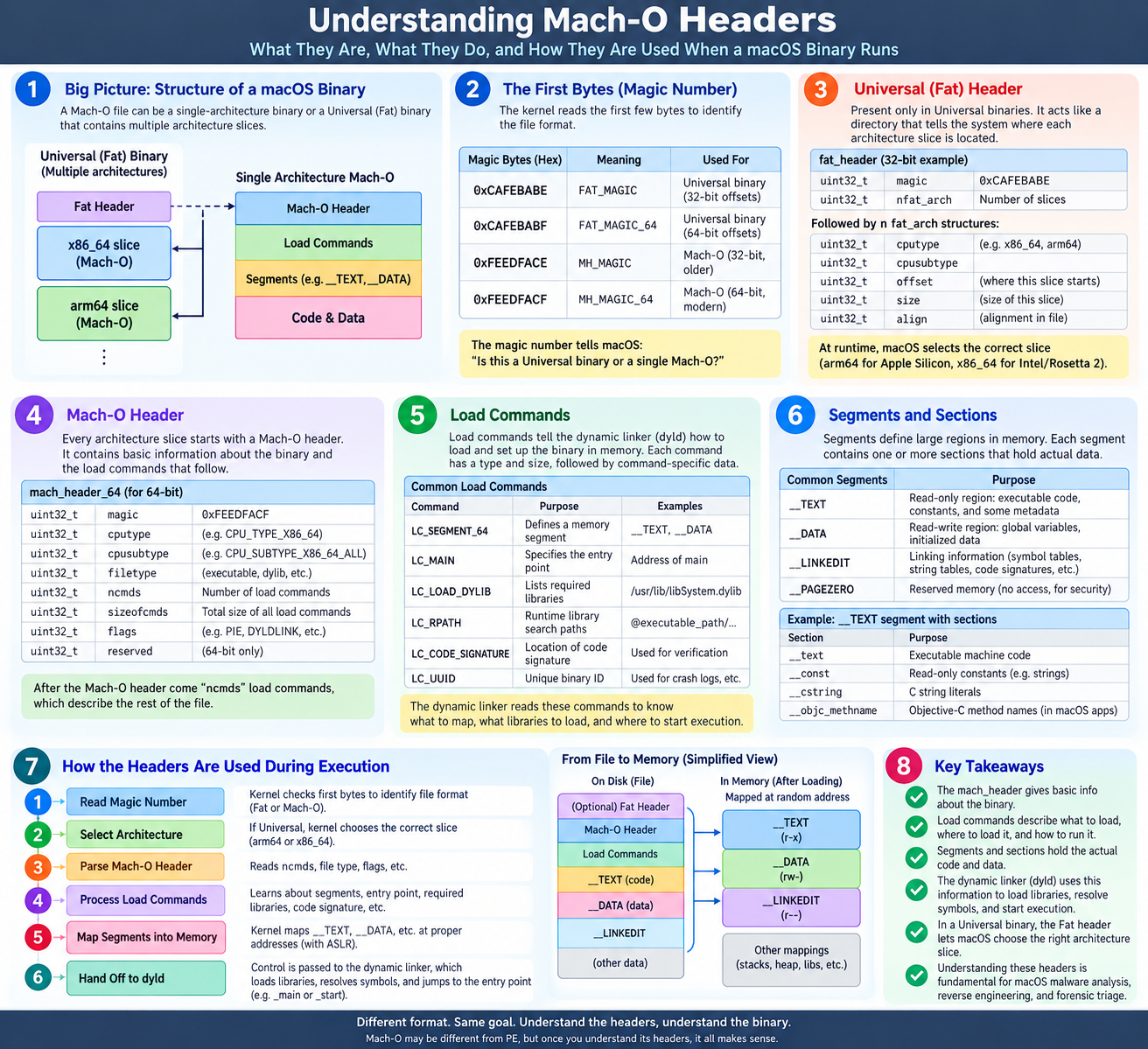
Understanding Mach-O Headers
Step 5: The Execution Blueprint - Load Commands
If the Mach header is the identity badge of the binary, the Load Commands are the execution blueprint. Immediately following the header, they tell the kernel and the dynamic linker (dyld):
.dylib) must be mapped inLet's list the first 15 load commands of the pd_x86 slice using otool -l:
otool -l pd_x86 | grep "cmd " | head -n 15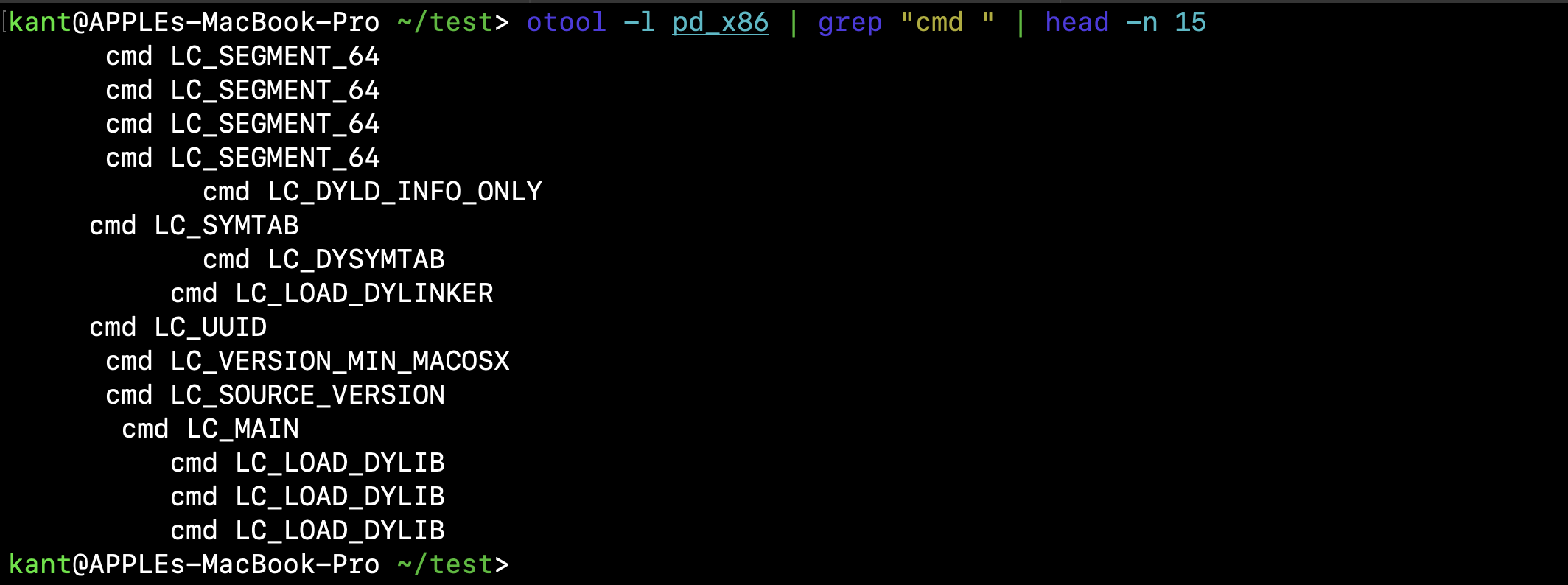
terminal output
What These Commands Instruct the System to Do
LC_SEGMENT_64 (x4): Directs the kernel to map four primary memory regions into the virtual address space: __PAGEZERO, __TEXT, __DATA, and __LINKEDIT.LC_DYLD_INFO_ONLY: Provides the compressed rebase, bind, weak-bind, lazy-bind, and export opcodes used by dyld during ASLR rebasing and symbol resolution.LC_SYMTAB & LC_DYSYMTAB: Pointers to the static and dynamic symbol tables (function names, variable names, and relocation entries).LC_LOAD_DYLINKER: Path to the dynamic linker responsible for bootstrapping this process (almost universally /usr/lib/dyld).LC_UUID: A unique 128-bit build identifier matched with debug symbols (.dSYM).LC_VERSION_MIN_MACOSX: The minimum macOS SDK version required to execute this slice.LC_MAIN: The replacement for the legacy LC_UNIXTHREAD command. Specifies the offset to the program's initial entry point (main).LC_LOAD_DYLIB: Dynamically linked libraries/frameworks required by the malware at runtime.Now let's run the exact same command on the ARM64 slice to spot the architectural differences:
Step 6: Architectural Differences in Load Commands (x8664 vs. ARM64)
Now let's inspect the first 15 load commands of the pd_arm64 slice:
otool -l pd_arm64 | grep "cmd " | head -n 15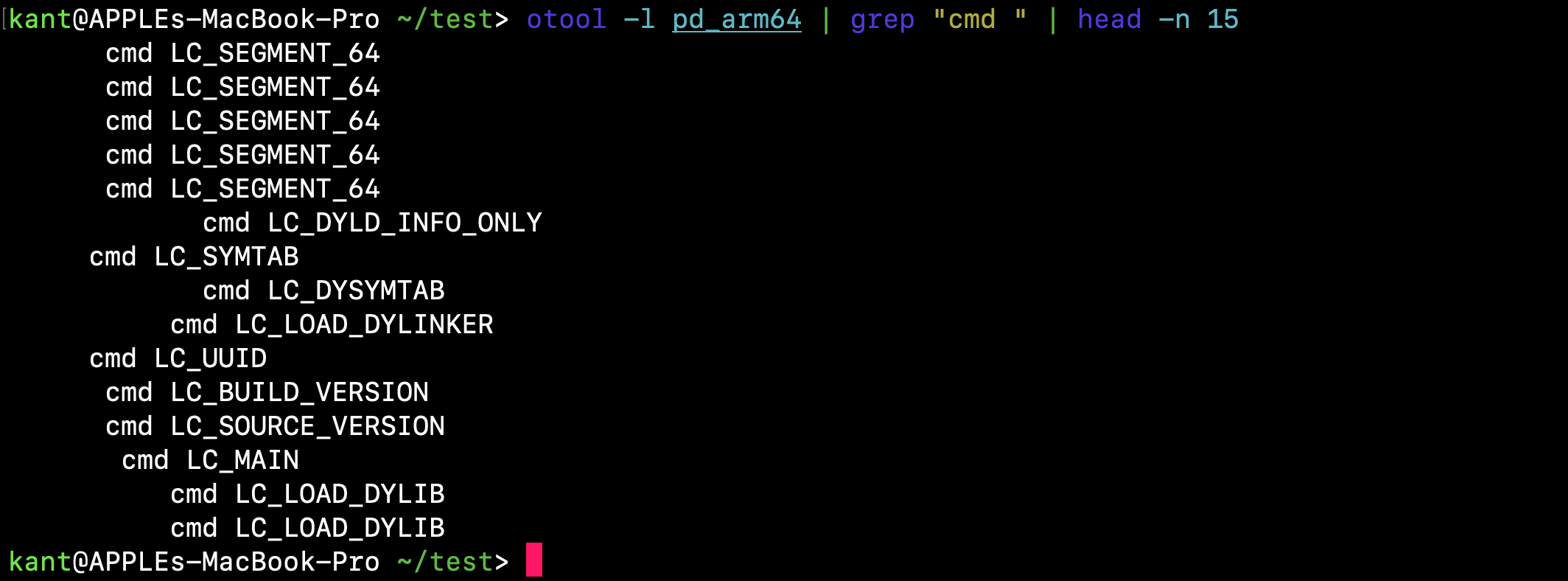
| Feature | pd_x86 (Intel) | pd_arm64 (Apple Silicon) | What It Means for Malware Analysis |
|---|---|---|---|
| Segment Count | 4 segments | 5 segments | ARM64 splits constant data into its own dedicated segment (__DATA_CONST) alongside __DATA, strengthening page permission protections. |
| Version Command | LC_VERSION_MIN_MACOSX | LC_BUILD_VERSION | LC_VERSION_MIN_MACOSX is the legacy load command. Apple Silicon uses LC_BUILD_VERSION, which specifies the target platform, minimum OS version, and the exact SDK version used to compile the binary. |
Step 7: Anatomy of Mach-O Segments
In Mach-O, a Segment is a high-level container that the kernel maps into virtual memory with a specific page protection (rwx). Inside segments reside individual Sections, which hold the actual instructions, constants, and pointers.
Let's inspect the segments declared in each slice:
otool -l pd_x86 | grep -E "(cmd LC_SEGMENT_64|segname)"
otool -l pd_arm64 | grep -E "(cmd LC_SEGMENT_64|segname)"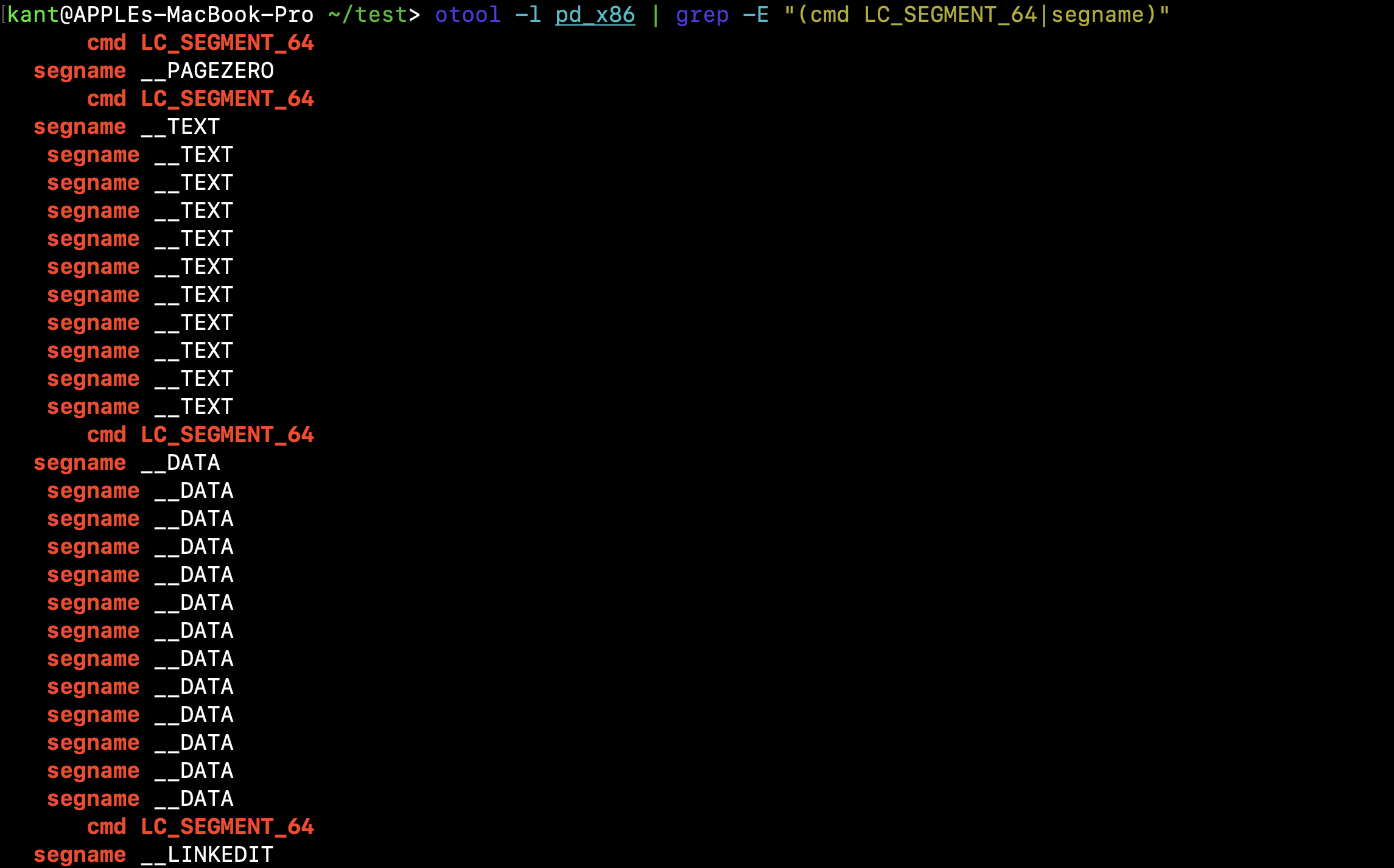
otool -l pd_x86 | grep -E "(cmd LC_SEGMENT_64|segname)”
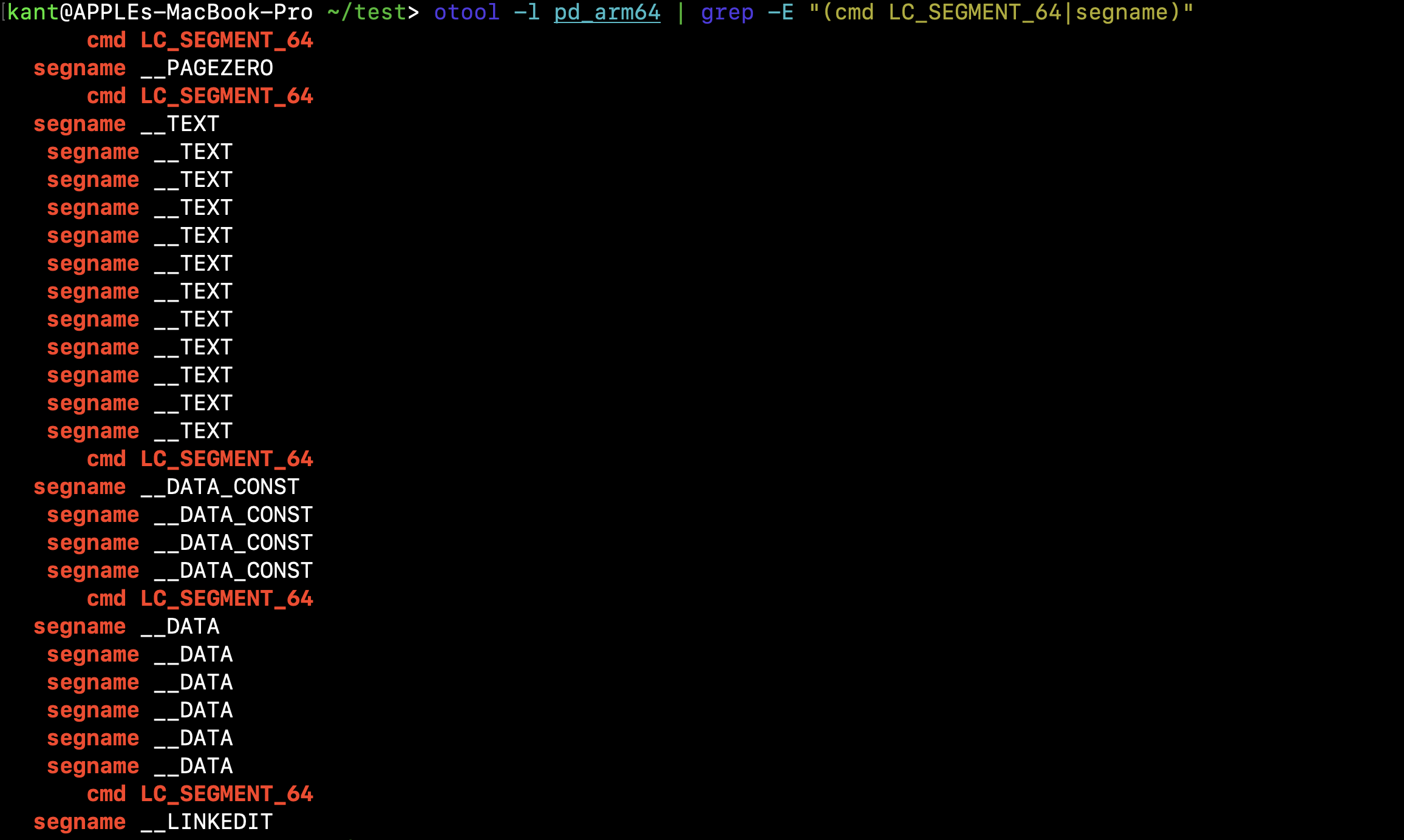
otool -l pd_arm64 | grep -E "(cmd LC_SEGMENT_64|segname)”
[pd_x86]
  cmd LC_SEGMENT_64 -> segname __PAGEZERO
  cmd LC_SEGMENT_64 -> segname __TEXT        (11 sections)
  cmd LC_SEGMENT_64 -> segname __DATA        (12 sections)
  cmd LC_SEGMENT_64 -> segname __LINKEDIT

[pd_arm64]
  cmd LC_SEGMENT_64 -> segname __PAGEZERO
  cmd LC_SEGMENT_64 -> segname __TEXT        (11 sections)
  cmd LC_SEGMENT_64 -> segname __DATA_CONST  (3 sections)
  cmd LC_SEGMENT_64 -> segname __DATA        (5 sections)
  cmd LC_SEGMENT_64 -> segname __LINKEDIT
What Each Segment Does Under the Hood
| Segment | Permissions | Purpose |
|---|---|---|
__PAGEZERO | --- (None) | A non-executable, non-readable guard block starting at virtual address 0x0. Catches NULL pointer dereferences by immediately triggering an EXC_BAD_ACCESS crash if the malware tries to read/write to 0x0. |
__TEXT | r-x (Read / Exec) | Contains the compiled machine instructions and immutable data (like string literals). It is read-only to prevent self-modifying code. |
__DATA_CONST | r-- (Read-only) | ARM64 / Modern macOS only. Holds pointers and structures initialized at load time by dyld and then immediately locked down to read-only before execution starts. |
__DATA | rw- (Read / Write) | Mutable global variables, static storage, and lazy symbol pointers that are modified at runtime. |
__LINKEDIT | r-- (Read-only) | Raw dynamic link metadata, including export tables, symbol tables, code signatures, and relocation info used by dyld. |
Step 8: Diving into PAGEZERO & Virtual Memory Protection
To understand how macOS protects memory at the binary level, let’s inspect the fields of the very first segment command:
otool -l pd_arm64 | grep -A 8 "segname __PAGEZERO"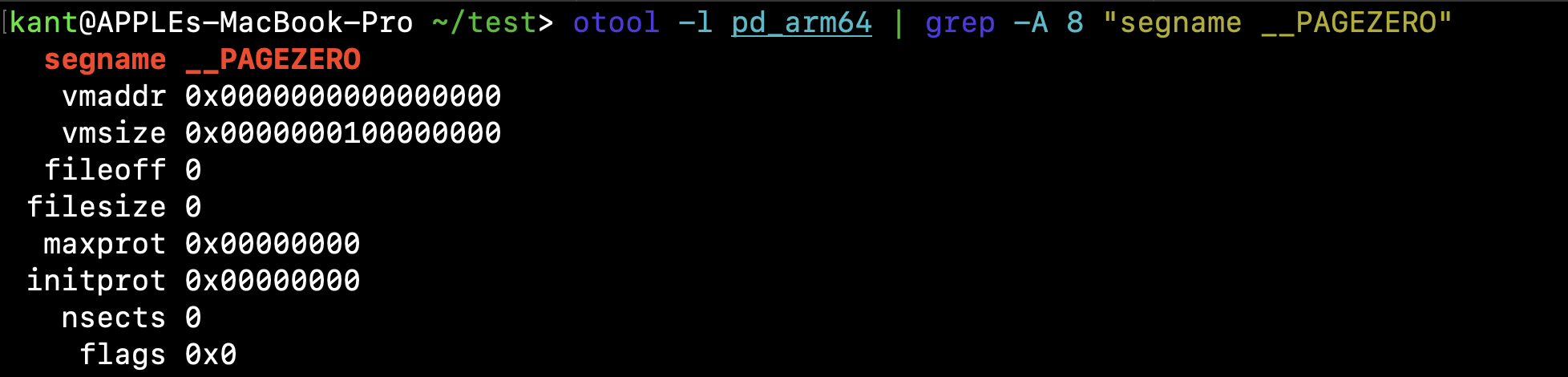
otool -l pd_arm64 | grep -A 8 "segname __PAGEZERO”
Decoding the Guard Page
vmaddr 0x0000000000000000 & vmsize 0x0000000100000000:The segment begins at virtual address 0x0 and extends for 0x100000000 bytes (exactly 4 GB in size). This 4 GB region covers the entire 32-bit lower address range.
fileoff 0 & filesize 0:It consumes zero bytes on disk. It is purely a virtual memory allocation made by the kernel at runtime.
initprot 0x0 & maxprot 0x0:Initial and maximum page permissions are both 0 (--, no read, no write, no execute).
Why This Matters for Malware Analysis:
If a developer or malware author introduces a NULL pointer dereference (or tries to access memory via a corrupted 32-bit integer offset inside this 4 GB window), the CPU immediately faults with EXC_BAD_ACCESS (SIGSEGV) rather than allowing an exploit to hijack execution via NULL page spraying.
Step 9: Inside TEXT & Calculating the Entry Point
Now let's inspect the __TEXT segment and the load command that points to execution: LC_MAIN.
otool -l pd_arm64 | grep -A 8 "segname __TEXT" | head -n 9
otool -l pd_arm64 | grep -A 4 "cmd LC_MAIN"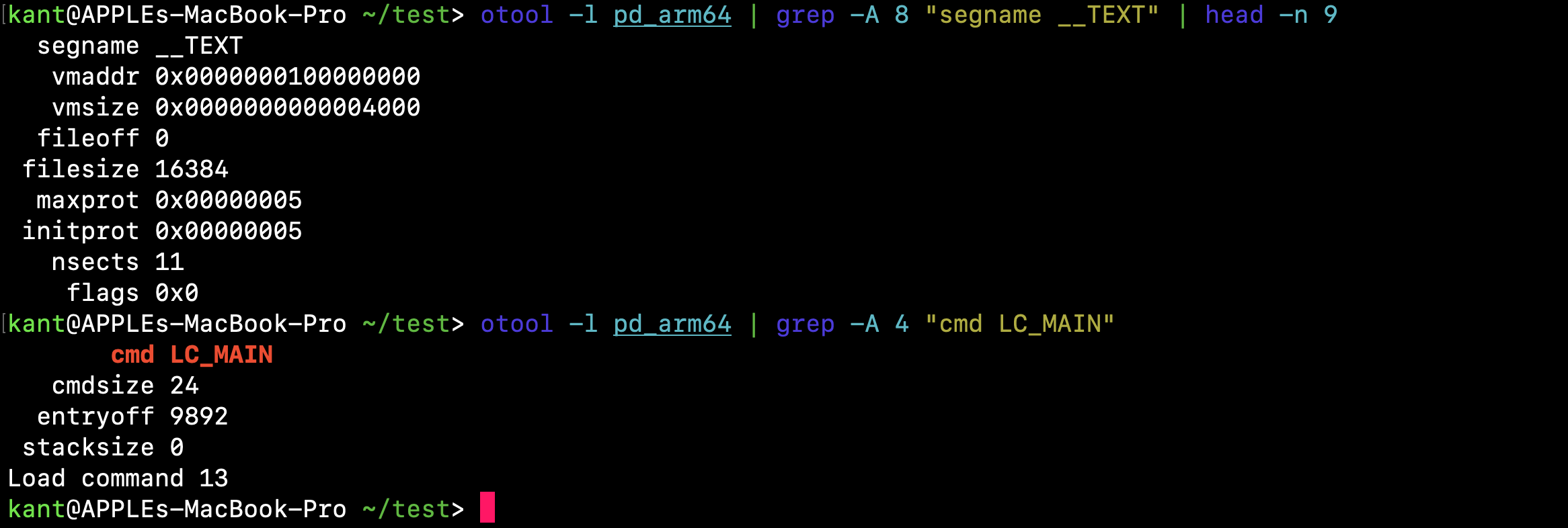
output
segname __TEXT
   vmaddr 0x0000000100000000
   vmsize 0x0000000000004000
  fileoff 0
 filesize 16384
  maxprot 0x00000005
 initprot 0x00000005
   nsects 11
    flags 0x0
---
       cmd LC_MAIN
   cmdsize 24
  entryoff 9892
 stacksize 0
Deconstructing TEXT Memory Setup
vmaddr 0x0000000100000000: As expected, __TEXT begins immediately where __PAGEZERO ends (at the 4 GB mark, 0x100000000).initprot 0x00000005: In octal/hex permissions, 0x5 corresponds to Read + Execute (4 + 1 = 5, r-x). It is non-writable.filesize 16384: Exactly 16 KB (aligned to Apple Silicon page size).****
Demystifying LCMAIN & The Entry Point
On legacy Mach-O binaries, execution entry was governed by LC_UNIXTHREAD, which explicitly supplied CPU register states (rip or pc). Modern macOS uses LC_MAIN:
entryoff 9892: This is a raw relative byte offset from the start of the binary image to the first instruction of main(). VM Base + entryoff = 0x100000000 + 9892 (0x26A4) = 0x1000026A4When you open pd_arm64 in a disassembler like Ghidra or IDA Pro, this address (0x1000026A4) is precisely where the decompilation flow starts.
Step 10: Mapping Dynamic Dependencies (otool -L)
Before any malware code executes, the dynamic linker (dyld) walks the LC_LOAD_DYLIB commands to map shared libraries into the process address space.
Checking linked libraries is the macOS equivalent of scanning the Import Directory on a Windows PE. It immediately answers two fundamental questions:
Let's inspect the dynamic libraries loaded by pd_arm64:
otool -L pd_arm64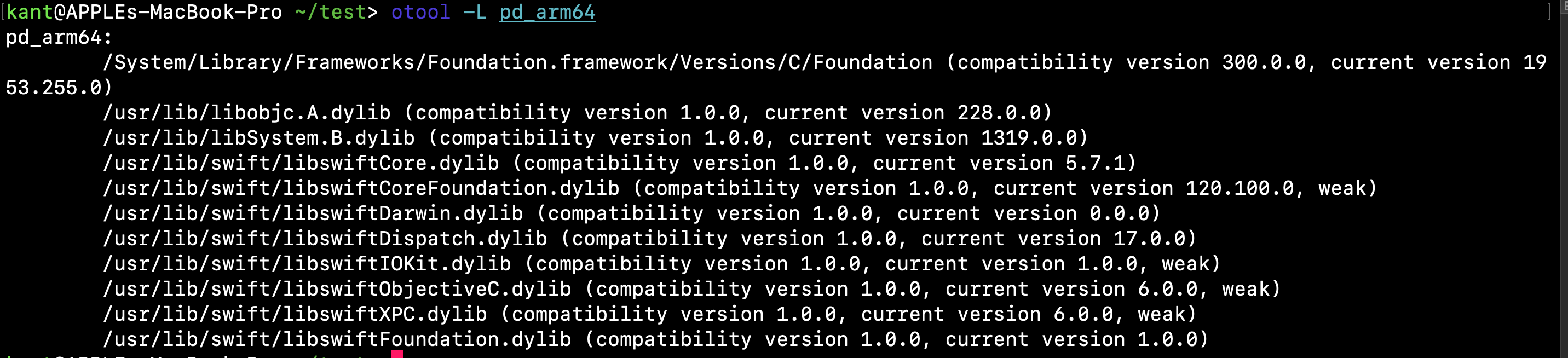
pd_arm64:
    /System/Library/Frameworks/Foundation.framework/Versions/C/Foundation (compatibility version 300.0.0, current version 1953.255.0)
    /usr/lib/libobjc.A.dylib (compatibility version 1.0.0, current version 228.0.0)
    /usr/lib/libSystem.B.dylib (compatibility version 1.0.0, current version 1319.0.0)
    /usr/lib/swift/libswiftCore.dylib (compatibility version 1.0.0, current version 5.7.1)
    /usr/lib/swift/libswiftCoreFoundation.dylib (compatibility version 1.0.0, current version 120.100.0, weak)
    /usr/lib/swift/libswiftDarwin.dylib (compatibility version 1.0.0, current version 0.0.0)
    /usr/lib/swift/libswiftDispatch.dylib (compatibility version 1.0.0, current version 17.0.0)
    /usr/lib/swift/libswiftIOKit.dylib (compatibility version 1.0.0, current version 1.0.0, weak)
    /usr/lib/swift/libswiftObjectiveC.dylib (compatibility version 1.0.0, current version 6.0.0, weak)
    /usr/lib/swift/libswiftXPC.dylib (compatibility version 1.0.0, current version 6.0.0, weak)
    /usr/lib/swift/libswiftFoundation.dylib (compatibility version 1.0.0, current version 1.0.0)
Triage Analysis: What Does This Tell Us?
/usr/lib/swift/libswift*.dylib indicates this payload is written in Swift rather than pure C or Objective-C. When reversing in Ghidra or IDA Pro later, function names will follow Swift name mangling conventions ($s...).Foundation.framework): Foundation provides classes like FileManager, URLSession, and Process. This points to standard file dropping, HTTP network requests, or launching subprocesses.libswiftIOKit.dylib & libswiftXPC.dylib):IOKit: Often leveraged by malware for hardware profiling, gathering serial numbers, or detecting virtualized/sandbox environments.XPC: macOS’s native Inter-Process Communication (IPC) framework, often used to communicate with system daemons or escalate privileges.libSystem.B.dylib: The core Darwin umbrella library containing libc, libdispatch, POSIX calls, and Mach messaging primitives.Step 11: Targeted Triage with cstring
Running strings blindly against an entire binary often returns hundreds of lines of noise, mangled symbol references, and linker metadata.
In Mach-O, real ASCII string literals embedded by the programmer sit in a dedicated section: __cstring inside the __TEXT segment. We can dump just this section with its exact virtual memory offsets using otool:
otool -v -s __TEXT __cstring pd_arm64 | head -n 35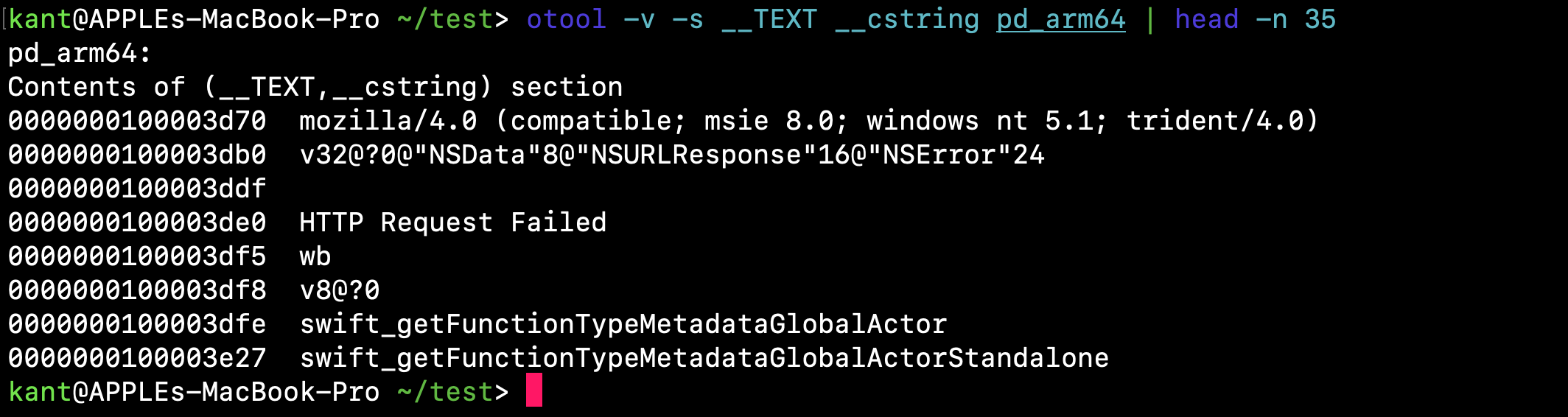
strings
pd_arm64:
Contents of (__TEXT,__cstring) section
0000000100003d70  mozilla/4.0 (compatible; msie 8.0; windows nt 5.1; trident/4.0)
0000000100003db0  v32@?0@"NSData"8@"NSURLResponse"16@"NSError"24
0000000100003ddf
0000000100003de0  HTTP Request Failed
0000000100003df5  wb
0000000100003df8  v8@?0
0000000100003dfe  swift_getFunctionTypeMetadataGlobalActor
0000000100003e27  swift_getFunctionTypeMetadataGlobalActorStandalone
Triaging the Indicators
Even without decompiling a single line of assembly, this snippet reveals critical operational behaviors:
mozilla/4.0 (compatible; msie 8.0; windows nt 5.1; trident/4.0)This is an ancient Windows XP / Internet Explorer 8 User-Agent string. A macOS binary running natively on Apple Silicon using a legacy Windows XP User-Agent is an immediate red flag—designed to blend in with legacy network traffic or evade naive macOS detections.
v32@?0@"NSData"8@"NSURLResponse"16@"NSError"24 This is an Objective-C / Swift type encoding string representing a block completion handler signature: (void)(NSData *data, NSURLResponse *response, NSError *error). It confirms that the binary uses Foundation's URLSession dataTaskWithRequest:completionHandler: for command-and-control (C2) communication.
HTTP Request Failed: Standard error logging following an unsuccessful beacon attempt.wb: Standard POSIX file mode for "write binary," commonly passed to fopen() when writing an incoming payload directly to disk.Step 12: Code Signing & Gatekeeper Checks (codesign)
Every modern binary executing on Apple Silicon must have at least a baseline cryptographic signature. If an ARM64 binary completely lacks a code signature, the Mach kernel aborts execution immediately with a crash (SIGKILL / CODESIGNING).
To see how the author signed this binary, we invoke Apple’s native verification tool, codesign:
codesign -dv --verbose=4 pd_arm64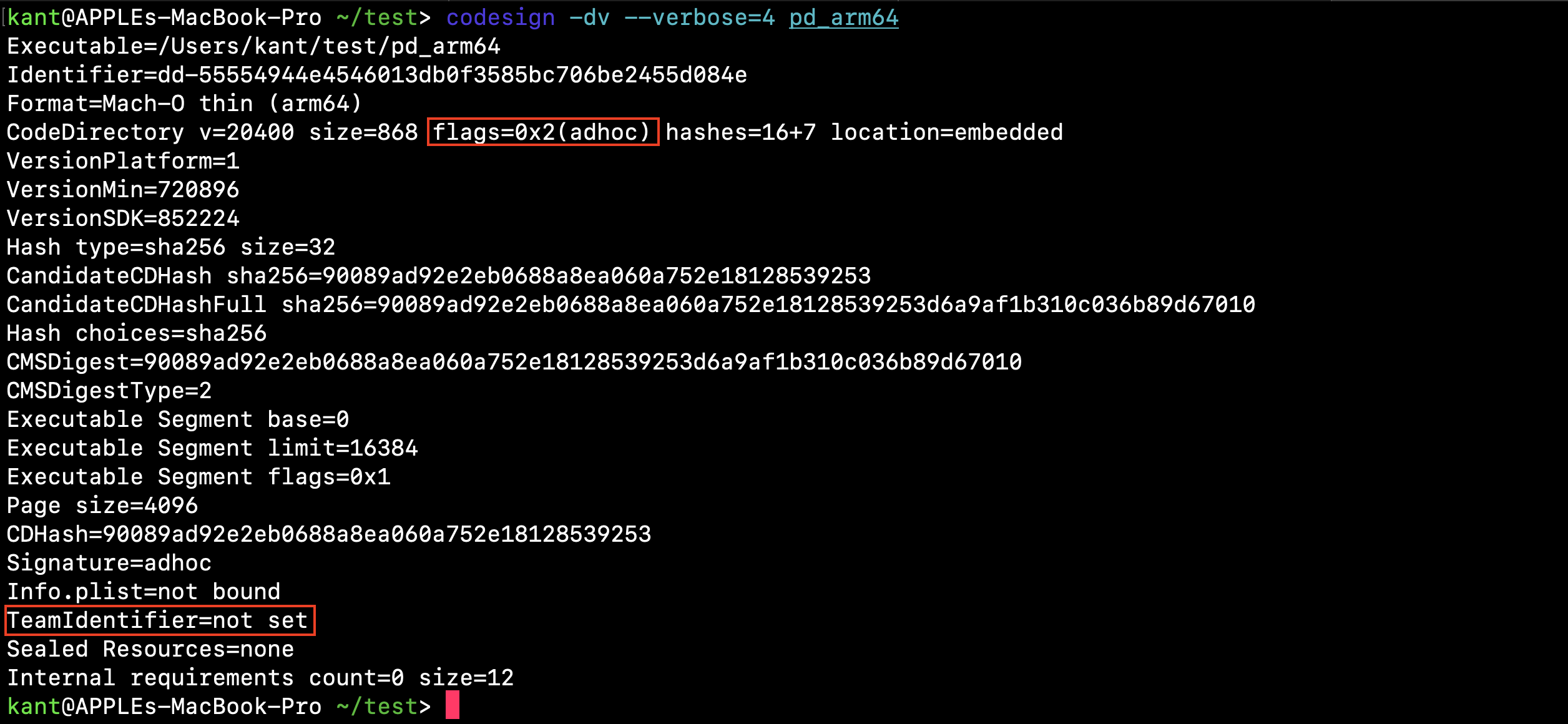
codesign output
Reading the Security Attributes
Signature=adhoc & flags=0x2(adhoc):The binary is ad-hoc signed (signed locally with a pseudo-identity rather than an Apple Developer Certificate).
TeamIdentifier=not set:There is no Apple Developer Team ID tied to this specimen.
CDHash=90089ad92e2eb0688a8ea060a752e18128539253:The Code Directory Hash (CDHash) is one of the most critical IoCs in macOS threat hunting. It is a cryptographic hash of the binary's code directory pages. macOS security subsystems (like Endpoint Security Framework, Endpoint Detection and Response tools, and XProtect) track binaries by CDHash rather than just the full file SHA-256.
Gatekeeper Impact: Because the binary lacks a valid Developer ID signature and Apple Notarization ticket, if a user downloads this file via a web browser or email client, macOS applies the com.apple.quarantine extended attribute (xattr). Gatekeeper will immediately block execution with a warning dialog.
To bypass this, campaigns like RustBucket rely on an initial first-stage dropper or AppleScript droplet that writes the .pd payload directly to disk via command-line utilities (like curl or shell scripts), intentionally omitting the quarantine attribute.
Static Triage Cheat Sheet
When a new macOS specimen lands on your triage desk, this command chain gives you full architectural context within 60 seconds:
# 1. Identify container type and architectures
file sample

# 2. Inspect Fat container offsets (if Universal)
otool -f sample

# 3. Thin down to isolated architectures
lipo sample -thin arm64 -output sample_arm64

# 4. View Mach-O header flags and capabilities
otool -h sample_arm64

# 5. Extract virtual memory layouts and the entry point
otool -l sample_arm64 | grep -E "(cmd LC_MAIN|entryoff|segname)"

# 6. Map linked runtime frameworks and system libraries
otool -L sample_arm64

# 7. Dump literal ASCII strings from the code section
otool -v -s __TEXT __cstring sample_arm64

# 8. Check code signing identity and CDHash
codesign -dv --verbose=4 sample_arm64
Coming Up in Part 2: Disassembly & Dynamic Behavior
Now that we understand the basics of how a macOS binary is structured and runs, it’s time to see what happens inside the code.
In Part 2, we’ll take a closer look at the RustBucket sample and follow its behavior step by step.
See you in Part 2!