Sample Metadata
File Identification & Hashes
| Attribute | Value |
|---|---|
| MD5 | ed65ae70cc20bc28a0dfde57820f5f20 |
| SHA-1 | 88b5b59ae69953dac222df1763e874df07c91a2e |
| SHA-256 | 37348e1864b8aaab9fb284023ef2a6e3a775c94c0e72d875de4be8593c010a5f |
| Vhash | 86e3589afa09bdaf5cb414379bb5dd4b |
| SSDEEP | 6144:j7ZArxSNznzUfhyocAzAbaDz0JDkDoGk:0fEba/ |
| TLSH | T1EC94F833A7041424C276F6F5168F8B4CF835F921E6E01766A76871869FF93102E7AEC9 |
| Symhash | 56d64cb09fd967b246855f77e4645942 |
| File Type | Mach-O Universal Binary |
| Architectures | x86_64, arm64 |
| File Size | 407.09 KB (416,864 bytes) |
| TrID Classification | Mac OS X Mach-O Universal Dynamically Linked Shared Library (82.2%) |
| Magika Classification | MACHO |
Binary Ninja Analysis
We are gonna take look at the arm64 open it in binary ninja and select arm.

So we are inside of the main function.
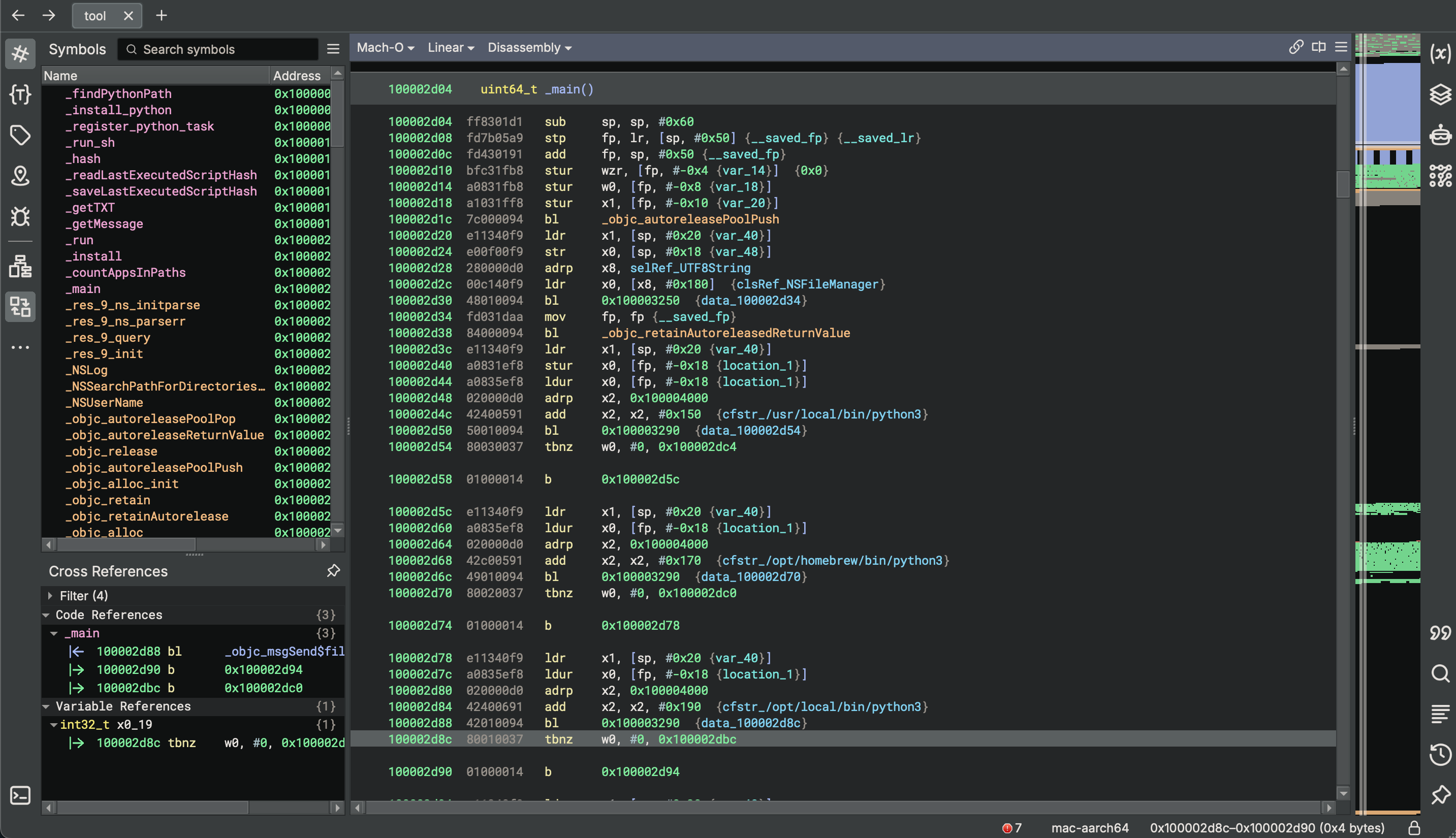
The first branch in the link instruction to call a function is _objc_autoreleasePoolPush .
100002d1c 7c000094 bl **_objc_autoreleasePoolPush**This is a part of automatic reference counting, this is for object memory management in objective c. We don’t need to worry about this.
Then we have a pair of instructions.
100002d28  280000d0   adrp    x8, selRef_UTF8String
100002d2c  00c140f9   ldr     x0, [x8, #0x180]  {clsRef_NSFileManager}
This is very common in arm64 compiled binaries.
Then we have
100002d28  280000d0   adrp    x8, selRef_UTF8String
100002d2c  00c140f9   ldr     x0, [x8, #0x180]  {clsRef_NSFileManager}
this loads a page into x8 then we are calculating an offset from the page.
Binary ninja is able to see that this is for an objective c class NSFileManager. If we go in we’ll see this exists within the objective c class, references section.and yeah it’s just a reference to this file manager.
__objc_classrefs (REGULAR) section started  {0x100008180-0x1000081d8}
100008180  struct objc_class_t* clsRef_NSFileManager = _OBJC_CLASS_$_NSFileManager
100008188  struct objc_class_t* clsRef_NSTask = _OBJC_CLASS_$_NSTask
100008190  struct objc_class_t* clsRef_NSArray = _OBJC_CLASS_$_NSArray
100008198  struct objc_class_t* clsRef_NSString = _OBJC_CLASS_$_NSString
1000081a0  struct objc_class_t* clsRef_NSUUID = _OBJC_CLASS_$_NSUUID
1000081a8  struct objc_class_t* clsRef_NSMutableString = _OBJC_CLASS_$_NSMutableString
1000081b0  struct objc_class_t* clsRef_NSUserDefaults = _OBJC_CLASS_$_NSUserDefaults
1000081b8  struct objc_class_t* clsRef_NSMutableArray = _OBJC_CLASS_$_NSMutableArray
1000081c0  struct objc_class_t* clsRef_NSData = _OBJC_CLASS_$_NSData
1000081c8  struct objc_class_t* clsRef_NSMutableData = _OBJC_CLASS_$_NSMutableData
1000081d0  struct objc_class_t* clsRef_NSDictionary = _OBJC_CLASS_$_NSDictionary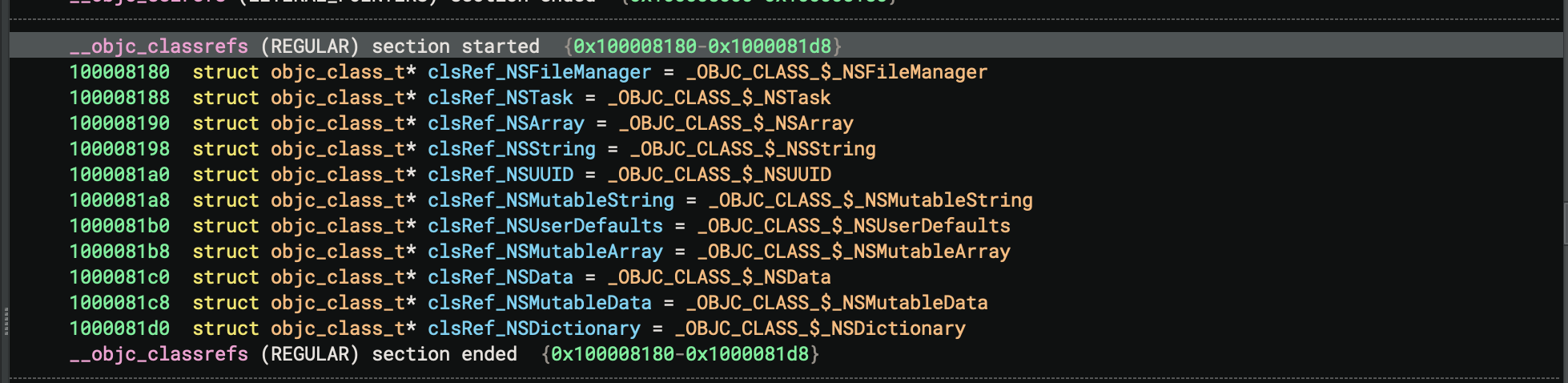
So that’s used for file operations which is where we’re going to see it used here.
100002d30 48010094 bl 0x100003250 {data_100002d34}Then we have this branch and link to this objective c message
100002d30 48010094 bl 0x100003250 {data_100002d34}If we go inside, This is a method for defaultManager.
100003250    int64_t _objc_msgSend$defaultManager(id arg1)

100003250  210000b0   adrp    x1, 0x100008000
100003254  214c40f9   ldr     x1, [x1, #0x98]  {sel_defaultManager, "defaultManager"}  {selRef_defaultManager}
100003258  100000b0   adrp    x16, 0x100004000
10000325c  100240f9   ldr     x16, [x16]  {_objc_msgSend}
100003260  00021fd6   br      x16
There’s another adrp, ldr instructions to get the page and then adding 98 hex to that page. Which ends up being defaultManager
So ARM is a load and store architecture so you are going to see a lot of storing and loading values to and from the stack.
Here we have this stur .
100002d40  a0831ef8   stur    x0, [fp, #-0x18 {location_1}]
100002d44  a0835ef8   ldur    x0, [fp, #-0x18 {location_1}]
for this value that’s inside the x0 register, Which is the return value of the defaultManager right after we ran that and that is going to be saved at the address calculated whatever is in -0x18 {location_1} .
So we have a frame pointer and our stack pointer this is calculating a space in between that for the main function. and it’s storing this value there.
We are going to do ldur of that into x0 and then we are end up calling this file exist at path method
100002d38  84000094   bl      _objc_retainAutoreleasedReturnValue
100002d3c  e11340f9   ldr     x1, [sp, #0x20 {var_40}]
100002d40  a0831ef8   stur    x0, [fp, #-0x18 {location_1}]
100002d44  a0835ef8   ldur    x0, [fp, #-0x18 {location_1}]
100002d48  020000d0   adrp    x2, 0x100004000
100002d4c  42400591   add     x2, x2, #0x150  {cfstr_/usr/local/bin/python3}
100002d50  50010094   bl      0x100003290  {data_100002d54}                       //**fileExistsAtPath**:
100002d54  80030037   tbnz    w0, #0, 0x100002dc4
100003290    int64_t _objc_msgSend$fileExistsAtPath:(id arg1)

100003290  210000b0   adrp    x1, 0x100008000
100003294  215440f9   ldr     x1, [x1, #0xa8]  {sel_fileExistsAtPath:, "fileExistsAtPath:"}  {selRef_fileExistsAtPath:}
100003298  100000b0   adrp    x16, 0x100004000
10000329c  100240f9   ldr     x16, [x16]  {_objc_msgSend}
1000032a0  00021fd6   br      x16
Before that we see this adrp, for this cfstr which is CF string. That we have same pair of instructions get the page plus 150 hex
100002d48  020000d0   adrp    x2, 0x100004000
100002d4c  42400591   add     x2, x2, #0x150  {cfstr_/usr/local/bin/python3}
If we look cfstr_/usr/local/bin/python3 we’ll se that this for a CF string which is inside of the CF string section of the binary.
__cfstring (REGULAR) section started  {0x100004150-0x100004630}
100004150  struct __NSConstantString cfstr_/usr/local/bin/python3 =
100004150  {
100004150      void* isa = ___CFConstantStringClassReference
100004158      enum CFStringFlag flags = UTF8 | 0x7c0
100004160      char* data = cstr_/usr/local/bin/python3 {"/usr/local/bin/python3"}
100004168      uint64_t length = 0x16
100004170  }
These are structs inside we have this /usr/local/bin/python3 which is a string itself, that we are concerned with which is usr local bin python3.
If we look ahead we’ll see homebrew path, then local path and the usr bin path.
__cfstring (REGULAR) section started  {0x100004150-0x100004630}
100004150  struct __NSConstantString cfstr_/usr/local/bin/python3 =
100004150  {
100004150      void* isa = ___CFConstantStringClassReference
100004158      enum CFStringFlag flags = UTF8 | 0x7c0
100004160      char* data = cstr_/usr/local/bin/python3 {"/usr/local/bin/python3"}
100004168      uint64_t length = 0x16
100004170  }
100004170  struct __NSConstantString cfstr_/opt/homebrew/bin/python3 =
100004170  {
100004170      void* isa = ___CFConstantStringClassReference
100004178      enum CFStringFlag flags = UTF8 | 0x7c0
100004180      char* data = cstr_/opt/homebrew/bin/python3 {"/opt/homebrew/bin/python3"}
100004188      uint64_t length = 0x19
100004190  }
100004190  struct __NSConstantString cfstr_/opt/local/bin/python3 =
100004190  {
100004190      void* isa = ___CFConstantStringClassReference
100004198      enum CFStringFlag flags = UTF8 | 0x7c0
1000041a0      char* data = cstr_/opt/local/bin/python3 {"/opt/local/bin/python3"}
1000041a8      uint64_t length = 0x16
1000041b0  }
1000041b0  struct __NSConstantString cfstr_/usr/bin/python3 =
1000041b0  {
1000041b0      void* isa = ___CFConstantStringClassReference
1000041b8      enum CFStringFlag flags = UTF8 | 0x7c0
1000041c0      char* data = cstr_/usr/bin/python3 {"/usr/bin/python3"}
1000041c8      uint64_t length = 0x10
1000041d0  }
1000041d0  struct __NSConstantString cfstr_/bin/bash =
1000041d0  {
1000041d0      void* isa = ___CFConstantStringClassReference
1000041d8      enum CFStringFlag flags = UTF8 | 0x7c0
1000041e0      char* data = cstr_/bin/bash {"/bin/bash"}
1000041e8      uint64_t length = 0x9
1000041f0  }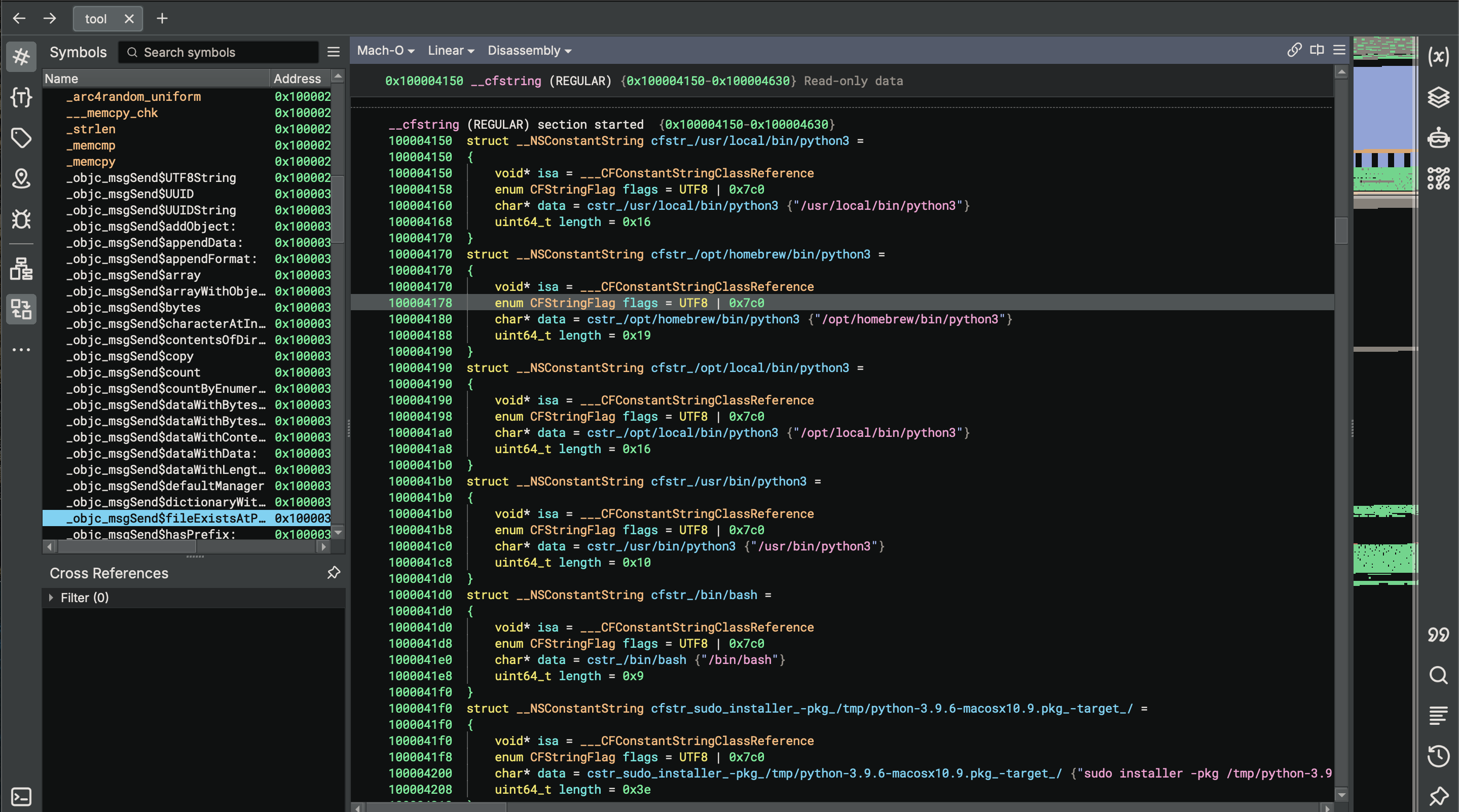
All for python3. So this binary is looking if python3 is installed on this machine or not. it’s going to use four paths in order to check for that.
So we’re just working with the first path right now.
This call to objective c message send fileExistsAtPath which return a boolean value based on the file exists or not.
100002d50 50010094 bl 0x100003290 {data_100002d54} //fileExistsAtPath:100003290 int64_t _objc_msgSend$fileExistsAtPath:(id arg1)
100003290 210000b0 adrp x1, 0x100008000
100003294 215440f9 ldr x1, [x1, #0xa8] {sel_fileExistsAtPath:, "fileExistsAtPath:"} {selRef_fileExistsAtPath:}
100003298 100000b0 adrp x16, 0x100004000
10000329c 100240f9 ldr x16, [x16] {_objc_msgSend}
1000032a0 00021fd6 br x16So let’s talk about how this works.
| Address | Instruction | Description |
|---|---|---|
100003290 | adrp x1, 0x100008000 | Load page address containing selector reference. |
100003294 | ldr x1, [x1, #0xa8] | Load selector "fileExistsAtPath:" into x1. |
100003298 | adrp x16, 0x100004000 | Load page containing _objc_msgSend pointer. |
10000329c | ldr x16, [x16] | Load address of _objc_msgSend into x16. |
1000032a0 | br x16 | Branch to _objc_msgSend. |
And that ends up executing fileExistsAtPath which returns a boolean value. and then there’s a check for this. and you’ll see that there’s a check for each one of these paths along this chain here.
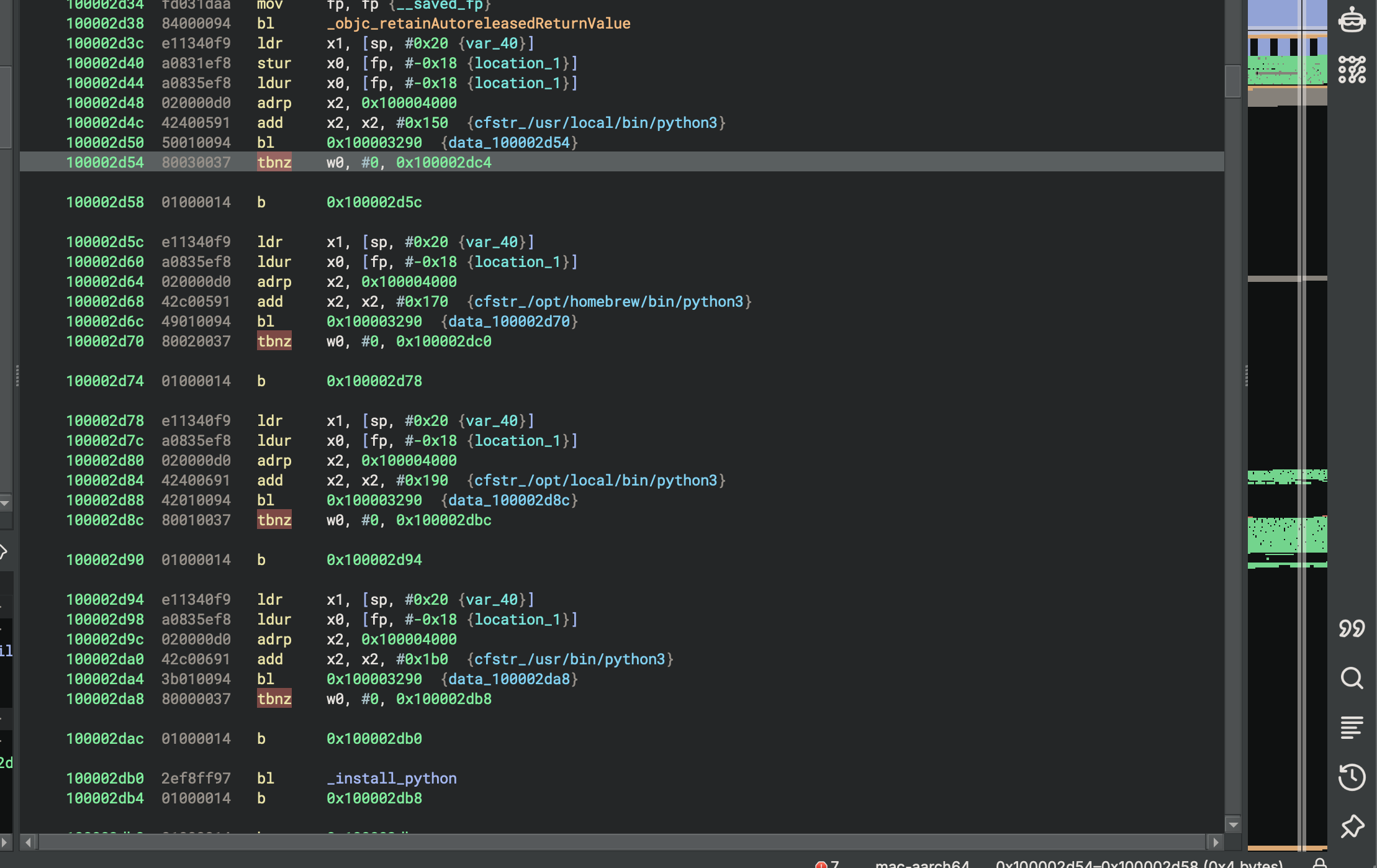
And tbnz (test bit not zero) is checking the return value.
0 = file does not exist
1 = file exists
The reason that w0 is used here instead of x0 for the return value is because this is going to be a one or zero depending on the return value of this boolean. and you don’t need to use x0 register for that you can use 32-bit equivalent of that register. So w0 is checking against that and if does not find it then it continues right so we have this branch here that goes and checks the next one.
100002d5c  e11340f9   ldr     x1, [sp, #0x20 {var_40}]
100002d60  a0835ef8   ldur    x0, [fp, #-0x18 {location_1}]
100002d64  020000d0   adrp    x2, 0x100004000
100002d68  42c00591   add     x2, x2, #0x170  {cfstr_/opt/homebrew/bin/python3}
100002d6c  49010094   bl      0x100003290  {data_100002d70}
100002d70  80020037   tbnz    w0, #0, 0x100002dc0

100002d74  01000014   b       0x100002d78
Decompiled main
We have this huge if statement, that’s looking to see if it exists or not.
100002d54        if ((_objc_msgSend(self: location_1, cmd: "fileExistsAtPath:",
100002d54                &cfstr_/usr/local/bin/python3) & 1) == 0 && (_objc_msgSend(self: location_1,
100002d54                cmd: "fileExistsAtPath:", &cfstr_/opt/homebrew/bin/python3) & 1) == 0 && (
100002d54                _objc_msgSend(self: location_1, cmd: "fileExistsAtPath:",
100002d54                &cfstr_/opt/local/bin/python3) & 1) == 0 && (_objc_msgSend(self: location_1,
100002d54                cmd: "fileExistsAtPath:", &cfstr_/usr/bin/python3) & 1) == 0)
100002db0            _install_python()
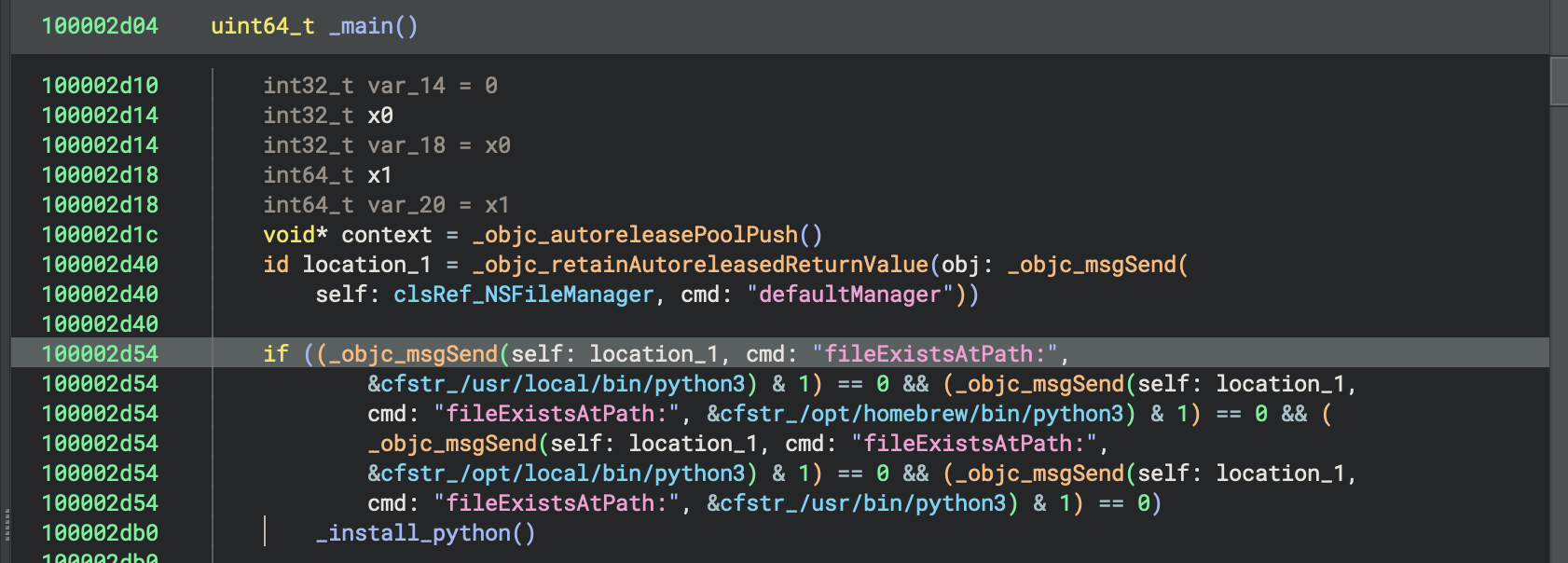
And if it doe’s not find a match using this fileExistsAtPath method call, It then runs this install python functions.
100000e7c        int64_t x8 = *___stack_chk_guard
100000e84        void* context = _objc_autoreleasePoolPush()
100000ea4        id location_1 = _objc_alloc_init(cls: clsRef_NSTask)
100003460        _objc_msgSend(self: location_1, cmd: "setLaunchPath:", &cfstr_/bin/bash)
100000ed0        id location = _objc_retain(obj:
100000ed0            &cfstr_sudo_installer_-pk...python-3.9.6-macosx10.9.pkg_-target_/)
100000ed4        id location_3 = location_1
100000ee8        struct __NSConstantString* const var_28 = &cfstr_-c
100000ef0        id location_2 = location
100000f08        id obj = _objc_retainAutoreleasedReturnValue(obj: _objc_msgSend(
100000f08            self: clsRef_NSArray, cmd: "arrayWithObjects:count:", &var_28, 2))
100003420        _objc_msgSend(self: location_3, cmd: "setArguments:", obj)
100000f24        _objc_release(obj)
100003360        _objc_msgSend(self: location_1, cmd: "launch")
1000035a0        _objc_msgSend(self: location_1, cmd: "waitUntilExit")
100003580        int32_t x0_15 = _objc_msgSend(self: location_1, cmd: "terminationStatus")
100000f68        _objc_storeStrong(&location, obj: nullptr)
100000f74        _objc_storeStrong(location: &location_1, obj: nullptr)
100000f7c        _objc_autoreleasePoolPop(context)
100000f7c
100000f98        if (*___stack_chk_guard == x8)
100000fb4            return zx.q(x0_15 == 0 ? 1 : 0) & 1
100000fb4
100000fa0        ___stack_chk_fail()
100000fa0        noreturn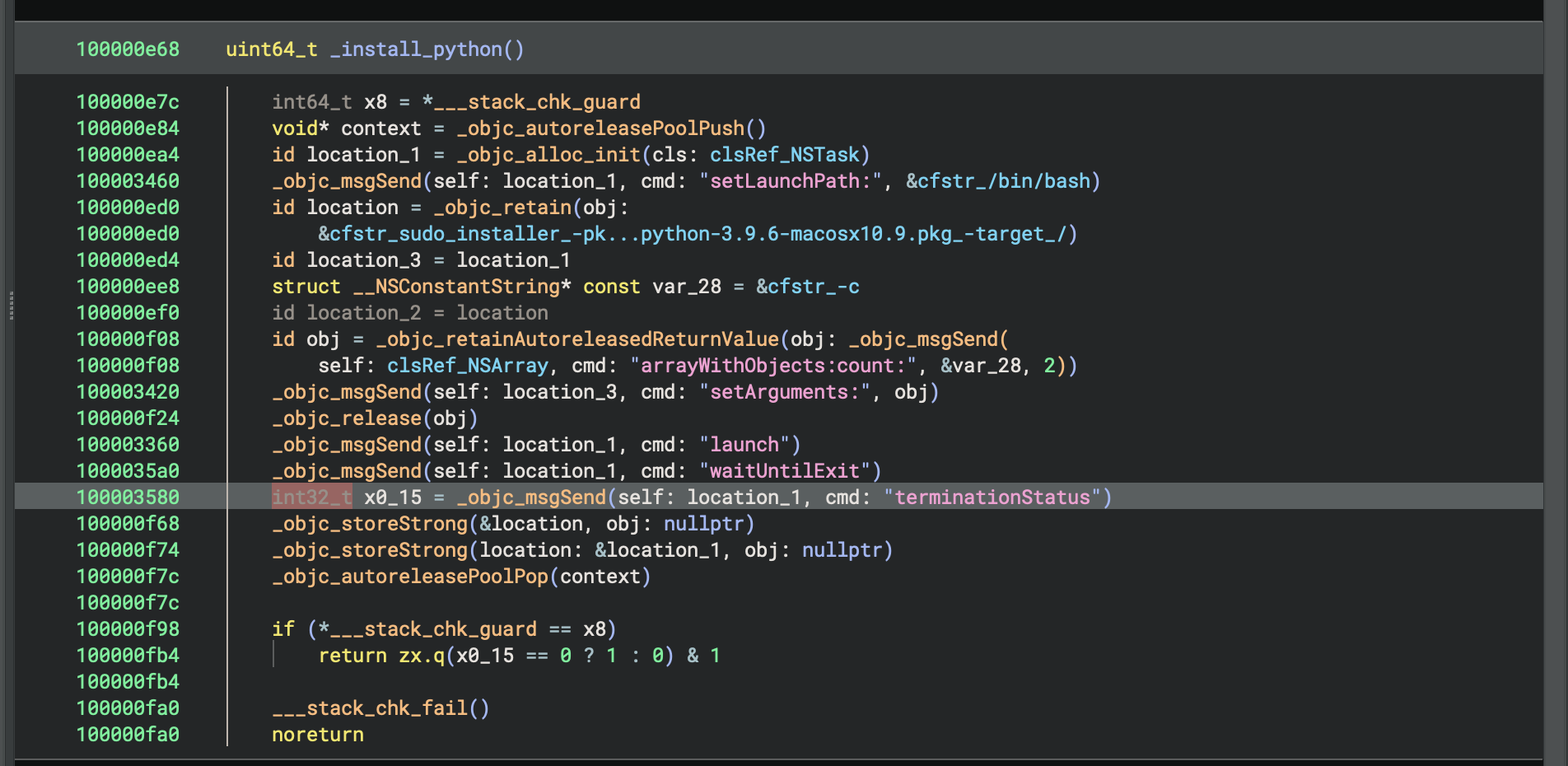
The sample attempts to install Python 3.9.6 when no existing Python interpreter is detected. It creates an NSTask configured to execute /bin/bash -c with a command invoking sudo installer against a Python package (python-3.9.6-macosx10.9.pkg). The process waits for completion and verifies successful installation through the task's termination status. This behavior indicates that Python is a required dependency for subsequent stages of the malware's execution chain.