Table of Contents
21 Sections
- 01. Sample Overview
- 02. Shared libraries (dynamic linking)
- 03. The PAM password verification mechanism
- 04. Deconstructing the password validation loop in assembly
- 05. Discovering the embedded helper payloads
- 06. Identifying the embedded helper binaries
- 07. How the helpers execute persistence and keychain dumping
- 08. Dropping and running the Keychain Helper in assembly
- 09. How the Binaries Communicate: The Anonymous In-Memory Pipe
- 10. Tracking Down Encrypted Configuration and the Malware Version
- 11. Dissecting the XChaCha20 Decryption Routine in Disassembly
- 12. Emulating the Decryption Engine to Extract the C2 Infrastructure
- 13. Mapping the Harvest - What User Data is Accessed and Which APIs are Used
- 14. The Discovery Trail: How We Find the C2 Network Engine
- 15. Dissecting the C2 Exfiltration Engine
- 16. Detection
- 17. Indicators of Compromise (IoCs)
- 18. File Identifiers and Hashes
- 19. Network and Command & Control (C2) Indicators
- 20. Host and Persistence Artifacts
- 21. Cryptographic Signatures and Data Offsets
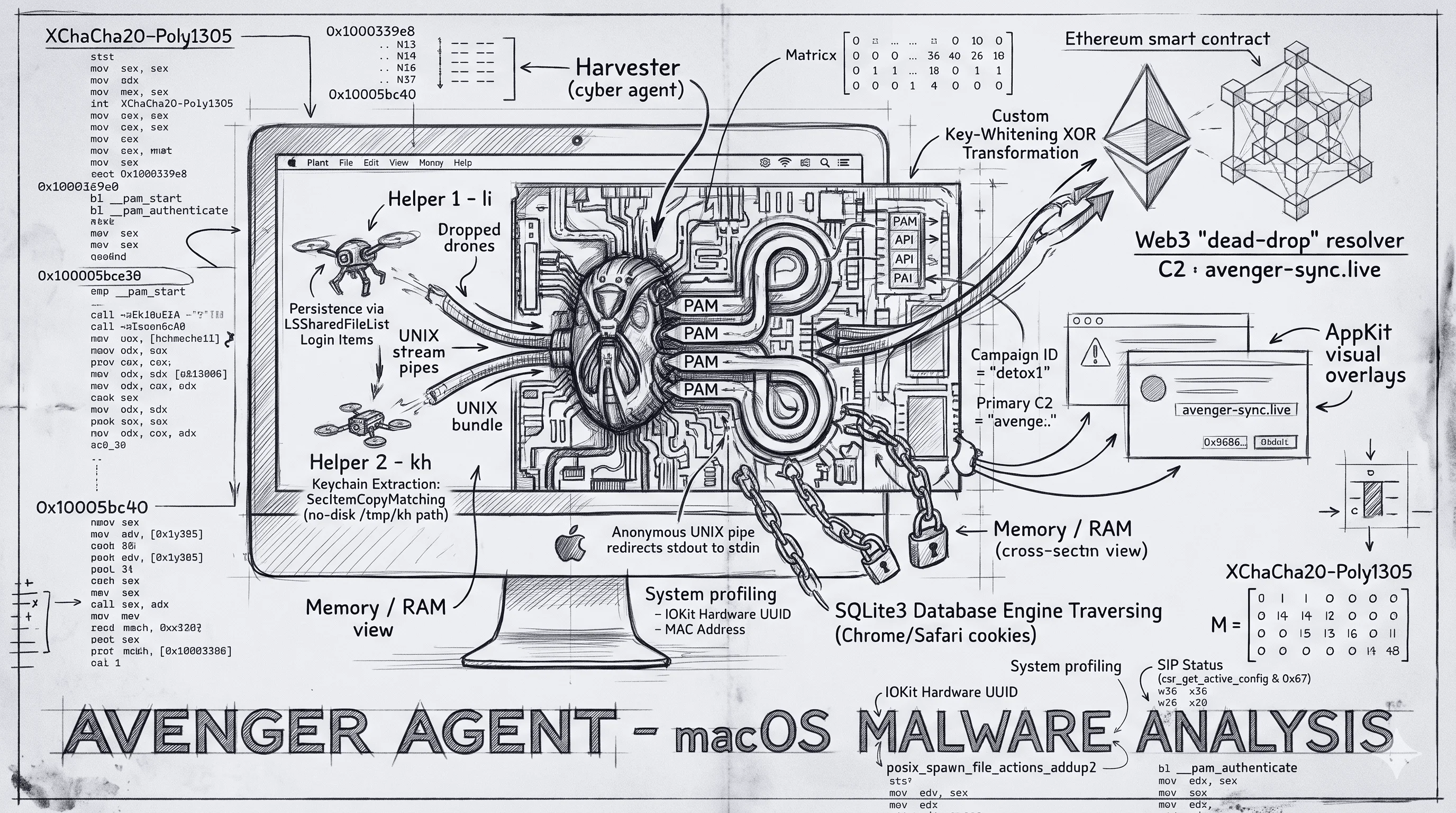
In this analysis, we examine a stealthy macOS credential harvester and backdoor identified as Avenger Agent (avenger_agent-bacc7f3ef1dfcbdb). Written in Rust and compiled natively for Apple Silicon (arm64), this sample departs from conventional macOS commodity stealer scripts by leveraging native Cocoa modal alerts, direct system PAM authentication loops, and bundled helper payloads.
Sample Overview
| Property | Value |
|---|---|
| MD5 | 65ddfaf0b2b012392eb14cede6649a60 |
| SHA-1 | 95bf914caed674d7db6600b9750af2b6c6ae0dfb |
| SHA-256 | 06fdd1d97df1105c542ddb881d751b659d555b5522c266f6364dae9f350fcfd0 |
| Vhash | 9f10572adc57c413ab0ac77d5bf7c685 |
| SSDEEP | 24576:GUCIJuKeGNwTS9TRtIWOhVbbap/nzJU/Sk3KvX65gDpx8:1teGNZtIWOhVnEfzJ63Kvq5gDpx8 |
| TLSH | T16415C0D36F9E343BE0C9E1BEAE8785A5711BF6F4026502363D1AB34CDE583962417B21 |
| CDHash | cc8037c0375696da9aac238a2eb8e31191de1e3d |
| Symhash | c0b56d858c97f18d9c0ba366c82da7b7 |
| File Type | Mach-O 64-bit ARM64 Executable |
| File Format | Mach-O |
| Architecture | ARM64 (AArch64) |
| Operating System | macOS |
| Magic | Mach-O 64-bit arm64 executable, flags: <NOUNDEFS|DYLDLINK|TWOLEVEL|PIE|HAS_TLV_DESCRIPTORS> |
| TrID | Mac OS X Mach-O 64-bit ARM executable (100%) |
| DetectItEasy | Mach-O64 |
| Magika | MACHO |
| File Size | 920.78 KB (942,880 bytes) |
Checking the code signature
On macOS, legitimate applications are signed with an Apple Developer certificate so Gatekeeper knows who made them. We inspect this with codesign:
codesign -dvvv ./06fdd1d97df1105c542ddb881d751b659d555b5522c266f6364dae9f350fcfd0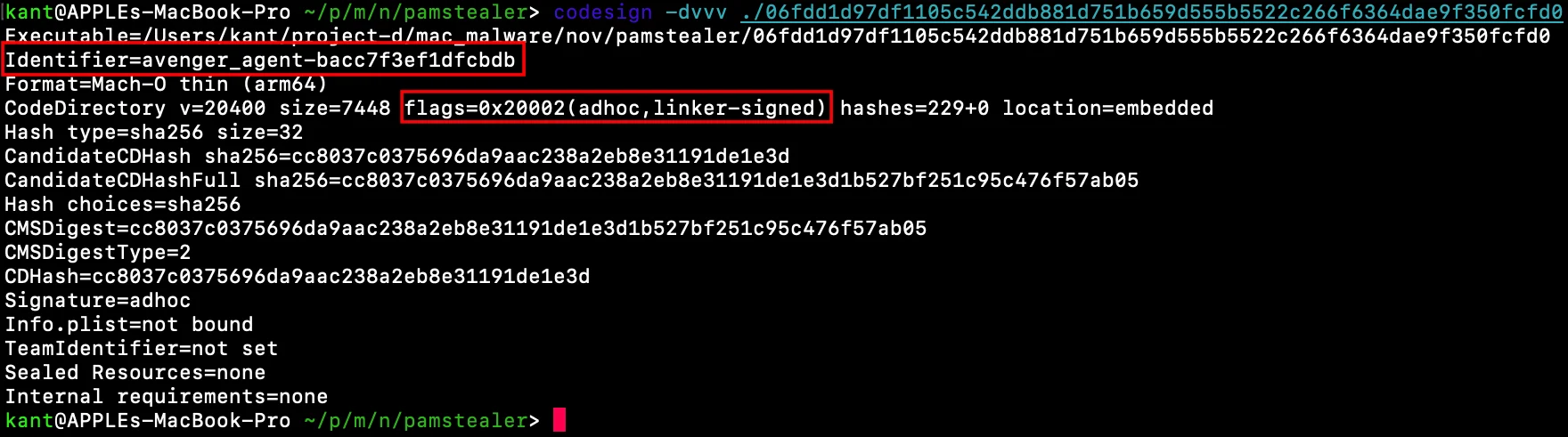
avenger_agent-bacc7f3ef1dfcbdb. This tells us the malware author named their project "Avenger Agent".That means it was signed locally when compiled, without a real Apple developer identity or certificate.On a default macOS installation, Gatekeeper would block this file from double-clicking because it lacks developer notarization.
Shared libraries (dynamic linking)
When a program runs, it relies on macOS libraries (called dylibs and frameworks) to do things like draw windows, talk to the network, or check passwords. The otool -L command lists those shared libraries.
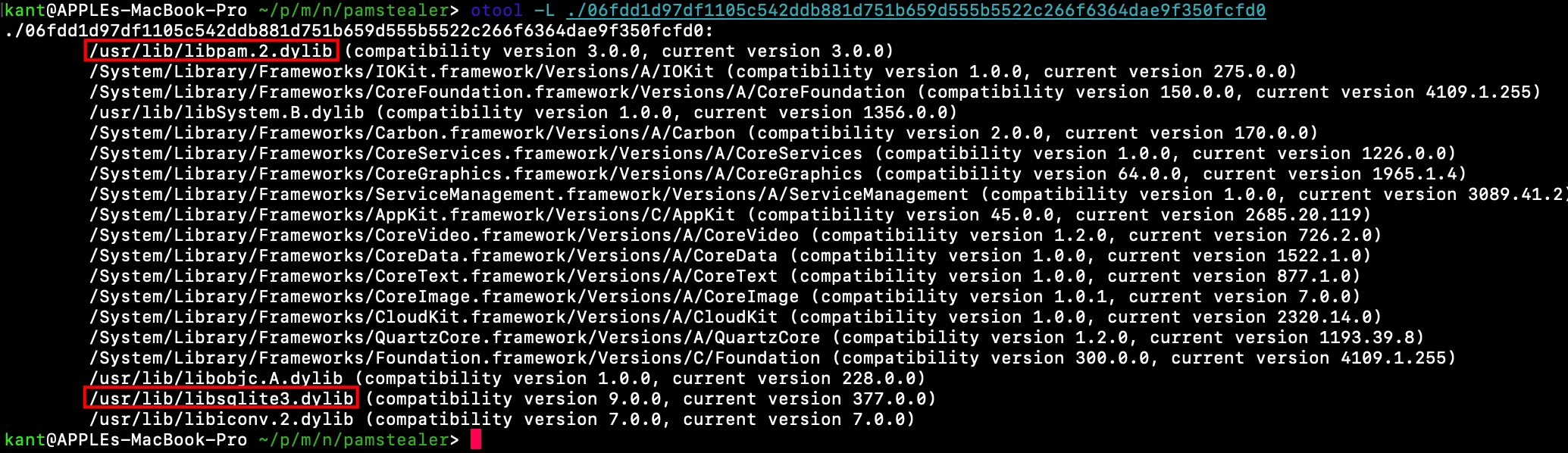
Here is what our scan found, and why each item matters to a malware analyst:
1. The biggest red flag: libpam.2.dylib
sudo or the login screen).libpam. Linking to PAM suggests this program directly checks or handles raw user account passwords.2. GUI and user interface: AppKit.framework
and text input boxes on the user's desktop.
3. Persistence: ServiceManagement.framework and CoreServices.framework
4. Database operations: libsqlite3.dylib
5. Hardware profiling: IOKit.framework
The PAM password verification mechanism
When you run nm -u, it lists the external functions the binary imports from the operating system. Our search returned three functions:
_pam_start_pam_authenticate_pam_end
These three functions make up the complete lifecycle of a PAM authentication check in Unix and macOS:
pam_start sets up an authentication session for a given username and service name.pam_authenticate checks the credentials (the password) against the system database (on macOS, this talks to Directory Utility / OpenDirectory).pam_end closes the session and reports whether the check succeeded or failed.Why this is different from typical macOS stealers
Most simple Mac stealers show a fake popup using a basic AppleScript command like display dialog ... with hidden answer. That trick has two major flaws for an attacker:
First, AppleScript popups look slightly out of place and often show "Script Editor" or another host app name in the menu bar. Second, and more importantly, a basic script cannot tell whether the user typed their real password or just typed random letters to close the window.
Avenger Agent solves both problems:
_pam_authenticate.Deconstructing the password validation loop in assembly
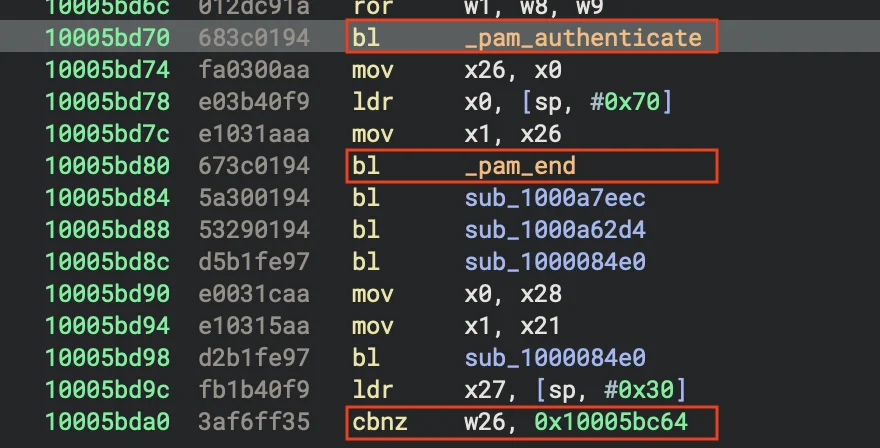
Now we look at the assembly instructions inside Binary Ninja around function address 0x10005bc40. This is where the malware verifies the password.
The PAM validation block
In ARM64 assembly, function arguments are passed in registers x0, x1, x2, and so on. The return value comes back in register x0.
Here is the assembly sequence:
; 1. Start the PAM transaction
bl    _pam_start

; 2. Run the authentication check
bl    _pam_authenticate
mov   x26, x0                ; Store the return code in register w26

; 3. Clean up the PAM session
ldr   x0, [sp, #0x70]        ; Reload PAM handle
mov   x1, x26                ; Pass the authentication status
bl    _pam_end

; 4. Check whether authentication succeeded
cbnz  w26, 0x10005bc64       ; If w26 != 0 (auth failed), jump back
In ARM64 architecture, x26 and w26 refer to the exact same physical register.
x0 through x30 are 64-bit registers. The letter x stands for the full 64-bit register (8 bytes wide).w0 through w30 are 32-bit registers. The letter w stands for "word" (4 bytes wide), which represents the lower 32 bits of the corresponding x register. +---------------------------------------------------------------+
| Register x26 (64-bit) |
+-------------------------------+-------------------------------+
| Upper 32 bits | Lower 32 bits (w26) |
+-------------------------------+-------------------------------+ 
Discovering the embedded helper payloads
Our Python scan searched the entire binary for the 4-byte header 0xFEEDFACF (\xcf\xfa\xed\xfe), which marks the start of a 64-bit Mach-O file.
The scan returned three offsets:

Here is what those three offsets mean:
Offset 0x0: This is the beginning of the main file you are analyzing.Offset 0xac812: A second, complete Mach-O executable stored inside the data constants of the main binary.Offset 0xb4e75: A third, complete Mach-O executable stored immediately after the second one.Why the author embedded whole programs inside the binary
In malware development, this is known as a dropper or multi-stage payload. Instead of writing all the functionality into one large program, or downloading secondary tools from a remote command-and-control server (which security software might detect and block), the author compiled two helper tools and embedded them directly into the main file.
When the main agent runs, it reads those byte ranges from its own memory, writes them to disk as temporary files, and executes them.
Identifying the embedded helper binaries
Extracting the two byte ranges confirmed that both are standalone, valid 64-bit arm64 executables. Looking at their code signing identifiers reveals their specific jobs:
1. helper1 (Size: 34,400 bytes)
lili stand for Login Items. This helper handles persistence on older macOS versions by registering the malware into the user's Login Items list so it launches every time the user logs in.2. helper2 (Size: 53,104 bytes)
kh-57aebaab0e5de898kh stand for Keychain Helper. This tool extracts saved passwords, tokens, and credentials from the macOS Keychain database.Why split these out into separate helpers?
Separating these tasks into dedicated helper binaries offers several advantages to the author:
SMAppService API. If that fails, it drops and runs helper_1 (li) as a fallback.helper_2) keeps the main agent process decoupled from any errors or crashes.
| File Name | MD5 Hash |
|---|---|
helper_1 | 82882531c88b5ebcda86f5a22a9ad362 |
helper_2 | 152eff8373515ff328105ede28931f41 |
How the helpers execute persistence and keychain dumping
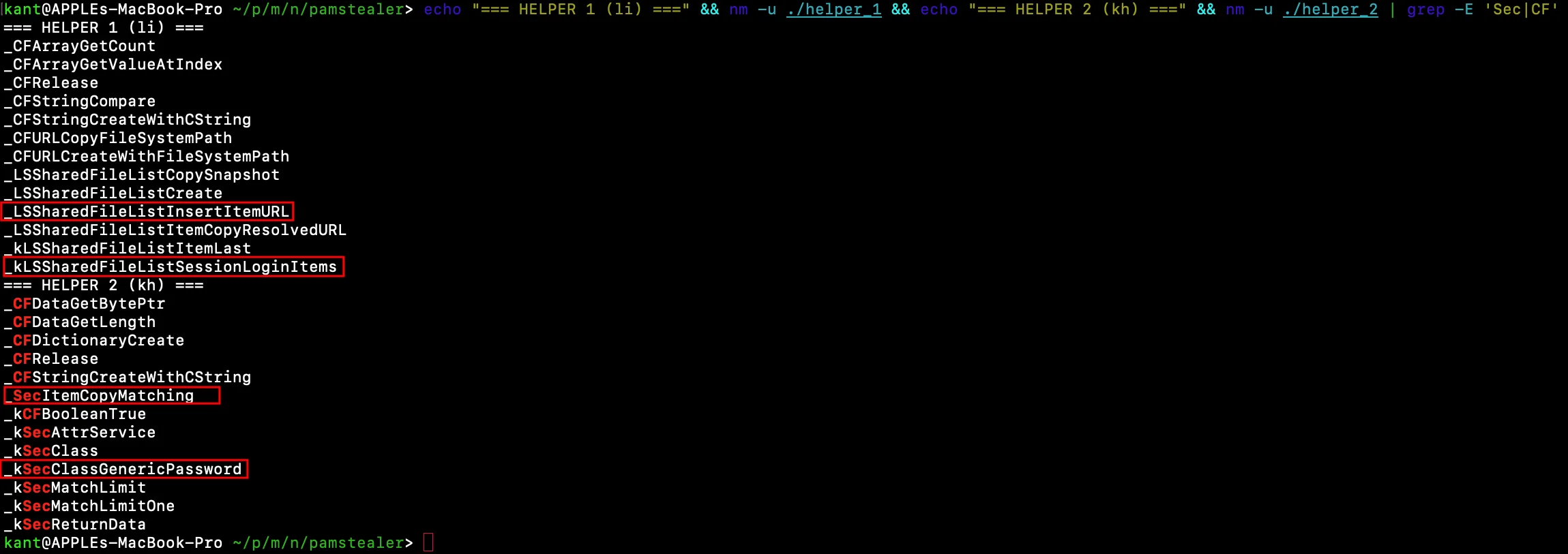
The imported functions confirm the exact roles of both helper tools.
1. helper1 (li): Adding persistence through Login Items
The functions imported by helper_1 belong to the CoreServices LSSharedFileList API:
_LSSharedFileListCreate_LSSharedFileListInsertItemURL_kLSSharedFileListSessionLoginItemsOn macOS, LSSharedFileList is the system interface used to manage user login items. When you add an app to System Settings > General > Login Items, macOS uses this underlying system list.
helper_1 creates a handle to kLSSharedFileListSessionLoginItems and calls LSSharedFileListInsertItemURL to insert the malware path. This ensures that every time the infected user logs in, macOS automatically starts the agent in the background.
2. helper2 (kh): Extracting saved Keychain passwords
The functions imported by helper_2 come directly from the macOS Security framework:
_SecItemCopyMatching_kSecClassGenericPassword_kSecMatchLimitOne_kSecReturnDataThe helper binary does not dump the entire Keychain in bulk. Disassembly shows it reads a specific service name from argv[1], converts it with CFStringCreateWithCString, and builds a four-key query dictionary for SecItemCopyMatching:
kSecClass = kSecClassGenericPasswordkSecAttrService = argv[1] (queries only the targeted service)kSecReturnData = kCFBooleanTrue (requests the decrypted secret)kSecMatchLimit = kSecMatchLimitOne (retrieves at most one matching credential)If the call returns -25293 (errSecAuthFailed) or -128 (userCanceledErr), the helper retries up to 10 times with brief nanosleep delays. Standard Keychain access controls still apply: if an item requires user authorization, macOS prompts the user. On success, CFDataGetBytePtr retrieves the raw secret bytes and writes them to standard output descriptor 1 (write(1, buf, len)), streaming directly into the parent agent's memory pipe.
Dropping and running the Keychain Helper in assembly
At address 0x1000339e8, we see the exact assembly code where the main agent prepares to deploy helper_2 (kh).
1. The carving and execution assembly
In Binary Ninja, the assembly instructions at this location read:

adr   x2, #0x8148d        ; Computes address 0x1000b4e75
mov   w3, #0xcf70         ; Size parameter: 0xcf70 = 53,104 bytes
bl    sub_10009cd48       ; Drop buffer to disk and execute
Here is what happens step by step:
adr x2, #0x8148d: The adr instruction computes a PC-relative address. Adding 0x8148d to the current instruction address (0x1000339e8) gives 0x1000b4e75. This is the exact memory address inside the __TEXT,__const section where helper_2 begins.mov w3, #0xcf70: The number 0xcf70 in hexadecimal equals 53,104 in decimal. Register w3 passes the size of the payload to the dropper routine.bl sub_10009cd48: The program branches to a helper routine that creates a temporary executable file on disk, writes the 53,104 bytes into it, and spawns the new process to steal the Keychain contents.How the Binaries Communicate: The Anonymous In-Memory Pipe
When analyzing multi-stage malware, a critical question for forensic examiners is: *Where does the Keychain helper save the stolen passwords? Does it drop a* .txt *or* .json *file in* /tmp*?* The answer is no. The stolen passwords never touch the disk.
The threat actor avoids leaving file artifacts by establishing an anonymous UNIX pipe between the main binary and helper_2 (kh). The dumped Keychain credentials stream directly from the helper into the main agent's memory.
┌────────────────────────────────┐
│                                │
│  Main Binary (avenger_agent)   ├◄────────"2.─posix_spawnp()<br/>stdout─redirected"─────────┐
│                                │                      │                                    │
└────────────────┬───────────────┘                      │                                    │
            "1. pipe()"                      "5. read() into memory"                         │
                 ▼                                      │                                    ▼
┌────────────────────────────────┐                      │                     ┌────────────────────────────┐
│                                │                      │                     │                            │
│ ("Anonymous Pipe (In-Memory)") ├◄─────────"4.─write()─to─stdout"────────────┤ helper_2 (Keychain Dumper) │◄───────────────────────┐
│                                │                                            │              ┬             │ "3. SecItemCopyMatching()<br/>dumps passwords"
└────────────────────────────────┘                                            └────────────────────────────┘                        │
                                                                                             └──────────────────────────────────────┘
Creating the In-Memory Channel (pipe)
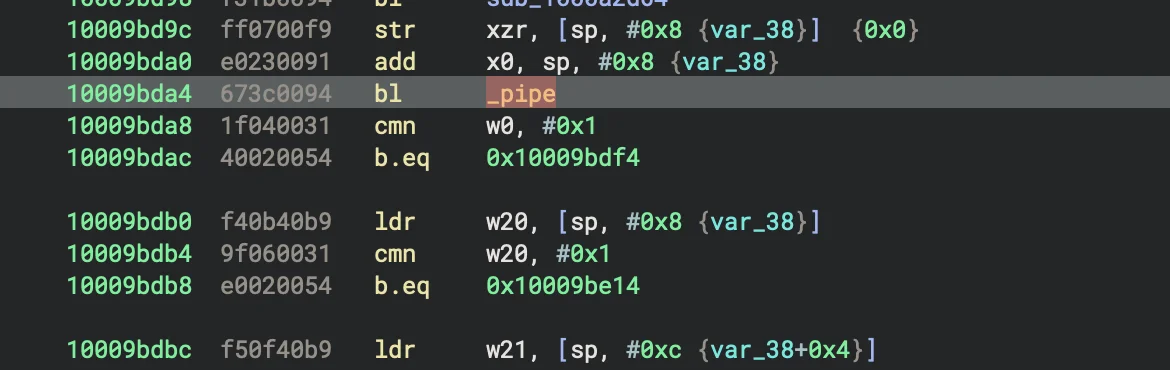
In function sub_10009bd88, the main agent initializes an anonymous pipe:
Address: 0x10009bda4
0x10009bda4
Click to zoom ↗
    10009bd9c  str     xzr, [sp, #8]           ; Zero-initialize the 8-byte buffer
    10009bda0  add     x0, sp, #8              ; x0 = pointer to [sp, #8] (the fds buffer)
    10009bda4  bl      0x1000aaf40             ; Call _pipe stub
    10009bda8  cmn     w0, #1                  ; Compare return code with -1
    10009bdac  b.eq    0x10009bdf4             ; Branch if pipe() failed
    10009bdb0  ldr     w20, [sp, #8]           ; Load fds[0] (the read descriptor)
    10009bdb4  cmn     w20, #1                 ; Validate descriptor
    10009bdb8  b.eq    0x10009be14
10009bdbc ldr w21, [sp, #0xc] ; Load fds[1] (the write descriptor) 10009bda0 add x0, sp, #8: Points x0 to the 8-byte stack slot allocated for two 32-bit integers (int fds[2]).10009bda4 bl 0x1000aaf40: Calls the _pipe stub.10009bda8 cmn w0, #1 & 10009bdac b.eq 0x10009bdf4: Checks if pipe() returned -1 (error condition) and branches to the error handler.10009bdb0 ldr w20, [sp, #8]: Loads fds[0], the read end of the pipe, into register w20.10009bdbc ldr w21, [sp, #0xc]: Loads fds[1], the write end of the pipe, into register w21.Redirecting the Helper's Output (posixspawnfileactionsadddup2)
When launching helper_2, the main binary must attach the helper's standard output (stdout) to the write end of that pipe. Instead of spawning a shell command with a redirection operator (>), the malware configures low-level POSIX spawn file actions.
address 0x10009b224 in function sub_10009b090:
    10009b224  ldr     w1, [sp, #0x3c]         ; Load the write descriptor (fds[1])
    10009b228  sub     x0, x29, #0x58          ; x0 = posix_spawn_file_actions_t
    10009b22c  mov     w2, #1                  ; w2 = STDOUT_FILENO (1)
    10009b230  bl      0x1000aaf64             ; Call _posix_spawn_file_actions_adddup2 stub
    10009b234  cbnz    w0, 0x10009b2f0         ; Check return code
w2 is loaded with #1, which is the standard file descriptor for stdout (STDOUT_FILENO).w1 contains the write end of the anonymous pipe._posix_spawn_file_actions_adddup2 tells macOS: When helper_2 launches, duplicate the pipe's write descriptor onto file descriptor 1.3. How helper2 Transmits the Data
Inside helper_2 (kh), after SecItemCopyMatching extracts the generic passwords from the Keychain, it does not open a file.
If you check the dynamic symbols of helper_2:
nm -u ./helper_2 | grep -E 'write|open'You will find _write, but no file creation calls. helper_2 simply calls write(1, buffer, len), pushing the stolen data straight into standard output.
Because stdout was redirected to the anonymous pipe, the bytes travel directly through the Mach kernel into the main binary's read buffer.
Why This Matters for Incident Responders
/tmp, /var/tmp, or user cache directories will find zero text files containing dumped passwords.posix_spawn_file_actions_adddup2, no shell process (/bin/sh or /bin/zsh) ever appears in telemetry.Tracking Down Encrypted Configuration and the Malware Version
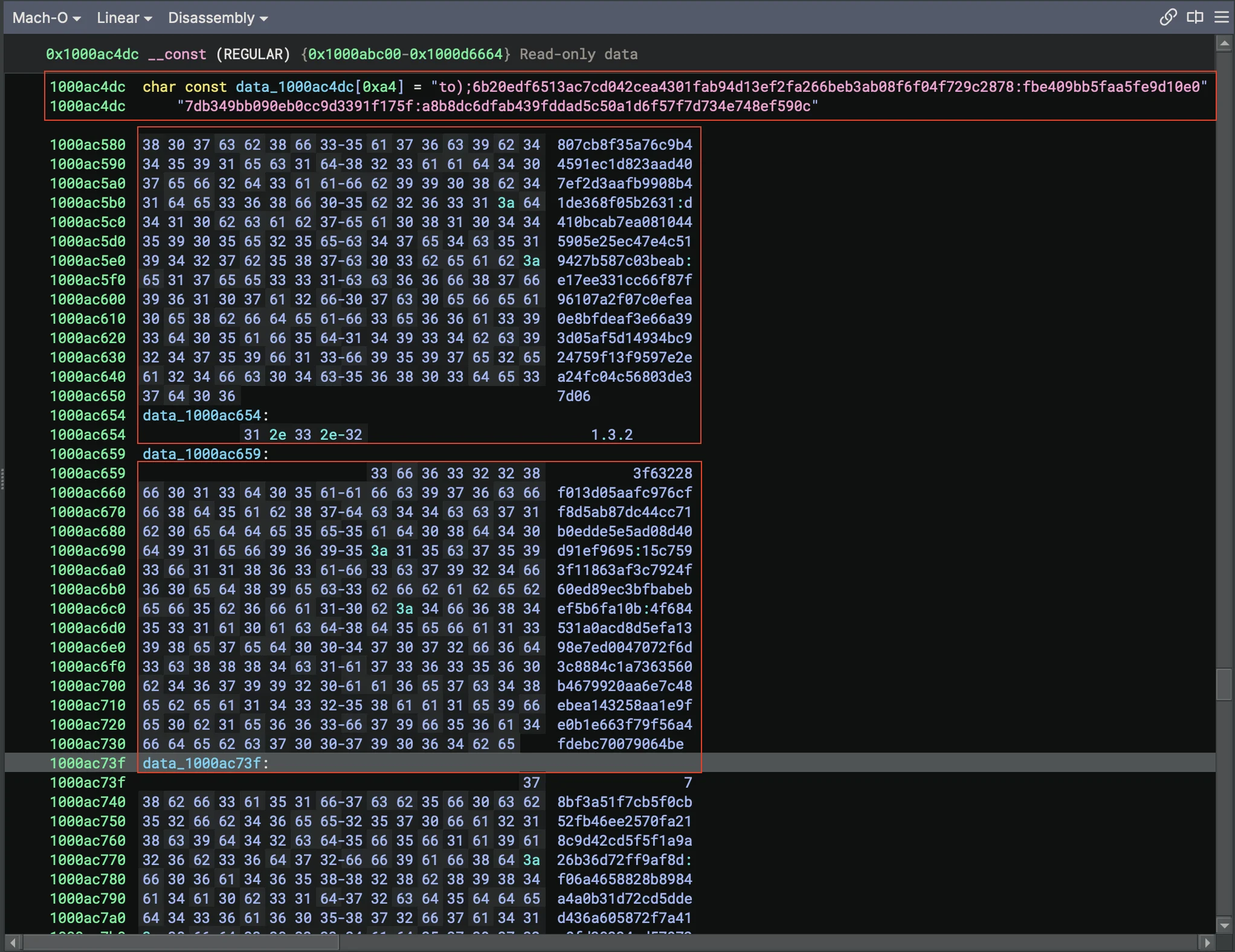
When analyzing binaries that drop embedded payloads, you always want to inspect the data section immediately preceding the payload offsets. Since our earlier header scan located the first helper binary at file offset 0xac812, we inspected the raw data directly ahead of it.

kant@APPLEs-MacBook-Pro ~/p/m/n/pamstealer> python3 -c 'with open("./06fdd1d97df1105c542ddb881d751b659d555b5522c266f6364dae9f350fcfd0", "rb") as f: d = f.read(); print("=== ENCRYPTED RECORD 1 (158 bytes) ==="); print(d[0xac4e0:0xac4e0+158].decode("latin1")); print("\n=== VERSION STRING ==="); print(d[0xac654:0xac659].decode("latin1"))'
=== ENCRYPTED RECORD 1 (158 bytes) ===
6b20edf6513ac7cd042cea4301fab94d13ef2fa266beb3ab08f6f04f729c2878:fbe409bb5faa5fe9d10e07db349bb090eb0cc9d3391f175f:a8b8dc6dfab439fddad5c50a1d6f57f7d734e748ef59

=== VERSION STRING ===
1.3.2
This reveals two crucial pieces of evidence:
0xac654 is the string 1.3.2. Threat actors frequently embed internal version strings to track client capabilities across different victim machines.:):XChaCha20, which extends ChaCha20's default 12-byte nonce to 24 bytes using HChaCha20.Scanning the file between offset 0xac4e0 and the first helper binary at 0xac812 reveals four such configuration records:
Dissecting the XChaCha20 Decryption Routine in Disassembly
To confirm how the malware consumes these configuration records, we turn to Binary Ninja and follow the cross-references (XREFs) from the encrypted strings back into code.
At address 0x100058b10 in Disassembly view:
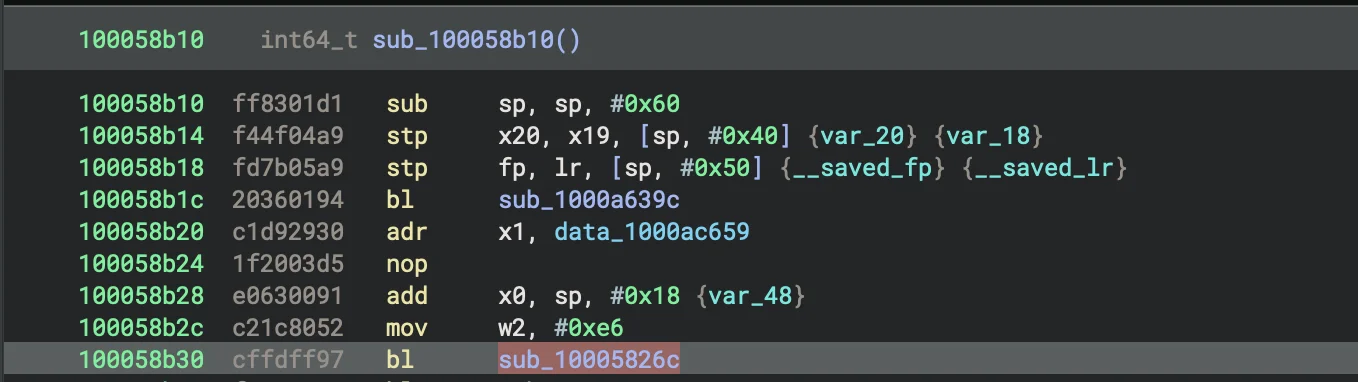
0x100058b10
Click to zoom ↗
    100058b10  sub     sp, sp, #0x60
    100058b14  stp     x20, x19, [sp, #0x40]
    100058b18  stp     fp, lr, [sp, #0x50]
    100058b1c  bl      0x1000a639c
    100058b20  adr     x1, 0x1000ac659         ; Load pointer to Encrypted Record 3
    100058b24  nop
    100058b28  add     x0, sp, #0x18           ; Output buffer for plaintext
    100058b2c  mov     w2, #0xe6               ; Length argument: 0xe6 = 230 bytes
    100058b30  bl      0x10005826c             ; Call decryption dispatcher
The assembly logic is straightforward:
adr x1, 0x1000ac659 points register x1 directly to the start of Record 3.mov w2, #0xe6 passes the exact length of the record (0xe6 is 230 in decimal).bl 0x10005826c calls the central decryption function.Now at 0x10005826c to see how the string is processed:
100058284  sub     x0, x29, #0xc0
100058288  mov     w3, #0x3a               ; ASCII 0x3a is ':'
10005828c  bl      0x100004eac             ; Split string by delimiter
100058290  sub     x0, x29, #0xc0
100058294  bl      0x1000811cc             ; Iterator setup
...
10005832c  cmp     x22, #3                 ; Verify exactly 3 tokens exist
100058330  b.ne    0x1000585a0             ; Abort if format is invalid
100058334  ldp     x1, x2, [x21]
100058338  bl      0x1000a7c0c             ; Hex decode Part 1 (Key)
...
100058350  bl      0x1000a7c0c             ; Hex decode Part 2 (Nonce)
...
100058368  bl      0x1000a7c0c             ; Hex decode Part 3 (Ciphertext)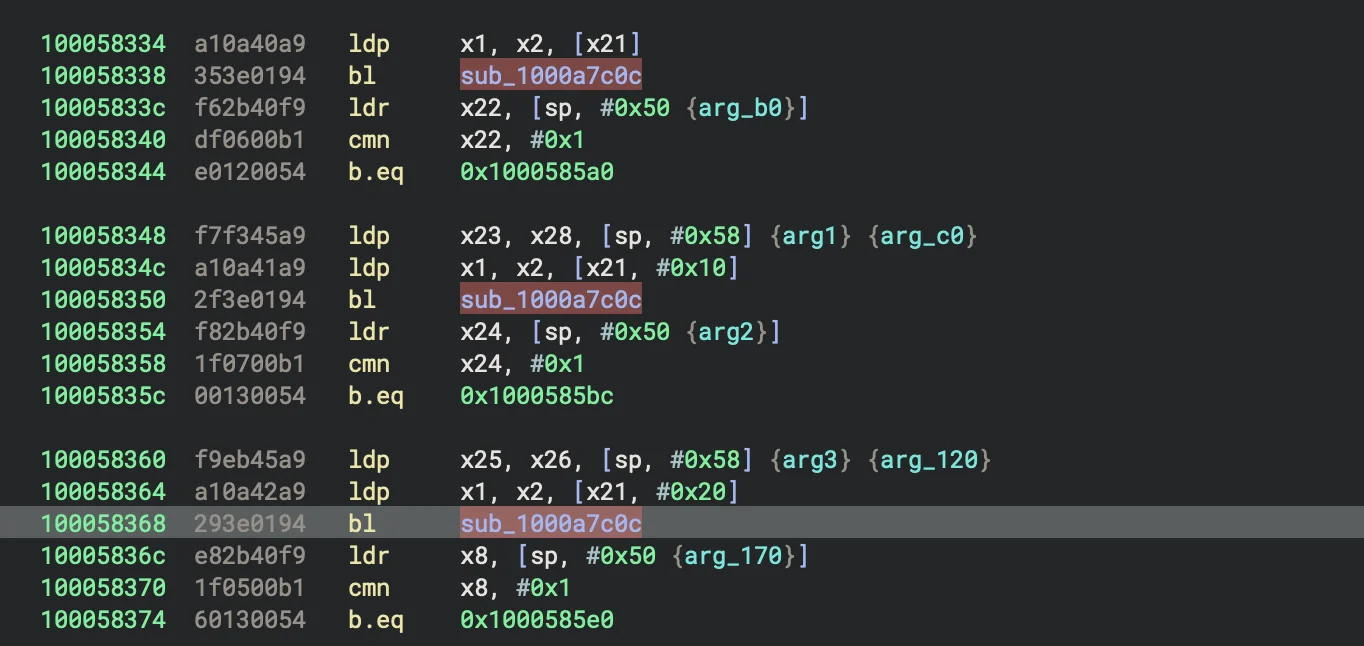
sub_1000a7c0c
Click to zoom ↗
mov w3, #0x3a loads the colon character (:) into register w3.sub_100004eac tokenizes the input record using that delimiter.cmp x22, #3 confirms that three pieces were found. If someone alters the record format, execution jumps away to an error handler.sub_1000a7c0c convert each ASCII hexadecimal token into raw byte buffers.cmp x7, #0x18 (verifying the 24-byte nonce requirement) and passes the buffers into the XChaCha20 engine containing the hardcoded constant "expand 32-byte k" at 0x1000abc20.
0x1000abc20
Click to zoom ↗
Emulating the Decryption Engine to Extract the C2 Infrastructure
Static analysis showed us that the malware expects three colon-delimited tokens per record (Key, Nonce, Ciphertext) and processes them with XChaCha20. But if you try feeding those raw hexadecimal keys into standard cryptography libraries, decryption fails with an authentication error.
Looking closely at sub_10005826c, the malware author did not feed the keys directly into the cipher state. The binary applies a custom key-whitening transformation (a round of byte XOR operations with internal constants) before handing the buffers to the XChaCha20-Poly1305 core.
Rather than reverse engineering every single mathematical transform by hand, we can use instruction-level CPU emulation. By mapping the binary's code section into a lightweight Unicorn ARM64 engine and hooking a few basic memory allocation stubs (posix_memalign, bzero, memcpy), we let the malware execute its own decryption routine inside a safe, isolated emulator.
We wrote a Python script, decrypt_config.py, to emulate function sub_10005826c for all four records.
#!/usr/bin/env python3
"""
Avenger Agent (macOS Stealer) - Configuration Decryptor
Decrypts the embedded XChaCha20-Poly1305 configuration records
via instruction-level Unicorn emulation of sub_10005826c.
"""

import sys
import struct
import unicorn
from unicorn import arm64_const

TARGET_FILE = "./06fdd1d97df1105c542ddb881d751b659d555b5522c266f6364dae9f350fcfd0"

# Target records located in __TEXT,__const
RECORDS = [
    ("Record 1 (Campaign ID)", 0x1000ac4e0, 0x9e),
    ("Record 2 (Primary C2 URL)", 0x1000ac57e, 0xd6),
    ("Record 3 (Web3 Smart Contract Dead-Drop)", 0x1000ac659, 0xe6),
    ("Record 4 (Session / Payload Secret Key)", 0x1000ac73f, 0xd2),
]

def decrypt_record(binary_data, name, addr, sz):
    # Patch ldapr w8, [x8] at 0x100058514 to standard ldr w8, [x8] (0xb9400108)
    patched_data = bytearray(binary_data)
    patched_data[0x58514:0x58518] = struct.pack("<I", 0xb9400108)

    uc = unicorn.Uc(unicorn.UC_ARCH_ARM64, unicorn.UC_MODE_ARM)

    # Map binary image
    BASE = 0x100000000
    uc.mem_map(BASE, 0x100000)
    uc.mem_write(BASE, bytes(patched_data[:0x100000]))

    # Map stack
    STACK_BASE = 0x200000000
    STACK_SIZE = 0x200000
    uc.mem_map(STACK_BASE, STACK_SIZE)
    SP = STACK_BASE + STACK_SIZE - 0x1000
    uc.reg_write(arm64_const.UC_ARM64_REG_SP, SP)

    # Map heap
    HEAP_BASE = 0x300000000
    HEAP_SIZE = 0x200000
    uc.mem_map(HEAP_BASE, HEAP_SIZE)
    heap_ptr = HEAP_BASE

    def hook_code(uc, address, size, user_data):
        nonlocal heap_ptr
        if address == 0x1000aaf58: # posix_memalign
            memptr = uc.reg_read(arm64_const.UC_ARM64_REG_X0)
            align = uc.reg_read(arm64_const.UC_ARM64_REG_X1)
            alloc_sz = uc.reg_read(arm64_const.UC_ARM64_REG_X2)
            if align > 0:
                heap_ptr = (heap_ptr + align - 1) & ~(align - 1)
            allocated = heap_ptr
            heap_ptr += (alloc_sz + 0x20)
            uc.mem_write(memptr, struct.pack("<Q", allocated))
            uc.reg_write(arm64_const.UC_ARM64_REG_X0, 0)
            lr = uc.reg_read(arm64_const.UC_ARM64_REG_X30)
            uc.reg_write(arm64_const.UC_ARM64_REG_PC, lr)
        elif address in (0x1000aae2c, 0x1000aac10): # malloc / calloc
            alloc_sz = uc.reg_read(arm64_const.UC_ARM64_REG_X0)
            allocated = heap_ptr
            heap_ptr += (alloc_sz + 0x20)
            uc.reg_write(arm64_const.UC_ARM64_REG_X0, allocated)
            lr = uc.reg_read(arm64_const.UC_ARM64_REG_X30)
            uc.reg_write(arm64_const.UC_ARM64_REG_PC, lr)
        elif address == 0x1000aac04: # bzero
            dst = uc.reg_read(arm64_const.UC_ARM64_REG_X0)
            n = uc.reg_read(arm64_const.UC_ARM64_REG_X1)
            uc.mem_write(dst, bytes([0] * n))
            lr = uc.reg_read(arm64_const.UC_ARM64_REG_X30)
            uc.reg_write(arm64_const.UC_ARM64_REG_PC, lr)
        elif address == 0x1000aadc0: # free
            lr = uc.reg_read(arm64_const.UC_ARM64_REG_X30)
            uc.reg_write(arm64_const.UC_ARM64_REG_PC, lr)
        elif address == 0x1000aae44: # memcmp
            s1 = uc.reg_read(arm64_const.UC_ARM64_REG_X0)
            s2 = uc.reg_read(arm64_const.UC_ARM64_REG_X1)
            n = uc.reg_read(arm64_const.UC_ARM64_REG_X2)
            b1 = uc.mem_read(s1, n)
            b2 = uc.mem_read(s2, n)
            res = 0 if b1 == b2 else (1 if b1 > b2 else -1)
            uc.reg_write(arm64_const.UC_ARM64_REG_X0, res)
            lr = uc.reg_read(arm64_const.UC_ARM64_REG_X30)
            uc.reg_write(arm64_const.UC_ARM64_REG_PC, lr)
        elif address == 0x1000aae50: # memcpy
            dst = uc.reg_read(arm64_const.UC_ARM64_REG_X0)
            src = uc.reg_read(arm64_const.UC_ARM64_REG_X1)
            n = uc.reg_read(arm64_const.UC_ARM64_REG_X2)
            uc.mem_write(dst, bytes(uc.mem_read(src, n)))
            lr = uc.reg_read(arm64_const.UC_ARM64_REG_X30)
            uc.reg_write(arm64_const.UC_ARM64_REG_PC, lr)
        elif address == 0x1000aae68: # memset
            dst = uc.reg_read(arm64_const.UC_ARM64_REG_X0)
            c = uc.reg_read(arm64_const.UC_ARM64_REG_X1) & 0xff
            n = uc.reg_read(arm64_const.UC_ARM64_REG_X2)
            uc.mem_write(dst, bytes([c] * n))
            lr = uc.reg_read(arm64_const.UC_ARM64_REG_X30)
            uc.reg_write(arm64_const.UC_ARM64_REG_PC, lr)

    uc.hook_add(unicorn.UC_HOOK_CODE, hook_code)

    OUT_BUF = SP + 0x18
    uc.reg_write(arm64_const.UC_ARM64_REG_X0, OUT_BUF)
    uc.reg_write(arm64_const.UC_ARM64_REG_X1, addr)
    uc.reg_write(arm64_const.UC_ARM64_REG_X2, sz)
    uc.reg_write(arm64_const.UC_ARM64_REG_X30, 0x100000000)

    try:
        uc.emu_start(0x10005826c, 0x100000000, timeout=10000000)
    except Exception:
        pass

    res = uc.mem_read(OUT_BUF, 0x20)
    ptr = struct.unpack("<Q", res[8:16])[0]
    length = struct.unpack("<Q", res[16:24])[0]
    return uc.mem_read(ptr, length)

def main():
    try:
        with open(TARGET_FILE, "rb") as f:
            binary_data = f.read()
    except FileNotFoundError:
        print(f"Error: Target file {TARGET_FILE} not found.")
        sys.exit(1)

    print("=" * 65)
    print(" Avenger Agent (1.3.2) - Decrypted Configuration Records")
    print("=" * 65)

    for name, addr, sz in RECORDS:
        raw_val = decrypt_record(binary_data, name, addr, sz)
        try:
            val_str = raw_val.decode("utf-8")
            print(f"[*] {name}:")
            print(f"    -> \"{val_str}\"")
        except UnicodeDecodeError:
            print(f"[*] {name}:")
            print(f"    -> 0x{raw_val.hex()} (hex)")
        print("-" * 65)

if __name__ == "__main__":
    main()
Running the above code:
kant@APPLEs-MacBook-Pro ~/p/m/n/pamstealer> python3 decrypt_config.py
=================================================================
 Avenger Agent (1.3.2) - Decrypted Configuration Records
=================================================================
[*] Record 1 (Campaign ID):
    -> "detox1"
-----------------------------------------------------------------
[*] Record 2 (Primary C2 URL):
    -> "https://avenger-sync.live/api/sync"
-----------------------------------------------------------------
[*] Record 3 (Web3 Smart Contract Dead-Drop):
    -> "0x9686d66EFc63eDc54502BC0DBF888e233Db6C4f7"
-----------------------------------------------------------------
[*] Record 4 (Session / Payload Secret Key):
    -> 0x283b19cb53980b67b3cb346b73ad7d9f10da701d8f29f43a7d44d18ee409b71d (hex)
-----------------------------------------------------------------
kant@APPLEs-MacBook-Pro ~/p/m/n/pamstealer>
This unpacks the threat actor's entire command-and-control strategy:
Record 1 holds the campaign code. This tags stolen victim data in the attacker's panel so multiple affiliates or operations can share the same backend infrastructure.
https://avenger-sync.live/api/sync):Record 2 is the primary HTTPS endpoint where stolen credentials, Keychain databases, and clipboard logs are transmitted.
0x9686d66EFc63eDc54502BC0DBF888e233Db6C4f7):Record 3 is a 42-character Ethereum smart contract address. If defenders or hosting providers seize or sinkhole avenger-sync.live, the stealer queries this blockchain contract to retrieve the updated backup C2 domain.
Record 4 is a 32-byte secret key used to encrypt the staged JSON data before it is posted over the wire.
Mapping the Harvest - What User Data is Accessed and Which APIs are Used
When analyzing an unknown stealer, you never have to guess what data it targets. If you look at the raw dynamic imports from nm -u, the binary literally provides an inventory of the operating system services it requests.
Instead of hunting blindly, we group the binary's 120 imported symbols into functional capability clusters. This immediately exposes four distinct data harvesting pipelines:
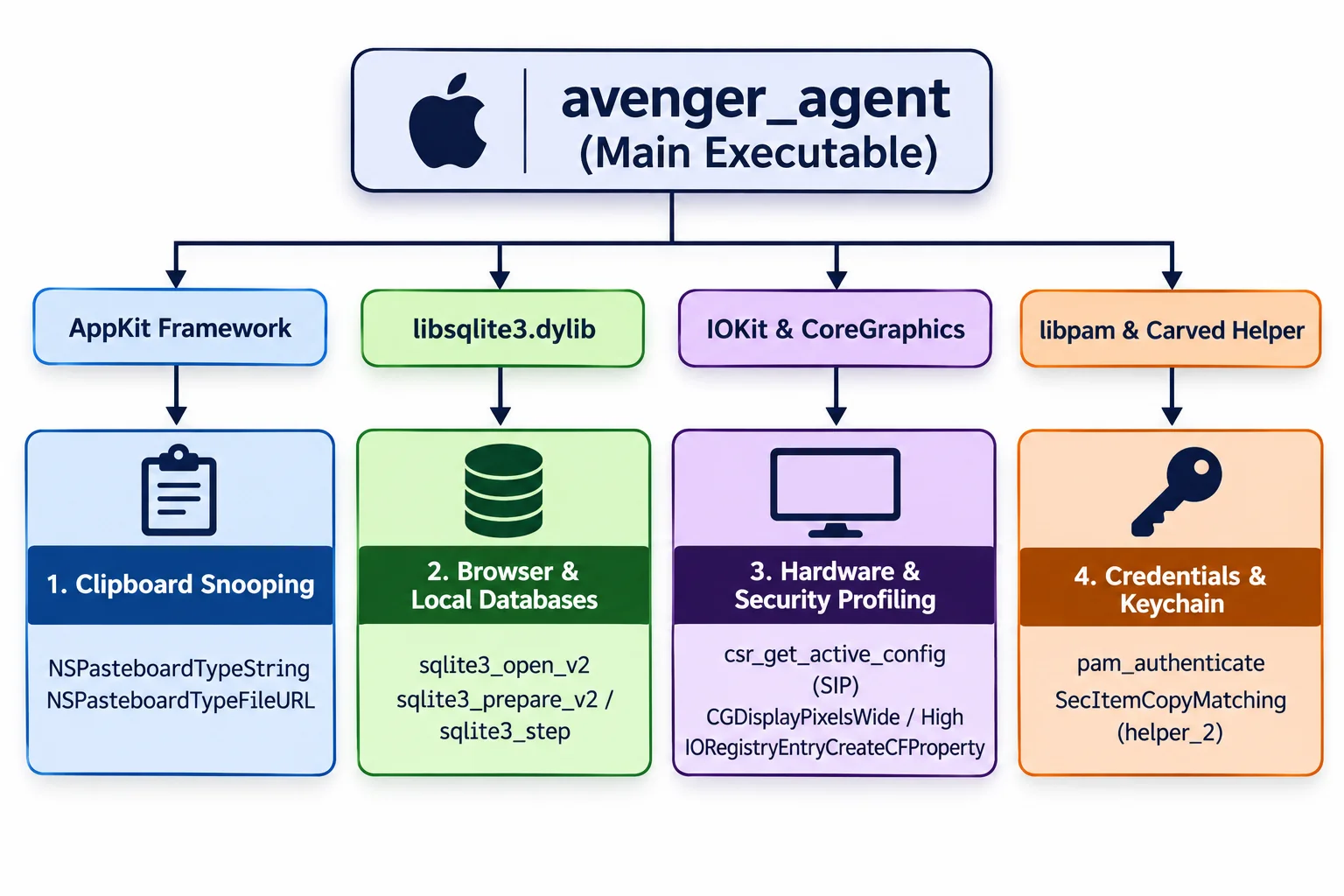
Live Clipboard Hijacking (AppKit)
_NSPasteboardTypeString: Queries raw text stored on the system clipboard._NSPasteboardTypeFileURL: Queries file system paths when a user copies files in Finder. In the dynamic symbol table, these two tokens sit at data addresses 0x1000d8000 and 0x1000d8008. In Binary Ninja, following cross-references leads directly to function sub_100027aa4.
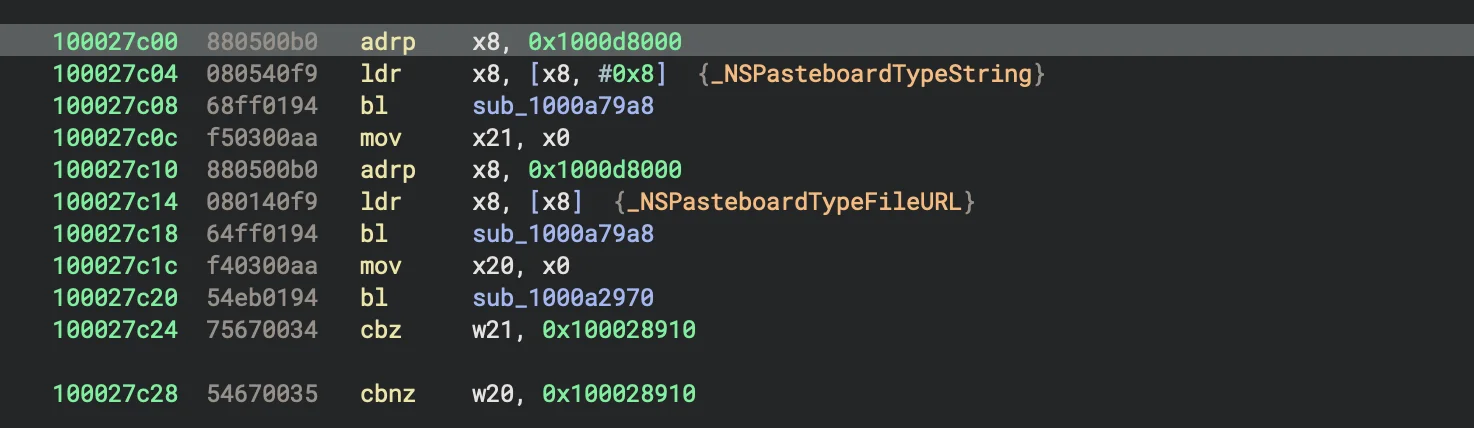
address 0x100027c00:
100027c00  adrp    x8, 0x1000d8000
100027c04  ldr     x8, [x8, #8]            ; Loads _NSPasteboardTypeString
100027c08  bl      0x1000a79a8             ; Query pasteboard for string content
100027c0c  mov     x21, x0                 ; Save string result
100027c10  adrp    x8, 0x1000d8000
100027c14  ldr     x8, [x8]                ; Loads _NSPasteboardTypeFileURL
100027c18  bl      0x1000a79a8             ; Query pasteboard for file URL
100027c1c  mov     x20, x0                 ; Save file URL result
100027c24  cbz     w21, 0x100028910        ; Branch if no string data present
100027c28  cbnz    w20, 0x100028910        ; Handle file URLs
The assembly logic is transparent:
[x8, #8] and queries AppKit's clipboard service.x21.[x8] and queries for copied files, storing that result into x20.Local Browser Databases (SQLite3 Engine)
_sqlite3_open_v2: Opens local database files in read-only mode (SQLITE_OPEN_READONLY)._sqlite3_prepare_v2: Compiles SQL queries into bytecode._sqlite3_step: Executes the prepared query and iterates row-by-row._sqlite3_column_text: Extracts text values from individual table columns._sqlite3_close: Closes the database handle cleanly without leaving locks._opendir and _readdir_r: Traverses the user's home folder (~/Library/Application Support/) to locate database files.Rather than spawning noisy command-line processes like /usr/bin/sqlite3, the malware dynamically links against /usr/lib/libsqlite3.dylib.
Inside function sub_1000053a0 (at 0x10000544c), the malware initializes database connections silently in memory, runs queries against cookie and login stores, reads the column data into string buffers, and immediately closes the file descriptor.
Deep System and Security Profiling (IOKit, CoreGraphics, and System Frameworks)
_csr_get_active_config: Directly inspects Apple's System Integrity Protection (SIP) status._CGDisplayPixelsWide and _CGDisplayPixelsHigh: Reads screen resolution and monitor geometry._NSUserName: Retrieves the current user's login account name._uname and _sysctlbyname: Pulls kernel architecture (Darwin, arm64), CPU model string, and core count._CFTimeZoneCopySystem and _CFTimeZoneGetName: Determines the victim's geographical timezone._CFLocaleCopyCurrent and _kCFLocaleCountryCode: Detects victim language and regional country code._TISCreateInputSourceList and _kTISPropertyInputSourceID: Records active keyboard layouts._IORegistryEntryCreateCFProperty and _IOServiceMatching: Queries the IOKit registry for the motherboard hardware UUID and MAC address.Notice function sub_100014114 at address 0x1000144c4:
1000144c4  bl  _csr_get_active_config

1000144c8  ldr x8, [fp, #-4]

1000144cc  and x8, x8, #0x67
The malware queries csr_get_active_config and applies a bitmask (#0x67) against the returned configuration bits. This tells the attacker whether kernel protections, filesystem protections, or debugging restrictions are disabled on the victim machine.
The Credential Vaults (PAM and Keychain)
NSAlert with NSSecureTextField) and validating the user's input in real time using _pam_authenticatehelper_2 (kh), which executes _SecItemCopyMatching with _kSecClassGenericPassword and _kSecReturnData to dump all generic passwords stored in the macOS Keychain without triggering terminal promptsThe Discovery Trail: How We Find the C2 Network Engine
When you want to know how a malware sample communicates over the network, you start by eliminating possibilities:
Step 1: Check for Standard Network Libraries
Earlier our otool -L library check showed:
libcurl.dylib (it does not use curl).System.B.dylib and CoreFoundation are linked.Step 2: Check for POSIX Sockets in Imports
We look at our nm -u dump from earlier. Are there standard BSD socket functions like connect, socket, send, or getaddrinfo? No. None of them appear.
Step 3: Check the Objective-C Runtime Bridge
Since the binary has no socket imports and no libcurl, how can it communicate?
In our nm -u import table, we saw these three specific runtime primitives:
_objc_getClass_sel_registerName_objc_msgSendBecause this malware was compiled with Rust, it doesn't use the clang compiler's standard Objective-C tables (__objc_classrefs). Instead, the Rust objc crate resolves macOS Cocoa classes dynamically at runtime by passing string names into objc_getClass and selector names into sel_registerName.
Step 4: Finding the Contiguous String Table
Because all class and method strings in a compiled binary are placed sequentially in the TEXT,cstring section, looking around any Cocoa string reveals the entire network API sequence sitting together in memory.
Run this simple command in Terminal to see how the compiler laid out the networking strings back-to-back:
python3 -c 'with open("./06fdd1d97df1105c542ddb881d751b659d555b5522c266f6364dae9f350fcfd0", "rb") as f: d = f.read(); print(d[0xd6afe:0xd6b70].decode("latin1").replace("\x00", "\n"))'Output

Every single component of macOS's native Cocoa HTTP client is laid out contiguously starting at file offset 0xd6afe (virtual address 0x1000d6afe). That is how we know, with zero guesswork, that the malware uses Cocoa's asynchronous NSURLSession engine.
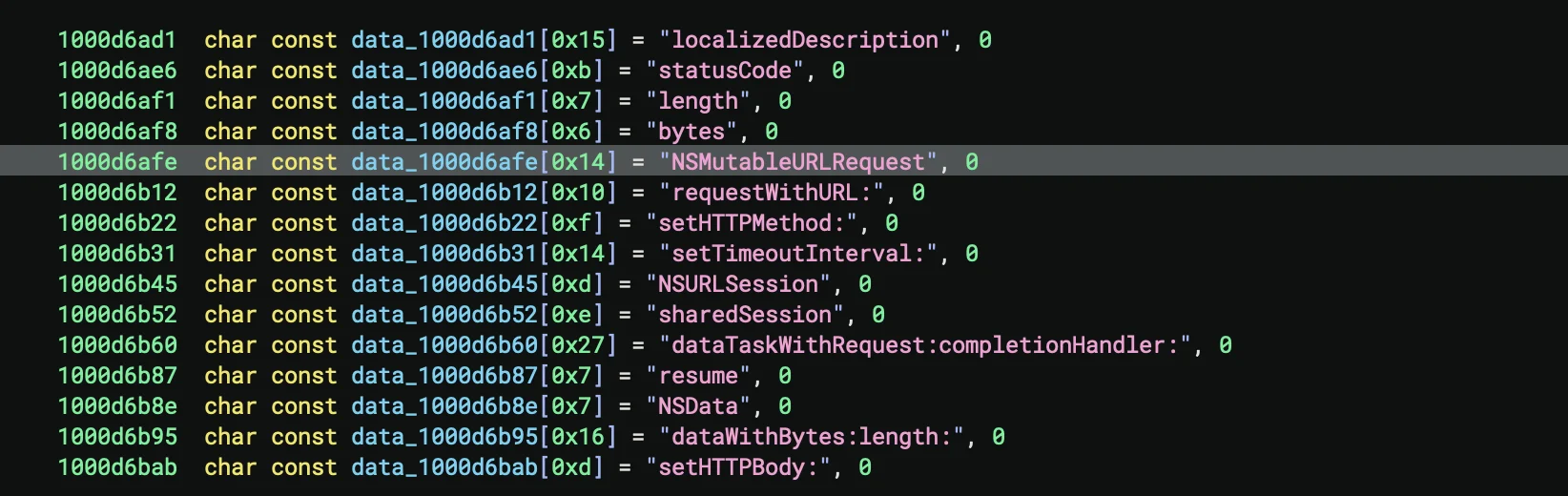
0x1000d6afe
Click to zoom ↗
Dissecting the C2 Exfiltration Engine
Now that we know the string table starts at 0x1000d6afe, we use Binary Ninja to see which function references it.
Double click or jump to 0x100020e40:
100020e40  nop

100020e44  adr     x1, 0x1000d6afe         ; Loads "NSMutableURLRequest"

100020e48  nop

100020e4c  bl      0x1000a636c             ; objc_getClass("NSMutableURLRequest")

100020e50  bl      0x1000a52d0             ; sel_registerName("requestWithURL:")

100020e54  bl      0x1000a63a8             ; Allocates new mutable request

100020e58  mov     x25, x0                 ; Save request object pointer
Follow down that same function:
The malware registers selector setHTTPMethod: and sets the method string to "POST".
It packages the harvested credentials, keychain dump, system profile, and clipboard records into a JSON document. It invokes [NSData dataWithBytes:length:] on the buffer and attaches it via setHTTPBody:.
It retrieves the system shared session via [NSURLSession sharedSession] and spawns an asynchronous background task with dataTaskWithRequest:completionHandler:.
Finally, it calls [task resume] to fire the HTTP request out to the command-and-control server.
Using native NSURLSession instead of spawning /usr/bin/curl is a deliberate stealth technique. It runs entirely inside the agent's process space without creating suspicious child processes that Endpoint Detection and Response (EDR) tools typically monitor.

Detection
rule OSX_Avenger_Stealer {
    meta:
        description = "Avenger / PAM Stealer macOS information stealer binaries"
        author = "Chandra Kant Bauri"
        date = "2026-11-09"
        malware_family = "AvengerStealer"
				hash = "06fdd1d97df1105c542ddb881d751b659d555b5522c266f6364dae9f350fcfd0"
    strings:
        // Cryptographic cha20 RFC 7539 state initialization
        $chacha = "expand 32-byte k" ascii

        // Subprocess IPC execution primitives
        $ipc_pipe   = "_pipe" ascii
        $ipc_spawn  = "_posix_spawnp" ascii
        $ipc_dup2   = "posix_spawn_file_actions_adddup2" ascii

        // Variant 1 (v1.3.x): PAM verification, clipboard harvesting, and embedded helpers
        $crate       = "avenger_agent" ascii
        $kh_id       = "kh-57aebaab0e5de898" ascii
        $api_pam     = "_pam_authenticate" ascii
        $api_pb      = "_NSPasteboardTypeString" ascii
        $api_csr     = "_csr_get_active_config" ascii
        $macho_embed = { CF FA ED FE 0C 00 00 01 }

        // Variant 2 Chrome DevTools Protocol (CDP) & Cocoa workspace automation
        $cdp_nav    = "Page.navigate" ascii
        $cdp_dl1    = "Browser.setDownloadBehavior" ascii
        $cdp_dl2    = "Page.setDownloadBehavior" ascii
        $cocoa_ws   = "NSWorkspaceOpenConfiguration" ascii
        $cocoa_inst = "setCreatesNewApplicationInstance:" ascii
        $cocoa_open = "openApplicationAtURL:configuration:completionHandler:" ascii

    condition:
        (
            (uint32(0) == 0xfeedfacf and (uint32(4) == 0x0100000c or uint32(4) == 0x01000007)) or
            uint32(0) == 0xcafebabe or
            uint32be(0) == 0xcafebabe
        ) and

        filesize < 10MB and

        (
            $crate or

            (
                $chacha and
                2 of ($ipc_*) and
                (
                    ($api_pam and ($api_pb or $api_csr)) or
                    $kh_id or
                    #macho_embed > 1 or

                    (1 of ($cdp_*) and 1 of ($cocoa_*))
                )
            )
        )
}

rule OSX_Avenger_Stealer_Keychain_Helper {
    meta:
        description = "carved or standalone keychain dumper helper dropped by Avenger / PAM Stealer"
        author = "Chandra Kant Bauri"
        date = "2026-11-09"
        malware_family = "AvengerStealer"
        platform = "macOS"

    strings:
        // Keychain Dumper Helper (kh): Unique ad-hoc code-signing identifier & API
        $kh_id  = "kh-57aebaab0e5de898" ascii
        $sec1   = "SecItemCopyMatching" ascii
        $sec2   = "kSecClassGenericPassword" ascii

    condition:
        uint32(0) == 0xfeedfacf and
        (uint32(4) == 0x0100000c or uint32(4) == 0x01000007) and
        filesize < 200KB and
        $kh_id and
        all of ($sec*)
}
Indicators of Compromise (IoCs)
1. File Identifiers and Hashes
| Component | Identifier / Path | SHA-256 Hash | MD5 Hash | Size | Description |
|---|---|---|---|---|---|
| Main Executable | Main Mach-O arm64 binary | 06fdd1d97df1105c542ddb881d751b659d555b5522c266f6364dae9f350fcfd0 | 65ddfaf0b2b012392eb14cede6649a60 | 942,880 B | Main stealer agent |
| Helper 1 (li) | Offset 0xac812 (carved as ./helper_1) | ca7f5c0668f1a871523d485e42884c3b98910117d7ca17c8b3c3b3744a936e0f | 82882531c88b5ebcda86f5a22a9ad362 | 34,400 B | Login Items persistence payload |
| Helper 2 (kh) | Offset 0xb4e75 (carved as ./helper_2) | c77f94d0a5439ae0a08b628b2cc49dd385a7416787e550969f894428c7052f29 | 152eff8373515ff328105ede28931f41 | 53,104 B | Keychain harvesting payload |
2. Network and Command & Control (C2) Indicators
| Indicator Type | Value / Address | Description |
|---|---|---|
| Primary C2 URL | https://avenger-sync.live/api/sync | Primary HTTPS exfiltration endpoint |
| Primary C2 Domain | avenger-sync.live | C2 host domain |
| Web3 Fallback Resolver | 0x9686d66EFc63eDc54502BC0DBF888e233Db6C4f7 | Ethereum smart contract address (candidate Web3 dead-drop resolver) |
| Campaign Identifier | detox1 | Affiliate or operation tag decrypted from Record 1 |
| Exfiltration Encryption Key | 283b19cb53980b67b3cb346b73ad7d9f10da701d8f29f43a7d44d18ee409b71d | 32-byte secret key decrypted from Record 4 |
| Network Protocol | Native Cocoa NSURLSession | Asynchronous HTTP POST carrying JSON payload |
3. Host and Persistence Artifacts
| Artifact | Indicator | Technical Behavior |
|---|---|---|
| Persistence Mechanism | _LSSharedFileListInsertItemURL | Registers bundle under user's session Login Items |
| Staging Drop Locations | /tmp/li, /tmp/kh | Staging paths for carved helper binaries |
| Inter-Process IPC | Anonymous UNIX pipe (_pipe) | Streams dumped Keychain passwords into memory via file descriptor redirection (adddup2) |
| Internal Build ID | avenger_agent-bacc7f3ef1dfcbdb | Rust build crate identifier embedded in code |
| Malware Release Version | 1.3.2 | Plain ASCII version string embedded at file offset 0xac654 |
| Code Signing Identity (Helper 1) | li | Ad-hoc signature identifier |
| Code Signing Identity (Helper 2) | kh-57aebaab0e5de898 | Ad-hoc signature identifier |
4. Cryptographic Signatures and Data Offsets
| Signature / Artifact | Offset / Address | Description |
|---|---|---|
| Cipher Constant | 0x1000abc20 (Offset 0xabc20) | RFC 7539 ChaCha20 constant: expand 32-byte k |
| Record 1 (Campaign) | 0x1000ac4e0 (Offset 0xac4e0) | Encrypted block: 158 bytes (decrypts to detox1) |
| Record 2 (C2 URL) | 0x1000ac57e (Offset 0xac57e) | Encrypted block: 214 bytes (decrypts to https://avenger-sync.live/api/sync) |
| Record 3 (Web3 Resolver) | 0x1000ac659 (Offset 0xac659) | Encrypted block: 230 bytes (decrypts to 0x9686d66EFc63eDc54502BC0DBF888e233Db6C4f7) |
| Record 4 (Secret Key) | 0x1000ac73f (Offset 0xac73f) | Encrypted block: 210 bytes (decrypts to a 32-byte hexadecimal key) |
| Format Structure | Key[64]:Nonce[48]:Ciphertext | Colon-delimited XChaCha20 configuration blocks |