Table of Contents
18 Sections
- 01. Triage
- 02. Basic properties
- 03. History
- 04. Code Signing & Gatekeeper Checks
- 05. Mach-O Anatomy - Finding the Hidden Config Section
- 06. The Library Anomaly
- 07. Inspecting Imported Symbols - What Is Missing?
- 08. Extracting Evidence from Strings - The Mask Comes Off
- 09. Hunting for Network Indicators - Finding the C2 Server
- 10. Stepping into Binary Ninja: The Entry Point
- 11. Disassembling instancemain - Syscalls and Config Validation
- 12. Mapping the Command Dispatcher
- 13. The Complete Direct Syscall Reference Table
- 14. Anatomy of a Darwin Kernel Syscall
- 15. Detection Engineering
- 16. MITRE ATT&CK Mapping and Indicators of Compromise
- 17. Indicators of Compromise (IOCs)
- 18. What We Learned
Unraveling the C5 Binary: Beacon Object File Loading, Reflective Code Execution, and Command-and-Control Indicators.
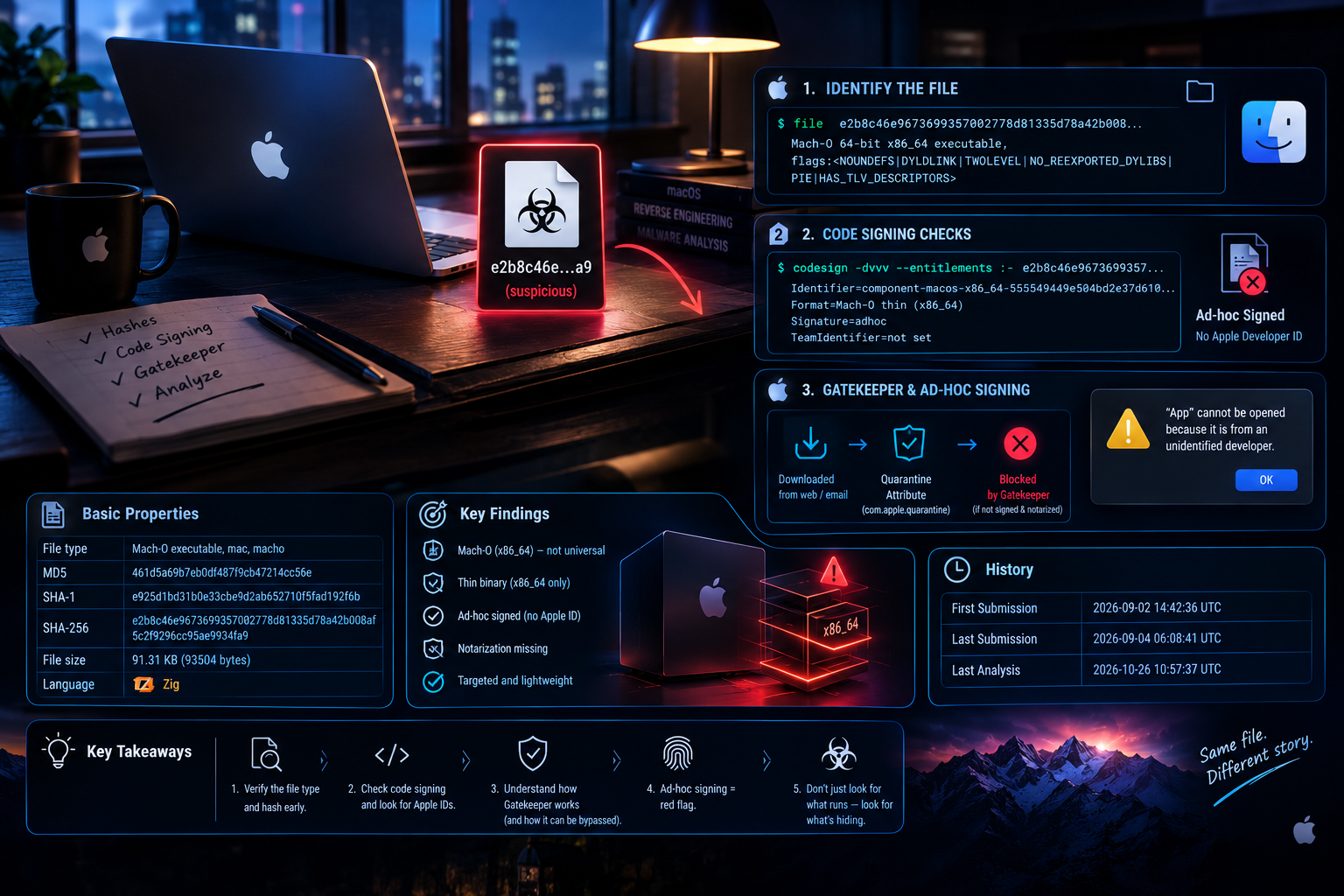
Triage
Whenever you get handed a suspicious file on macOS, fight the urge to double-click it. Attackers routinely strip extensions or disguise an executable
with a folder icon. Treat every unknown file as live ordnance until you know what it is.
Open Terminal and inspect what you are actually holding:
file e2b8c46e9673699357002778d81335d78a42b008af5c2f9296cc95ae9934fa9The output gives us our first breadcrumbs:
e2b8c46e9673699357002778d81335d78a42b008af5c2f9296cc95ae9934fa9e: Mach-O 64-bit x86_64 executable,
flags:<NOUNDEFS|DYLDLINK|TWOLEVEL|NO_REEXPORTED_DYLIBS|PIE|HAS_TLV_DESCRIPTORS>
Basic properties
| Property | Value |
|---|---|
| File type | Mach-O executable, mac, macho |
| MD5 | 461d5a69b7eb0df487f9cb47214cc56e |
| SHA-1 | e925d1bd31b0e33cbe9d2ab652710f5fad192f6b |
| SHA-256 | e2b8c46e9673699357002778d81335d78a42b008af5c2f9296cc95ae9934fa9e |
| Vhash | faf8e23aa83aba454ac6f9607aa0319c |
| SSDEEP | 768:wmniNQlGkniHn2o4pQXMm706kqlgkRmT+KOikO9dJ63F7YEZjJtF94:5RF0n2vpUXdGkRpKPkO9dYFcEtJ2 |
| TLSH | T156937C335F51A467C099B97023A79B422F72F5728A01379623D841317FA6CDAA3AD70F |
| CDHash | a0cf22a892a632b1ecd8d51839c3d4c6c3e8ac1f |
| Symhash | 9a9bbf082aae2d10e0f6fc025178eedc |
| Magic | Mach-O 64-bit x86_64 executable, flags: <NOUNDEFS|DYLDLINK|TWOLEVEL|NO_REEXPORTED_DYLIBS|PIE|HAS_TLV_DESCRIPTORS> |
| TrID | Mac OS X Mach-O 64-bit Intel executable (100%) |
| DetectItEasy | Mach-O64 — [Operation system: macOS [EXECUTE64]](https://www.virustotal.com/gui/) |
| Magika | MACHO |
| File size | 91.31 KB (93504 bytes) |
| Language | Zig |
History
| Property | Value |
|---|---|
| First Submission | 2026-09-02 14:42:36 UTC |
| Last Submission | 2026-09-04 06:08:41 UTC |
| Last Analysis | 2026-10-26 10:57:37 UTC |
Four things jump out immediately:
Code Signing & Gatekeeper Checks
macOS relies on strict gatekeeping. Real apps carry digital signatures backed by an official Apple Developer ID and validated through Apple
notarization servers.
Run codesign to see who built this:
codesign -dvvv --entitlements :- e2b8c46e9673699357002778d81335d78a42b008af5c2f9296cc95ae9934fa9e 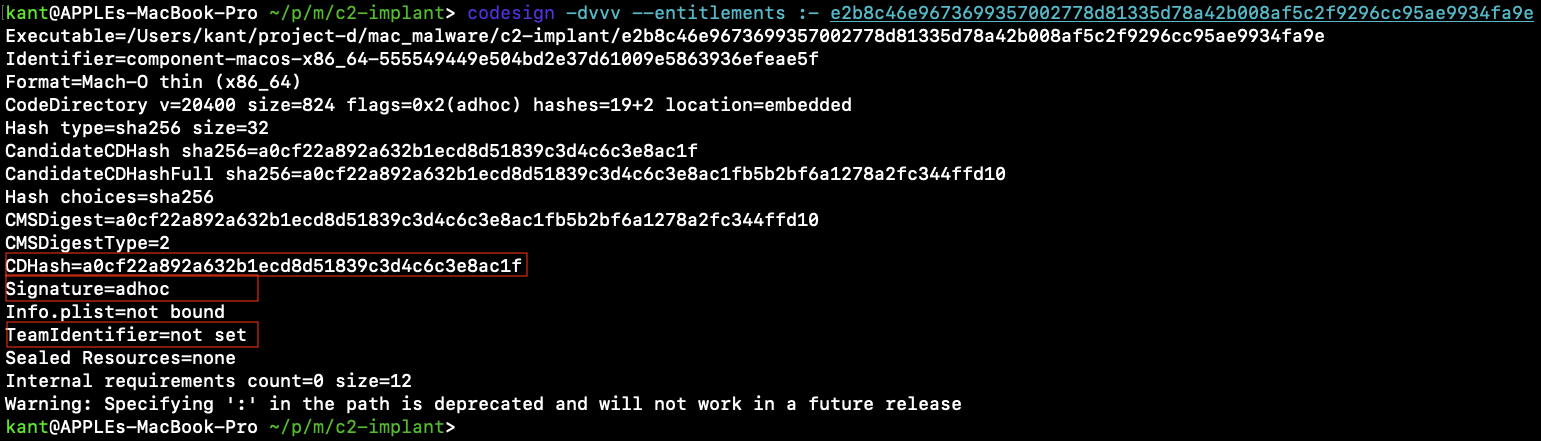
     Identifier=component-macos-x86_64-555549449e504bd2e37d61009e5863936efeae5f
     Format=Mach-O thin (x86_64)
     CodeDirectory v=20400 size=824 flags=0x2(adhoc) hashes=19+2 location=embedded
     CDHash=a0cf22a892a632b1ecd8d51839c3d4c6c3e8ac1f
     Signature=adhoc
     TeamIdentifier=not set
     Sealed Resources=none
Why Ad-Hoc Signing Screams Suspicious
Apple Silicon kernels mandate code signing. If a Mach-O file has no code signature at all, the kernel kills the process on launch.
Malware authors solve this with ad-hoc signing. It satisfies the kernel requirement for execution, but provides zero identity validation.
Notice the two giveaways:
Gatekeeper Bypasses and Ad-Hoc Signing
How Gatekeeper Actually Works
Many people assume Gatekeeper scans every binary that runs on a Mac. That is not how macOS works.
Gatekeeper relies on a specific file tag called the Quarantine Attribute (com.apple.quarantine).
When you download a file through a web browser, Slack, or email, macOS slaps this extended attribute onto the file. When you double-click that file, macOS checks for the tag. Finding it, Gatekeeper halts execution to check:
If the answer is no, macOS pops up a warning blocking the app from running.
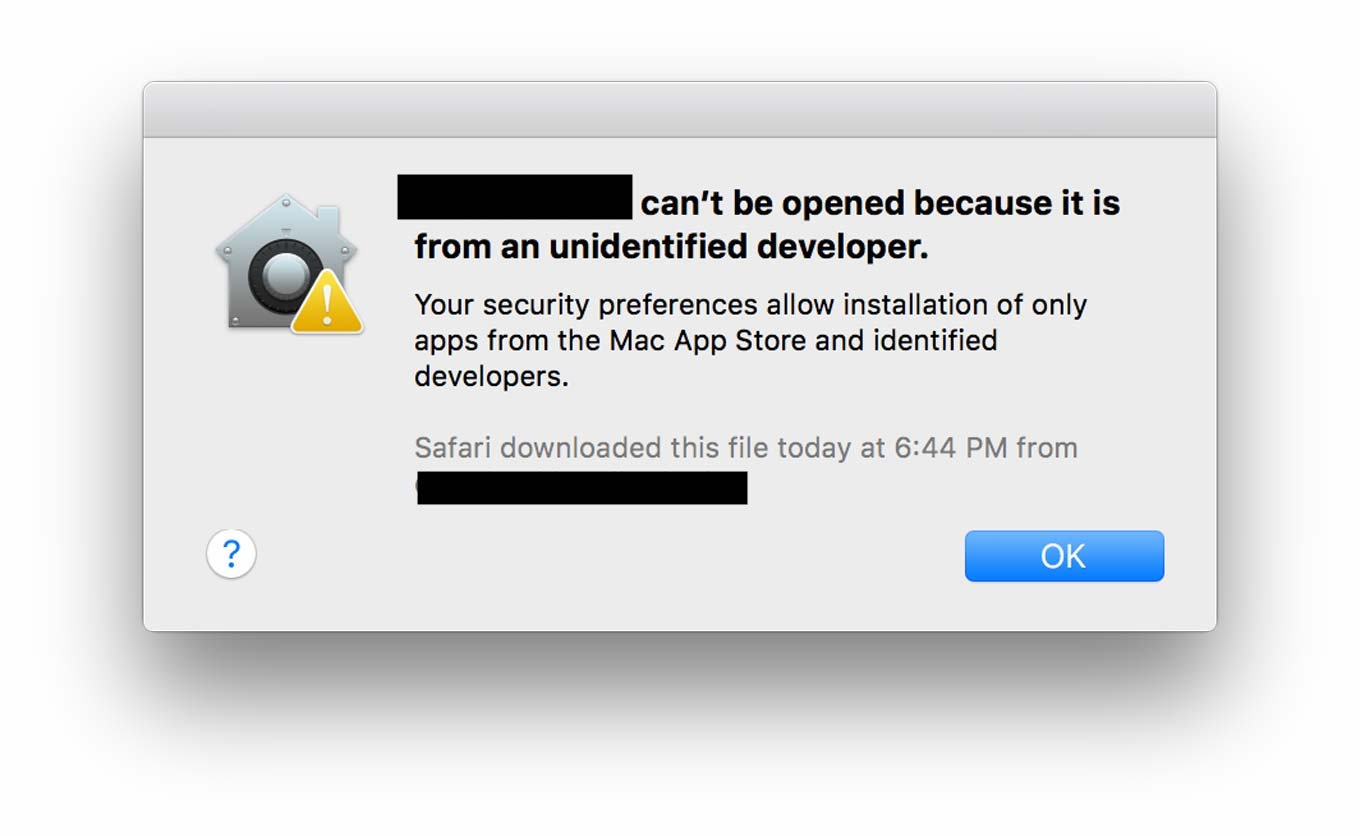
How Malware Authors Sidestep Gatekeeper
Attackers use several tricks to prevent Gatekeeper from ever checking their payloads:
Command-line tools like curl, wget, or staging scripts do not attach the quarantine attribute. If an attacker delivers an implant through a bash one-liner, Gatekeeper stays asleep.
If a file does get quarantined, a simple command removes it:
xattr -d com.apple.quarantine ./implantWithout the quarantine tag, macOS treats the file as if it was created locally, skipping Gatekeeper checks entirely.
Attackers package binaries inside disk images (.dmg) or custom archives to mess with how quarantine flags propagate down to inner payloads.
Why Ad-Hoc Signing Exists
If an attacker skips Gatekeeper, why bother signing the file at all?
Because Apple Silicon Macs enforce kernel-level execution rules. On ARM64 hardware, the kernel refuses to run any native binary that lacks a Code Directory. Unsigned code crashes immediately with a SIGKILL error.
Attackers bypass this restriction using ad-hoc signing:
codesign -s - --force ./implant The -s - flag tells macOS to generate a local cryptographic hash for each code page without requiring a paid Apple Developer certificate.
This gives the attacker two advantages:
The Library Anomaly
When analyzing an unknown binary, you want to know what building blocks it leans on. On macOS, running otool -L shows all shared dynamic libraries (.dylib and frameworks) linked to the executable.
otool -L e2b8c46e9673699357002778d81335d78a42b008af5c2f9296cc95ae9934fa9e 
Why This Is Odd
Most Mac software links against multiple frameworks to get work done:
Foundation.framework for file manipulation and process tasks.CFNetwork.framework or libcurl.dylib for internet communication.Security.framework for certificates and encryption.Our sample links to only one file: /usr/lib/libSystem.B.dylib.
libSystem is the standard C runtime umbrella on macOS, roughly equivalent to libc on Linux. Almost every compiled binary links against it by default.
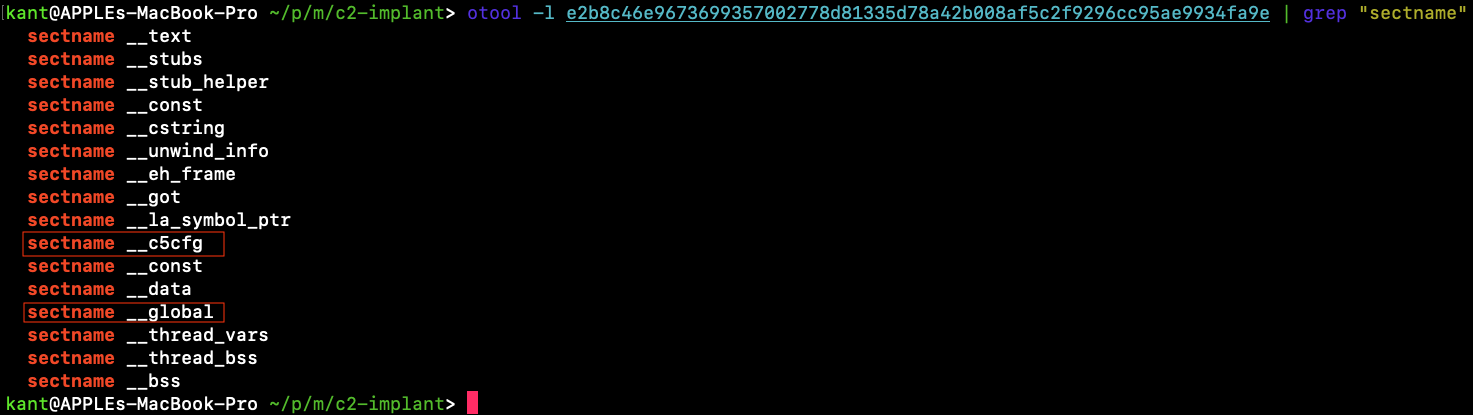
This creates an interesting gap. We have an ad-hoc signed binary with a custom configuration section (__c5cfg), yet it does not import any standard high-level frameworks.
How does a program interact with the operating system without those libraries? To answer that, we must inspect the exact functions it requests from libSystem.
Inspecting Imported Symbols - What Is Missing?
When a Mach-O binary runs, macOS uses its dynamic linker (dyld) to hook up external functions provided by shared libraries.
By running nm with the -u flag, we can view every external symbol the binary expects the operating system to supply:
nm -u e2b8c46e9673699357002778d81335d78a42b008af5c2f9296cc95ae9934fa9e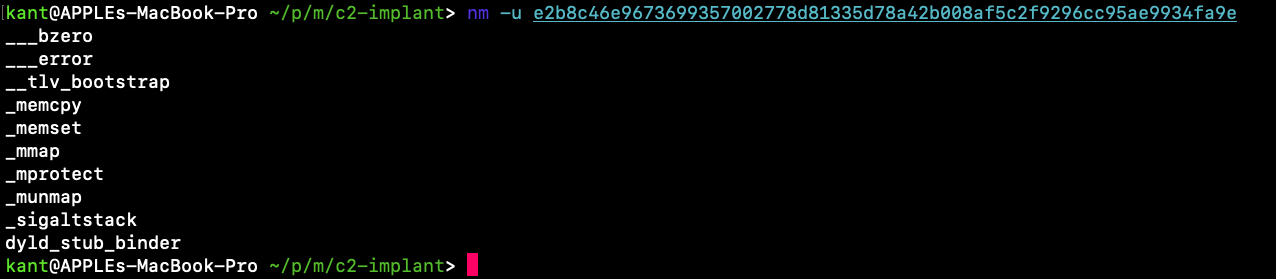
Breaking Down the Import List
Take a close look at what is present:
_memcpy, _memset, and ___bzero copy or clear raw memory buffers._mmap, _munmap, and _mprotect map raw pages into memory, free them, or alter page permissions (like making memory executable).__tlv_bootstrap handles thread-local variables, while _sigaltstack configures an alternate signal stack.Now ask yourself what is missing:
printf, puts, malloc, or free.fopen, read, write, or stat.socket, connect, send, or recv.fork, execve, or posix_spawn.This is a massive anomaly. A program cannot open files or communicate over a network using only memcpy and mmap.
At this point, we have two possibilities:
Before we start disassembling code, let us pull out all printable strings to find concrete evidence of what this binary actually talks about.
Extracting Evidence from Strings - The Mask Comes Off
String analysis is one of the quickest ways to verify what a program is designed to do. Developers and malware authors alike leave behind error logs, paths, protocol names, and command syntaxes.
We run strings with a minimum length filter of 5 characters to weed out binary noise:
strings -n 5 e2b8c46e9673699357002778d81335d78a42b008af5c2f9296cc95ae9934fa9e | head -n 45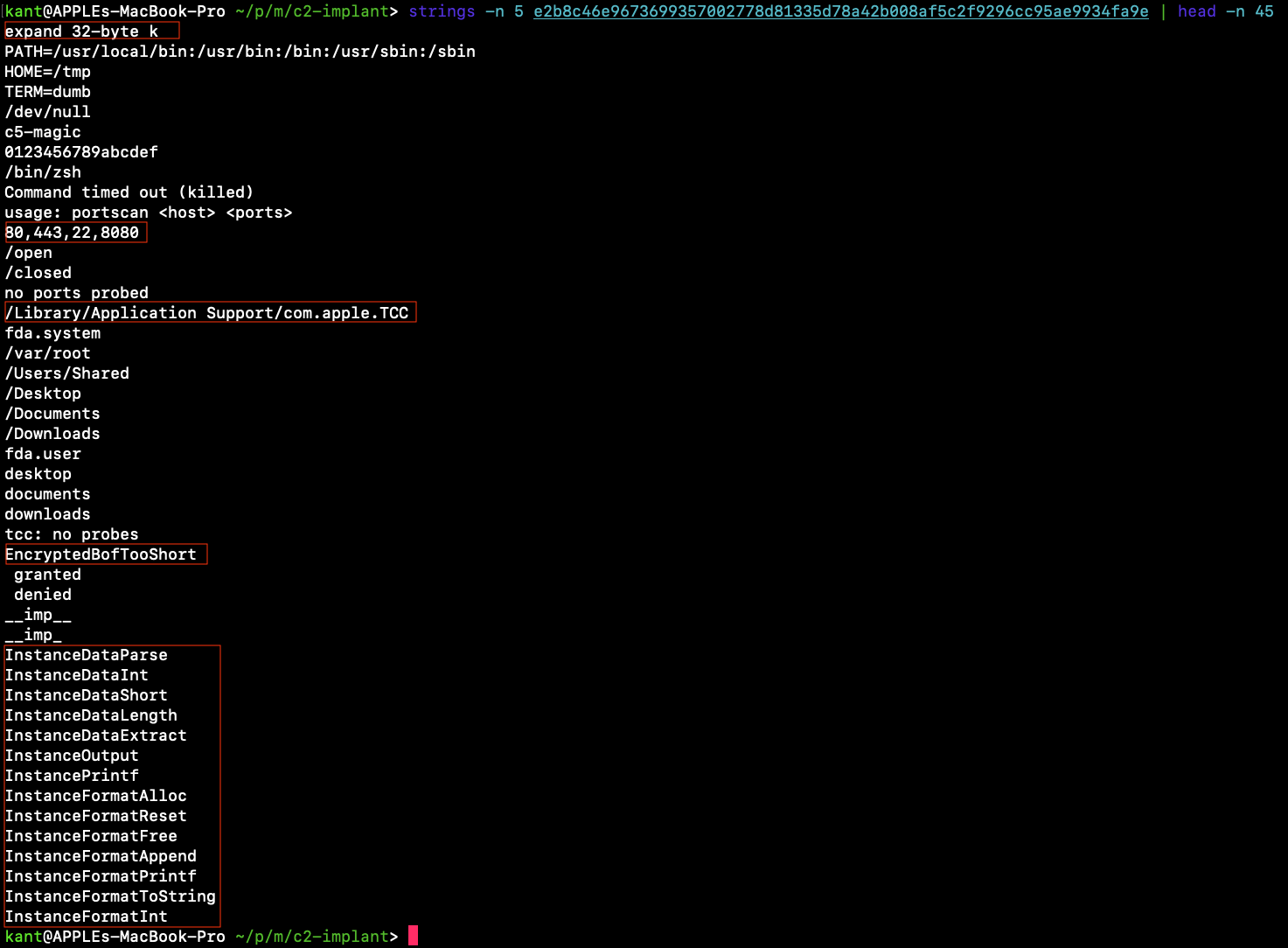
Embedded Cryptography (expand 32-byte k)
The literal string expand 32-byte k is not random. It is the exact 16-byte initialization constant mandated by RFC 7539 for the ChaCha20 stream cipher. The author built custom encryption directly into the binary.
Headless Shell Execution (/bin/zsh)
Notice the environment variables right below it: TERM=dumb, HOME=/tmp, and /dev/null. This is the classic setup used when spawning detached, non-interactive reverse shells.
Internal Network Reconnaissance (portscan)
The binary contains a built-in TCP port scanner: usage: portscan <host> <ports> with default targets 80,443,22,8080. Attackers use this to map internal networks after landing on a victim machine.
macOS Privacy Probing (TCC and Full Disk Access)
On modern macOS, Apple protects user privacy through TCC (Transparency, Consent, and Control). Protected directories like ~/Desktop, ~/Documents, ~/Downloads, and /Library/Application Support/com.apple.TCC/TCC.db require user approval.
The strings fda.system, fda.user, granted, and denied prove this binary deliberately probes sensitive directories to test whether it has Full Disk Access privileges.
In-Memory BOF Loader (InstanceDataParse, EncryptedBofTooShort)
In the Windows world, Cobalt Strike uses Beacon Object Files (BOFs), small compiled C objects executed in memory using functions like BeaconDataParse and BeaconPrintf.
Here, the author ported that exact architecture to macOS, renaming the APIs to InstanceDataParse, InstanceOutput, and InstancePrintf. The binary accepts encrypted object files over the wire (EncryptedBofTooShort), decrypts them, and executes them in memory.
Remember our puzzle from Inspecting Imported Symbols Part The binary imports _mmap and _mprotect. Now we know why:
it allocates executable memory at runtime to run in-memory BOF modules.
How In-Memory BOF Execution Works
When a normal application runs on a Mac, the operating system reads the executable file from the hard drive through execve(). Apple security tools like XProtect and commercial endpoint software monitor every file written to disk.
If an attacker drops a new hacking tool onto the SSD, security software scans the file immediately and flags it.
To avoid this, sophisticated implants use in-memory execution. The attacker never writes their secondary modules to disk. Instead, the implant downloads raw, compiled code over an encrypted network connection and runs it entirely inside RAM.
In post-exploitation frameworks, these lightweight modules are known as Beacon Object Files (BOFs)
Mechanics of mmap and mprotect
Modern operating systems enforce a strict security policy known as W^X (Write XOR Execute). A block of memory can be writable, or it can be executable, but the operating system tries hard to prevent memory from being both at once.
This creates a technical hurdle for the attacker. How do you write new code into memory, and then execute it?
This is where the two symbols we uncovered come into play:
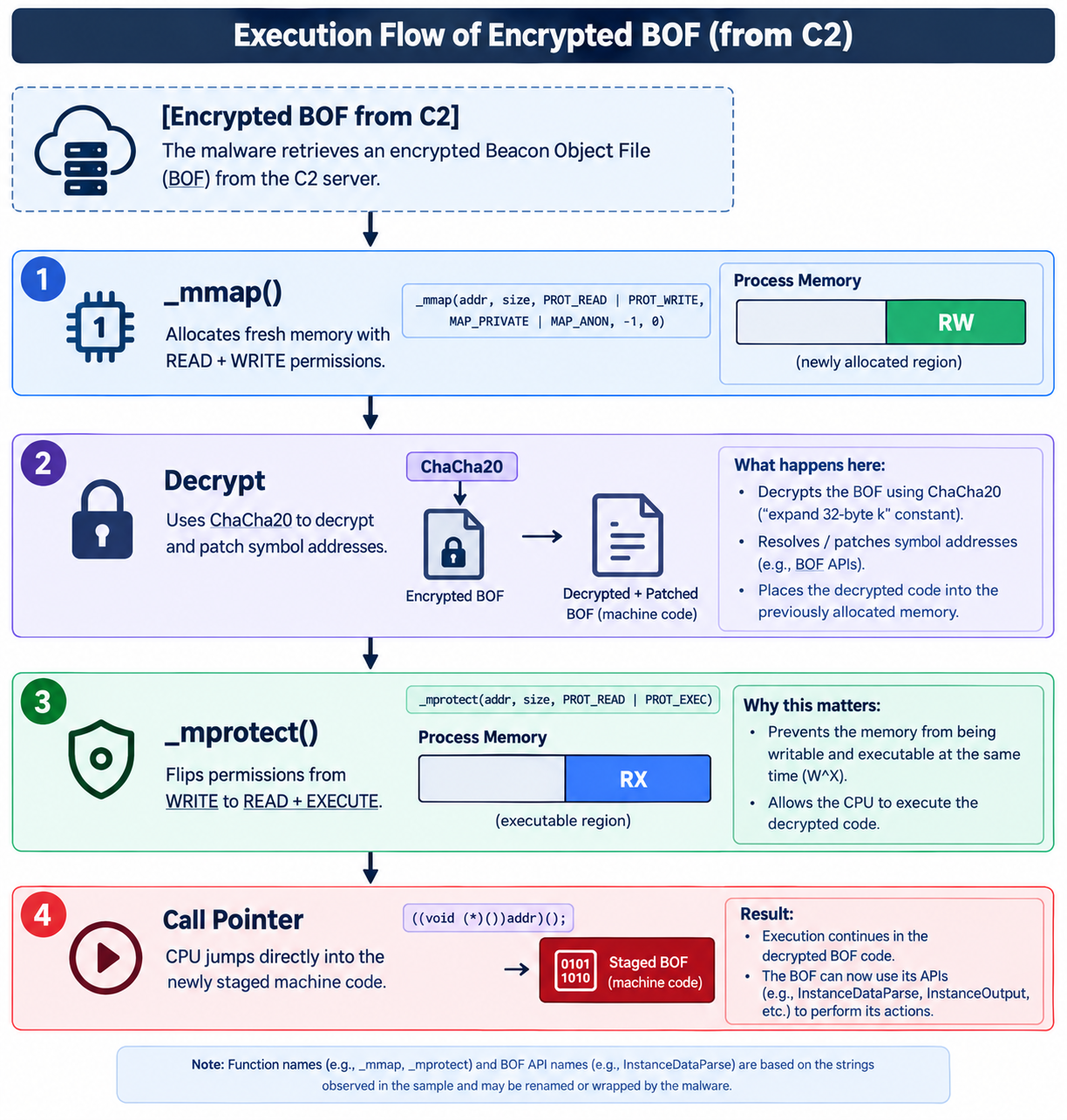
Here is what the implant code actually does:
Step 1: Carving Out Memory (mmap)
The implant requests a fresh virtual memory page from the macOS kernel:
void *buffer = mmap(NULL, bof_size, PROT_READ | PROT_WRITE, MAP_ANON | MAP_PRIVATE, -1, 0); At this point, the memory is writable. The implant can copy data into it, but if it tries to execute that memory, the CPU throws a segmentation fault.
Step 2: Decrypting and Linking Symbols in RAM
The implant decrypts the incoming payload using ChaCha20.
Because a BOF is an unlinked object file, it cannot run on its own yet. It contains empty placeholders where function calls should be. The implant acts as a mini-linker, resolving function pointers like InstanceDataParse and InstanceOutput so the payload knows where to send output.
Step 3: Flipping the Switch (mprotect)
Once the payload is copied and ready, the attacker no longer needs write permissions. They need execute permissions:
mprotect(buffer, bof_size, PROT_READ | PROT_EXEC);This system call tells the kernel: lock this memory down against writes, and allow the CPU to run code here.
Step 4: Execution
The implant casts the memory address into a function pointer and calls it:
((void(*)())buffer)();The payload executes, extracts its target data, hands the results back to the implant, and exits. The implant then calls _munmap to wipe the memory clean.
The entire attack happens in RAM without touching the file system.
Hunting for Network Indicators - Finding the C2 Server
Every Command and Control implant needs a way to call home. If it cannot receive tasks, it cannot do damage. By looking at the final lines of our strings output, we find the exact network settings hardcoded into this binary:
strings -n 4 e2b8c46e9673699357002778d81335d78a42b008af5c2f9296cc95ae9934fa9e | tail -n 25 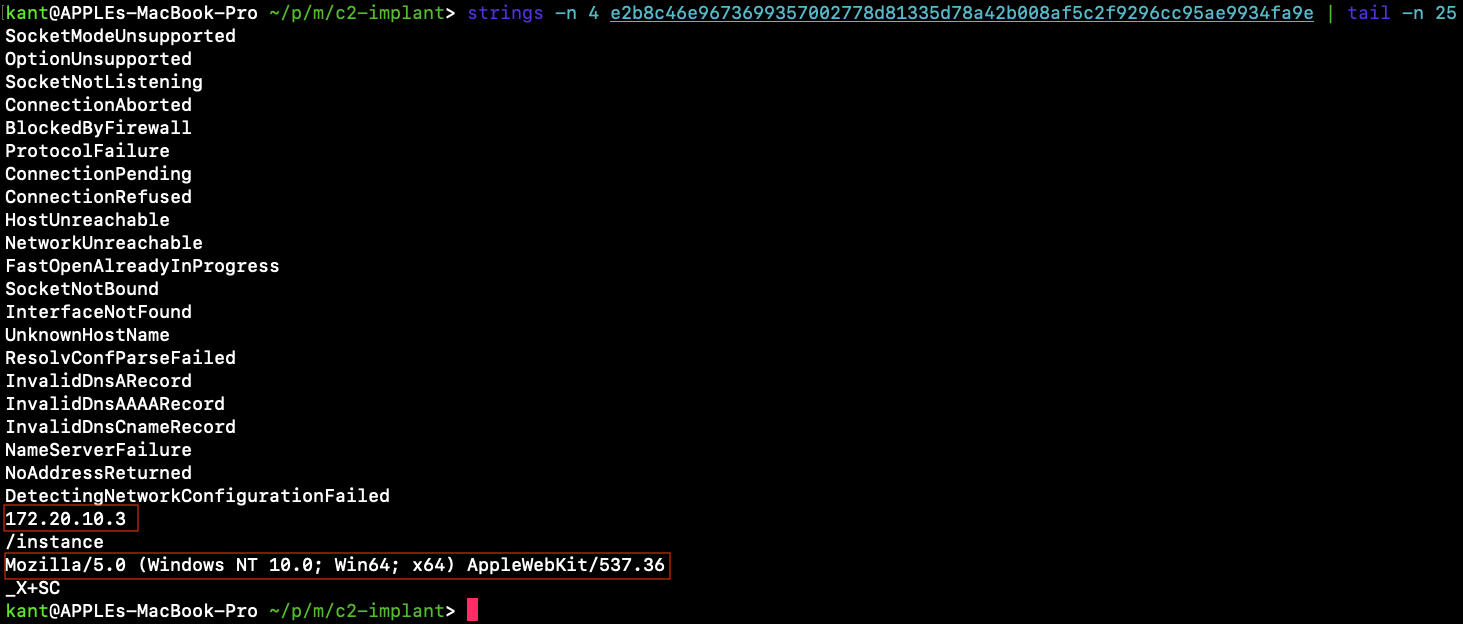
Three Critical Threat Intel Takeaways
1. Hardcoded IP and Endpoint
The implant reaches out to this IP over HTTP to fetch commands. Network defenders can immediately blacklist this IP and monitor firewall logs for outbound connections hitting /instance.
2. The Spoofed User-Agent Anomaly
Notice the User-Agent string:
Mozilla/5.0 (Windows NT 10.0; Win64; x64) AppleWebKit/537.36This is a Mach-O binary compiled specifically for macOS. Yet, its outbound web traffic claims to be a Windows 10 PC running Google Chrome.
Attackers often spoof common Windows browser User-Agents so their beacon traffic blends in with corporate network traffic. But from a detection standpoint, this creates a massive discrepancy. When network monitoring tools see an Apple MacBook sending HTTP requests claiming to be Windows 10, that alerts security teams immediately.
3. Registration Token (X+SC)
The token _X+SC serves as an implant identifier. When the payload first connects to the server, it hands this token over so the C2 operator knows which campaign or payload version just checked in.
Stepping into Binary Ninja: The Entry Point
We open our sample in Binary Ninja:
Once analysis finishes, press g on your keyboard, type _main, and hit Enter.
Disassembly of main (0x1000009f8)
The function breaks down into three distinct basic blocks:
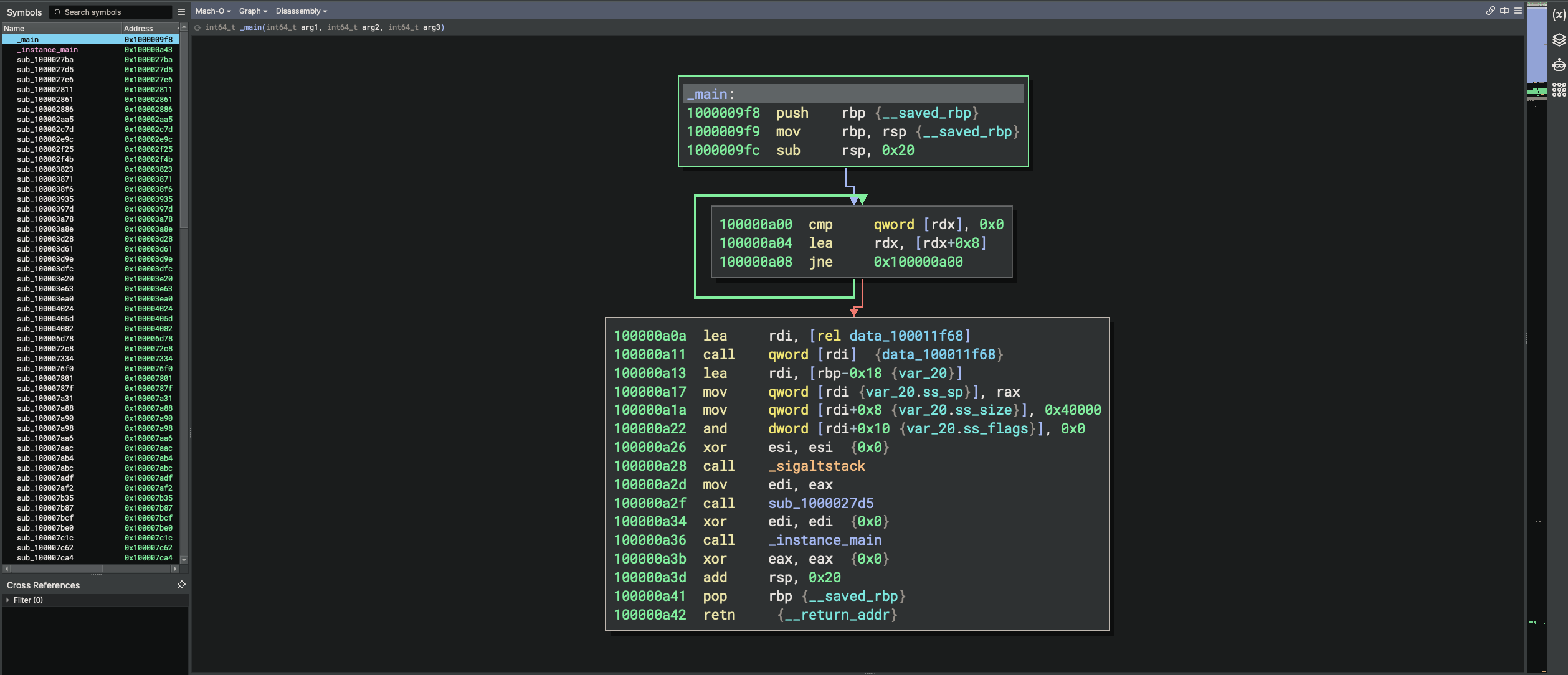
; --- Block 1: Function Prologue ---
1000009f8  push    rbp
1000009f9  mov     rbp, rsp
1000009fc  sub     rsp, 0x20

; --- Block 2: Environment Walk Loop ---
100000a00  cmp     qword [rdx], 0x0
100000a04  lea     rdx, [rdx+0x8]
100000a08  jne     0x100000a00

; --- Block 3: Signal Stack & Main Execution ---
100000a0a  lea     rdi, [rel data_100011f68]
100000a11  call    qword [rdi]
100000a13  lea     rdi, [rbp-0x18]
100000a17  mov     qword [rdi], rax       ; ss_sp: buffer pointer
100000a1a  mov     qword [rdi+0x8], 0x40000 ; ss_size: 256 KB (0x40000)
100000a22  and     dword [rdi+0x10], 0x0  ; ss_flags: 0
100000a26  xor     esi, esi                ; NULL (old_stack)
100000a28  call    _sigaltstack            ; sigaltstack(&alt_stack, NULL)
100000a2d  mov     edi, eax
100000a2f  call    sub_1000027d5
100000a34  xor     edi, edi                ; arg1 = 0
100000a36  call    _instance_main          ; Launch primary engine
100000a3b  xor     eax, eax                ; return 0
100000a3d  add     rsp, 0x20
100000a41  pop     rbp
100000a42  retn
Reading the Assembly
Even if you are new to x86_64 assembly, the flow is easy to follow once you know the register conventions.
1. Walking the Environment (Block 2)
In the standard System V AMD64 calling convention, function arguments arrive in specific registers:
Look at the three instructions in Block 2:
100000a00  cmp     qword [rdx], 0x0
100000a04  lea     rdx, [rdx+0x8]
100000a08  jne     0x100000a00
cmp qword [rdx], 0x0 tests whether the current environment pointer is NULL. If it is not, lea rdx, [rdx+0x8] steps 8 bytes forward to the next pointer, and jne loops back. It simply walks the environment array to find where it ends.
2. A Safety Net sigaltstack
Block 3 populates a 24-byte structure on the stack (rbp-0x18) corresponding to macOS stack_t:
[rdi] receives the memory pointer from rax.[rdi+0x8] is set to 0x40000 (262,144 bytes, or 256 KB).[rdi+0x10] is set to 0 (ss_flags).Then it calls _sigaltstack.
Why does an implant set up an alternate signal stack before doing anything else?
Because if the implant crashes while running in-memory shellcode or unmapped memory pages, the operating system normally terminates the process immediately. With a dedicated signal stack in place, the implant can catch segmentation faults (SIGSEGV), recover gracefully, and stay alive to report the failure back to the operator.
3. The Handoff to instancemain
Finally, look at lines 100000a34 and 100000a36:
     xor     edi, edi          ; zero out rdi (argument 0)
     call    _instance_main    ; jump to core engine
The binary wipes rdi and calls _instance_main. That is where all the malicious functionality starts.
Disassembling instancemain - Syscalls and Config Validation
When _main finishes setting up the alternate signal stack, it branches directly to _instance_main (0x100000a43).
n Binary Ninja, press g and jump to 0x100000a43. The first basic block performs two critical operations:
100000a5a  mov     edi, 0x9f8
100000a5f  call    sub_10000cc5f       ; Custom allocator
100000a64  test    rax, rax
100000a67  je      0x100002792         ; Exit on allocation failure
...
100000aa7  mov     rdi, rbx
100000aaa  call    sub_100003ea0       ; Load & validate __c5cfg
Let us dive into those two subroutines.
The Direct mmap Syscall Allocator (sub10000cc5f)
Earlier , we noticed the binary imported _mmap, but never imported malloc. Double-clicking sub_10000cc5f reveals why: the author wrote their own heap allocator using a raw kernel system call.
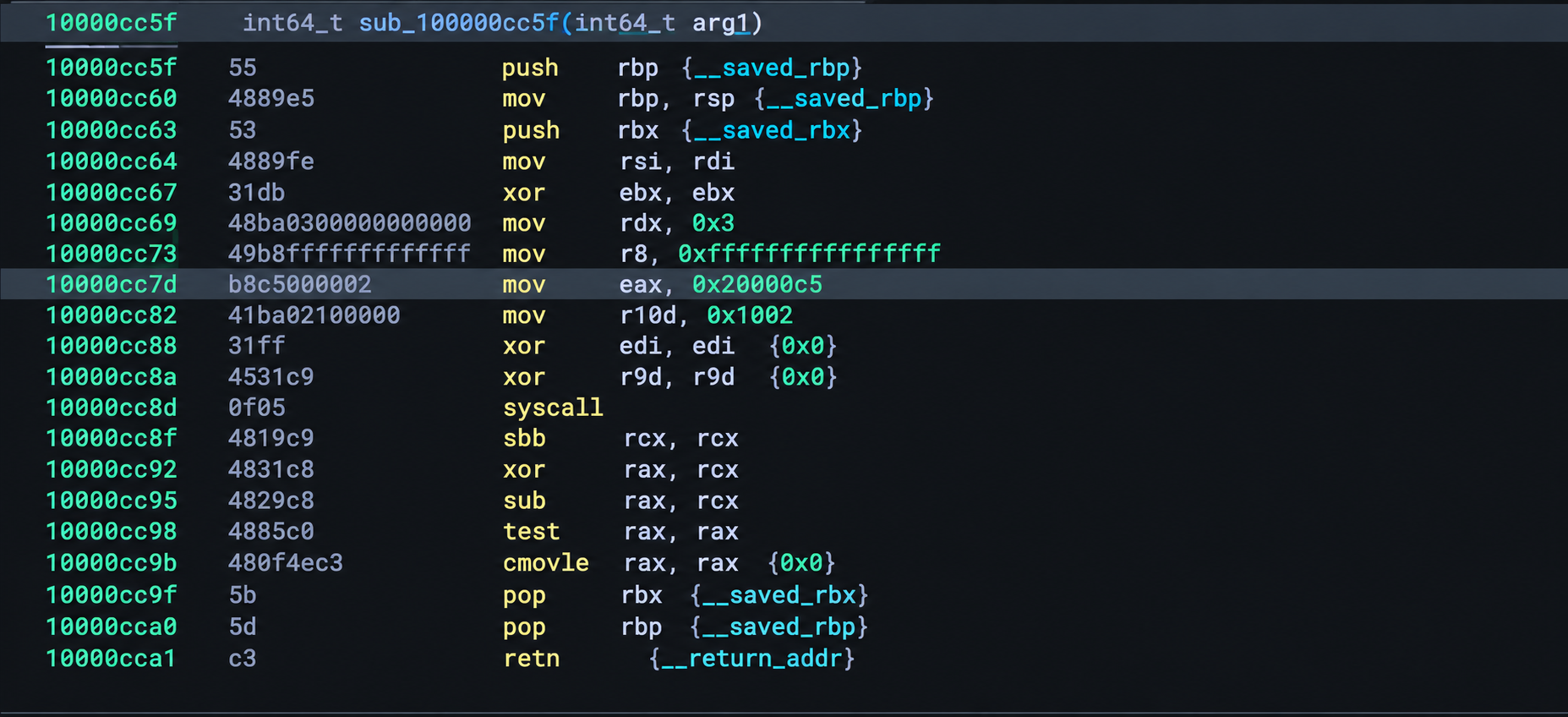
10000cc64  mov     rsi, rdi          ; size = 0x9f8 (2552 bytes)
10000cc69  mov     rdx, 0x3          ; prot = PROT_READ | PROT_WRITE (0x3)
10000cc73  mov     r8, 0xffffffffffffffff ; fd = -1 (anonymous mapping)
10000cc7d  mov     eax, 0x20000c5    ; Darwin BSD Syscall 197: mmap
10000cc82  mov     r10d, 0x1002      ; flags = MAP_ANON | MAP_PRIVATE
10000cc88  xor     edi, edi          ; addr = NULL
10000cc8a  xor     r9d, r9d          ; offset = 0
10000cc8d  0f 05                      syscall ; Execute directly in kernel
10000cc8f  sbb     rcx, rcx          ; Check Carry Flag for error
10000cc92  xor     rax, rcx
10000cc95  sub     rax, rcx
How Direct Darwin Syscalls Work
On macOS x86_64, system calls are categorized into classes. The BSD layer uses the class number 0x2000000
Look at line 10000cc7d:
mov eax, 0x20000c5Hex 0xC5 in decimal is 197. In the macOS XNU kernel source code, syscall 197 is SYS_mmap.
By loading 0x20000C5 directly into eax and calling syscall (0f 05), the malware bypasses any userland security hooks or monitoring software placed on libSystem.dylib.
Validating the c5cfg Section (sub100003ea0)
Once memory is allocated, _instance_main calls sub_100003ea0. Jump to 0x100003ea0 in Binary Ninja.
This subroutine is the gatekeeper for the configuration block.
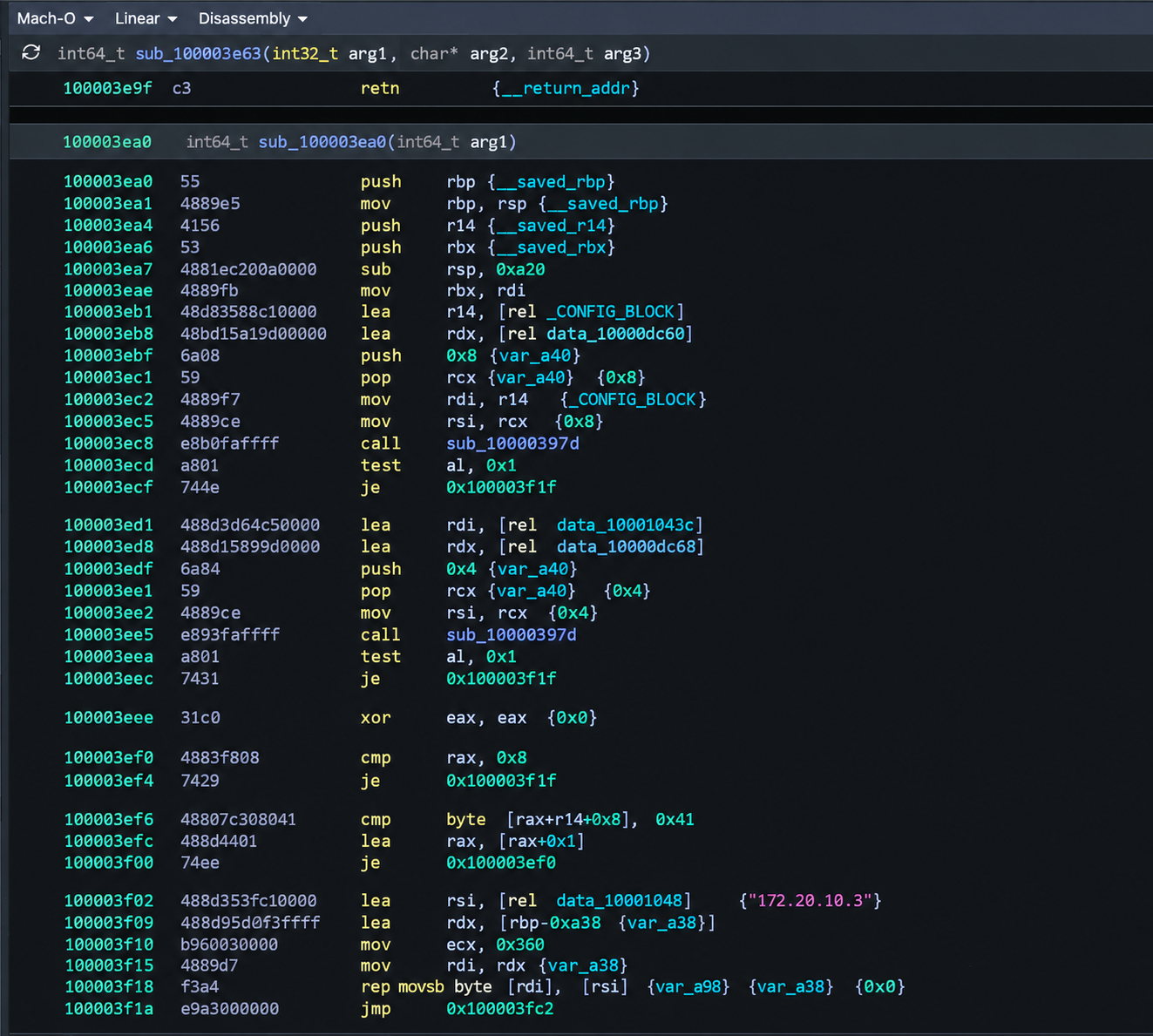
; --- Step 1: Check Header Magic ---
100003eb1  lea     r14, [rel 0x100010040]      ; Pointer to __c5cfg section
100003eb8  lea     rdx, [rel data_10000dc60]   ; Pointer to f2 f8 f2 f8 f2 f8 f2 f8
100003ebf  push    0x8                         ; 8 bytes
100003ec1  pop     rcx
100003ec2  mov     rdi, r14
100003ec5  mov     rsi, rcx
100003ec8  call    sub_10000397d               ; memcmp(cfg, magic_header, 8)
100003ecd  test    al, 0x1
100003ecf  je      0x100003f1f                 ; If invalid, jump to fallback config

; --- Step 2: Check Footer Magic ---
100003ed1  lea     rdi, [rel 0x10001043c]      ; Pointer to cfg + 0x3fc (footer)
100003ed8  lea     rdx, [rel data_10000dc68]   ; Pointer to f8 f2 f8 f2
100003edf  push    0x4                         ; 4 bytes
100003ee1  pop     rcx
100003ee2  mov     rsi, rcx
100003ee5  call    sub_10000397d               ; memcmp(cfg_footer, magic_footer, 4)
100003eea  test    al, 0x1
100003eec  je      0x100003f1f                 ; If invalid, jump to fallback config

; --- Step 3: Copy Active Configuration ---
100003f02  lea     rsi, [rel 0x100010048]      ; cfg + 8 (C2 host string)
100003f09  lea     rdx, [rbp-0xa30]            ; local destination buffer
100003f10  mov     ecx, 0x360                  ; 864 bytes to copy
100003f15  mov     rdi, rdx
100003f18  rep movsb byte [rdi], [rsi]         ; Fast copy into runtime state
Look at how cleanly the assembly tells the story:
r14 to 0x100010040, the exact virtual address of the __c5cfg section we found.(f2 f8 f2 f8 f2 f8 f2 f8).(f8 f2 f8 f2).rep movsb to copy 864 bytes of configuration data directly into the active implant structure.If either check fails, it jumps to 0x100003f1f, which loads a hardcoded fallback configuration.
Mapping the Command Dispatcher
Once an implant establishes communications, it sits in a listening loop waiting for operator instructions. When a task arrives from the C2 server, a central dispatcher inspects the command opcode and routes execution to the correct handler.
jump to address 0x100004082.
How Relative Jump Tables Work in Assembly
Instead of writing fifty nested if/else statements, compilers optimize large switch statements into jump tables.
assembly instructions at 0x100004133:
100004133  lea     ecx, [rax-0x1]            ; Normalize command code (1-based to 0-based)\
100004136  cmp     ecx, 0x3b                ; Check if command > 59 (0x3b)\
100004139  ja      0x10000417b              ; Default case: out of bounds\
10000413e  lea     rax, [rel data_100006bc0] ; rax = Base of jump table\
100004145  movsxd  rcx, dword [rax+rcx\*4]   ; Load 32-bit signed relative offset\
100004149  add     rcx, rax                 ; Absolute address = base + offset\
10000414c  jmp     rcx                      ; Jump directly to command handler!
Here is what happens step by step:
cmp ecx, 0x3b ensures the command number is within the valid range (0 through 59).lea rax, [rel data_100006bc0] loads the address of an array containing 60 relative offsets.movsxd rcx, dword [rax+rcx*4] reads the 4-byte offset corresponding to that command ID.add rcx, rax adds the offset to the table base address to calculate the final destination.jmp rcx jumps straight to the handler.Cataloging the Implant Capabilities
By following each branch target from the jump table, we can map out every action the operator can take on a compromised Mac:
| Command | Handler Address | Underlying Mechanism | What It Does |
|---|---|---|---|
shell | 0x100006d78 | Direct fork, execve, /bin/zsh | Spawns a headless zsh shell session |
ps | 0x1000082b0 | Kernel sysctl(KERN_PROC) | Enumerates all running processes |
kill | 0x100007ffd | Direct kill syscall | Terminates any process by PID |
ls | 0x10000894a | Direct getdirentries64 | Lists directory contents |
cat | 0x1000087e0 | Direct open, read, close | Reads target files off disk |
upload | 0x100008dc4 | Direct open(O_CREAT), write | Writes attacker payloads to local disk |
cd / pwd | 0x100009348 | chdir, fcntl(F_GETPATH) | Gets or changes the working directory |
portscan | 0x100005c22 | Direct socket, connect | Multi-port internal scanner (80, 443, 22, 8080) |
netstat | 0x10000565c | sysctl(NET_RT_IFLIST) | Dumps active network interfaces |
tcc | 0x100007334 | Directory probing | Tests for Full Disk Access (fda.system, fda.user) |
inject | 0x1000053cf | DYLD_INSERT_LIBRARIES | Targets non-hardened apps for process injection |
bof | 0x100005f50 | mmap, mprotect, ChaCha20 | In-memory Beacon Object File execution engine |
It provides full remote administration capabilities without relying on external utilities or standard system frameworks.
Reversing Stack Strings: The R Key Trick in Binary Ninja
While tracing the jump table targets, you will notice instructions like this:
1000056f8 mov rax, 0x68746170203A6D72That huge integer looks like an address or encryption constant, but it is actually a Stack String.
Attackers build strings directly on the CPU stack instead of storing them in the __cstring section. Because each 64-bit register holds 8 bytes, an 8-character string can be loaded in a single instruction.
In Binary Ninja, you do not have to decode little-endian hex in your head. Simply click on 0x68746170203A6D72 and press R.
Binary Ninja instantly formats the value into ASCII:
1000056f8 mov rax, 'rm: path'Looking at the surrounding instructions confirms the handler purpose:
1000056f8: mov rax, 'rm: path'1000056ea: mov rax, ' require’Together, they assemble the error message "rm: path required". When you see these string patterns, you can immediately rename the handler functions in your disassembly to match their true command names.
Addresses and Constants to Convert in Binary Ninja
| Address in Binary Ninja | Raw Hexadecimal Constant | Converts to ASCII | Command |
|---|---|---|---|
0x1000056f8 | 0x68746170203A6D72 | rm: path | File deletion (rm) |
0x100005745 | 0x70203A7269646B6D | mkdir: p | Create directory (mkdir) |
0x10000579c | 0x5C637273203A766D | mv: src\ | Rename/Move (mv) |
0x100005800 | 0x5C637273203A7063 | cp: src\ | File copy (cp) |
0x100006df8 | 0x65203A6C6C656873 | shell: e | Interactive shell (shell) |
0x10000809d | 0x502064656C6C694B | Killed P | Process termination (kill) |
0x1000088c5 | 0x746170203A746163 | cat: pat | File read (cat) |
0x100008ccb | 0x6E6E6163203A736C | ls: cann | Directory listing (ls) |
0x100008e93 | 0x646564616F6C7055 | Uploaded | File upload (upload) |
0x1000093e4 | 0x6E6366203A647770 | pwd: fcn | Print working directory (pwd) |
0x1000095ab | 0x68746170203A6463 | cd: path | Change directory (cd) |
The Direct Syscall Evasion Technique
we uncovered a paradox. The binary imported zero networking or process-spawning functions from libSystem. Yet, earlier, we saw handlers for /bin/zsh, port scanning, file transfers, and process termination.
How does an executable talk to the network or spawn shells without importing the functions to do so?
It bypasses the standard C library entirely and executes raw kernel system calls.
go to address 0x10000729b (inside the shell execution handler).
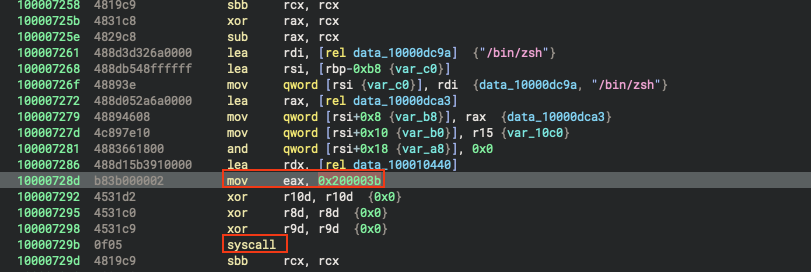
assembly block:
10000729b  mov  eax, 0x200003b    ; 0x3b = 59 (SYS_execve)
1000072a0  syscall                ; Direct transition to XNU kernel
1000072a2  sbb  rcx, rcx           ; Check Carry Flag for error
1000072a5  xor  rax, rcx
1000072a8  sub  rax, rcx
at 0x10000802e (the kill command):
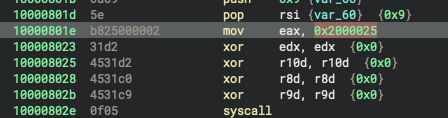
10000802e  mov  eax, 0x2000025  ; 0x25 = 37 (SYS_kill)
100008033  syscall
0x100008a04 (the ls directory enumeration handler):
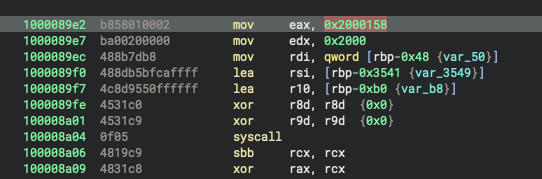
100008a04  mov  eax, 0x2000158  ; 0x158 = 344 (SYS_getdirentries64)
100008a09  syscall
The Complete Direct Syscall Reference Table
To bypass security monitoring on libSystem.dylib, the malware implements its own mini-kernel interface. Here is every single direct system call identified in the binary, mapped to its Darwin syscall number and purpose:
1. Network Communication & Sockets (10 sites)
| Syscall Name | BSD ID | Register Value (eax) | Count | Purpose in Implant |
|---|---|---|---|---|
SYS_socket | 97 | 0x2000061 | 3 | Creates raw network socket descriptors |
SYS_connect | 98 | 0x2000062 | 2 | Connects to C2 server and port scan targets |
SYS_setsockopt | 105 | 0x2000069 | 3 | Sets socket timeouts and non-blocking flags |
SYS_sendto | 133 | 0x2000085 | 1 | Sends outbound encrypted C2 payloads |
SYS_recvfrom | 29 | 0x200001d | 1 | Receives inbound task packets from C2 |
2. Process Execution & Shell Control (8 sites)
| Syscall Name | BSD ID | Register Value (eax) | Count | Purpose in Implant |
|---|---|---|---|---|
SYS_fork | 2 | 0x2000002 | 1 | Clones process to spawn background shells |
SYS_execve | 59 | 0x200003b | 1 | Executes /bin/zsh with attacker arguments |
SYS_pipe | 42 | 0x200002a | 1 | Creates unidirectional pipes for shell I/O |
SYS_dup2 | 90 | 0x200005a | 3 | Redirects stdin, stdout, stderr to pipes |
SYS_wait4 | 7 | 0x2000007 | 3 | Waits for child process exit status |
SYS_exit | 1 | 0x2000001 | 1 | Terminates failed child execution paths |
3. File System Operations & Exfiltration (46 sites)
| Syscall Name | BSD ID | Register Value (eax) | Count | Purpose in Implant |
|---|---|---|---|---|
SYS_open | 5 | 0x2000005 | 9 | Opens files for reading or creation |
SYS_read | 3 | 0x2000003 | 6 | Reads file content or pipe streams |
SYS_write | 4 | 0x2000004 | 3 | Writes uploaded payloads to target files |
SYS_close | 6 | 0x2000006 | 29 | Closes open file and socket descriptors |
SYS_getdirentries64 | 344 | 0x2000158 | 1 | Enumerates files and folders for ls |
SYS_fstatat64 | 470 | 0x20001d6 | 1 | Gathers file metadata (permissions, size) |
SYS_unlink | 10 | 0x200000a | 1 | Deletes target files from disk (rm) |
SYS_rmdir | 137 | 0x2000089 | 1 | Removes directories |
SYS_mkdir | 136 | 0x2000088 | 1 | Creates new directories |
SYS_rename | 128 | 0x2000080 | 1 | Renames or moves files (mv) |
SYS_chdir | 12 | 0x200000c | 1 | Changes current working directory (cd) |
4. Host Reconnaissance & Process Management (13 sites)
| Syscall Name | BSD ID | Register Value (eax) | Count | Purpose in Implant |
|---|---|---|---|---|
SYS_sysctl | 202 | 0x20000ca | 7 | Queries process list (kinfo_proc) and interface list (iflist) |
SYS_kill | 37 | 0x2000025 | 2 | Terminates processes by PID (kill) |
SYS_getpid | 20 | 0x2000014 | 1 | Obtains own process ID |
SYS_getuid | 24 | 0x2000018 | 1 | Checks real user ID |
SYS_geteuid | 25 | 0x2000019 | 1 | Checks effective user ID (checks for root) |
SYS_gettimeofday | 116 | 0x2000074 | 1 | High-precision timing for beacon sleep intervals |
SYS_getentropy | 500 | 0x20001f4 | 1 | Fetches cryptographic seed bytes from kernel |
5. Memory Management & I/O Multiplexing (13 sites)
| Syscall Name | BSD ID | Register Value (eax) | Count | Purpose in Implant |
|---|---|---|---|---|
SYS_mmap | 197 | 0x20000c5 | 1 | Custom heap and executable BOF allocation |
SYS_munmap | 73 | 0x2000049 | 8 | Frees memory pages after module execution |
SYS_fcntl | 92 | 0x200005c | 1 | Queries current working directory path (F_GETPATH) |
SYS_poll | 230 | 0x20000e6 | 1 | Monitors multiple file descriptors for events |
SYS_select | 93 | 0x200005d | 1 | Synchronous I/O multiplexing for network timeouts |
Total: 34 distinct syscalls across 100 call sites.
Anatomy of a Darwin Kernel Syscall
To understand why this works, you have to look at how macOS handles system calls on x86_64 hardware:
0x2000000): macOS kernels (XNU) divide system calls into classes. Mach calls use 0x1000000, while BSD calls use 0x2000000.
When you see an immediate value like 0x200003B, strip away 0x2000000 to find the BSD system call number:
0x3B in hex = 59 in decimal.sys/syscall.h header reveals that syscall 59 is SYS_execve. Userland function calls pass arguments in rdi, rsi, rdx, rcx, r8, and r9. But raw x86-64 system calls swap rcx for r10 because the CPU hardware uses rcx internally to save the return address.
Notice the instruction immediately following every syscall:
sbb rcx, rcx In the Darwin kernel, system calls do not return negative error numbers like Linux. Instead, macOS sets the CPU Carry Flag (CF) if a call fails. The sbb rcx, rcx instruction (subtract with borrow) turns rcx into -1 if the Carry Flag is set, or 0 if it succeeded. The subsequent xor and sub instructions convert the result into a clean error code.
Why Malware Uses Direct Syscalls
Most endpoint detection and response (EDR) software monitors macOS by placing inline hooks on popular C library functions in libSystem.B.dylib. When an app calls execve() or socket(), the security agent intercepts the call, checks the arguments, and decides whether to block it.
By placing the syscall number directly into eax and issuing syscall (0f 05), the malware bypasses userland library hooks. The CPU jumps directly from user space into the XNU kernel.
For security analysts, finding direct syscalls in an application is an immediate red flag. Legitimate developers almost never write raw assembly syscalls because Apple changes internal syscall numbers between major OS updates.
Detection Engineering
rule macOS_Backdoor_C5_Implant {
    meta:
        description = "Detects custom macOS x86_64 C2 implant featuring in-memory BOF execution and direct BSD syscalls"
        author = "Chandra Kant Bauri"
        date = "2026-10-28"
        hash = "e2b8c46e9673699357002778d81335d78a42b008af5c2f9296cc95ae9934fa9e"

    strings:
        // Dedicated custom configuration section name and magic markers
        $section_c5cfg = "__c5cfg" fullword ascii
        $cfg_magic_header = { f2 f8 f2 f8 f2 f8 f2 f8 }
        $cfg_magic_footer = { f8 f2 f8 f2 }

        // Session and protocol indicators
        $proto_session = "c5-session-v1" fullword ascii
        $proto_magic   = "c5-magic" fullword ascii

        // In-memory BOF) loader artifacts
        $bof_error = "EncryptedBofTooShort" fullword ascii
        $bof_api1  = "InstanceDataParse" fullword ascii
        $bof_api2  = "InstanceOutput" fullword ascii
        $bof_api3  = "InstancePrintf" fullword ascii
        $bof_api4  = "InstanceFormatAlloc" fullword ascii

        // TCC / Full Disk Access permission
        $tcc_path = "/Library/Application Support/com.apple.TCC" ascii
        $tcc_fda1 = "fda.system" fullword ascii
        $tcc_fda2 = "fda.user" fullword ascii

    condition:

        uint32(0) == 0xfeedfacf and

        filesize < 5MB and

        (
            // Signature A: Contains the custom config section and magic markers
            ($section_c5cfg and ($cfg_magic_header or $cfg_magic_footer)) or

            // Signature B: Custom C5 protocol identifiers
            ($proto_session and $proto_magic) or

            // Signature C: In-memory BOF TCC probing
            ($bof_error and 2 of ($bof_api*) and 1 of ($tcc_*))
        )
}
How the YARA Rule Works: Key Points
uint32(0) == 0xfeedfacf): Checks the first 4 bytes for 64-bit Mach-O magic. If a file is a PDF, image, or text document, YARA skips it immediately without scanning further.filesize < 5MB): Prevents the scanner from wasting CPU cycles on massive disk images or databases.__c5cfg: Matches the unique custom configuration section.{ f2 f8 f2 f8 f2 f8 f2 f8 }: Matches the 8-byte configuration header magic.c5-session-v1 and c5-magic: Match the custom C2 protocol handshake.EncryptedBofTooShort and InstanceDataParse: Match the in-memory Beacon Object File (BOF) loader.fda.system and /Library/Application Support/com.apple.TCC: Match the privacy permission probing routines.Detection Logic (Multi-Tier Condition):
False-Positive Considerations: The combination of ad-hoc Mach-O signing, in-memory BOF loader indicators, and __c5cfg configuration markers may provide strong detection confidence. However, no YARA rule can guarantee zero false positives without testing against a representative benign corpus.
Speed: The rule contains no open-ended regular expressions, which can reduce scanning overhead. Actual performance depends on the rule, file size, scanner, and environment; microsecond-level scanning is not guaranteed.
MITRE ATT&CK Mapping and Indicators of Compromise
| Tactic | Technique ID | Technique Name | Evidence in Sample |
|---|---|---|---|
| Execution | T1059.004 | Unix Shell | Spawns /bin/zsh with direct pipes |
| Defense Evasion | T1106 | Native API (Direct Syscalls) | Uses 100 direct Darwin kernel syscalls to bypass library hooks |
| Defense Evasion | T1027 | Obfuscated / Stack Strings | Builds string error messages on the fly in CPU registers |
| Defense Evasion | T1036 | Masquerading | Spoofs Windows 10 Chrome User-Agent from a macOS host |
| Discovery | T1082 | System Information Discovery | Queries sysctl, getpid, getuid, and geteuid |
| Discovery | T1057 | Process Discovery | Lists active processes via sysctl(KERN_PROC) |
| Discovery | T1046 | Network Service Discovery | Integrated TCP port scanner targeting ports 80, 443, 22, and 8080 |
| Discovery | T1548 | Privacy / TCC Probing | Probes /Library/Application Support/com.apple.TCC for Full Disk Access |
| Command & Control | T1071.001 | Web Protocols | HTTP beaconing to hxxp[:]//172.20.10.3/instance |
| Execution | T1620 | Reflective Code Loading | Executes in-memory Beacon Object Files using mmap and mprotect |
Indicators of Compromise (IOCs)
File Fingerprints
e2b8c46e9673699357002778d81335d78a42b008af5c2f9296cc95ae9934fa9ee925d1bd31b0e33cbe9d2ab652710f5fad192f6b461d5a69b7eb0df487f9cb47214cc56ea0cf22a892a632b1ecd8d51839c3d4c6c3e8ac1fcomponent-macos-x86_64-555549449e504bd2e37d61009e5863936efeae5fNetwork Indicators
172.20.10.380 (HTTP)/instanceMozilla/5.0 (Windows NT 10.0; Win64; x64) AppleWebKit/537.36c5-session-v1, c5-magic, _X+SCHost Artifacts
__DATA,__c5cfg_CONFIG_BLOCKf2 f8 f2 f8 f2 f8 f2 f8f8 f2 f8 f2What We Learned
Analyzing macOS malware requires a disciplined workflow. By refusing to run the binary blindly and taking it step by step, we turned a bare hash into a complete forensic picture:
file, codesign, and otool, we spotted an ad-hoc signature, identified a suspicious __c5cfg section, and noticed a lack of standard network libraries in under five minutes.zsh shells, internal port scanning, and Cobalt Strike-style Beacon Object File loaders.macOS is not immune to sophisticated malware. Attackers can write low-level code that bypasses userland security hooks by making direct syscalls to the Darwin kernel. As analysts, learning to identify direct syscalls, extract custom sections, and craft resilient YARA rules is an important part of malware analysis.